
Package for creating, using and showing tables in the Terminal, even interactive ones

Project description
Gridlines
What is it?
Gridlines is a Python package for creating, editing and showing tables. Even interactive tables.
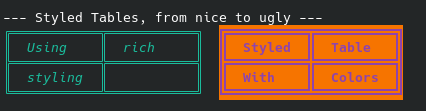
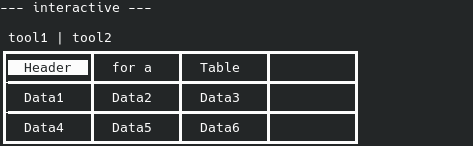
Output examples
Features
Creation/Modification
- Set size tables
- Expandable tables
- Converting 2 dimensional lists into tables/writing them to tables
- Automatic expansion
Styling
- 5 default border themes
- Allows custom border themes (set each used char yourself)
- Customizable styling (color, spacing, equal width, etc.)
- Rich styling (uses rich and allows Console Markup)
Interactive
- Navigate table with arrow keys
- Returns a cell's value on enter (a cell has both content and value)
- Toolbar
- (WIP: hotkeys)
Getting started
To get started read further or have a look at the examples
Creating a table
To create a table simply create one with the create_empty_table function. It has some arguments but defaults to 1x1, resizable and not interactive.
Arguments:
- rows (int): how many rows the table has
- cols (int): how many cols the table has
- interactive (bool): whether the
print_tablefunction should just print the table or be interactive and listen for user input - resize (bool): whether the table can change its size after creation
- styling (TableStyling): sets the styling of the table via a TableStyling Object. Can also later on be set with
set_styling.
from gridlines import create_empty_table

# Creates 1x1, resizable table
new_table = create_empty_table()

# Creates 4x3, not resizable table, interactive
new_table = create_empty_table(rows=4, cols=3, interactive=True, resize=False)
small_table:
 ┏━━┓
 ┃  ┃
 ┗━━┛

bigger_table:
 ┏━━┳━━┳━━┓
 ┃  ┃  ┃  ┃
 ┠━━╋━━╋━━┫
 ┃  ┃  ┃  ┃
 ┠━━╋━━╋━━┫
 ┃  ┃  ┃  ┃
 ┠━━╋━━╋━━┫
 ┃  ┃  ┃  ┃
 ┗━━┻━━┻━━┛
Editing a table
Basics
A table is made of many TableCell Objects. A TableCell has both content (what will be displayed) and value (what will be returned if selected, also only important if your table is interactive). Content always is a string and will be converted to one by the methods and value can be anything from function or partial to a float.
When calling any table operation (in this example write_cell) you can declare a WriteMode. By default it is WriteMode.CONTENT, so by default every operation should write to the content(s) of the cell(s). Your other options are:
- CONTENT: To the content
- VALUE: To the value
- BOTH: To the content and value
- CELL: Will replace the TableCell Object in the cell. Your data should be a TableCell Object when using this.
Methods
Exact data methods
write_cell: writes to cell at the given positionwrite_rowandwrite_col: write to the given row/column, writes over existing content. Can write with an offset, e.g. write_row(row_pos=1, starting_col=2), would write to row 1 but starts at cell in column 2.write_list: will write the given 2 dimensional list to the table (currently only starting from the top left of the table)
Free space methods
These methods will only write to spots where there is not already data.
write_next_rowandwrite_next_col: write to the next completely free row/column and expand if necessary and possible
Resizing
If a table has resizing enabled most methods will automatically resize if necessary, but if you want to resize yourself you can do it with expand.
expand can either extend to a total number of rows/columns or add a specified number of rows/columns, e.g. table.expand(new_cols=2, new_rows=1) will add 2 new columns and one new row
Printing / Showing a table
To print a single table simply use table.print_table(). It will automatically use the correct methods for printing the table. If you enable plain it will just print the content separated by spaces and vertical bars.
Interactive tables
print_table automatically works with interactive tables. It will run until the user presses enter, then it will either return the cell's value or run the value if it is a function or partial and then return.
Printing multiple tables side by side
If you want to have multiple tables side by side you can use print_tables (separate method and not part of Table Class). Just give it all tables in a list.
See an example
Styling a table
You can style a table by using set_styling. When given a TableStyling Object it will set it to the table and apply it.
TableStyling arguments, all arguments are optional, as all have defaults:
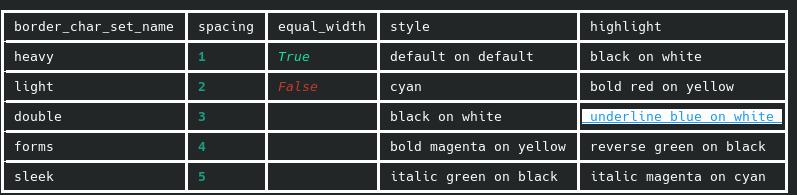
border_char_set: specify a BorderCharSet Object which the table should use for printingborder_char_set_name: the name of the char set preset which you want to use. Currently there are: heavy, light, double, forms, sleekspacing: How many spaces there should be between a cell's content and border at minimum (2 = 2 spaces before and 2 spaces after the cell's content)equal_width: whether all columns should have the same widthstyle: define a rich style which will be applied to all lineshighlight: the rich style for when a cell is selected (default: "black on white")
Look at the interactive styling example!
Release history Release notifications | RSS feed

Download files
Download the file for your platform. If you're not sure which to choose, learn more about installing packages.
Source Distribution
Built Distribution
Filter files by name, interpreter, ABI, and platform.
If you're not sure about the file name format, learn more about wheel file names.
Copy a direct link to the current filters
File details
Details for the file gridlines-1.0.0.tar.gz.
File metadata
- Download URL: gridlines-1.0.0.tar.gz
- Upload date:
- Size: 18.1 kB
- Tags: Source
- Uploaded using Trusted Publishing? No
- Uploaded via: twine/6.2.0 CPython/3.13.7
File hashes
| Algorithm | Hash digest | |
|---|---|---|
| SHA256 |
e7cf2ef02cfecb6ad4d90b289b63385a4dcf305d1214b0cb401fb0c08474b7c0
|
|
| MD5 |
03fde8bd2f8e1a7677684af54d923acc
|
|
| BLAKE2b-256 |
bf932a4ca6512189c4a186dbb21418c36966c47e23ea58ef55cb4f3b69dbeeb9
|
File details
Details for the file gridlines-1.0.0-py3-none-any.whl.
File metadata
- Download URL: gridlines-1.0.0-py3-none-any.whl
- Upload date:
- Size: 16.8 kB
- Tags: Python 3
- Uploaded using Trusted Publishing? No
- Uploaded via: twine/6.2.0 CPython/3.13.7
File hashes
| Algorithm | Hash digest | |
|---|---|---|
| SHA256 |
4d3b4e19b92ad89bcdfe6e730f17b8736a4dca3f22e1742efd7be147e64109c2
|
|
| MD5 |
641871be34bf1edcd8e14bb8afa059ff
|
|
| BLAKE2b-256 |
00be365df88a9fabd1161104d41e0bcf66a1b1a67b174a95559c2e3fef236919
|






