
GrimoireLab
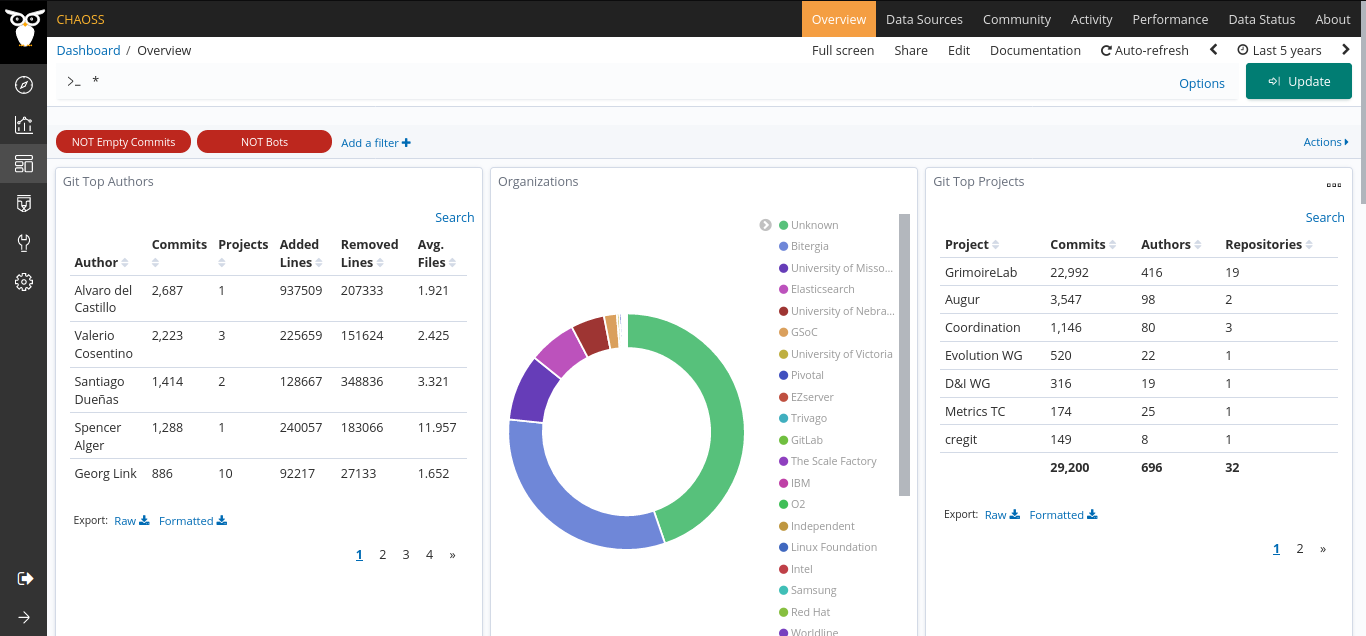
GrimoireLab is a CHAOSS toolset for software development analytics. It includes a coordinated set of tools to retrieve data from systems used to support software development (repositories), store it in databases, enrich it by computing relevant metrics, and make it easy to run analytics and visualizations on it.
You can learn more about GrimoireLab in the GrimoireLab tutorial, or visit the GrimoireLab website.
Metrics available in GrimoireLab are, in part, developed in the CHAOSS project. For more information regarding CHAOSS metrics, see the latest release at: https://chaoss.community/metrics/
Getting started
To ease the newcomer experience we are providing a default setup to analyze git activity for this repository. For this set up, there are several options to run GrimoireLab:
Using docker-compose
Requirements:
- Software: git, docker client and docker compose. An example of working configuration:
root@test-68b8628f:~# git --version
git version 2.17.1
root@test-68b8628f:~# docker --version
Docker version 19.03.1, build 74b1e89
root@test-68b8628f:~# docker-compose --version
docker-compose version 1.22.0, build f46880fe
- Hardware: 2 CPU cores, 8GB memory RAM and enough virtual memory for Elasticsearch
Steps:
- Clone this project:
git clone https://github.com/chaoss/grimoirelab
- Go to
docker-composefolder and run the following command:
cd grimoirelab/docker-compose
docker-compose up -d
Your data will be ready after a while. The waiting time depends on the amount of data to fetch from a repo, for small repositories you can expect your data to be available after 10-15 minutes.
To view the data you can access OpenSearch Dashboards at http://localhost:8000 or use the API directly at http://localhost:9200.
To manage the identities you can access SortingHat at http://localhost:8000/identities/.
By default, OpenSearch Dashboards doesn't contain any visualization, but we have
a set of default dashboards.
To import them, open OpenSearch Dashboards, go to Stack Management > Saved Objects
and import the files you want.
More details or troubleshooting in the docker-compose folder.
Using docker run
Requirements:
- Software: git and docker client. An example of working configuration:
root@test-68b8628f:~# git --version
git version 2.17.1
root@test-68b8628f:~# docker --version
Docker version 19.03.1, build 74b1e89
- Hardware: 2 CPU cores, 8GB memory RAM and set
- ElasticSearch and Kibana up and running.
- SortingHat up and running
Steps:
- Clone this project:
git clone https://github.com/chaoss/grimoirelab
- Go to the project folder and run the following command:
cd grimoirelab
docker run --net=host \
    -v $(pwd)/default-grimoirelab-settings/projects.json:/home/grimoire/conf/projects.json \
    -v $(pwd)/default-grimoirelab-settings/setup-docker.cfg:/home/grimoire/conf/setup.cfg \
    -t grimoirelab/grimoirelab
Your dashboard will be ready after a while at http://localhost:8000. The waiting time depends on the amount of data to fetch from a repo, for small repositories you can expect your data to be visible in the dashboard after 10-15 minutes.
More details in the docker folder.
Using on FreeBSD
Recently FreeBSD has adopted Grimoirelab for their Bugzilla Analysis and have deployed Grimoirelab in their cluster. FreeBSD Foundation has been kind enough to share the process of running Grimoire on FreeBSD which is available here. This guide will also help who are interested in running Grimoirelab from source instead of deploying them with Docker.
Breaking changes
GrimoireLab 1.3.0. SortingHat permission groups.
Starting from GrimoireLab 1.3.0, creating new users in SortingHat requires assigning them to a permission group. By default, they will have read-only permissions. Please refer to the following documentation for instructions on how to update permissions: assign users to permission groups
GrimoireLab components
Currently, GrimoireLab toolkit is organized in the following repositories:
- Data retrieval related components:
- Perceval: retrieval of data from data sources
- Graal: source data analysis with external tools
- KingArthur: batch processing for massive retrieval
- Data enrichment related components:
- GrimoireElk: storage and enrichment of data
- Cereslib: generic data processor
- SortingHat: identity management
- Data consumption related components:
- Sigils: visualizations and dashboards
- Kidash: visualizations and dashboards manager
- Manuscripts: reporting
- Platform management, orchestration, and common utils:
- Mordred: orchestration
- GrimoireLab Toolkit: common utilities
There are also some components built by the GrimoreLab community, which can be useful for you. Other related repositories are:
- GrimoireLab Tutorial
- GrimoireLab as a whole (this repository)
Contents of this repository
This repository is for content relevant to GrimoireLab as a whole. For example:
-
Issues for new features or bug reports that affect more than one GrimoireLab module. In this case, let's open an issue here, and when implementing the fix or the feature, let´s comment about the specific tickets in the specific modules that are used. For example, when supporting a new datasource, we will need patches (at least) in
Perceval,GrimoireELKand panels. In this case, we would open a feature request (or the user story) for the whole case, an issue (and later a pull request) inPercevalfor the data retriever, same forGrimoireELKfor the enriching code, and same forpanels. -
Release notes for most GrimoireLab components (directory releases).
-
Docker container for showcasing GrimoireLab (directory docker). Includes a Dockerfile and configuration files for the GrimoireLab containers that can be used to demo the technology, and can be the basis for real deployments. See more information in the docker README.md file.
-
If you feel more comfortable with
docker-compose, the docker-compose folder includes instructions and configuration files to deploy GrimoireLab usingdocker-composecommand. -
Source code of the GrimoireLab components is available in
src. Each directory is a Git submodule, so its contents will not be available after cloning the repository. To fetch all the data, and get the latest version, you can run the following command:
git submodule update --init --remote
- How releases of GrimoireLab are built and tested: Building
Citation
If you use GrimoireLab in your research papers, please refer to GrimoireLab: A toolset for software development analytics:
APA style:
Dueñas S, Cosentino V, Gonzalez-Barahona JM, del Castillo San Felix A, Izquierdo-Cortazar D, Cañas-Díaz L, Pérez García-Plaza A. 2021. GrimoireLab: A toolset for software development analytics. PeerJ Computer Science 7:e601 https://doi.org/10.7717/peerj-cs.601
BibTeX / BibLaTeX:
@Article{duenas2021:grimoirelab,
  author = 	 {Dueñas, Santiago and Cosentino, Valerio and Gonzalez-Barahona, Jesus M. and del Castillo San Felix, Alvaro and Izquierdo-Cortazar,  Daniel and Cañas-Díaz, Luis and Pérez García-Plaza, Alberto},
  title = 	 {GrimoireLab: A toolset for software development analytics},
  journaltitle = {PeerJ Computer Science},
  date = 	 {2021-07-09},
  volume = 	 7,
  number = 	 {e601},
  doi = 	 {10.7717/peerj-cs.601},
  url = 	 {https://doi.org/10.7717/peerj-cs.601}}
Contributing
Contributions are welcome, please check the Contributing Guidelines.
1 maintainer

Metadata
1 maintainer
Release files for grimoirelab 1.22.1
For a detailed explanation of source distributions (sdists) and built distributions (wheels), please see the package formats documentation.
Source distribution (sdist)
| File | Size | Uploaded | |
|---|---|---|---|
| grimoirelab-1.22.1.tar.gz | 17.7 kB | Details |
Built distribution (wheel)
| File | Interpreter | ABI | Platform | Reset |
|---|---|---|---|---|
| grimoirelab-1.22.1-py3-none-any.whl | Python 3 | none | any | Details |
Total release size: 37.6 kB
Release files / grimoirelab-1.22.1.tar.gz
| Download URL | grimoirelab-1.22.1.tar.gz |
|---|---|
| Size | 17.7 kB |
| Tags | Source |
|
SHA-256 checksum How to use checksums |
ba1b6b1203688df4e52e53eca7273676886d8b6fdd8be4a4b447ba3a0c4f34ba
|
|
BLAKE2b-256 checksum How to use checksums |
6a0eb6a929e159cdbf2e4e8c8e6615592ec431aaa0200107a9836e8adf4fcbd3
|
| Upload date | |
|
Uploaded using Trusted Publishing? What is trusted publishing? |
No |
| Uploaded via |
poetry/2.5.1 CPython/3.12.3 Linux/6.17.0-1022-azure
|
Release files / grimoirelab-1.22.1-py3-none-any.whl
| Download URL | grimoirelab-1.22.1-py3-none-any.whl |
|---|---|
| Size | 19.9 kB |
| Tags | Python 3 |
|
SHA-256 checksum How to use checksums |
d447dfec38566ce30b78fdbeb5bad4a2123782329a1ee49eabb3e7f270821e91
|
|
BLAKE2b-256 checksum How to use checksums |
064f58a5ba5063ad59fe16251b668a21af3ec88d46ece3b480c6f71468f37cad
|
| Upload date | |
|
Uploaded using Trusted Publishing? What is trusted publishing? |
No |
| Uploaded via |
poetry/2.5.1 CPython/3.12.3 Linux/6.17.0-1022-azure
|














