
grokbot-kit
Grok Bot integration kit: delegate tasks to headless coding agents (opencode, Claude Code, Codex) and wake the right Grok Bot routine when they finish or need input.
Leia em português: docs/pt-BR/README.md
Status: 0.x. The commands below work; the event schema grokbot-kit.event/v1 may still change, always with a
CHANGELOG entry.
What it is
A Grok Bot that delegates a long task to a headless coding agent hibernates while the agent runs, and nothing wakes it up. The exit code alone does not tell whether the task was done, failed, or stopped at a permission prompt.
grokbot-kit wraps the agent run (grokbot-kit run), listens to each agent's native hooks, and sends exactly one
terminal event (completed, error or timeout) — plus a needs_input event when the agent hits a permission — to
the webhook trigger of the routine of the bot that delegated the task. Other bots are not woken up.
Install
uv tool install --managed-python grokbot-kit
pipx install grokbot-kit also works. To try what is on main before it is released:
uv tool install --managed-python git+https://github.com/rodrigo-pasini/grokbot-kit
Requires Linux and Python 3.11 or newer (uv manages the interpreter). The package has no runtime dependencies.
Quick start
With a Grok Bot
Send this message to the bot. It installs the skill and walks you through the setup: the kit, the
CLIs and their login, the default CLI, the model tiers and the routine that the bot's events wake up. Replace
mybot with a short name for the bot (letters, digits, ., _ and -).
Install the grokbot-kit skill and set up grokbot-kit on this box:
1. Download https://github.com/rodrigo-pasini/grokbot-kit/releases/latest/download/SKILL.md (follow redirects)
   to /home/box/agent-data/workflows/grokbot-kit/SKILL.md (create the directory).
2. Read that skill and follow its "Setup (primeira vez)" section from start to finish, one step at a time,
   skipping what `grokbot-kit doctor --json` shows as already done. Use "mybot" as the name of this bot.
3. Never ask me for a secret (API key, routine URL or key) in the chat: read it yourself from the routine
   or ask me in a masked secret field, and pass it to `grokbot-kit secret set` on standard input.
4. At the end, run `grokbot-kit doctor --json` and summarise the result and any problems.
The bot creates the routine, with a webhook trigger and the routine prompt from the skill, or asks you to create it
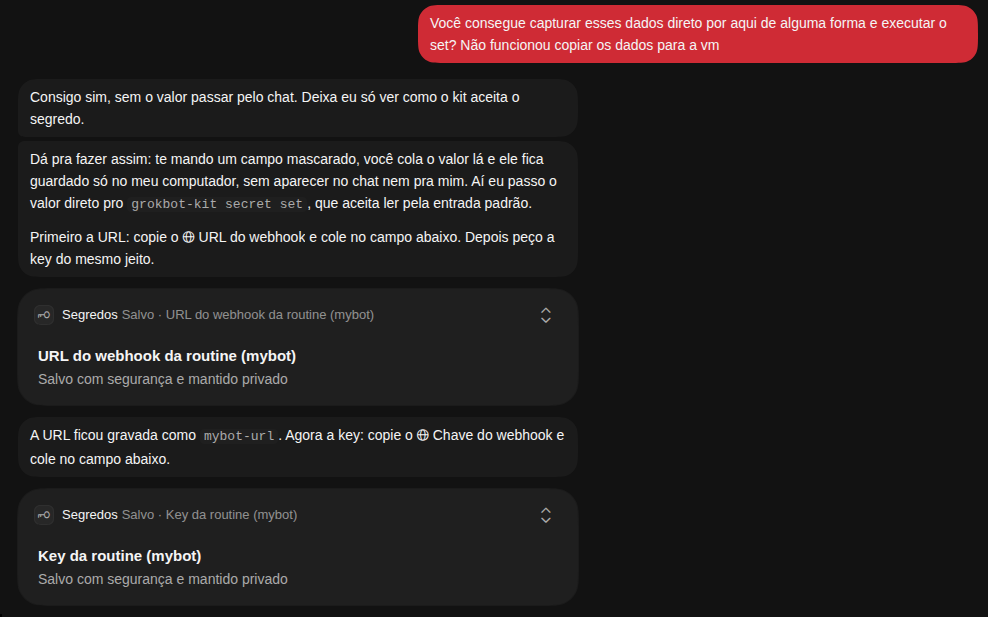
in the Grok Bot panel. It reads the routine URL and key itself or asks for each one in a masked secret field, never
in the chat or a screenshot. When the setup ends, ask for a small task, such as "rename the variables in x.py": the bot picks the
trivial tier and tells you so, and the result arrives through the routine.
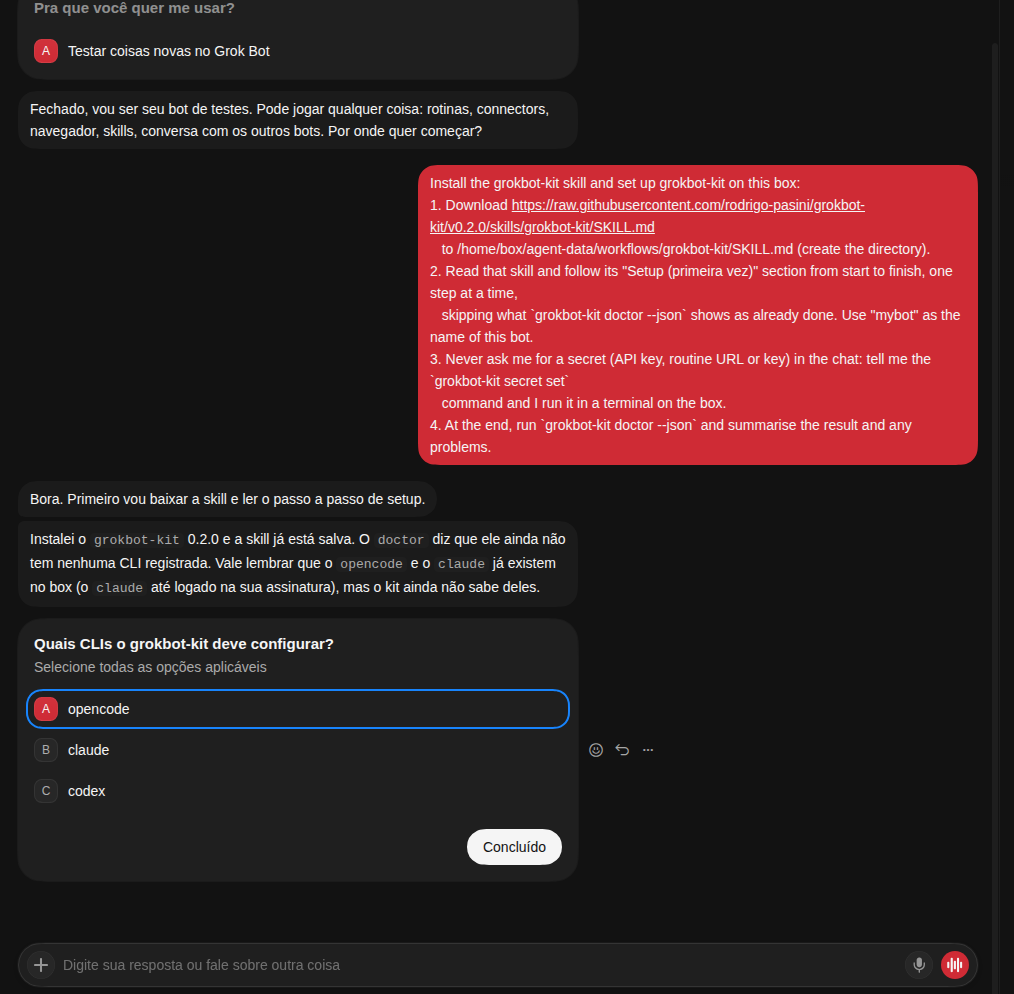
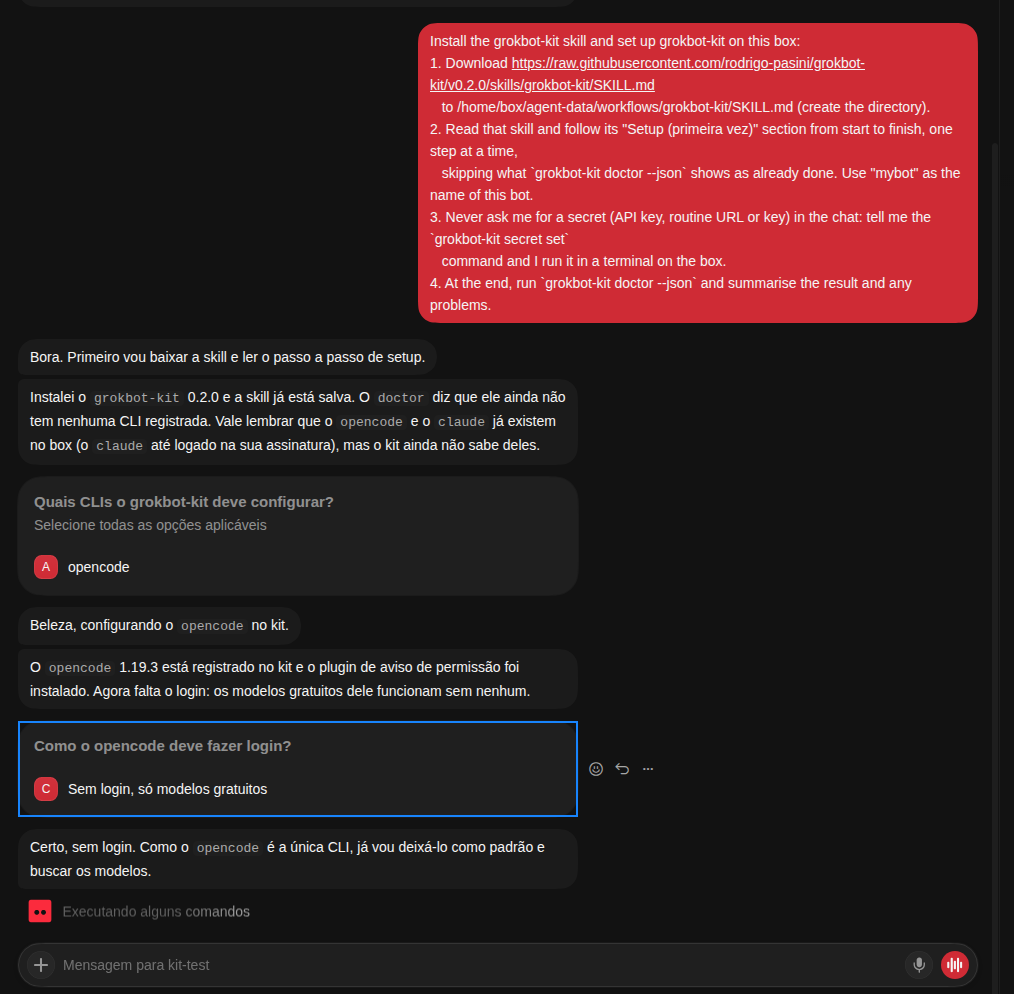
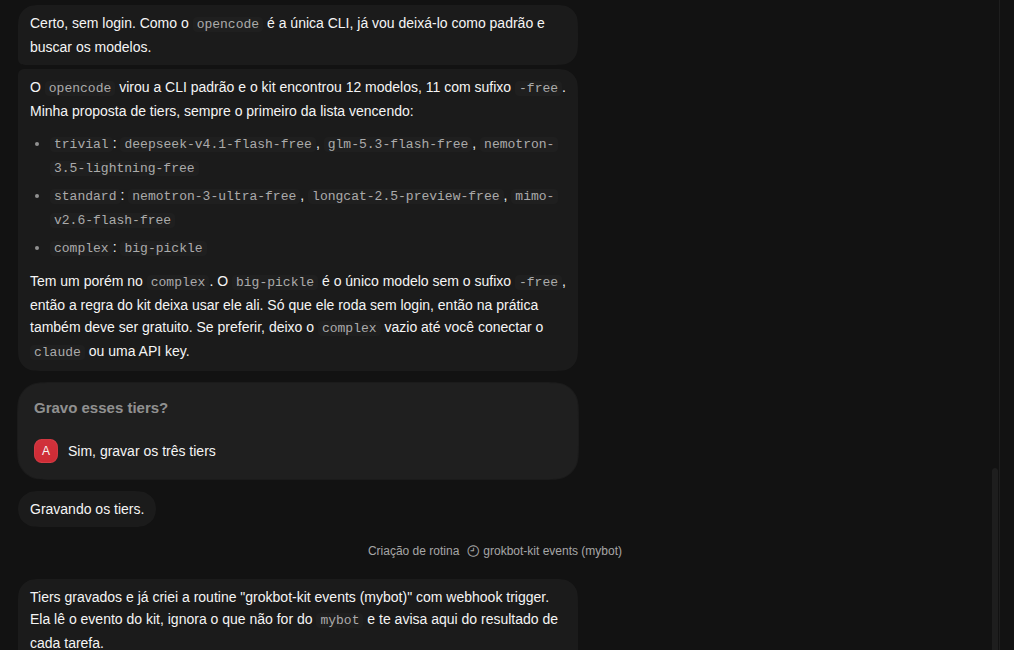
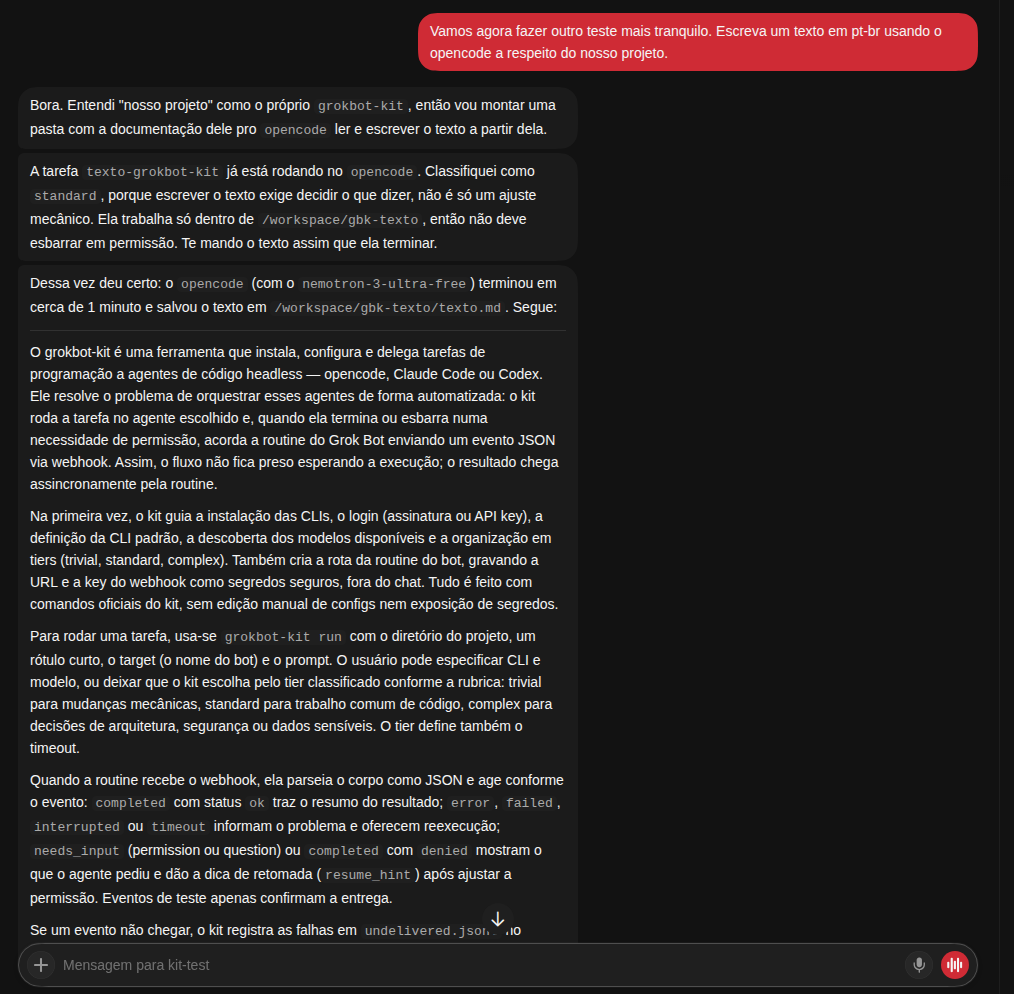
Screenshots of a setup and a task (Grok Bot, in Portuguese)
1. The message and the choice of CLIs
2. opencode installed, free models without login
3. Model tiers and the routine created by the bot
4. Routine URL and key through the masked secret field
5. A task delegated to opencode, with the result back through the routine
By hand
grokbot-kit setup cli add opencode
grokbot-kit setup default opencode
grokbot-kit secret set mybot-url
grokbot-kit secret set mybot-key
grokbot-kit route add mybot --url-secret mybot-url --key-secret mybot-key
grokbot-kit route test mybot
grokbot-kit run --target mybot --label rename-vars -- "Rename the variables in x.py"
Grok Bot skill
skills/grokbot-kit/ is a skill for any Grok Bot. Copy the folder into the bot's workflows directory and the bot can
install the kit, install and log in to the CLIs you choose, create the route to its own routine, and delegate tasks
choosing CLI and model.
Configuration
The configuration lives in ~/.config/grokbot-kit/config.toml: installed CLIs and the default one, model tiers
(trivial, standard, complex) per CLI, timeouts per tier, and one route per target bot. Each task keeps its
output, logs and events in ~/.grokbot-kit/tasks/<task_id>/ until grokbot-kit gc removes it.
Security
- Secrets (routine URL and key, API keys) are written with
grokbot-kit secret setto~/.secrets/grokbot-kit/with mode0600, never to the config file and never pasted into a chat. grokbot-kitnever writes a secret to logs, stdout, stderr or events.~/.claude/settings.jsonand~/.codex/are never modified; Codex runs in its ownCODEX_HOME.
Contributing
See CONTRIBUTING.md.
License
MIT. Third-party material in this repository is listed in NOTICE.
1 maintainer

Metadata
1 maintainer
Release files for grokbot-kit 0.3.0
For a detailed explanation of source distributions (sdists) and built distributions (wheels), please see the package formats documentation.
Source distribution (sdist)
| File | Size | Uploaded | Provenance | |
|---|---|---|---|---|
| grokbot_kit-0.3.0.tar.gz | 34.4 kB | With provenance | Details |
Built distribution (wheel)
| File | Interpreter | ABI | Platform | Reset |
|---|---|---|---|---|
| grokbot_kit-0.3.0-py3-none-any.whl | Python 3 | none | any | Details |
Total release size: 80.0 kB
Release files / grokbot_kit-0.3.0.tar.gz
| Download URL | grokbot_kit-0.3.0.tar.gz |
|---|---|
| Size | 34.4 kB |
| Tags | Source |
|
SHA-256 checksum How to use checksums |
7aecdcfea631437ac784de8becdf6a5547d6a3b50786ff38ef9c83816590d830
|
|
BLAKE2b-256 checksum How to use checksums |
7ea17d63740819c47a6a9614593706162009b14352e778c5cef6588e1c851bd7
|
| Upload date | |
|
Uploaded using Trusted Publishing? What is trusted publishing? |
Yes |
| Uploaded via |
twine/7.0.0 CPython/3.13.16
|
Provenance
Provenance describes where a file came from. On PyPI, provenance is shared via attestations, which provide a verifiable record of the build or publishing details. View details, limitations and caveats.


PyPI Publish Attestation
PyPI verified that this artifact, at this checksum, originated from the publisher listed below.
Signed by GitHub Actions, verified by PyPI on Oct 21, 2026.
Transparency logRelease files / grokbot_kit-0.3.0-py3-none-any.whl
| Download URL | grokbot_kit-0.3.0-py3-none-any.whl |
|---|---|
| Size | 45.6 kB |
| Tags | Python 3 |
|
SHA-256 checksum How to use checksums |
09b8b5513337d46e2883253ff75e654499943d2b25212232dce8957841bd370c
|
|
BLAKE2b-256 checksum How to use checksums |
6a9acd8b19f842b100817c7b3a902b7c189fa73c3395d00f240c2cadce0f1ef3
|
| Upload date | |
|
Uploaded using Trusted Publishing? What is trusted publishing? |
Yes |
| Uploaded via |
twine/7.0.0 CPython/3.13.16
|
Provenance
Provenance describes where a file came from. On PyPI, provenance is shared via attestations, which provide a verifiable record of the build or publishing details. View details, limitations and caveats.
PyPI Publish Attestation
PyPI verified that this artifact, at this checksum, originated from the publisher listed below.
Signed by GitHub Actions, verified by PyPI on Oct 21, 2026.
Transparency logSecurity for grokbot-kit 0.3.0
Provenance
Provenance describes where a file came from. On PyPI, provenance is shared via attestations, which provide a verifiable record of the build or publishing details. View details, limitations and caveats.
Full provenance
All 2 files in this release have been uploaded with provenance metadata.
Attestation for grokbot_kit-0.3.0.tar.gz
PyPI Publish Attestation
PyPI verified that this artifact, at this checksum, originated from the publisher listed below.
Signed by GitHub Actions, verified by PyPI on Oct 21, 2026.
Transparency logA note on package security
PyPI is a repository for distributing packages, not a service for auditing them. While third-party security researchers and our staff do their best to detect and remove malicious packages, PyPI cannot guarantee the quality, security or suitability of any given package.














