
grooveclean
Offline declicker for vinyl and 78rpm transfers. It finds clicks with a small trained CNN, fills each one by least-squares autoregressive interpolation, and writes three files: the cleaned audio, the exact difference, and a JSON report of every click it touched. Then it lets you hear what it took in half a minute and put back anything you disagree with.
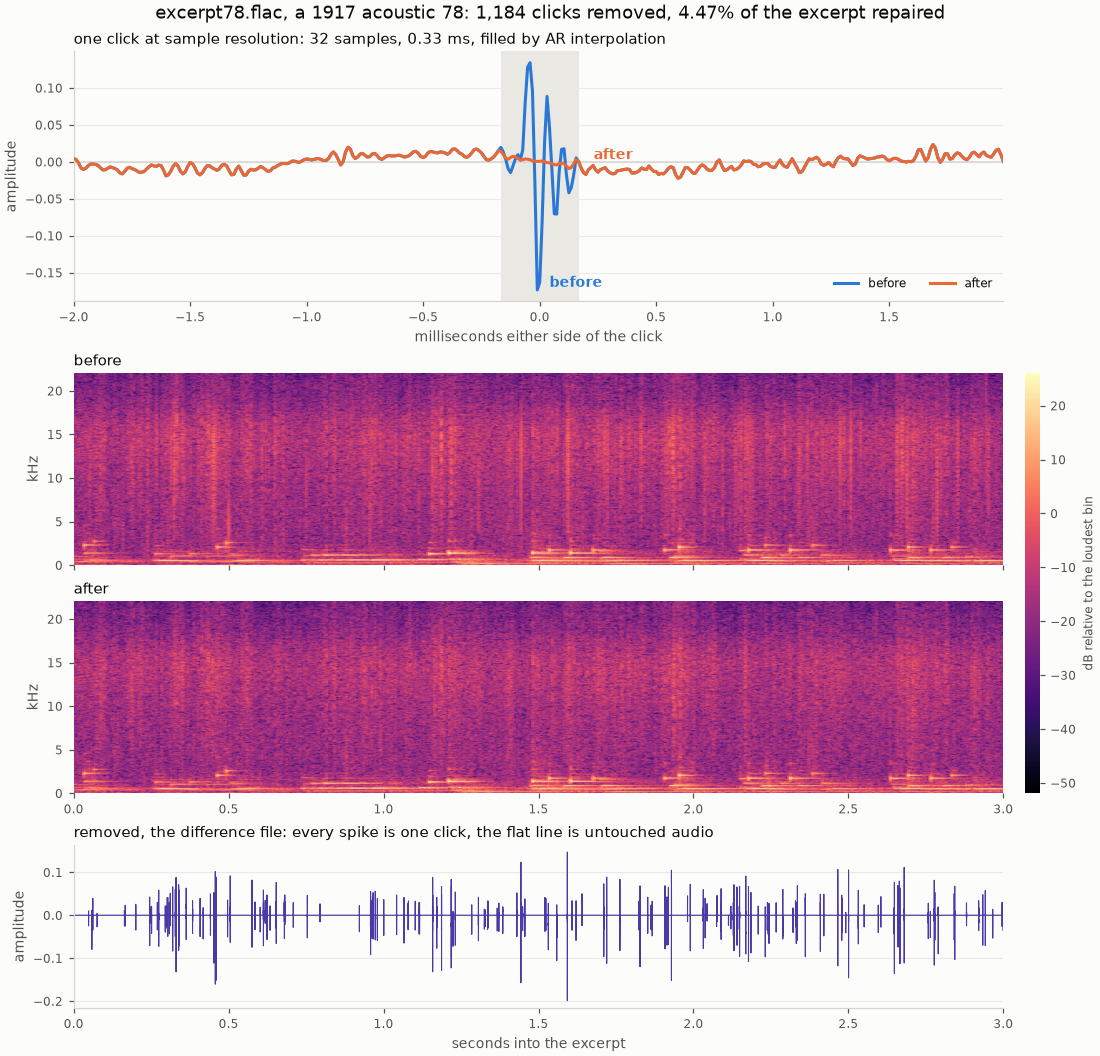
MIT licensed, no account, no upload, nothing phones home. Runs on a GPU if you have one and falls back to the CPU if you do not.
The difference file
OUT.removed.wav is the input minus the output, sample for sample. Play it and you hear only
what was taken away. If you hear a marimba note in there, the tool got it wrong, and you can
hear that in seconds instead of listening to a whole side twice trying to spot a hole.
The invariant is exact for integer formats, not approximate:
OUT.wav + OUT.removed.wav == IN.wav
That is what the first test group checks, on every bit depth and sample rate it supports. It is also what Check the work is built on: because the difference file holds the audio that was under every repair, any repair can be put back exactly.
Hear it
Ten seconds of a 1925 Banner side, the Hollywood Dance Orchestra's Do You Care. The archive lists the disc as worn and it sounds like it. The detector never saw this transfer in training or in scoring.
Listen for the ticks rather than the hiss. Ninety-five ticks jump more than 20 dB above the music in those ten seconds and none of them survive, which takes the peak from -0.7 to -11.9 dBFS. Broadband surface noise is deliberately left alone, so the bed still sounds like a 78, and before and after land within half a decibel of each other overall. Below 1 kHz the music measures 0.1 dB different. The third file is the difference, and it is the one worth your time: all ticks, no music.
All three share one gain, so before still equals after plus removed. A README cannot embed a
player, so those links point straight at the raw files, which most browsers play in a tab.
Cloning the repo and opening docs/demo/ works too. They are MP3s because everything can
play one; grooveclean itself refuses lossy input, and the encode happened after the cleaning,
not before.
Install
pipx install grooveclean
or, if you want it in the current environment:
pip install grooveclean
On Windows there is a single-file grooveclean-win64.exe on the
releases page. It needs no Python.
The PyPI package pulls in PyTorch, which is a large download. The CPU-only build is a lot smaller if you have no GPU:
pip install torch --index-url https://download.pytorch.org/whl/cpu
pip install grooveclean
Use
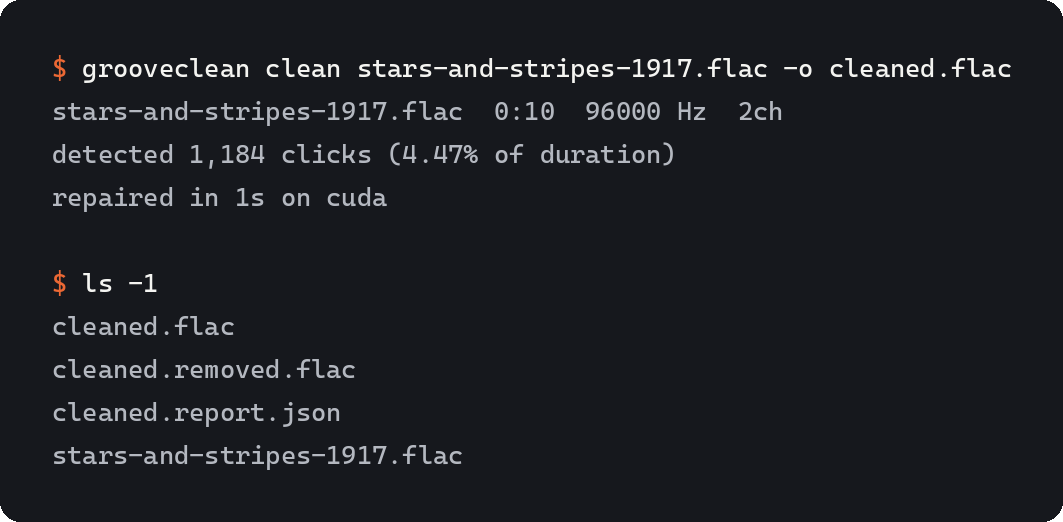
Clean one side:
grooveclean clean sideA.wav -o sideA.clean.wav
That writes sideA.clean.wav, sideA.clean.removed.wav and sideA.clean.report.json, and
prints a summary to stderr so you can pipe the audio around without it getting in the way.
Clean a folder:
grooveclean batch ./transfers -o ./cleaned
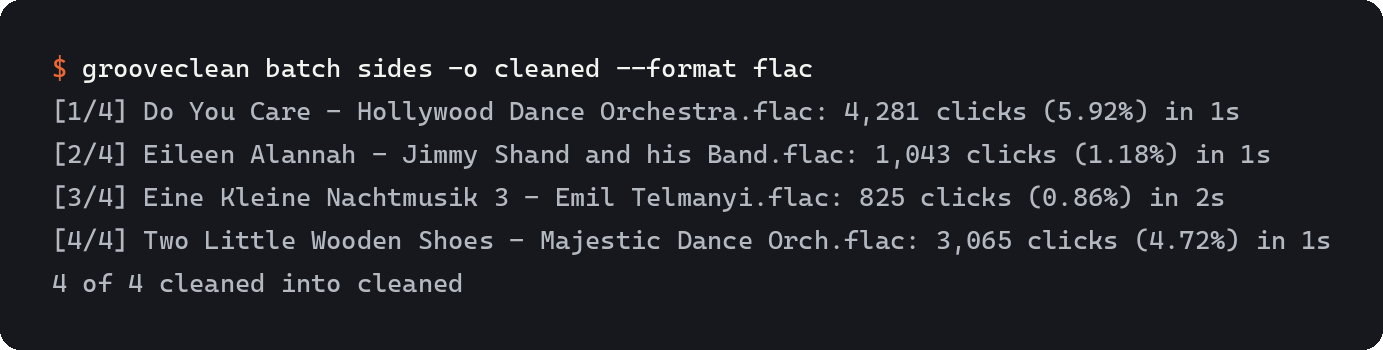
One file failing does not stop the run. The exit code is non-zero if any file was skipped.
--skip-existing leaves anything that already has a report in the output folder alone, which
is how you carry on after stopping a long batch. --format flac writes FLAC instead of WAV,
which is worth doing before you point it at a shelf of 96 kHz sides.
The output format follows the extension you ask for. -o sideA.flac writes FLAC, and the
difference file and report sit beside it. Sample rate, channel count and bit depth always
match the input, whatever the container.
Options
| Option | Default | What it does |
|---|---|---|
--sensitivity |
0.5 |
0 finds only the obvious damage, 1 is aggressive. 0.5 is the trained operating point. |
--max-width-ms |
20 |
Longest span to interpolate. Anything wider is reported as unrepaired and left alone. |
--device |
auto |
cuda, cpu, or auto. Asking for cuda without a GPU warns and uses the CPU. |
--dry-run |
off | Write only the report. Survey a stack of transfers without spending the disk. |
--weights |
bundled | Point at your own trained detector. |
--skip-existing |
off | batch only. Leave files that already have a report in the output folder. |
--format |
wav |
batch only. Container for the cleaned files: wav, flac, aiff, w64, caf or rf64. |
Sensitivity is the knob to reach for first. If quiet passages come out with holes in them, drop it to 0.3 and compare the difference files. If dense crackle is surviving, push it to 0.7. Everything else can stay where it is.
The report
{
  "input": "sideA.wav",
  "sample_rate": 96000,
  "channels": 2,
  "duration_s": 1504.31,
  "clicks": [
    {
      "channel": 0,
      "start_sample": 138204,
      "end_sample": 138219,
      "width_samples": 15,
      "confidence": 0.9931,
      "residual_rms": 0.00412617,
      "repair": "lsar"
    }
  ],
  "totals": { "count": 41882, "samples_repaired": 447120, "pct_of_duration": 0.31 }
}
repair is lsar for the normal case, cubic for a click too close to the start or end of
the file to fit a model around, and unrepaired for a span wider than --max-width-ms, which
is reported but left in the audio. residual_rms is the level of what was removed at that
click, so you can sort the report and go straight to the loudest thing the tool touched.
samples_repaired counts every repaired sample across all channels, and
pct_of_duration is that count against the file's length in frames, so on a stereo side a
click that hits both channels is counted twice.
Check the work
Trusting a declicker means knowing what it took out. Two commands do that, both working off the difference file rather than re-running anything.
audit cuts the repairs out into two short files, before and after:
grooveclean audit sideA.clean.wav
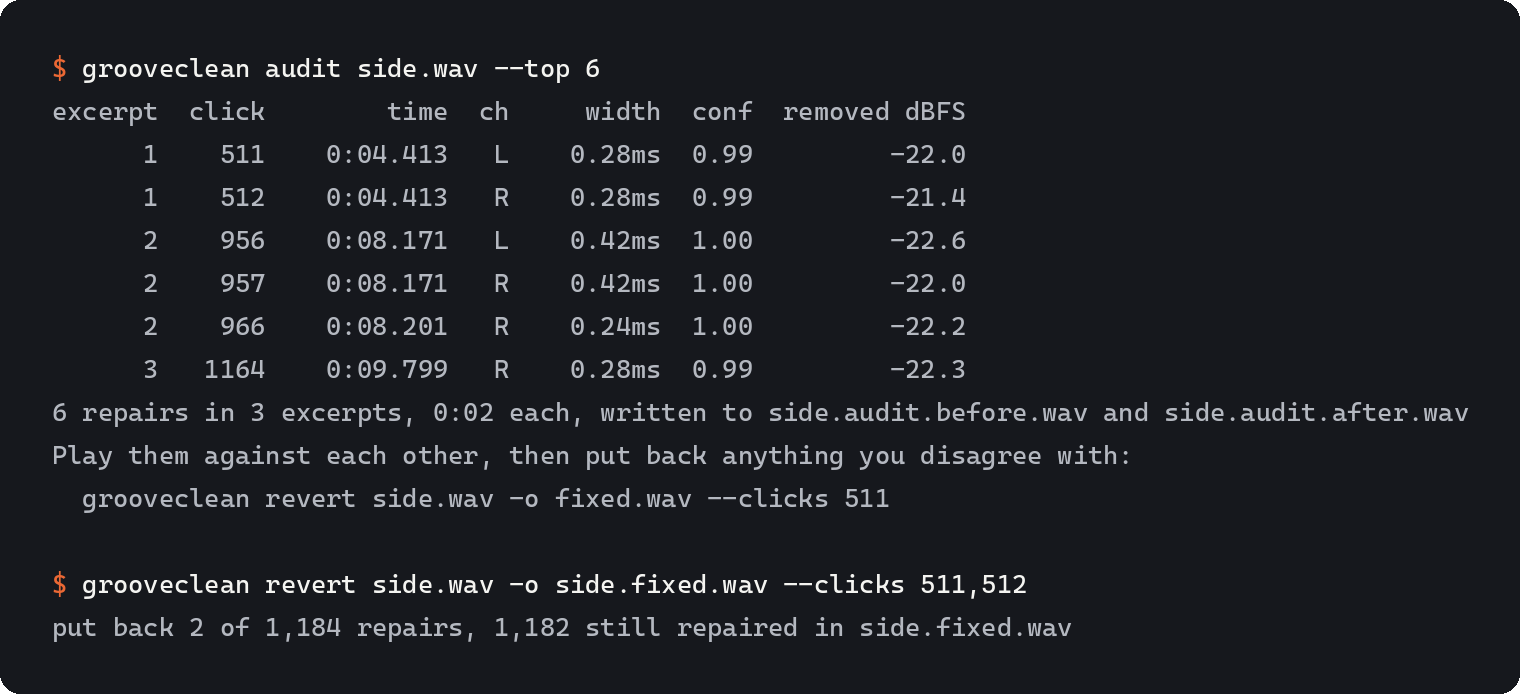
The two files are the same length sample for sample, so loading both into an editor and switching between them is an instant A/B. Twenty repairs off a twenty-five minute side come out as about thirty seconds of audio, which is the difference between checking the work and meaning to. The default twenty are the ones that removed the most energy, because those are the likeliest to have been music. Repairs close enough together to share their context are merged into one excerpt, so the table can list several clicks against the same number.
revert puts chosen repairs back:
grooveclean revert sideA.clean.wav -o sideA.fixed.wav --clicks 511,512
What goes back is what was there. It comes out of the difference file, so a reverted span is
the input again to the sample rather than a second guess. You get a new cleaned file with its
own difference file and report, and out + removed == in still holds on the new pair, so the
result can be audited in turn.
| Option | Applies to | What it does |
|---|---|---|
--clicks |
both | Click numbers from the audit table: 3,17,204 or 12-18. |
--between |
both | Everything in a stretch of the side: 1:32-1:40. |
--wider-than |
both | Every repair longer than this many milliseconds. |
--confidence-below |
both | Every repair the detector was less sure than this about. |
--top |
audit |
How many to include. Default 20. 0 takes every one that matched. |
--sort |
audit |
Which to take first: removed, width, doubt or time. |
--context-ms |
audit |
Music kept either side of each repair. Default 250. |
Given no selector at all, audit considers every repair in the file and revert refuses,
because putting all of them back just gives you the file you started with. If you hear a
swallowed note at 2:14 in the cleaned side, --between 2:13-2:15 on audit finds whatever
happened there and the same flag on revert undoes it.
What it does not do
Deliberately, so that what it does do can be checked:
- No hiss or broadband noise reduction. No spectral subtraction of any kind.
- No wow and flutter correction, no speed or pitch correction.
- No de-hum, no EQ, no filtering of any sort applied to the output.
- No GUI, no VST or AU plugin. It is a command line tool that processes files.
- No MP3, AAC, Vorbis or Opus input. Lossy encoding smears a click across the frame it sits in, and the codec's ringing is exactly the shape a declicker must not learn to chase.
- No cue sheets, no track splitting, no CD burning.
How it works
The signal is resampled to 44.1 kHz and normalised for local level, then a dilated 1-D convolutional network emits one click probability per sample. Every window in the analysis is defined in milliseconds rather than samples, which is what makes a 44.1 kHz transfer and a 192 kHz transfer behave the same way.
Spans are taken by hysteresis on that probability, mapped back to the file's own sample rate, and trimmed to the samples that are genuinely impulsive there. Clipped runs are excluded: a square-topped peak is impulsive but it is not a click, and treating it as one puts holes in loud passages.
Each span is then filled by least-squares AR interpolation of order 64. An AR model is fitted to the 256 samples either side and the missing samples are chosen to minimise that model's prediction error over every window touching the gap. Every span in a channel is assembled into one batched tensor and solved together, so a side with forty thousand clicks costs one solve per size bucket rather than forty thousand solves.
Files are streamed as overlapping blocks with a second of context on each side, so a two-hour 192 kHz transfer costs the same memory as a three-minute one. The boundary between what one block writes and what the next writes is pushed clear of any repaired span, so no click is ever written twice or cut in half.
The detector was trained on real damage
Clicks are not synthesised. They are harvested from FLAC transfers in the Internet Archive's 78rpm collection: a 78 has almost no musical energy above 10 kHz, so impulses are located in the band above that, and the click waveform itself is taken as the AR interpolation residual over the full band. What the interpolator removes is the tick, and what it leaves is the music. How large a residual counts is calibrated per transfer against the same interpolation run over randomly chosen click-free spans.
Those real clicks are then added to click-free music from the Internet Archive's netlabels collection, at 0.1 to 200 events per second and 3 to 30 dB over the local level, which makes the training mask exact: it is the support of what was added. Candidate clean tracks are run through an impulse detector of their own and rejected if they are already clicky. Percussive material is deliberately kept, because the model has to see snare hits labelled as not a click. The music is rolled off at a random corner between 4 and 16 kHz for most segments, since a shellac transfer has no music in its top octave and a model trained only on full-band audio reads that empty band as one long anomaly.
Ten percent of the source items on both sides are held out by hash of the identifier, so no
recording contributes to both training and evaluation. See train/ for the whole pipeline.
Compared to what
Airwindows DeCrackle is free, MIT licensed, and runs in real time as an AU, VST, CLAP or LV2 plugin. Prefer it when you are working inside a DAW, when you want to hear the change while you move the controls, or when the crackle is light. Chris Johnson says plainly that it removes the loudest crackles rather than all of them, and for a lot of records that is the right trade.
Prefer grooveclean when the job is offline batch work on a stack of transfers, when the crackle is dense enough that a real-time algorithm has to stay conservative, or when you want a report and a difference file you can audit afterwards. It is slower than real time on a CPU and there is no plugin. The two tools are not really competing.
GTK Wave Cleaner by Jeff Welty is the prior art for the repair method here. It is a GTK editor for exactly this job and it has been doing least-squares autoregressive interpolation of click spans for two decades. The name LSAR comes from that project. grooveclean's interpolator is an independent implementation of the same published method, written from the Janssen and Vaseghi formulation and batched for the GPU; no gwc code is used, and gwc is GPL-2.0-or-later while this is MIT. If you want a waveform editor with a click-by-click undo, and you are on Linux, use gwc.
Wave Corrector PE is freeware, Windows only, closed source and still the default answer in most vinyl-transfer threads. It is a whole restoration suite rather than a declicker: batch processing, de-hiss, hum filters, track splitting, CD burning. Its declicker is quiet and cautious, and at its lowest thresholds it disturbs undamaged music less than anything else measured here. Use it if you want one program that does the whole transfer, or if you want a GUI at all.
Needledropper's Declicker by Keith
Hanlon is AGPL-3.0, cross-platform, and the closest thing here in spirit: a modern rewrite of the
classical approach, autoregressive detection over a wavelet decomposition, with a click-by-click
review GUI so you can audit every repair before you commit it. grooveclean answers the same need
from a terminal rather than a waveform display: audit cuts the repairs down to a before/after
pair you can A/B in half a minute and revert puts any of them back exactly. If you would rather
see every click and decide on each one, use theirs. It has no releases yet, so you build it.
The three have been run head to head on the same audio with the same scoring, and the tables are
in bench/README.md. Short version: on damage that can be repaired at all,
grooveclean recovers 4 to 10 dB more of the clean signal than either of them, at every setting
either of them exposes, and it disturbs undamaged music 28x less often than Wave Corrector and
222x less often than Needledropper's at the settings each ships with. The margin is nearly as
large on a damage model it was never trained on as on the one it was, so most of it is not home
advantage. On groove damage that loses the music rather than burying it, all three are within
0.3 dB of doing nothing. It is also the slowest of the three and the only one that wants a GPU.
Accuracy
Detection is scored on held-out synthetic mixes built from source recordings the training run never saw. A click counts as found if the detected span overlaps it at all, because a tick two samples short at one edge is still a caught tick.
The shipped weights score F1 0.994 on that held-out set, precision 0.999 and recall 0.990, with no false positives at all in the click-free half. That click-free half is the same kind of material as the rest of the set, mostly music sitting on a synthesised surface-noise bed, since that is the condition the tool actually runs in. The test suite refuses to pass below F1 0.95 or above one false positive per minute, so those numbers are a floor rather than a claim.
The training settings that produced them are in
src/grooveclean/weights/detector.json.
The other measurement worth having is what it does to music nobody asked it to touch. Pointed at
forty arbitrary netlabels releases that a plain impulse screen calls click-free, it left eighteen
of them bit-for-bit untouched, touched under 0.01% of the file on fourteen more, and took a
measurable amount out of the last eight. The worst case is 0.15% of the duration. Those eight are
loud, distorted, high-frequency-dense electronic tracks where the waveform is jagged everywhere
and a local impulse test has nothing to stand out against. Lowering --sensitivity cuts that
back but does not separate the two cleanly, so if you are cleaning something that is not a groove
transfer, listen to the difference file first.
Speed
On a 25 minute 96 kHz 24-bit stereo side:
$ grooveclean clean sideA.wav -o sideA.clean.wav
sideA.wav  25:00  96000 Hz  2ch
detected 67,647 clicks (1.70% of duration)
repaired in 44s on cuda
That is an RTX 4090. The same side takes 2m51s with --device cpu on an i9-14900K and finds
67,648 clicks rather than 67,647. Detection is float32 arithmetic and a GPU sums it in a
different order, so a probability sitting exactly on a threshold can fall either side of it.
Comparing the two devices' detected masks directly, they differ on 75 samples out of 288
million. The device decides where the arithmetic happens, and to that tolerance not what comes
out of it.
Running the tests
pip install -e ".[dev]"
pytest
A hundred tests in five groups, matching the five things that can go wrong: the reconstruction invariant, the clean-audio guard, detector F1 and false positive rate, a golden click count on a bundled 1917 transfer, and the command line's behaviour on mono, stereo, 44.1 kHz, 96 kHz and lossy input. They run offline and need no GPU.
Training your own detector
python train/harvest_noise.py --items 600 --out corpus/noise
python train/harvest_clean.py --items 400 --out corpus/clean
python train/harvest_clean.py --items 400 --redistributable
python train/train.py --steps 12000
The harvesters talk to archive.org and take a while. Nothing else in the project needs the network. Training builds the held-out evaluation file itself if it is not already there, then calibrates the two hysteresis thresholds against it and refuses to exit zero if the result misses either gate.
The second clean harvest asks archive.org for public domain and CC-BY items only. Those are the ones the evaluation file can be built from, since that file is checked into the repo.
Credits
Click waveforms and clean music come from the Internet Archive's
78rpm and
netlabels collections. Per-item provenance for
everything that went into the shipped model is in CREDITS.md.
The bundled test excerpt is the Imperial Marimba Band's 1917 recording of Sousa's The Stars and Stripes Forever. The demo is the Hollywood Dance Orchestra's Do You Care, issued on Banner in 1925. Both are in the public domain in the United States.
Licence
MIT. See LICENSE.
1 maintainer

Release files for grooveclean 1.2.0
For a detailed explanation of source distributions (sdists) and built distributions (wheels), please see the package formats documentation.
Source distribution (sdist)
| File | Size | Uploaded | |
|---|---|---|---|
| grooveclean-1.2.0.tar.gz | 5.5 MB | Details |
Built distribution (wheel)
| File | Interpreter | ABI | Platform | Reset |
|---|---|---|---|---|
| grooveclean-1.2.0-py3-none-any.whl | Python 3 | none | any | Details |
Total release size: 5.8 MB
Release files / grooveclean-1.2.0.tar.gz
| Download URL | grooveclean-1.2.0.tar.gz |
|---|---|
| Size | 5.5 MB |
| Tags | Source |
|
SHA-256 checksum How to use checksums |
cd7a12ce112f862c1c4bc1243ab71480df2f57dda11d4a26b0112de6b44d1f4e
|
|
BLAKE2b-256 checksum How to use checksums |
76b62cd6e46d7a25977b8d42d0386d8298bb2e0647abe1302d6c5765ffcfe053
|
| Upload date | |
|
Uploaded using Trusted Publishing? What is trusted publishing? |
No |
| Uploaded via |
twine/7.0.0 CPython/3.11.9
|
Release files / grooveclean-1.2.0-py3-none-any.whl
| Download URL | grooveclean-1.2.0-py3-none-any.whl |
|---|---|
| Size | 365.2 kB |
| Tags | Python 3 |
|
SHA-256 checksum How to use checksums |
904d9c02d6ae45dec60684494d010ae6081fc5742f9bf481d93eac3f7fc680ce
|
|
BLAKE2b-256 checksum How to use checksums |
1b60c841227cae1d73a3191a13c01fad7495672f56598d64bf7663f508a0cf89
|
| Upload date | |
|
Uploaded using Trusted Publishing? What is trusted publishing? |
No |
| Uploaded via |
twine/7.0.0 CPython/3.11.9
|














