
grstbx




grstbx gathers the scientific code used to visualize and post-process the images produced by the GRS processor (Glint Removal for Sentinel-2-like sensors):
- L2A products: remote-sensing reflectance Rrs(λ) corrected for the atmosphere and the sunglint (GRS multispectral, hGRS hyperspectral for EnMAP and PRISMA),
- L2B products: water-quality parameters (chlorophyll-a, suspended matter, ...) retrieved from Rrs.
It provides:
- the selection of the products stored in a data lake by tile, date and cloud coverage,
- the loading of image series as lazy, dask-backed multi-temporal xarray datacubes, from NetCDF files or single-resolution / multiscale (pyramid) Zarr stores,
- the decoding of the GRS bitmask
flagsinto boolean masks, - the cropping of L2A products to an area of interest and the export of the subsets as GRS products (NetCDF, Zarr) or GeoTIFF,
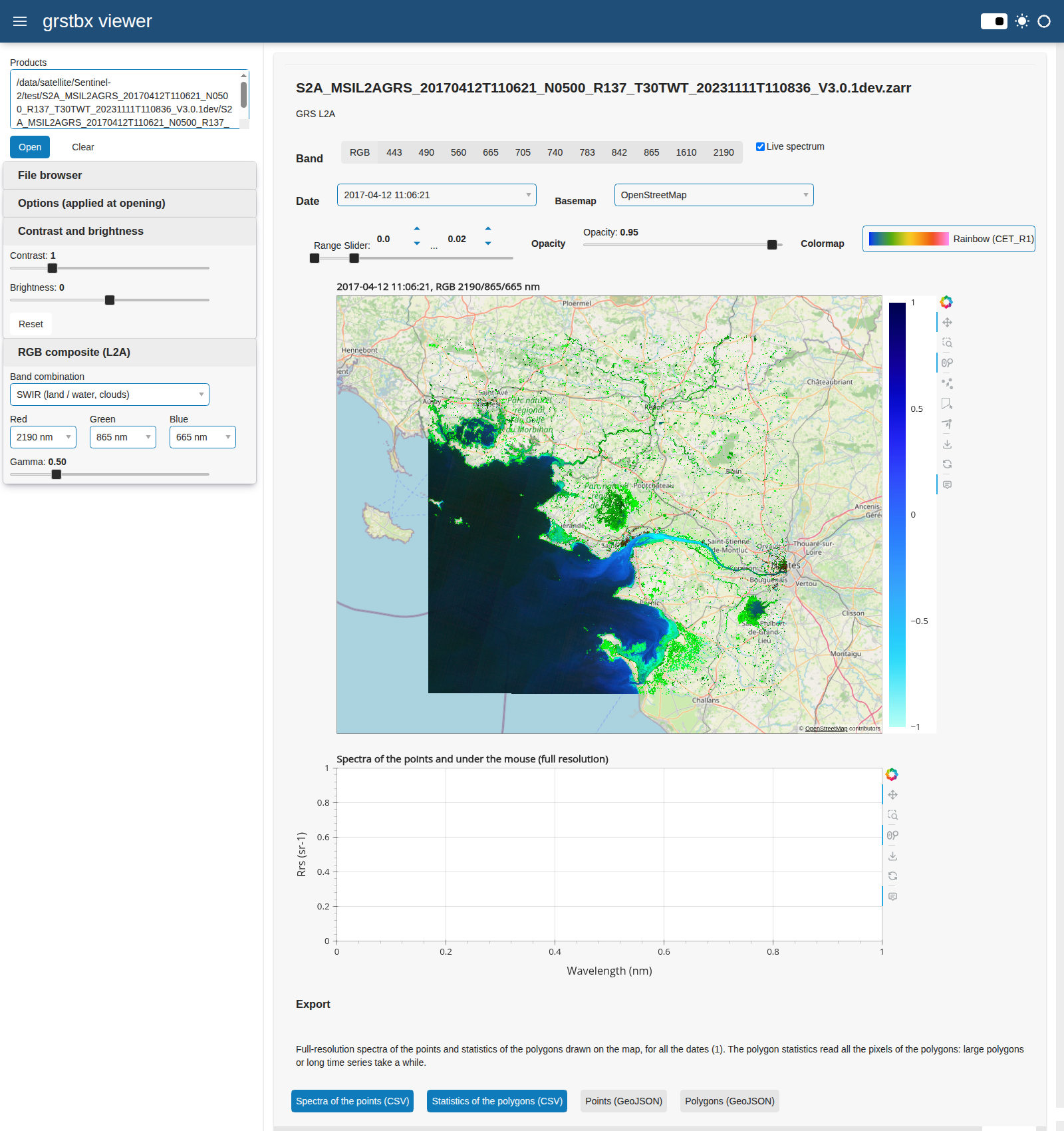
- interactive viewers for Jupyter notebooks, based on holoviews, datashader and panel, to browse the
images by date and band and to draw areas or points of interest, and a web dashboard to explore L2A
and L2B products and time series without notebook (
grstbx-viewer), - matchups between satellite and in situ data, and miscellaneous helpers: bounding boxes, AERONET-OC readers, solar irradiance, DEM-based illumination, plotting.

Installation
grstbx requires Python >= 3.11. Install it from PyPI:
pip install grstbx                 # library, viewers and web dashboard (grstbx-viewer)
pip install "grstbx[notebook]"     # + JupyterLab environment to use the viewers in notebooks
The geospatial libraries (GDAL, PROJ, GEOS) are compiled libraries: in a conda environment, install them from conda-forge first, then grstbx with pip:
conda create -n grstbx -c conda-forge python=3.12 gdal rasterio pyproj cartopy netcdf4
conda activate grstbx
pip install "grstbx[notebook]"
To run the notebooks of the repository or to develop grstbx, clone it and create the conda environment
of environment.yml, which installs all the dependencies (including Jupyter and xesmf) and grstbx in
editable mode:
git clone https://github.com/Tristanovsk/grstbx.git
cd grstbx
conda env create -f environment.yml
conda activate grstbx
| extra | content | usage |
|---|---|---|
notebook |
JupyterLab, ipykernel, jupyter_bokeh | run the notebooks and the viewers |
regrid |
xesmf | grstbx.utils.Reproj.regridding; xesmf needs ESMF: conda install -c conda-forge xesmf |
docs |
Sphinx, sphinx-book-theme, myst-nb... | build the documentation |
all |
notebook and docs |
The export of subsets (grstbx.export_l2a, grstbx.crop_and_export) uses the writers of
GRS: it needs grs >= 3.0.1 in the same environment. To use the
environment in Jupyter, register it as a kernel: python -m ipykernel install --user --name=grstbx.
See the installation page for the details and troubleshooting.
Quick start
import grstbx

dc = grstbx.L2grs(files)                    # list of GRS L2A products
dc.get_l2a_datacube(subset=aoi)             # aoi: geopandas.GeoDataFrame
water = grstbx.Masking(dc.datacube).get_mask(ndwi=False)
Rrs = dc.datacube.Rrs.where(water)

viewer = grstbx.visual.ViewSpectral(Rrs, reproject=True)   # interactive viewer, in Jupyter
viewer.visu()
Web dashboard
grstbx-viewer explores GRS L2A and L2B products (Zarr or NetCDF, hGRS NetCDF), single images, time
series or datacubes, in the web browser, without notebook:
grstbx-viewer /path/to/product.zarr              # or: grstbx-viewer --root /data/satellite
grstbx-viewer "/data/L2B/BEFR/2024/*/*/*.nc"     # time series of L2B products
grstbx-viewer /data/L2A_zarr --tile 31TEJ        # time series of a tile, folders <tile>/YYYY/MM/DD/<product>
grstbx-viewer "/data/L2B/31TFJ/*/*/*/*/*.json" --max-cloud-cover 20   # STAC Items of GRSl2bgen products
grstbx-viewer --stac /data/L2B                   # STAC search card: area, period, cloud cover (or a STAC API URL)
Pan and zoom the images over a basemap, hover them to plot the spectrum (L2A) or the time series (L2B) under the mouse, change the RGB bands, contrast and brightness, draw points and polygons, and download their values and statistics. See the dashboard tutorial.
Documentation
https://grstbx.readthedocs.io: installation, GRS products, tutorials (L2A image, web dashboard, L2B datacube, cropping and export, validation with in situ data, case studies, hGRS products), API reference and history. Changes of each version: CHANGELOG.md.
Related projects
- GRS: atmospheric and sunglint correction producing the L2A images,
- hGRS: hyperspectral version of GRS for EnMAP and PRISMA,
- GRSdriver: readers of the L1C images used by GRS.
License
GNU General Public License v3, see LICENSE.
1 maintainer

Metadata
1 maintainer
Release files for grstbx 2.6.0
For a detailed explanation of source distributions (sdists) and built distributions (wheels), please see the package formats documentation.
Source distribution (sdist)
| File | Size | Uploaded | Provenance | |
|---|---|---|---|---|
| grstbx-2.6.0.tar.gz | 486.3 kB | With provenance | Details |
Built distribution (wheel)
| File | Interpreter | ABI | Platform | Reset |
|---|---|---|---|---|
| grstbx-2.6.0-py3-none-any.whl | Python 3 | none | any | Details |
Total release size: 967.7 kB
Release files / grstbx-2.6.0.tar.gz
| Download URL | grstbx-2.6.0.tar.gz |
|---|---|
| Size | 486.3 kB |
| Tags | Source |
|
SHA-256 checksum How to use checksums |
b7520b543a33e4f09f424ecfa8af92c769fbbeec56dd898d67c257f440b318f7
|
|
BLAKE2b-256 checksum How to use checksums |
286a47bf9c810ca84ab52da1f8cb86e4c5b3320117a92fb54af608b0bbcfb9d9
|
| Upload date | |
|
Uploaded using Trusted Publishing? What is trusted publishing? |
Yes |
| Uploaded via |
twine/7.0.0 CPython/3.13.16
|
Provenance
Provenance describes where a file came from. On PyPI, provenance is shared via attestations, which provide a verifiable record of the build or publishing details. View details, limitations and caveats.


PyPI Publish Attestation
PyPI verified that this artifact, at this checksum, originated from the publisher listed below.
Signed by GitHub Actions, verified by PyPI on Oct 22, 2026.
Transparency logRelease files / grstbx-2.6.0-py3-none-any.whl
| Download URL | grstbx-2.6.0-py3-none-any.whl |
|---|---|
| Size | 481.5 kB |
| Tags | Python 3 |
|
SHA-256 checksum How to use checksums |
6a3071f9711de645724205df516cbcf7f545beb43ab269476a177a0f2573ce82
|
|
BLAKE2b-256 checksum How to use checksums |
9b30da886745723020d936e987bc6e3bf61e9c5b90fd2ff0ba9d66422360b5ec
|
| Upload date | |
|
Uploaded using Trusted Publishing? What is trusted publishing? |
Yes |
| Uploaded via |
twine/7.0.0 CPython/3.13.16
|
Provenance
Provenance describes where a file came from. On PyPI, provenance is shared via attestations, which provide a verifiable record of the build or publishing details. View details, limitations and caveats.
PyPI Publish Attestation
PyPI verified that this artifact, at this checksum, originated from the publisher listed below.
Signed by GitHub Actions, verified by PyPI on Oct 22, 2026.
Transparency logSecurity for grstbx 2.6.0
Provenance
Provenance describes where a file came from. On PyPI, provenance is shared via attestations, which provide a verifiable record of the build or publishing details. View details, limitations and caveats.
Full provenance
All 2 files in this release have been uploaded with provenance metadata.
Attestation for grstbx-2.6.0.tar.gz
PyPI Publish Attestation
PyPI verified that this artifact, at this checksum, originated from the publisher listed below.
Signed by GitHub Actions, verified by PyPI on Oct 22, 2026.
Transparency logA note on package security
PyPI is a repository for distributing packages, not a service for auditing them. While third-party security researchers and our staff do their best to detect and remove malicious packages, PyPI cannot guarantee the quality, security or suitability of any given package.














