
Gruyère 🧀
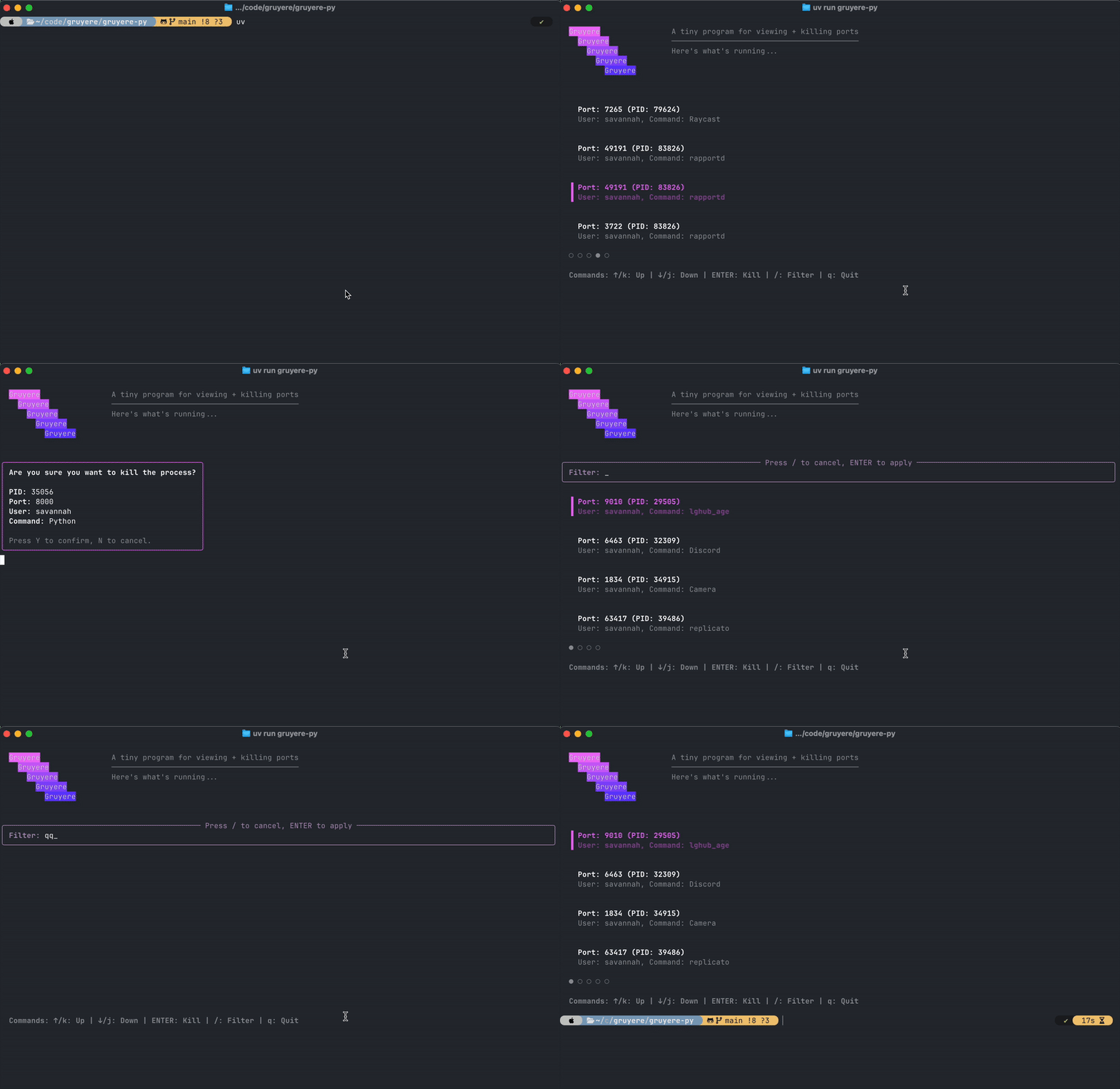
A tiny, beautiful TUI program for viewing and killing processes listening on ports.
Install:
uv tool install gruyere
# or
pipx install gruyere
# or
pip install gruyere
Usage:
gruyere                    # Show processes with clean app names
gruyere --details          # Show full command details
gruyere --port 8000        # Filter by specific port
gruyere --user username    # Filter by specific user
Controls
↑/k: Move up↓/j: Move down/: Filter processesENTER: Kill selected processq: Quit
Features
- 🎨 Beautiful gradient UI with rich colors
- 🔍 Filter processes by command name, port, or user
- 📱 Clean app names by default, with optional
--detailsflag to show full command strings - ⌨️ Vim-style navigation (j/k) or arrow keys
- 💀 Kill processes with confirmation dialog
- 📄 Pagination for many processes
Requirements
- macOS, Linux, or Windows (very experimental)
- Python 3.13+
Note: On macOS, the program will run without elevated privileges but will only show processes owned by the current user. For system-wide process information, run with sudo. On Windows, you may need to run as Administrator to see all processes.
License
MIT
1 maintainer

Metadata
1 maintainer
Release files for gruyere 0.1.0
For a detailed explanation of source distributions (sdists) and built distributions (wheels), please see the package formats documentation.
Source distribution (sdist)
| File | Size | Uploaded | |
|---|---|---|---|
| gruyere-0.1.0.tar.gz | 1.0 MB | Details |
Built distribution (wheel)
| File | Interpreter | ABI | Platform | Reset |
|---|---|---|---|---|
| gruyere-0.1.0-py3-none-any.whl | Python 3 | none | any | Details |
Total release size: 1.0 MB
Release files / gruyere-0.1.0.tar.gz
| Download URL | gruyere-0.1.0.tar.gz |
|---|---|
| Size | 1.0 MB |
| Tags | Source |
|
SHA-256 checksum How to use checksums |
3fe1ff4eef9a53ed46f17a7aa5efa2eb0212a2c6de618c2b36735bcc71d358be
|
|
BLAKE2b-256 checksum How to use checksums |
160fd951dda46ba3b3dcbdf14f55355130b016445f9aa6b021dd70a9a567026a
|
| Upload date | |
|
Uploaded using Trusted Publishing? What is trusted publishing? |
Yes |
| Uploaded via |
uv/0.9.11 {"installer":{"name":"uv","version":"0.9.11"},"python":null,"implementation":{"name":null,"version":null},"distro":{"name":"Ubuntu","version":"24.04","id":"noble","libc":null},"system":{"name":null,"release":null},"cpu":null,"openssl_version":null,"setuptools_version":null,"rustc_version":null,"ci":true}
|
Release files / gruyere-0.1.0-py3-none-any.whl
| Download URL | gruyere-0.1.0-py3-none-any.whl |
|---|---|
| Size | 9.4 kB |
| Tags | Python 3 |
|
SHA-256 checksum How to use checksums |
6faafc5feabd919f01c3286405f76beb65dd699ff5bca77205cf72f94f1a88fa
|
|
BLAKE2b-256 checksum How to use checksums |
437ad117be925bd4d541a275d69bc87c823daee6d4fb05428169d56aab05a806
|
| Upload date | |
|
Uploaded using Trusted Publishing? What is trusted publishing? |
Yes |
| Uploaded via |
uv/0.9.11 {"installer":{"name":"uv","version":"0.9.11"},"python":null,"implementation":{"name":null,"version":null},"distro":{"name":"Ubuntu","version":"24.04","id":"noble","libc":null},"system":{"name":null,"release":null},"cpu":null,"openssl_version":null,"setuptools_version":null,"rustc_version":null,"ci":true}
|














