

gs_prompt_manager
One home for every prompt in your LLM app.
Write prompts as plain Python classes. Point the manager at the folder. Call them by name.






Install · 60-second tour · How it works · Prompt groups · Recipes · API · FAQ · Docs
Prompts start as one f-string in a handler. Then there is a system variant, and a terse variant for the cheap model, and a French one, and a copy someone pasted into a notebook. By the time it matters, nobody can say which string production actually sends.
gs_prompt_manager gives prompts a place to live. Each one is a small class with
its template and its metadata; a directory of them becomes a namespace you can
autocomplete. PromptManager("./prompts") walks the folder, imports what it finds,
instantiates every PromptBase subclass, and files related variants together — so
m.Reviewer.system({"language": "Rust"}) is the whole call site.
No registry file to keep in sync, no YAML, no framework. It renders strings, and strings work with every model provider.
Why not just f-strings
| f-strings in the handler | gs_prompt_manager |
|
|---|---|---|
| Where a prompt lives | wherever it was first needed | one directory, one class each |
| Finding every variant | grep and hope | m.get_prompt_group_names() |
| A variable you forgot | renders {name} into the API call |
raises before the call is made |
| Defaults | a chain of or "" |
set_variable_defaults |
| Values the caller cannot know (dates, hostnames) | threaded down through every layer | <<MACRO>>, filled by the prompt itself |
| Version, author, tags, examples | a comment, if you are lucky | get_metadata() |
| Adding a variant | new function, new import, new call site | new class, nothing else |
Install
pip install gs-prompt-manager
Or with uv:
uv add gs-prompt-manager
Python 3.8+. The only dependency is regex.
60-second tour
1. Write your prompts as classes — prompts/reviewer.py:
from gs_prompt_manager import PromptBase, prompt_group


class ReviewerSystem(PromptBase):
    """System prompt for the code reviewer."""

    def set_prompt(self):
        return (
            "You are a senior {language} reviewer.\n"
            "Focus on correctness first, style last.\n"
            "Session started <<DATETIME>>."
        )

    def set_variable_defaults(self):
        self.variable_defaults = {"language": "Python"}


class ReviewerChat(PromptBase):
    def set_prompt(self):
        return "Review this diff:\n\n{diff}"


@prompt_group("Reviewer", "verdict")
class ReviewerFinalCall(PromptBase):
    def set_prompt(self):
        return "Answer with exactly one word: {options}."

    def set_variable_defaults(self):
        self.variable_defaults = {"options": "approve or reject"}
Three classes, one group. ReviewerSystem and ReviewerChat are filed under
Reviewer by their name suffix; ReviewerFinalCall says where it belongs
explicitly.
2. Point the manager at the folder:
from gs_prompt_manager import PromptManager

m = PromptManager("./prompts")
3. Call them:
>>> m.get_prompt_group_names()
['Reviewer']
>>> m.Reviewer.get_prompt_names()
['chat', 'verdict', 'system']

>>> print(m.Reviewer.system({"language": "Rust"}))
You are a senior Rust reviewer.
Focus on correctness first, style last.
Session started 2026-09-07 01:13:24.

>>> print(m.Reviewer.verdict())
Answer with exactly one word: approve or reject.
{language} came from the caller, {options} from the class default, and
<<DATETIME>> from the prompt itself. Leave out a variable that has no default and
you get a ValueError naming it — before a token is spent.
All of the above is in examples/;
clone the repo and run python examples/quickstart.py to watch it happen.
How it works
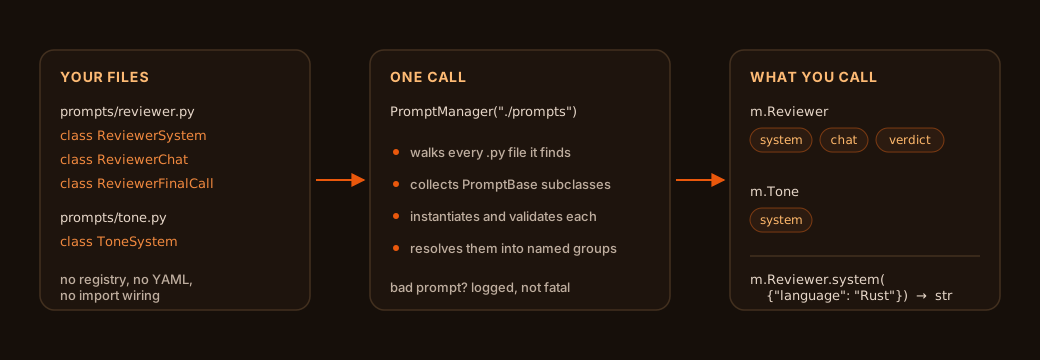
Discovery is a directory walk, so the folder layout is yours to choose — nest by feature, by agent, by language, however you like. A prompt that fails to import or fails validation is logged and skipped; one broken template does not take the rest of your app down with it.
Pass a list to load several trees at once:
m = PromptManager(["./prompts", "./vendor_prompts"], verbose=True)
Pass nothing and it searches the directory of the file that constructed it.
Prompt groups
A group is one logical prompt and all its variants, addressed by key. Membership is resolved three ways, in priority order:
1. The @prompt_group decorator — explicit, wins over everything:
@prompt_group("Assistant")            # key derived from the class name -> "formal"
class AssistantFormal(PromptBase): ...

@prompt_group("Assistant", "polite")  # key stated outright -> "polite"
class SomeOtherName(PromptBase): ...
2. A recognized class-name suffix — system, chat, pre, post, message,
prompt (case-insensitive, optional underscore):
class TranslatorSystem(PromptBase): ...   # group "Translator", key "system"
class Translator_chat(PromptBase): ...    # group "Translator", key "chat"
3. Anything else becomes a solo group named after the class, key "default".
Groups read three ways, so use whichever suits the call site:
group = m.get_prompt_group("Reviewer")   # explicit
group = m.Reviewer                       # attribute

group.system({"language": "Go"})         # attribute access
group["system"]({"language": "Go"})      # dict access
group.get_prompt("system")               # explicit

"system" in group                        # True
len(group)                               # 3
list(group)                              # ['chat', 'verdict', 'system']
str(group)                               # renders default -> chat -> first member
Two prompts claiming the same key is a warning, not a crash: the first one keeps the key, and the collision is logged with both class names.
Variables and macros
Two substitutions, deliberately different, because they have different owners.
| Syntax | Filled by | If it is missing | |
|---|---|---|---|
| Variable | {name} |
the caller, or variable_defaults |
ValueError |
| Macro | <<NAME>> |
the prompt class, via set_macros |
warning, left as-is |
class AuditSystem(PromptBase):
    def set_prompt(self):
        return "Audit for {user_id}. Generated <<DATETIME>> by <<HOST>>."

    def set_macros(self):
        import socket, datetime
        self.macros = {
            "<<DATETIME>>": datetime.datetime.now().isoformat(),
            "<<HOST>>": socket.gethostname(),
        }
Variables are auto-extracted from the template, so you rarely write set_variables
yourself. Need a literal brace in the output — JSON in a few-shot example, say?
Escape it:
def set_prompt(self):
    # {score} is a variable; the escaped braces are literal text
    return r'Reply as JSON: \{"score": {score}\}'
Use a raw string (or double the backslash) so Python itself leaves \{ alone —
on 3.12+ a bare '\{' is a SyntaxWarning.
Defaults are validated against the template at import time: a default for a variable the prompt does not have raises immediately, rather than silently doing nothing.
Recipes
Anthropic — the group maps straight onto the request:
import anthropic
from gs_prompt_manager import PromptManager

m = PromptManager("./prompts")
client = anthropic.Anthropic()

reviewer = m.Reviewer
response = client.messages.create(
    model="claude-sonnet-5",
    max_tokens=1024,
    system=reviewer.system({"language": "Python"}),
    messages=[{"role": "user", "content": reviewer.chat({"diff": diff})}],
)
OpenAI:
messages = [
    {"role": "system", "content": m.Reviewer.system({"language": "TypeScript"})},
    {"role": "user", "content": m.Reviewer.chat({"diff": diff})},
]
One group per agent, in a multi-agent system — hand each agent its group, not a string, and every variant travels with it:
class Agent:
    def __init__(self, group):
        self.group = group

    def system_prompt(self):
        return self.group.system()

planner = Agent(m.Planner)
critic = Agent(m.Critic)
Ship a prompt catalogue — every prompt carries its own metadata, so a browsable index is one comprehension:
catalogue = {
    name: prompt.get_metadata()
    for name, prompt in m.get_prompt_instances().items()
}
Works well with
- Emalia — an AI agent that lives in your email, plus the typed IMAP/SMTP toolkit behind it. Emalia ships its own prompts; once you start customising them, a prompt directory beats editing strings in place.
- Anything that takes a string. Provider-agnostic on purpose: no SDK dependency, no client wrapper, no opinion about how you call your model.
API at a glance
PromptBase — subclass it, implement set_prompt, override whatever else you
need.
| Member | What it does |
|---|---|
set_prompt() |
return the template string. The one required override |
set_name() |
defaults to the class name |
set_variables() |
defaults to auto-extracting {...} from the template |
set_variable_defaults() |
per-variable fallbacks |
set_variable_defaults_empty() |
fall back to "" for anything still unset |
set_macros() |
<<NAME>> substitutions the class computes itself |
set_tools() |
tool identifiers this prompt expects |
add_variable_default(name, value) / add_macro(key, value) |
tweak one entry at runtime |
get_prompt(variables) / prompt(variables) |
render. Instances are callable |
get_metadata() |
JSON-serializable dict: template, name, version, tags, author, example, tools |
PromptManager — discovery and lookup.
| Member | What it does |
|---|---|
PromptManager(prompt_paths=None, verbose=False) |
a str, a list of str, or None for the caller's directory |
get_prompt(name) / manager.Name |
one prompt instance, by class name |
get_prompt_group(name) / manager.Group |
one group. Groups win on name collisions |
get_prompt_names() / get_prompt_group_names() |
what got discovered |
get_prompt_instances() / get_prompt_groups() |
everything, as dicts |
search_available_prompts(path) |
the discovery step on its own, as a static method |
dir(manager) |
includes group and prompt names, so tab-completion works |
PromptGroup — group.key, group["key"], group.get_prompt("key"),
get_prompt_names(), get_prompts(), plus in, len(), iteration and str().
FAQ
Does it call a model? No. It renders strings. Bring your own client.
Do prompts have to live in files? That is what the manager is for, but
PromptBase works standalone — instantiate a subclass, or pass prompt=... to the
constructor directly, and skip discovery entirely.
What happens to a prompt that raises on import? It is logged with a traceback
and skipped. Everything else still loads. Construct with verbose=True to see the
counts.
Can two prompts share a name? Class names must be unique across all discovered paths — a duplicate raises. Group keys only need to be unique within their group.
Is discovery slow? It imports every .py file under the given paths, once, at
construction. Build the manager at startup and hold onto it; do not rebuild it per
request.
Does it cope with {} in JSON examples? Yes — escape them as \{ and \}.
Escaped braces are excluded from variable extraction and render as literal braces.
Documentation
Full docs at gs-prompt-manager.readthedocs.io.
- User Guide — concepts, configuration, patterns
- Examples — OpenAI, Claude, multi-agent systems
- Tutorial notebook — run it end to end
- Migration guide — upgrading from earlier versions
- Changelog · Contributing
Contributing
Issues and pull requests are welcome — see CONTRIBUTING.md.
License
Apache License 2.0. See LICENSE.
1 maintainer

Release files for gs-prompt-manager 0.0.10
For a detailed explanation of source distributions (sdists) and built distributions (wheels), please see the package formats documentation.
Source distribution (sdist)
| File | Size | Uploaded | |
|---|---|---|---|
| gs_prompt_manager-0.0.10.tar.gz | 52.9 kB | Details |
Built distribution (wheel)
| File | Interpreter | ABI | Platform | Reset |
|---|---|---|---|---|
| gs_prompt_manager-0.0.10-py3-none-any.whl | Python 3 | none | any | Details |
Total release size: 73.3 kB
Release files / gs_prompt_manager-0.0.10.tar.gz
| Download URL | gs_prompt_manager-0.0.10.tar.gz |
|---|---|
| Size | 52.9 kB |
| Tags | Source |
|
SHA-256 checksum How to use checksums |
263b149013973978fedadf429631b62c4902ebafacfa4ef04290aa042023299f
|
|
BLAKE2b-256 checksum How to use checksums |
f6c11db1fabddcc61ee1ebb0e1a3f373530162deb16a9feb1687b9150f570c97
|
| Upload date | |
|
Uploaded using Trusted Publishing? What is trusted publishing? |
Yes |
| Uploaded via |
twine/7.0.0 CPython/3.13.14
|
Provenance
Provenance describes where a file came from. On PyPI, provenance is shared via attestations, which provide a verifiable record of the build or publishing details. View details, limitations and caveats.


PyPI Publish Attestation
PyPI verified that this artifact, at this checksum, originated from the publisher listed below.
Signed by GitHub Actions, verified by PyPI on Sep 7, 2026.
Transparency logRelease files / gs_prompt_manager-0.0.10-py3-none-any.whl
| Download URL | gs_prompt_manager-0.0.10-py3-none-any.whl |
|---|---|
| Size | 20.4 kB |
| Tags | Python 3 |
|
SHA-256 checksum How to use checksums |
bd8b8aacd55e00a2aa6996b496c0af4923f19e5c4bcf233112962eeb59c44ec9
|
|
BLAKE2b-256 checksum How to use checksums |
382abc1d9b72905aa870a042d948dacbbae441b9e125f70917ac2ed51269465b
|
| Upload date | |
|
Uploaded using Trusted Publishing? What is trusted publishing? |
Yes |
| Uploaded via |
twine/7.0.0 CPython/3.13.14
|
Provenance
Provenance describes where a file came from. On PyPI, provenance is shared via attestations, which provide a verifiable record of the build or publishing details. View details, limitations and caveats.
PyPI Publish Attestation
PyPI verified that this artifact, at this checksum, originated from the publisher listed below.
Signed by GitHub Actions, verified by PyPI on Sep 7, 2026.
Transparency log













