
gsc-pulse
An honest report from your Google Search Console exports.
What grew, what dropped and why, and the five things to do next.
Every number computed from your data. Every recommendation shows its formula.




pipx install gsc-pulse          # or: pip install gsc-pulse
gsc-pulse demo -o demo.html     # a fictional site, to see a report right away
gsc-pulse report ./exports/     # your own Search Console exports
Why
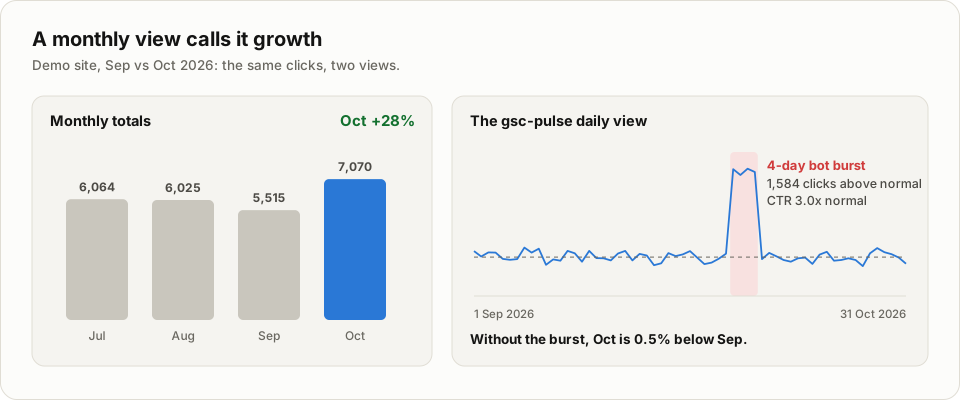
Search Console's charts are built to look at, not to decide from. A monthly total can call a four-day bot burst "growth". A core update can drop a site's clicks for months before anyone lines the date up with Google's rollout calendar. And the queries that are one title rewrite away from more clicks are buried in a 1,000-row table.
gsc-pulse reads the exports you already download, runs four detectors over them, and writes one HTML file that answers three questions: what changed, why, and what is worth doing next.
How it works
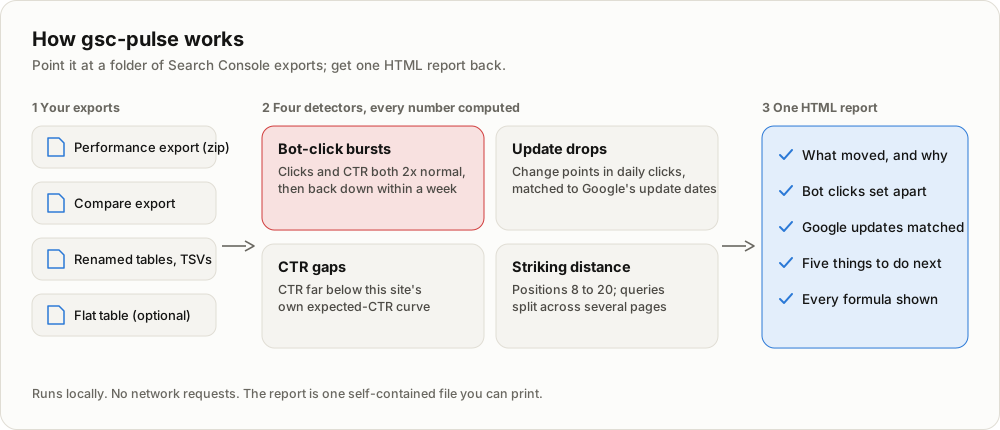
Nothing is estimated by hand and nothing is borrowed from industry averages: even the expected CTR at each position is fitted from your own site's queries. When a question needs data your exports don't have, the report names the exact export to make instead of guessing.
Every image on this page comes from the built-in demo, a fictional site
(acme-dental.example) with synthetic data. The figures are rebuilt from it by
scripts/readme_visuals.py, the tour by
scripts/tour.py.
What it finds
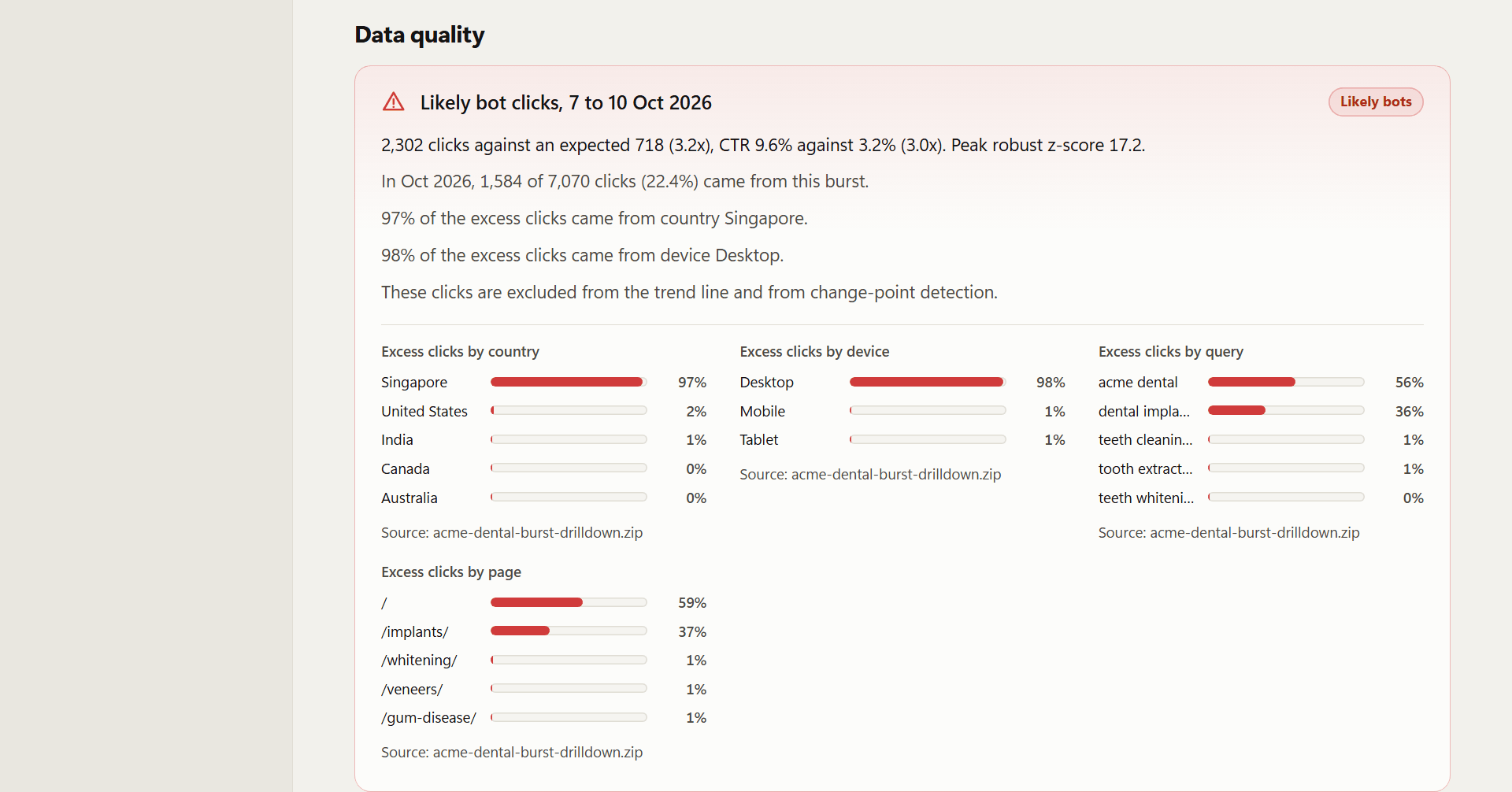
Bot-click bursts. Days where clicks and CTR both jump to at least 2x their trailing 28-day median (robust z >= 4). A burst has to come back down within a week; traffic that stays up, like a recovery after an outage, is a real shift, not bots. If 60% or more of the excess clicks come from one country or one device, it is flagged as likely bots. Burst clicks are kept out of the headline growth number and the trend line.
Update drops and rises. Change points in daily clicks (PELT on log clicks, day-of-week effect removed), matched to the dated list of Google ranking updates from the Google Search Status Dashboard. A shift counts at 20% or more. Drops with no update nearby are still listed, with a hint to check technical causes.
CTR gaps. Queries at positions 1 to 10 whose CTR is at or below half of what this site's queries usually get at that position: title and description rewrite candidates, ranked by missed clicks per month.
Striking distance and cannibalisation. Queries at positions 8 to 20 with real impressions, and queries whose impressions are split across several of the site's pages.
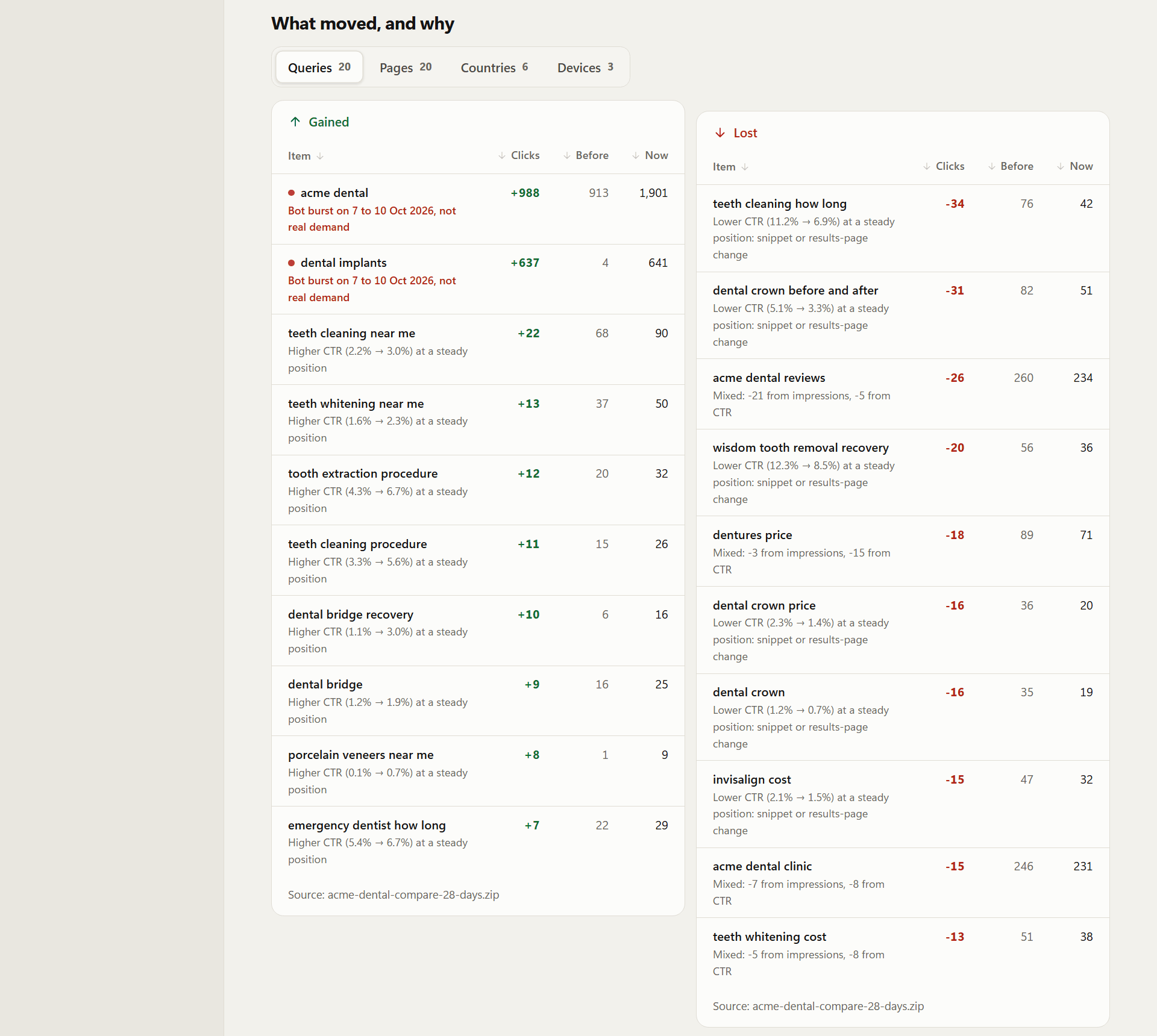
What moved, and why. Per query, page, country and device. Each click change is split exactly into an impression effect and a CTR effect, then labelled as a ranking move, a demand change or a CTR change at a steady position. Movers caused by a bot burst are labelled as such instead of being celebrated.
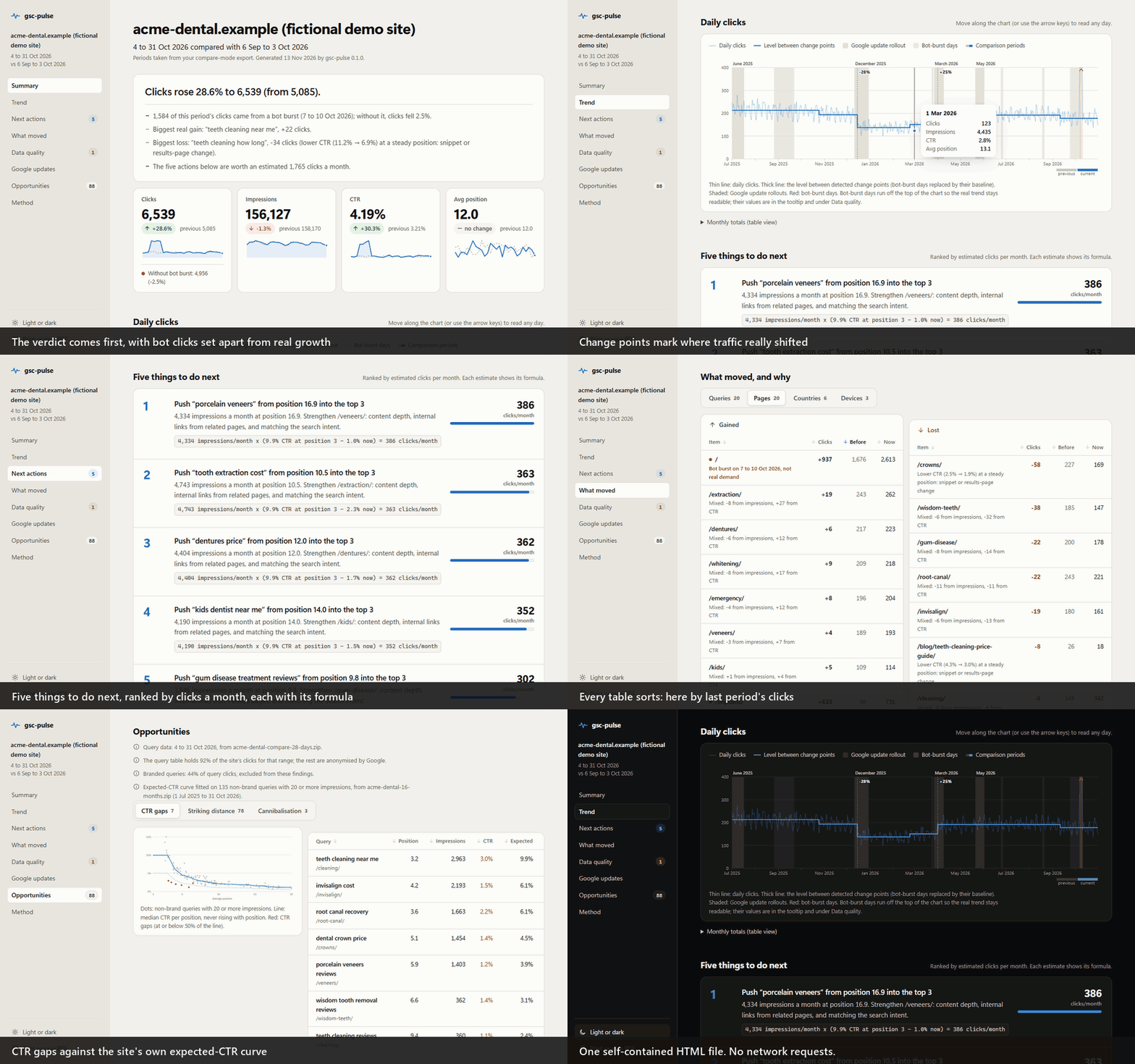
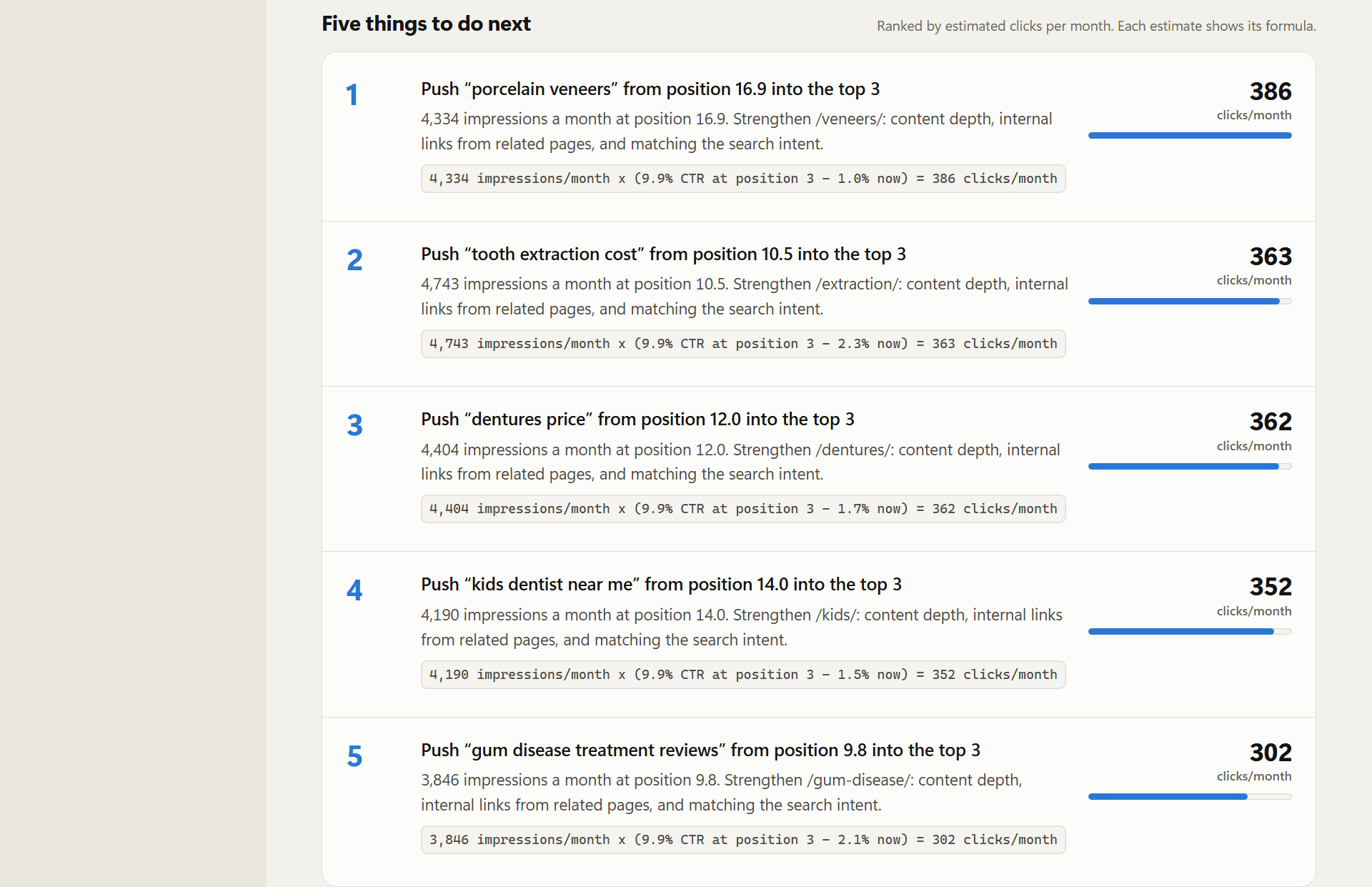
Five things to do next, ranked by estimated clicks per month, each with the formula that produced the estimate:
The report itself is one self-contained HTML file: a section nav, KPI cards that lay this period over the last, a daily chart you can read day by day with the mouse or the arrow keys, sortable tables, light and dark themes, and a clean A4 printout. It works offline and with JavaScript turned off.
What to export from Search Console
Point gsc-pulse at a folder. It reads any number of export zips, extracted export folders, flat tables and renamed CSV or TSV files, and recognises each table by its columns.
| Export | How | Unlocks |
|---|---|---|
| Long history (required) | Performance > Date: Last 16 months > Export > Download CSV | Daily trend, bot bursts, update drops |
| Compare (recommended) | Performance > Date > Compare: Last 28 days vs previous period > Export | What moved, CTR gaps, striking distance |
| Monthly exports (optional) | One export per month, side by side | Month-against-month comparison, matched exactly |
| Drill-downs (optional) | The report names the exact custom compare to export, for example the days of a burst vs the days before | Bot-burst attribution, pages behind an update drop |
| Flat table (optional) | Looker Studio, Search Analytics for Sheets or BigQuery bulk export, with query and page columns (and a date column) | Cannibalisation, plus everything above for its date range |
| Renamed tables and script pulls | CSV or TSV files named like queries-28d-20261013-20261109.tsv; # comment lines on top are skipped |
Kind and date range read from the name when there is no Filters.csv |
Search Console's UI export never crosses two dimensions (no query x page, no date x country), which is why the optional pieces exist.
Usage
gsc-pulse report ./exports/                    # writes ./exports/gsc-pulse-report.html
gsc-pulse report ./exports/ -o june.html --period month
gsc-pulse demo -o demo.html                    # synthetic data, fictional site
gsc-pulse synth ./demo-exports/                # just the synthetic exports
--period is 28d, 3m or month. Without it, gsc-pulse uses the most
recent month-length comparison the folder can answer exactly (a compare-mode
export, or two back-to-back exports), else the last 28 days against the 28
before. Periods of different length are compared per day.
Settings
Put a gsc-pulse.toml next to your exports (or pass --config). The most
useful setting is the brand list, so branded queries don't distort the CTR
curve:
site_name = "example.com"
brand_terms = ["example", "اگزمپل"]

[ctr_gaps]
min_impressions = 200
Every threshold is in examples/gsc-pulse.example.toml,
and the report's last section prints the values it used. The reasoning behind
each default is in docs/decisions.md.
Honest limits
- Google publishes no spec for the UI export files. The parser is built from
real exports and tolerates variations (localised digits,
Dates.csvorChart.csv, compare-mode headers, custom date labels). If yours doesn't parse, please open an issue with the header row only, not your data. - The UI export keeps 1,000 rows per table and Google hides anonymised queries; the report shows how much of the site's clicks the query table covers.
- The expected-CTR curve is your own site's median, so a CTR gap means "low for this site", not "low for the web".
- Click estimates are what the formula says, not a promise. They exist to rank the work, and each one shows its inputs.
Privacy
gsc-pulse runs on your machine and makes no network requests. The report has
no external scripts, fonts or images. The demo, the images on this page and
the tests use only the synthetic generator in gsc_pulse.synth.
Roadmap
Not in v0.1: orphan pages (crawl plus sitemap), PDF output, a Persian right-to-left layout with Jalali dates, the Search Console API instead of exports, and an optional LLM-written summary (with every number still computed in code).
Development
python -m venv .venv
.venv/Scripts/activate            # Windows; use .venv/bin/activate elsewhere
pip install -e ".[dev]"
pytest
ruff check . && ruff format --check .
Python 3.10 to 3.14. Change points use a small numpy PELT implementation
rather than ruptures, which doesn't support Python 3.14 yet.
License
MIT, see LICENSE.
1 maintainer

Metadata
1 maintainer
Release files for gsc-pulse 0.1.0
For a detailed explanation of source distributions (sdists) and built distributions (wheels), please see the package formats documentation.
Source distribution (sdist)
| File | Size | Uploaded | Provenance | Actions |
|---|---|---|---|---|
| gsc_pulse-0.1.0.tar.gz | 90.1 kB | With provenance | Details for gsc_pulse-0.1.0.tar.gz |
Built distribution (wheel)
| File | Interpreter | ABI | Platform | Actions Reset |
|---|---|---|---|---|
| gsc_pulse-0.1.0-py3-none-any.whl | Python 3 | none | any | Details for gsc_pulse-0.1.0-py3-none-any.whl |
Total release size: 176.4 kB
Release files / gsc_pulse-0.1.0.tar.gz
| Download URL | gsc_pulse-0.1.0.tar.gz |
|---|---|
| Size | 90.1 kB |
| Tags | Source |
|
SHA-256 checksum How to use checksums |
00a96f0e8d91e94ab105e2e183f7ba41e406bba33ad8c6ef1c9920a8b9809f19
|
|
BLAKE2b-256 checksum How to use checksums |
0c6c759525ae8569fb796c0c0861914876a82baca8eb8934048b8c7873f57fae
|
| Upload date | |
|
Uploaded using Trusted Publishing? What is trusted publishing? |
Yes |
| Uploaded via |
twine/7.0.0 CPython/3.13.16
|
Provenance
Provenance describes where a file came from. On PyPI, provenance is shared via attestations, which provide a verifiable record of the build or publishing details. View details, limitations and caveats.


PyPI Publish Attestation
PyPI verified that this artifact, at this checksum, originated from the publisher listed below.
Signed by GitHub Actions, verified by PyPI on Nov 13, 2026.
Transparency logRelease files / gsc_pulse-0.1.0-py3-none-any.whl
| Download URL | gsc_pulse-0.1.0-py3-none-any.whl |
|---|---|
| Size | 86.2 kB |
| Tags | Python 3 |
|
SHA-256 checksum How to use checksums |
5fa296bbfaaff09f47fe71fa4e05e2ab985643e2b8774bc10bdc505ae9cf30ee
|
|
BLAKE2b-256 checksum How to use checksums |
2efbf2c10b96d53749fc7c8d45c92dcf3c85a79a54d6a53974746de3f8564f07
|
| Upload date | |
|
Uploaded using Trusted Publishing? What is trusted publishing? |
Yes |
| Uploaded via |
twine/7.0.0 CPython/3.13.16
|
Provenance
Provenance describes where a file came from. On PyPI, provenance is shared via attestations, which provide a verifiable record of the build or publishing details. View details, limitations and caveats.
PyPI Publish Attestation
PyPI verified that this artifact, at this checksum, originated from the publisher listed below.
Signed by GitHub Actions, verified by PyPI on Nov 13, 2026.
Transparency logSecurity for gsc-pulse 0.1.0
Provenance
Provenance describes where a file came from. On PyPI, provenance is shared via attestations, which provide a verifiable record of the build or publishing details. View details, limitations and caveats.
Full provenance
Both files in this release have been uploaded with provenance metadata.
Attestation for gsc_pulse-0.1.0.tar.gz
PyPI Publish Attestation
PyPI verified that this artifact, at this checksum, originated from the publisher listed below.
Signed by GitHub Actions, verified by PyPI on Nov 13, 2026.
Transparency logA note on package security
PyPI is a repository for distributing packages, not a service for auditing them. While third-party security researchers and our staff do their best to detect and remove malicious packages, PyPI cannot guarantee the quality, security or suitability of any given package.
To learn more about protecting yourself from malicious actors, visit our package security documentation.













