
Google Search Console Links (GSCLinks)


Website administrators and SEOers will often monitor backlink data to know which websites are linking to their websites. From there, they can filter out bad backlinks to send to Google Disavow Links. This will help their website not be affected by bad backlinks and keep a good position on Google Search.
This package will help you scrape backlink data from Google Search Console with cookies.

Installation
GSCLinks is available on PyPI. You can install it through pip:
pip install gsclinks
Usage
Get raw cookie
Method 1: Open Chrome Developer Tool (F12), then go to Network tab, then visit Google Search Console, and then copy the Cookie's value in Request Header.
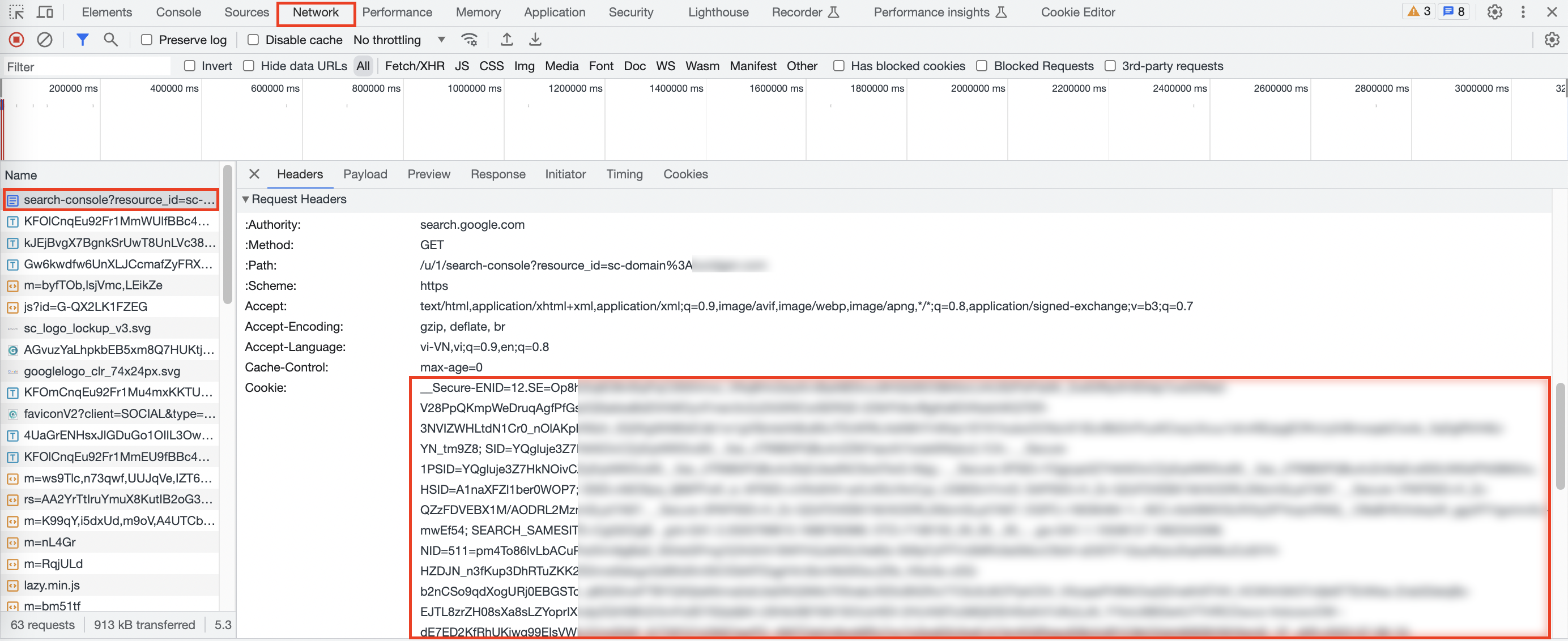
Method 2: Use Cookie-Editor extension on Chrome, visit Google Search Console, then open Cookie-Editor, and then export cookie as JSON.

Save the raw cookie in text file, such as cookie.txt.
Import packages and set variables
Import packages:
from gsclinks import parse_raw_cookie, SearchConsoleLinks
Set variables:
resource_id: It can behttps://your-domain.com/oryour-domain.com. It depends on how you add the property to Google Search Console.user_number: If you're signed in to more than 1 Gmail on Chrome, enter the number you see in URL when you visit Google Search Console (search.google.com/u/user_number/...), otherwise enterNone.
cookies = parse_raw_cookie(cookie_file='cookie.txt')
resource_id = 'https://your-domain.com' # or maybe your-domain.com
user_number = None # or maybe 0, 1, 2, ...
console = SearchConsoleLinks(cookies=cookies, resource_id=resource_id, user_number=user_number)
Get backlink data
If you want the entire backlink data in a simple way then use this method.
all_linking_pages = console.get_all_links(sleep=10)
# sleep: time to rest between each request sending (seconds).
You can get backlink data step by step to be able to intervene in the process. For example, you may want to remove some sites that you no longer need to get data.
# Get sites
sites = console.get_sites()

# Filter out the sites you want to continue to get data from.

# Get all target pages
all_target_pages = console.get_all_target_pages(sites=sites, sleep=5)

# Get all linking pages
all_linking_pages = console.get_all_linking_pages(target_pages=all_target_pages, sleep=5)
Finally, you can convert the backlink data to a frame using Pandas for analysis, or export the backlink data to a CSV (Excel) file.
import pandas as pd

df = pd.DataFrame(all_linking_pages)
df.to_csv('backlinks.csv', index=False)
Thank you for reading!
1 maintainer

Metadata
1 maintainer
Release files for gsclinks 1.0.5
For a detailed explanation of source distributions (sdists) and built distributions (wheels), please see the package formats documentation.
Built distribution (wheel)
| File | Interpreter | ABI | Platform | Reset |
|---|---|---|---|---|
| gsclinks-1.0.5-py3-none-any.whl | Python 3 | none | any | Details |
Release files / gsclinks-1.0.5-py3-none-any.whl
| Download URL | gsclinks-1.0.5-py3-none-any.whl |
|---|---|
| Size | 5.4 kB |
| Tags | Python 3 |
|
SHA-256 checksum How to use checksums |
09f8ad30c9b98e43bce09fc31bb38fe30dc9597d61ad9058ae7ecba2bec5fb6c
|
|
BLAKE2b-256 checksum How to use checksums |
52f11a3ea3a0c2505eea9d3eb90eeff6de8870031f1766709daf7a72aaebc5b3
|
| Upload date | |
|
Uploaded using Trusted Publishing? What is trusted publishing? |
No |
| Uploaded via |
twine/4.0.2 CPython/3.9.13
|














