
Gskynoise
Introduction
Gskynoise is a graphical wrapper for skynoise. skynoise exports a class, Skynoise, and gskynoise uses the methods of that class to calculate and display sky temperatures.
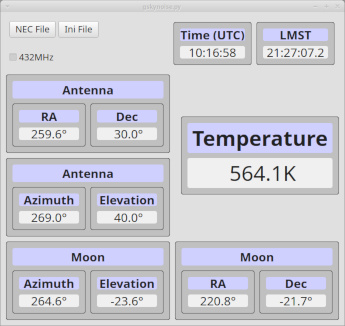
The application displays in real time the sky temperature computed from the antenna model in the Azimuth/Elevation direction at the location (QTH) provided. It also displays the current moon position as viewed from the QTH both in Azimuth/Elevation and Right Ascension/Declination. The display is updated every 2 seconds and displays the current UTC time and the Local Mean Sidereal Time (LMST) for the QTH.
Although astronomers tend to use hours, minutes & seconds for Right Ascension this program uses degrees for unit consistency. Hours is degrees/15 in this context.
User Guide
Installation
Refer to the installation instructions in skynoise to install Python, if necessary then:
pip install gskynoise
This will install all the dependent libraries - Pyside6, Numpy, Astropy, Astropy-healpix, Astronomy and skynoise.
Using Gskynoise
For the moment Gskynoise is a command line program, even on Windows and MacOS, so you will need to open a terminal window to start it. However the application displays in its own window. Once I sort out the packaging, I might be able to package it as a .exe file for Windows, and perhaps even the equivalent for MacOS if there is demand.
It is possible to create a shortcut in Windows to run Gskynoise from a desktop icon but it is not straightforward, especially if you want to stop the command window from opening.
To start, just type:
gskynoise
Typing:
gskynoise --help
will produce the following:
usage: gskynoise [-h] [-c CONF] [modelfile]

Calculate the Antenna temperature from the input model

positional arguments:
  modelfile

options:
  -h, --help            show this help message and exit
  -c CONF, --conf CONF  Additional configuration file
However both modelfile and additional configuration can be selected from buttons in the application.
the -c option takes an additional configuration file to provide Location and Observation data which supersede sections in the default configuration. The file is in toml format (https://toml.io):
[Location]
# example QTH Lat +ve North, Lon +ve East
Lat = 52.2
Lon = 1.4

[Antenna]
ModelFile = "necmodel.out"

[Observation]
# example pointing
Azimuth = 270.0
Elevation = 40.0
The [Antenna] section enables a model file to be provided directly without using either the command line or the NEC File button on the application.
Buttons
The NEC File button opens a dialogue box to enable the selection of a NEC output file. Selection is limited to .txt and .out file types.
The Ini File button opens a dialogue box to enable the selection of an additional configuration file. Selection is limited to .ini and .toml file types.
Both dialogues appear in the native file selector dialogue format for the operating system.
432MHz tick box
The default sky noise temperature data is for 144MHz. Ticking the 432MHz box selects the noise temperature data for 432MHz instead.
Azimuth & Elevation input
The application opens a UDP socket on port 4401 but only on the localhost address (127.0.0.1). It will accept Azimuth and Elevation as ASCII text that will match this Python regular expression string
r"^(\d+\.\d) (-?\d+\.\d)\r?\n"
An example is the string "270.1 45.5\n". The string has no leading or trailing characters, the first number is Azimuth, with 1 decimal place. Then a single space, then the Elevation, also with one decimal place and which also can be negative. The string is terminated by a LF character or the CRLF pair. The values presented are also checked for legal ranges.
This can be generated by the Linux or Windows program ncat:
ncat -u 127.0.0.1 4401
270.1 45.5
That is, start ncat then type the Az/El coordinates in and press return.
This is adequate for testing but the application may need more work to integrate with existing antenna orientation data sources.
1 maintainer

Metadata
1 maintainer
Release files for gskynoise 0.2.0
For a detailed explanation of source distributions (sdists) and built distributions (wheels), please see the package formats documentation.
Built distribution (wheel)
| File | Interpreter | ABI | Platform | Reset |
|---|---|---|---|---|
| gskynoise-0.2.0-py3-none-any.whl | Python 3 | none | any | Details |
Release files / gskynoise-0.2.0-py3-none-any.whl
| Download URL | gskynoise-0.2.0-py3-none-any.whl |
|---|---|
| Size | 512.4 kB |
| Tags | Python 3 |
|
SHA-256 checksum How to use checksums |
56504e042de1f8fca7558d4589e18560e6c4686926025b7800445f9fa25adb81
|
|
BLAKE2b-256 checksum How to use checksums |
2ed90167c2f4977fbcfb84f39bab543bea06431359d5a7179d0cadeb889a6259
|
| Upload date | |
|
Uploaded using Trusted Publishing? What is trusted publishing? |
No |
| Uploaded via |
twine/6.2.0 CPython/3.12.3
|













