
gstchecker
The details of a company is fetched using the requests library and parsed with BeautifulSoup4. GSTIN number — a 15 digit tax identification number is used to generate the name, address, type, etc. of the company.
Run this command in the terminal to install gstchecker package
pip install gstchecker
Documentation
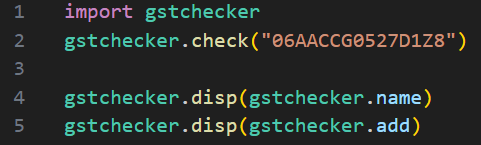
To import the file use the below code
import gstchecker
The program uses default test url and input parameters for testing and educational purposes. To GET details from GSTIN use
gstchecker.check("_15 character GSTIN goes here_")
You check whether the check() was a success or not using
gstchecker.status()
| variable name | entity value |
|---|---|
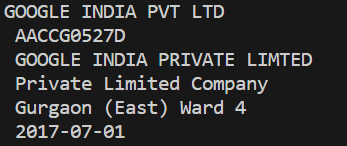
gstchecker.name |
Entity name |
gstchecker.pan |
Entity PAN |
gstchecker.person |
Entity registree |
gstchecker.type |
Entity type |
gstchecker.add |
Entity address |
gstchecker.date |
Entity registration date |
To print a particular variable listed above use the function
gstchecker.disp(_variable to print_)
To quickly print all the variables together
gstchecker.printall()
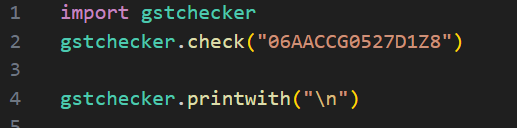
To print all the variable seperated by \t ot \n then use the following function. The \t or \n must be included within single or double quotes.
gstchecker.printwith("\n")
To use this program you need to have legal access from a website to GET details. The website should have two inputs in the form, one input for gstin number and another a hidded input for csrf token. The default must be changed before using. The author is not responsible for how the program is being used.
To change all the value of the request parameter, use the function
gstcheckerset("http://example.com/search.php","inputName","csrfmidwaretoken")
To change the just the url of the program
gstchecker.seturl("htttp://example.com/search.php")
To change just the inputName (It is the name="value" of the input tag)
gstchecker.setinput("value")
To change only the csrf (It is the name="value" of the hidden input tag)
gstchecker.setcsrf("value")
Note that these parameters must be change before calling check() for it apply.
| parameter | variable name |
|---|---|
| URL value | gstchecker.url |
| input tag name value | gstchecker.inputName |
| csrf hidden input tag name value | gstchecker.csrfName |
Errors
Errors are listed in specific order so that that one error can lead to subsequent errors in the list.
| displayed error | explanation |
|---|---|
[Offline] |
check() was not called and no parameters were sent and no data received |
[GET URL Failure] |
means the url is incorrect/incompatible ot No Internet |
[Content retreival failure] |
means url, input and csrf parameter are not compatible and no data was received |
[Parsing Failure] |
means that some data was received, but it was unable to translate to needed data. The site may have altered its HTML |
[No Error] |
is shown when requesting status through gstchecker.status() if all function worked perfectly |
Screenshots

Functionality issues
The program faces issues with correctly parsing nature (removed for improved functionality) and date.
1 maintainer

Metadata
1 maintainer
Release files for gstchecker 1.2
For a detailed explanation of source distributions (sdists) and built distributions (wheels), please see the package formats documentation.
Source distribution (sdist)
| File | Size | Uploaded | |
|---|---|---|---|
| gstchecker-1.2.tar.gz | 41.3 kB | Details |
Built distribution (wheel)
| File | Interpreter | ABI | Platform | Reset |
|---|---|---|---|---|
| gstchecker-1.2-py3-none-any.whl | Python 3 | none | any | Details |
Total release size: 69.0 kB
Release files / gstchecker-1.2.tar.gz
| Download URL | gstchecker-1.2.tar.gz |
|---|---|
| Size | 41.3 kB |
| Tags | Source |
|
SHA-256 checksum How to use checksums |
119925bb101ea445a064ded8b0157837b6d79db2c607e90030f630bfe2de014e
|
|
BLAKE2b-256 checksum How to use checksums |
51be0c840bf4f79d5e0a8d9ae31f136be537abb652b098f2576e6c9925e22654
|
| Upload date | |
|
Uploaded using Trusted Publishing? What is trusted publishing? |
No |
| Uploaded via |
twine/4.0.2 CPython/3.11.4
|
Release files / gstchecker-1.2-py3-none-any.whl
| Download URL | gstchecker-1.2-py3-none-any.whl |
|---|---|
| Size | 27.8 kB |
| Tags | Python 3 |
|
SHA-256 checksum How to use checksums |
5d45982c2aabcd77ca181aa125c2088cec186ad018c57dd90e071578457a33d2
|
|
BLAKE2b-256 checksum How to use checksums |
a1f9bb28829a0602e268297df4443b8f5028bb0ca84fdf38dad381a7cba08598
|
| Upload date | |
|
Uploaded using Trusted Publishing? What is trusted publishing? |
No |
| Uploaded via |
twine/4.0.2 CPython/3.11.4
|














