
A high-performance inference engine specifically designed for the GPT-SoVITS text-to-speech model

Project description

GSV-TTS-Lite
A high-performance inference engine specifically designed for the GPT-SoVITS text-to-speech model






About
The original motivation for this project was the pursuit of ultimate performance. While using the original GPT-SoVITS, I found that the inference latency often struggled to meet the demands of real-time interaction due to the computing power bottlenecks of the RTX 3050 (Laptop).
To break through these limitations, GSV-TTS-Lite was developed as an inference backend based on GPT-SoVITS V2Pro. Through deep optimization techniques, this project successfully achieves millisecond-level real-time response in low-VRAM environments.
Beyond the leap in performance, GSV-TTS-Lite implements the decoupling of timbre and style, supporting independent control over the speaker's voice and emotion. It also features subtitle timestamp alignment and voice conversion (timbre transfer).
Regarding multilingual support, this project inherits full synthesis capabilities for five languages: Chinese, English, Japanese, Korean, and Cantonese.
To facilitate integration for developers, GSV-TTS-Lite features a significantly streamlined code architecture and is available on PyPI as the gsv-tts-lite library, supporting one-click installation via pip.
Performance Comparison
[!NOTE] Test Environment: NVIDIA GeForce RTX 3050 (Laptop)
| Backend | Settings | TTFT (First Packet) | RTF (Real-time Factor) | VRAM | Speedup |
|---|---|---|---|---|---|
| Original | streaming_mode=3 |
436 ms | 0.381 | 1.6 GB | - |
| Lite Version | Flash_Attn=Off |
150 ms | 0.125 | 0.8 GB | ⚡ 2.9x Speed |
| Lite Version | Flash_Attn=On |
133 ms | 0.108 | 0.8 GB | 🔥 3.3x Speed |
As shown, GSV-TTS-Lite achieves 3x ~ 4x speed improvements while halving the VRAM usage! 🚀
One-click Download (Pre-configured)
[!TIP] If you are a beginner looking for a quick start, you can download the pre-configured integrated package.
- Hardware Requirements:
- OS: Windows only.
- GPU: NVIDIA GPU with at least 4GB VRAM.
- VRAM Note: The
Qwen3-ASRmodel is integrated by default. If VRAM is insufficient, you can disable the ASR module via parameters inrun.batto save space.
- Download Link: [Placeholder]
- Instructions:
- Download and extract the package (ensure the path contains no Chinese characters).
- Double-click
run.batand wait for the web UI to launch. - Start experiencing high-speed voice synthesis!
Deployment (For Developers)
Prerequisites
- Anaconda
- CUDA Toolkit
- Microsoft Visual C++
Installation Steps
1. Environment Configuration
It is recommended to create a virtual environment using Python >=3.10 and install the necessary system dependency ffmpeg.
conda create -n gsv-tts python=3.11
conda activate gsv-tts
conda install "ffmpeg"

pip install torch torchvision torchaudio --index-url https://download.pytorch.org/whl/cu128
2. Install GSV-TTS-Lite
If you have prepared the above basic environment, you can directly execute the following command to complete the integration:
pip install gsv-tts-lite --prefer-binary
Quick Start
[!TIP] The program will automatically download the required pre-trained models upon the first run.
1. Basic Inference
from gsv_tts import TTS

tts = TTS()

# Load GPT model weights from the specified path into memory; here, the default model is loaded.
tts.load_gpt_model()

# 将Load SoVITS model weights from the specified path into memory; here, the default model is loaded.
tts.load_sovits_model()


# infer is the simplest and most primitive inference method, suitable for short text inference.
audio = tts.infer(
    spk_audio_path="examples\laffey.mp3", # Speaker reference audio
    prompt_audio_path="examples\AnAn.ogg", # Prompt reference audio
    prompt_audio_text="ちが……ちがう。レイア、貴様は間違っている。", # Text corresponding to the prompt audio
    prompt_audio_language="ja", # Language corresponding to the text
    text="へぇー、ここまでしてくれるんですね。", # Target text to generate
    text_language="ja",  # Language corresponding to the text
)

audio.play()
tts.audio_queue.wait()
2. Stream Inference / Subtitle Synchronization
import time
import queue
import threading
from gsv_tts import TTS

class SubtitlesQueue:
    def __init__(self):
        self.q = queue.Queue()
        self.t = None

    def process(self):
        last_i = 0
        last_t = time.time()

        while True:
            subtitles, text = self.q.get()

            if subtitles is None:
                print()
                break

            for subtitle in subtitles:
                if subtitle["start_s"] > time.time() - last_t:
                    while time.time() - last_t <= subtitle["start_s"]:
                        time.sleep(0.01)

                if subtitle["end_s"] and subtitle["end_s"] > time.time() - last_t:
                    if subtitle["orig_idx_end"] > last_i:
                        print(text[last_i:subtitle["orig_idx_end"]], end="", flush=True)
                        last_i = subtitle["orig_idx_end"]
                        while time.time() - last_t <= subtitle["end_s"]:
                            time.sleep(0.01)

        self.t = None

    def add(self, subtitles, text):
        self.q.put((subtitles, text))
        if self.t is None:
            self.t = threading.Thread(target=self.process, daemon=True)
            self.t.start()

tts = TTS()

# infer, infer_stream, and infer_batched all support returning subtitle timestamps; infer_stream is used here just as an example.
subtitlesqueue = SubtitlesQueue()

# infer_stream implements token-level streaming output, significantly reducing first-token latency and enabling a ultra-low latency real-time feedback experience.
generator = tts.infer_stream(
    spk_audio_path="examples\laffey.mp3",
    prompt_audio_path="examples\AnAn.ogg",
    prompt_audio_text="ちが……ちがう。レイア、貴様は間違っている。",
    prompt_audio_language="ja",
    text="へぇー、ここまでしてくれるんですね。",
    text_language="ja",
    debug=False,
)

for audio in generator:
    audio.play()
    subtitlesqueue.add(audio.subtitles, audio.orig_text)

tts.audio_queue.wait()
subtitlesqueue.add(None, None)
3. Batched Inference
from gsv_tts import TTS

tts = TTS()

# infer_batched is optimized specifically for long-form text and multi-sentence synthesis scenarios. This mode not only offers significant advantages in processing efficiency but also supports assigning different reference audios to different sentences within the same batch, providing high synthesis freedom and flexibility.
audios = tts.infer_batched(
    spk_audio_paths="examples\laffey.mp3",
    prompt_audio_paths="examples\AnAn.ogg",
    prompt_audio_texts="ちが……ちがう。レイア、貴様は間違っている。",
    prompt_audio_languages="ja",
    texts=["へぇー、ここまでしてくれるんですね。", "The old map crinkled in Leo’s trembling hands."],
    texts_language=["ja", "en"],
)

for i, audio in enumerate(audios):
    audio.save(f"audio{i}.wav")
4. Voice Conversion
from gsv_tts import TTS

tts = TTS()

# Although infer_vc supports few-shot voice conversion and offers convenience, its conversion quality still has room for improvement compared to specialized voice conversion models like RVC or SVC.
audio = tts.infer_vc(
    spk_audio_path="examples\laffey.mp3",
    prompt_audio_path="examples\AnAn.ogg",
    prompt_audio_text="ちが……ちがう。レイア、貴様は間違っている。",
    prompt_audio_language="ja",
)

audio.play()
tts.audio_queue.wait()
5. Speaker Verification
from gsv_tts import TTS

tts = TTS(always_load_sv=True)

# verify_speaker is used to compare the speaker characteristics of two audio clips to determine if they are the same person.
similarity = tts.verify_speaker("examples\laffey.mp3", "examples\AnAn.ogg")
print("Speaker Similarity:", similarity)
6. Other Function Interfaces
1. Model Initialization and Loading
init_language_module(languages)
Preload necessary language processing modules.
load_gpt_model(model_paths)
Load GPT model weights from specified paths into memory.
load_sovits_model(model_paths)
Load SoVITS model weights from specified paths into memory.
2. Model Unloading and List Retrieval
unload_gpt_model(model_paths) / unload_sovits_model(model_paths)
Unload models from memory to free up resources.
get_gpt_list() / get_sovits_list()
Get the list of currently loaded models.
3. Audio Cache Management
cache_spk_audio(spk_audio_paths)
Preprocess and cache speaker reference audio data.
cache_prompt_audio(prompt_audio_list)
Preprocess and cache prompt reference audio data.
del_spk_audio(spk_audio_list) / del_prompt_audio(prompt_audio_list)
Remove audio data from the cache.
get_spk_audio_list() / get_prompt_audio_list()
Get the list of audio data in the cache.
Flash Attn
If you are looking for lower latency and higher throughput, it is highly recommended to enable Flash Attention support.
Since this library has specific compilation requirements, please install it manually based on your system:
-
🐧 Linux / Build from Source
- Official Repo: Dao-AILab/flash-attention
-
🪟 Windows Users
- Pre-compiled Wheels: lldacing/flash-attention-windows-wheel
[!TIP] After installation, set
use_flash_attn=Truein your TTS configuration to enjoy the acceleration! 🚀
Credits
Special thanks to the following projects:
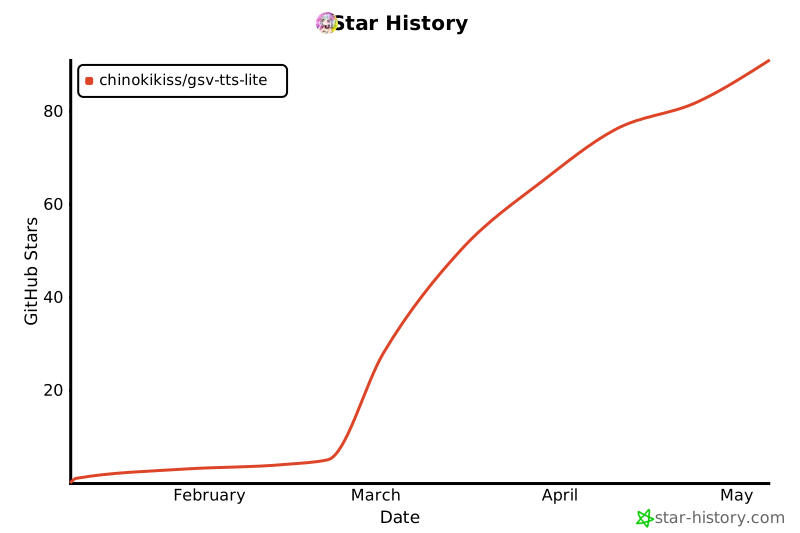
⭐ Star History
Release history Release notifications | RSS feed


Download files
Download the file for your platform. If you're not sure which to choose, learn more about installing packages.
Source Distribution
Built Distribution
Filter files by name, interpreter, ABI, and platform.
If you're not sure about the file name format, learn more about wheel file names.
Copy a direct link to the current filters
File details
Details for the file gsv_tts_lite-0.2.0.tar.gz.
File metadata
- Download URL: gsv_tts_lite-0.2.0.tar.gz
- Upload date:
- Size: 85.8 kB
- Tags: Source
- Uploaded using Trusted Publishing? No
- Uploaded via: twine/6.2.0 CPython/3.11.13
File hashes
| Algorithm | Hash digest | |
|---|---|---|
| SHA256 |
68d64e519acf7bbd4c6d1d3a64d52009bceafda948a8c5283eb2087999a2d96a
|
|
| MD5 |
d326242982d3c01a0ca52c25c08bbf97
|
|
| BLAKE2b-256 |
ec2279e72b258e82ab56d45c01408f801a68db22f352172b4c7a081b6c782d57
|
File details
Details for the file gsv_tts_lite-0.2.0-py3-none-any.whl.
File metadata
- Download URL: gsv_tts_lite-0.2.0-py3-none-any.whl
- Upload date:
- Size: 99.4 kB
- Tags: Python 3
- Uploaded using Trusted Publishing? No
- Uploaded via: twine/6.2.0 CPython/3.11.13
File hashes
| Algorithm | Hash digest | |
|---|---|---|
| SHA256 |
3e60f527381f5129c1ffe907fa699418b919972b5a49e0d008676a418ab16e6f
|
|
| MD5 |
9ffb06f54fe756efbe3d5f8b4461c0f2
|
|
| BLAKE2b-256 |
0984a9b933a31b6f5bbde5a59d11fdae7dbaab288af3eb31b9b15dd164e1ff5c
|






