
TRACE — GT7 Telemetry Suite
Telemetry Racing Analytics & Comparative Engine






A live telemetry dashboard, lap analyst, and race analyst for Gran Turismo 7 — reads the UDP telemetry stream straight off your PS4/PS5 over your local network. No mods, no jailbreak, just the game's own broadcast data, wrapped in three desktop tools you can install with one pip install.
Also published on PyPI as gt7tracetelem · Site: gt7trace.netlify.app
Community tool — not affiliated with, endorsed by, or connected to Polyphony Digital or Sony Interactive Entertainment.
Project status: actively maintained. Regular releases with bug fixes, car/track database refreshes (as ddm999's gt7info updates) and the occasional new feature.
Table of contents
- Screenshots
- What's in the box
- Install
- Code signing
- Quick start
- How it works
- Public data API
- Privacy & analytics
- Troubleshooting
- Contributing
- Credits
- License
- Support
Screenshots
What's in the box
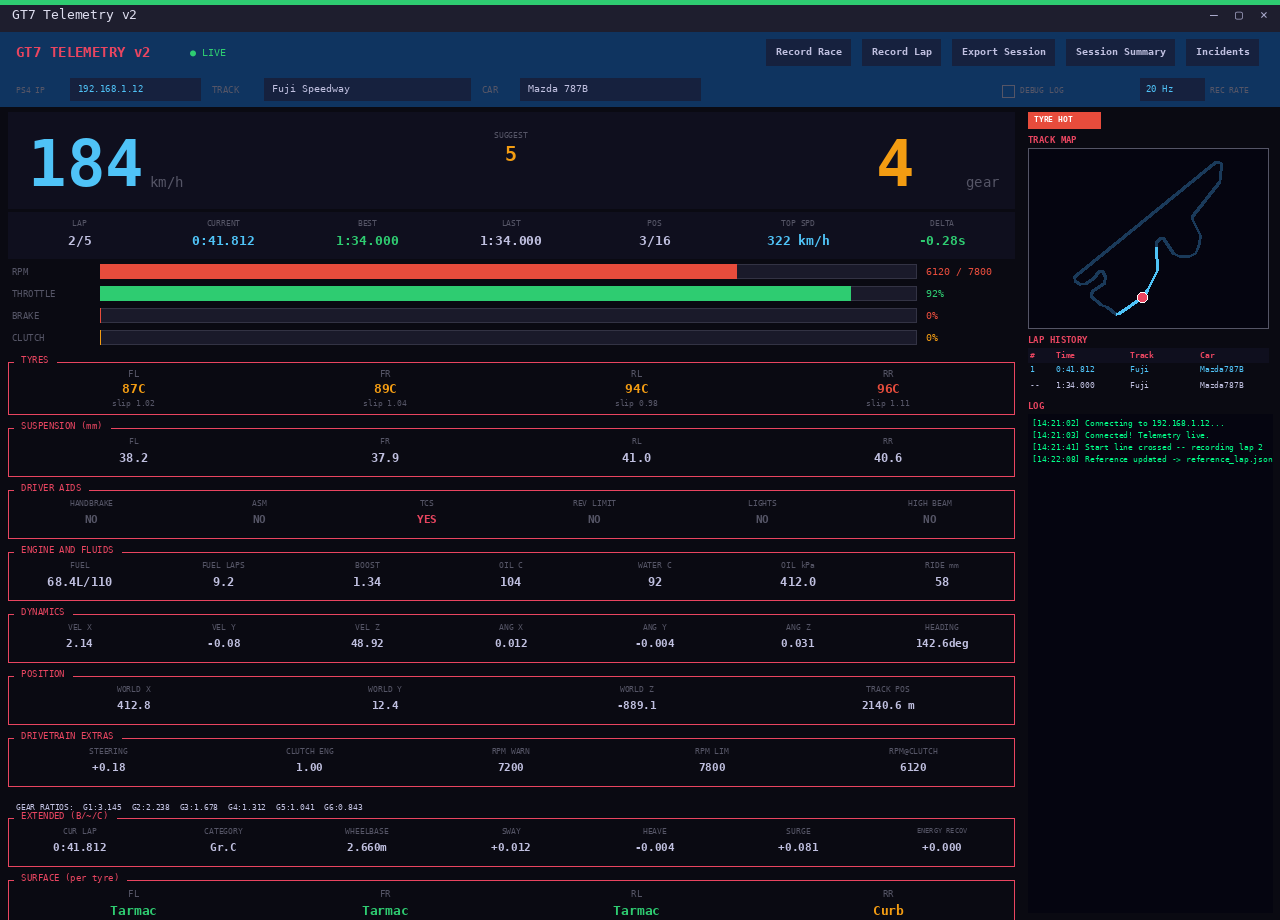
Live Dashboard
- Real-time speed, RPM, gear, throttle/brake, tyre temps & slip
- Mini track map with live position
- Configurable recording sample rate (10/20/30/60 Hz)
- Live delta vs. your best lap in the same car on the same track (
reference_<car>.json) - Track auto-detect — GT7 doesn't report the track, so TRACE recognises it from where a lap starts and which way you leave the line, and offers "Looks like X — use it?" (never fills it silently; in a race it appears about one lap in, once you cross the line). Unseen tracks are shortlisted by lap length, and the save-time "no track" dropdown lists the best guesses first
- Connection diagnostics — heartbeats, packet loss, decrypt/parse failures, actionable error messages
- Remembers every PS4/PS5 IP you've connected to (most recent first), plus an Auto-Detect button that finds the console on your network
- Automatic race recording — starts on a detected race start (race sessions only, not time trial/practice), stops at the flag or when you quit
- Fuel & tyre strategy (estimates) — median fuel burn per lap, laps of fuel left, a finish check and a suggested pit-by lap, plus a tyre-stint readout (pace loss, trend, last-lap temperatures). GT7 sends no tyre wear, so the tyre figures are estimates and are labelled that way
- Spoken alerts — fuel-low and tyre hot/cold warnings are read out through your system's voice (Windows speech and macOS
sayare built in; on Linux installspeech-dispatcherforspd-say, orespeak-ng/espeak), falling back to the alert sound if no voice is available. Each alert is spoken when it turns on; fuel and hot-tyre warnings repeat every minute while they last. UntickVOICE ALERTSin the header's Preferences row to mute. It never blocks the display - Live gap to the leaderboard's top lap — the
VS TOPreadout shows how far ahead or behind the fastest public lap for your car and track you are, at the same spot on the track. It makes one read-only request per car and track per run (once they've stayed put for a few seconds, so typing a name by hand doesn't send a request per letter), and stays silent if you're offline or nobody has set a lap yet. UntickTOP-LAP GHOSTto turn the request off (see Privacy & analytics) - Time-loss summary — after each lap, the log names the three corners that cost the most time against your reference lap (once you have one), e.g.
Time lost: T4 +0.21s, T9 +0.12s, T2 +0.08s - Preferences row —
SHARE USAGE DATA,CHECK FOR UPDATES,TOP-LAP GHOST,NOTIFICATIONS,VOICE ALERTSandDEBUG LOGcheckboxes,AUTO LAPandKEEP AWAKE, saved tosettings.json. TheWEB UI,METRICSand bothALLOW REMOTE (…)switches (below) sit in the console row above it - Prometheus metrics export (off by default) — tick
METRICS :9109to serve live gauges (speed, RPM, throttle, brake, fuel, current lap time and a connected flag) athttp://127.0.0.1:9109/metricsfor Grafana or any Prometheus scraper. It listens on this PC only.ALLOW REMOTEwidens it to your whole local network (0.0.0.0) so a Grafana/Prometheus box elsewhere can scrape it — the endpoint has no password, so anyone on the same Wi-Fi/LAN could then read your live telemetry. Leave it off unless you need it and trust the network. Nothing is sent to the internet either way - LAN web dashboard (off by default) — tick
WEB UI :8080and any phone, tablet or PC on the same Wi-Fi/LAN can openhttp://<your PC's IP>:8080in a browser (the Dashboard shows the exact address, click it to copy) for a live, read-only dash in the same look as the website: speedo, tacho with shift lights, gear, throttle/brake/steering trace, G-force circle, tyre temps and slip, fuel and strategy estimates, lap timing, delta,VS TOPand a live track map, split over five pages (HUD, Inputs & G, Tyres & Fuel, Timing, Full). Swipe or use the 1-5 and arrow keys to switch pages; km/h or mph, dark or light theme, fullscreen and keep-screen-awake buttons, auto-reconnect. Telemetry is pushed over a WebSocket on the same port, so nothing needs the internet — all the page's code and fonts are built in. It listens on this PC only until you tickALLOW REMOTE (WEB UI)next to it; other devices then need the 6-digit code the Dashboard shows (new each time WEB UI is turned on) or its QR code, with an optional Remember this device for 30 days and aLOG OUT ALL DEVICESbutton. Five wrong codes lock that device out for a minute, longer each time. Needs thewebsocketspackage (installed automatically bypip) - Lap history table with alerts
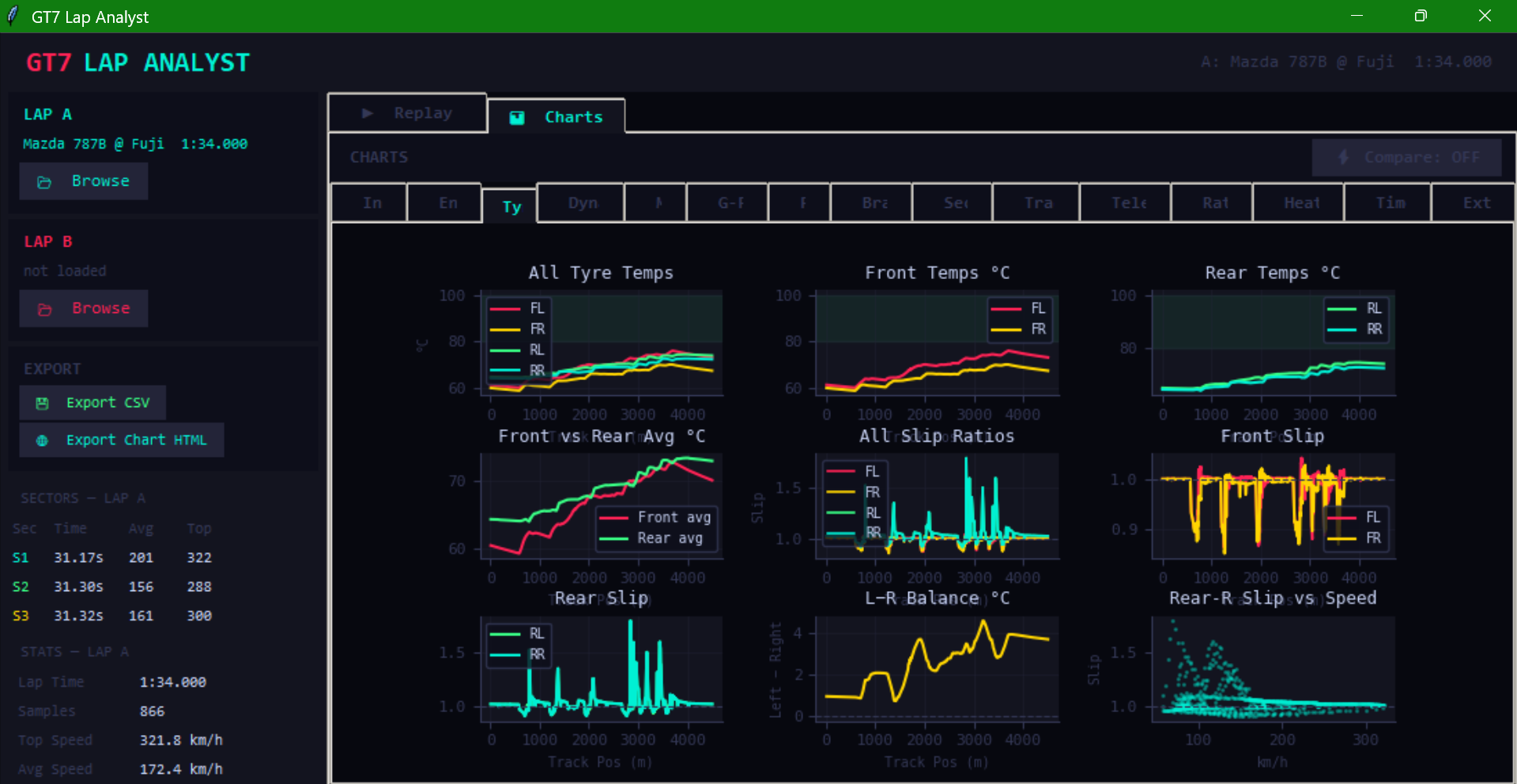
Lap Analyst
- 20 chart groups: Inputs, Engine, Tyres, Dynamics, Maps, G-Force, Fuel, Braking, Sectors, Traction, Tele Diff, Ratings, Heat Maps, Timeline, Extended, Consensus, Style, Corners, Theoretical, Dyno & Tune
- A/B lap comparison across every chart group
- Theoretical tab — stitches the fastest ~25 m micro-sector from each lap you've driven in this car on this track (Lap A, Lap B, any overlays, and your other saved laps) into the lap you could drive, and shows the zones where your best real lap is held back, and by whom. It's an optimistic ceiling: a faster exit carries into the next sector, so the real gain from fixing a weak zone is usually smaller
- Dyno & Tune tab — drive one lap and it rebuilds what GT7 never shows: the engine's power and torque curve (real hp and Nm once you enter the car's weight, hp/tonne otherwise), every gear's ratio, km/h per 1000 rpm and true top speed, and the best shift rpm for each gear against the one you actually use. It then reads the lap for tuning hints: understeer or oversteer on entry, mid-corner and exit, wheelspin, brake lock-ups, gearing that is too long or too short, unused gears and rear-vs-front tyre heat, each with the direction to try on the tuning sheet. Load a second lap as Lap B after changing a part or a setting to overlay the before/after curves. The curve shape and shift points are solid; absolute power is an estimate (about ±10%)
- Corners tab — finds every corner on the lap and, with your PB loaded as lap B, scores each one against the same corner on the PB: brake point, minimum speed, throttle-on point and time gained or lost, and a line naming the three corners that cost the most time
- Style tab — classifies the lap as Smooth / Balanced / Aggressive and reads cornering balance (understeer- vs oversteer-leaning) from front vs rear tyre slip
- 3+ lap overlay — add any number of extra saved laps on top of A/B as dotted lines on the Inputs tab
- Searchable lap picker — filter your saved laps by car, track or date
- Backup All Laps — zips your laps folder to
~/TRACE/backups/ - Dual replay — synced and realtime
- Driver ratings radar
- Track-map heatmaps across 9 metrics (speed, throttle, brake, lateral/longitudinal/total G, tyre temp, RPM, steering)
- CSV and HTML chart export
- Lap card — one click turns a lap into a shareable 1200x630 PNG showing only values read straight from the recording: car, track (as you typed it), date, lap time (or INCOMPLETE), top speed, fuel used, the speed trace round the lap and a speed-coloured track map (no map for a downloaded ghost)
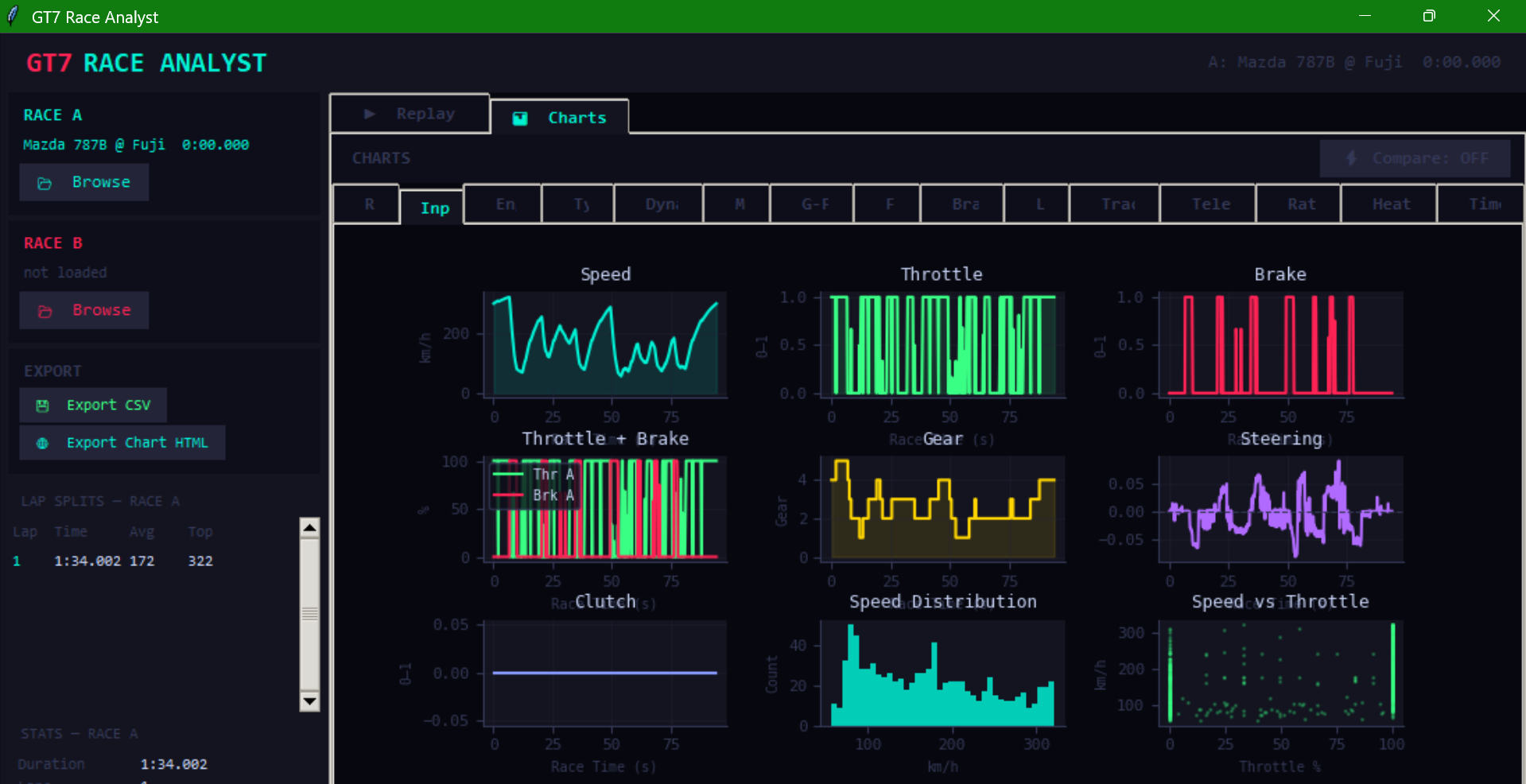
Race Analyst
- Same chart-group depth as Lap Analyst (17 groups, race-oriented: Race overview + Laps in place of Sectors + Extended, plus Corners and Consistency)
- Race timeline, minimap heatmap, replay with speed control up to 32×
- Per-lap splits (a partial final lap is shown but never counts as best/average), starting grid slot, and pit stops worked out from refuelling — GT7 sends no pit flag or live race position
- Fuel per lap and laps per full tank, measured from the clean laps of the recording
- Corners tab — scores every lap of the race corner by corner (time gained or lost per corner, as a lap × corner heat-map plus the average per corner). Switch the baseline with the Corner baseline button: the best lap of the race, or your saved PB lap for that car and track (
reference_<car>.json, the file the Dashboard keeps) - Consistency tab — lap-time spread, trend (speeding up or slowing down per lap), a 0–100 consistency score, and the most and least consistent corners over the race. Laps more than 7 % slower than your best (pit laps, spins) are left out of the numbers and shown dimmed. The score is 100 minus the standard deviation of your clean laps as a share of the average lap, scaled so a 2 % standard deviation scores 0
- Race card — a shareable 1200x630 PNG built the same way as the lap card: car, track, date, best lap (to 0.01 s), laps completed, top speed, every lap time at its real height with the best highlighted, and a speed-coloured map of the best lap
All tools
- Records — the Records link in the Launcher footer opens a table of your best lap for every car and track, built from your saved laps (incomplete laps and laps from before GT7 update 1.71 are left out unless you tick the box). It reads only the summary at the start of each lap file, so even a big laps folder opens quickly
- Desktop notifications (with a sound where the system supports one) on a new personal best and when a race recording ends automatically. Switch them off with the
NOTIFICATIONScheckbox in the Live Dashboard header - Keep awake — the
KEEP AWAKEcheckbox in the Live Dashboard header (on by default) stops Windows, macOS and Linux from idle-sleeping or hibernating the whole time the Dashboard is open, and lets the PC sleep again the moment you close it. Untick it to stay awake only while telemetry is flowing. The Android app does the same (it holds the phone awake while open), and both warn you with a red bar and a siren if the battery drops below 20% while a lap or race is recording on battery power - Dark / light theme toggle in the Launcher footer (applies the next time you open a tool)
- Update check — the Launcher shows its version (e.g.
v1.6.0) and, after one quiet background look at the latest GitHub release, eithercurrent(green) orupdate available: vX(blue, click to open the release page). Drafts and pre-releases are ignored and nothing is shown offline. TickIgnore update checkson the Launcher (or untickCHECK FOR UPDATESin the Live Dashboard header — the same setting) to stop it (see Privacy & analytics) - Ask TRACE (website chat) — the website has an AI support chat for setup and how-to questions. It only sends something when you type a question, it never runs in the desktop app, and nothing is stored. Answers are AI-generated and can be wrong; open an issue if it can't help. Details on the Privacy page
Coaching and analysis tools
- Driving coach — after every lap with a reference, up to three ranked tips ("Brake 14 m later at T4"), spoken as a short cue before each corner on the next lap (the
VOICE ALERTSswitch mutes it) - Setup advisor — reads understeer, oversteer, wheelspin, front lock-ups and bottoming-out from one lap and suggests changes in GT7's own units; an A/B check compares laps before and after a change
- Race engineer — pit window, undercut and overcut, a simulated finishing position and live "Pit next lap" / "Box this lap" calls. Estimates only: GT7 sends no tyre wear and no pit-lane flag
- 3D lap replay, Driver DNA, practice planner, friends groups and weekly challenges (pasteable codes, no server), lap validation, dyno overlay, and an OBS stream overlay at
/overlayon the web UI gt7telem-toolsruns the same tools on saved lap files from a terminal:coach,setup,ab,plan,validate,replay,dna,dyno-compare,challenge,motec,video
Local AI wording (optional, off by default)
Switch on LOCAL AI WORDING (Dashboard header, or Settings in the terminal edition) and a small language model on your own PC rewords the coach's tips after each lap in friendlier language. Nothing is sent anywhere. It is limited on purpose:
- It only rewords the rule-based tips. The rules decide what to say; a check throws the AI's sentence away unless every number, corner label (T4) and direction word (earlier / later / sooner) is unchanged, and then you simply get the rules text. The log says "AI wording" only for tips that passed.
- It never runs while you drive (the spoken cues stay rules-based and instant) and there is no chat or Q&A.
- Turning it on shows a warning first (your PC's spec check, the one-time download size, the free disk space needed) and downloads nothing until you say yes. "Remove AI model" in Settings deletes it again.
| CPU | RAM | Replies | |
|---|---|---|---|
| Minimum | 4 cores, no GPU | 6 GB | several seconds |
| Recommended | 4+ cores (any recent i5 / Ryzen 5) | 8 GB | 1-3 s, no GPU needed |
| Best | 6+ cores, optional NVIDIA GPU with 2 GB+ VRAM | 16 GB | fastest |
It needs about 1.5 GB of free disk space. Install the runtime with pip install "gt7tracetelem[ai]"; the downloadable
Windows TRACE.exe fetches a pinned official llama-server build instead (the Microsoft Store build does not download
or run extra programs, so it does not offer this). The model and runtime are checked against pinned SHA-256 sums.
Built with Llama. The model is Llama 3.2 1B Instruct (Q4_K_M), used under the Llama 3.2 Community License. Llama 3.2 is copyright (c) Meta Platforms, Inc. All rights reserved.
Export to MoTeC (.ld)
Export to MoTeC (.ld) in Lap Analyst (also in the terminal edition and as gt7telem-tools motec LAP.json OUT.ld)
writes the open lap as a MoTeC log file with speed, throttle, brake, steering, gear, rpm, tyre, suspension, g-force and
position channels, plus the car, track and lap time in the header. It is desktop and terminal only, not on Android. The
file layout was written from the public description of the format and is checked by byte-level tests (an optional extra
test reads it back with the third-party ldparser package when that is installed); it has not been opened in MoTeC i2
itself, so if i2 refuses a file, please open an issue.
Video sync (optional, needs ffmpeg)
Export video overlay in Lap Analyst (also in the terminal edition and as gt7telem-tools video LAP.json VIDEO OUT.mp4 --sync S) burns the lap's HUD (speed, gear, rpm, pedals, steering, lap timer, delta against Lap B if loaded, and a track
map) into your own gameplay video. You pick the second of the video where the lap starts, fine-tune it by up to 5 s and
check a preview frame first. The audio is copied untouched and the original video is never modified. It needs
ffmpeg on your PATH (or set FFMPEG_PATH in settings); without it the button is
greyed out with an install hint and everything else works as before. Not on Android. It has not been run against many
real recordings: keep the original video until you have checked the result.
Share lap link (optional, online)
Share lap link in Lap Analyst (PC and Android) uploads one lap so anyone you send the link to can open a read-only
page (gt7trace.netlify.app/lap?id=...) with its traces and track map. It always asks first ("This uploads this lap's
telemetry so anyone with the link can view it. It is deleted after 90 days or when you delete it.") and sends nothing
until you confirm. Links are unlisted, deleted after 90 days, and Delete shared lap removes one straight away from
the device that shared it. It uses the same free anonymous account as the leaderboard and is limited to 20 shares a day.
The upload is a compact trace of at most 3,000 points (time, position, speed, throttle, brake), not the whole lap file.
The server side is docs/supabase-shared-laps.sql; see Privacy & analytics.
Terminal edition
gt7telem tui(orpython -m gt7telem.tui, or the Terminal UI link in the Launcher footer) runs TRACE inside a terminal on Windows, macOS and Linux (not Android). It is part of the normal install; Textual and textual-plotext come with it. With no display (for example over SSH) plaingt7telemopens it automatically- On Windows, use Windows Terminal (the default terminal on Windows 11; free from the Microsoft Store on Windows 10): run
TRACE.exe tuiorgt7telem tuifrom a Windows Terminal tab for full colour, crisp charts and mouse support. The Launcher's "Terminal UI" link opens the older plain console window, which works but looks rougher - Five screens, keys
1-5,?for help: Live (telemetry, track map, lap and race recording, auto lap, delta, top-lap gap, coach cues, pit calls, track detection), Lap Analyst, Race Analyst, Records and Settings - It is built from the same code as the windows, not a copy: the chart drawing, the chart groups, the analysis tools, the exports (CSV, chart HTML, lap and race cards), notes, replay, leaderboard submit, car weight, backup and duplicate clean-up are shared, and
tests/test_parity.pyfails the build if the two ever differ. Charts in the terminal are drawn from the same matplotlib draw functions, rendered as braille plots
Android app (sideload)
- A standalone phone version of all three tools — Live Dashboard, Lap Analyst and Race Analyst — with the same features, layout, colours and fonts, tweaked for a touch screen. The phone receives your PS5's telemetry itself over Wi-Fi, so no PC is needed
- Everything the desktop apps do, with the same wording, layout and chart tabs (a test,
tests/test_android_parity.py, fails the build if a desktop label differs from Android's), includingAUTO LAP, theWEB UI :8080dashboard served from the phone, Dyno & Tune, Export Chart HTML and Find Duplicate Laps: live dashboard with strategy and the top-lap ghost gap, lap and race recording, all chart groups with chart-to-HTML export, replay with the saved track boundary, Lap and Race share cards (PNG), the Community Leaderboard (Top-10, ghost download, submit, consensus line), the Records table, spoken alerts (Android text-to-speech), notifications, the optional metrics endpoint, and Backup All Laps to a zip - The 1.2.0 analysis tools are on the phone too, with the desktop's wording: the driving coach (and its spoken cues), setup advisor, race engineer, Driver DNA, practice plan, lap validation, dyno comparison, 3D replay export, friends groups, the OBS overlay page at
/overlayon the phone's web UI, and Share lap link. MoTeC export and video sync are desktop-only - Two APKs. TRACE Lite (
gt7telem-android.apk) is the app that has always shipped. TRACE AI (gt7telem-android-ai.apk) is the same app plus the local AI wording: after a lap or session a small language model on the phone rewords the coach's tips. It is a separate app with the same signing key, bigger (it carries a 0.8 GB model, 64-bit phones only) and there is no switch inside Lite to turn it on. Same rules as on the PC: the rules decide what to say, a check discards any sentence whose numbers, corner labels or direction words changed, it never runs while you drive, and there is no chat. It shows a spec warning on first launch. Minimum: a mid-range phone from about 2022 (Snapdragon 7-series class) with 6 GB of RAM. Recommended: a Snapdragon 8-series class phone with 8 GB or more (replies in 1-3 s). Under 5 GB of RAM, use Lite - Free and sideloaded: download
gt7telem-android.apk(orgt7telem-android-ai.apk) from the latest release (see Install). Not on the Play Store
Tooling
gt7telem-add-car/gt7telem-add-track— add a missing car/track ID to the local database from the terminal (also runnable aspython -m gt7telem.add_car/python -m gt7telem.add_track). Additions are saved besidesettings.json(car_ids_local.csv/course_ids_local.csv), so they survive upgrades- Ships with 580+ cars and 120+ tracks pre-resolved out of the box; the car database is refreshed every time 10 or more new cars have been added since the last update
Community Leaderboard (Lap Analyst)
- Submit any recorded lap to a public per-car, per-track leaderboard with one click; live Top-10 panel in the sidebar
- Server-side anti-cheat — physically-impossible times are rejected outright; suspiciously fast first times for a car/track are held for manual review
- Ghost lap download — pull any Top-10 lap straight into the A/B compare view as Lap B
- Consensus racing line — overlay a community-average speed/throttle/brake line, bucketed from the current top 10 laps for your car and track
- Optional free account (display name only, no email or password) so a submission ties to something real; entirely skippable — viewing the leaderboard, ghost downloads, and the consensus line all work without one
Install
Windows: TRACE is now on the Microsoft Store. Install it from there for automatic updates and no SmartScreen warning. The options below still work on every platform.
Option 1 — pip
pip install gt7tracetelem
Or with uv:
uv tool install gt7tracetelem   # then run: gt7telem
uvx --from gt7tracetelem gt7telem   # one-off, no install
The importable module is gt7telem (not gt7tracetelem) — the PyPI distribution name and the import name are different:
import gt7telem
gt7telem.get_snapshot()
Or just run gt7telem from a terminal to launch the GUI menu. Run gt7telem tui for the terminal edition.
If you already have an unrelated package that installs a top-level
gt7telemmodule, the two will conflict. Check first withpip show gt7telem.
Option 2 — from source
Works on Windows, macOS, or Linux with Python 3.10+. On Debian/Ubuntu you may also need Tk: sudo apt install python3-tk.
git clone https://github.com/ransh2014/gt7telemtrace.git
cd gt7telemtrace
pip install -e .
gt7telem
Option 3 — standalone binaries
No Python required — grab a prebuilt Windows .exe, Linux binary, or macOS .app from gt7trace.netlify.app/setup.html. The macOS build is produced automatically on a GitHub-hosted Apple Silicon runner (see build-macos.yml) — on an older Intel Mac, use Option 1 or 2 instead.
Option 4 — package managers
On Windows:
winget install ransh2014.TRACE

# or Scoop
scoop bucket add gt7telem https://github.com/ransh2014/scoop-gt7telem
scoop install gt7telem/gt7telem

# or Chocolatey
choco install gt7telem
On macOS (Apple Silicon):
brew tap ransh2014/gt7telem
brew install --cask gt7telem
Package-manager releases go through a review step, so a new version can take a little while to appear there. The binaries above are always the latest build.
Option 5 — Android APK
Download gt7telem-android.apk from the latest release on your phone, open it and allow Install unknown apps for your browser or file manager when Android asks. It needs Android 8.0 or newer and the phone on the same Wi-Fi as your PS5 (enter the PS5's IP, or use Auto-Detect). Laps are saved in the app's own folder; use Backup Laps on the launcher to zip them out. Updating: install the newer APK over the old one — it keeps your laps and settings. Want the local AI wording? Install gt7telem-android-ai.apk instead (a separate app called TRACE AI; check the phone spec in Android app first). Lite and AI can be installed side by side.
Code signing
TRACE's binaries are unsigned on Windows today. If your browser or Windows SmartScreen flags the .exe as untrusted, that's expected for now — see the status below for each platform:
- Windows — Not signed. TRACE applied to SignPath Foundation, a free code-signing program for open-source projects, but wasn't approved yet — they look for more public adoption (stars, forks, external mentions) first, and TRACE will reapply once it has them. Until then SmartScreen shows "Windows protected your PC": click More info → Run anyway.
- Android —
gt7telem-android.apkis signed with TRACE's own release key (not a Play Store signature), so Android shows its usual "unknown source" prompt on install. Updates install over an older APK as long as they are signed with the same key. - macOS —
TRACE.appis ad-hoc signed (a local signature with no Apple-issued certificate). This satisfies macOS's baseline "must be signed" check and avoids "app is damaged" errors, but you'll still see an "unidentified developer" warning on first launch — right-click the app and choose Open to bypass it. Full notarization requires a paid Apple Developer account, which isn't in place yet. - Linux — The binary is built on Ubuntu 22.04, so it needs glibc 2.35 or newer (Ubuntu 22.04+, Fedora 36+, Debian 12+ and equivalents). The release zip is signed with a dedicated GPG key so you can verify it wasn't tampered with after being built. Import the public key and verify with:
gpg --import trace-public-key.asc
gpg --verify gt7telem-linux.zip.asc gt7telem-linux.zip
The public key is available in the repo atgpg-signing-key/trace-public-key.asc.
Quick start
- In GT7, make sure telemetry broadcasting is available (it's on by default while a session/menu is active — no separate settings toggle needed).
- Launch
gt7telem(or run the source/binary). - Pick Live Dashboard, Lap Analyst, or Race Analyst from the menu.
- Enter your console's IP in the Dashboard field and hit Enter — it's remembered for next time.
- Recorded laps save to
~/TRACE/laps. The one exception is a standalone .exe/binary unzipped into a folder you can write to — that stays portable and keeps alaps/folder next to the executable. (Chocolatey/WinGet installs and the macOS.appalways use~/TRACE/laps, so a package upgrade can't take your laps with it.) To move it, editLAPS_FOLDERinsettings.json— there's no in-app control for it.
Find your console's IP: Settings → Network → View Connection Status on your PS4/PS5. Your PC and console need to be on the same local network.
How it works
TRACE talks directly to the console for all core telemetry — no server, no browser, no cloud involved in reading your live data:
- A UDP heartbeat (
"C") is sent to<console IP>:33739roughly once a second, requesting GT7's fullest telemetry packet (the "extended" B + ~ + C fields — motion data, filtered inputs, and energy recovery all in one). - GT7 streams packets back to your PC on port
33740. - Each packet is decrypted with Salsa20 and unpacked into a
Telemetrysnapshot — the protocol details this library relies on were reverse-engineered by Bornhall (see Credits). - Because TRACE always requests the extended packet, you get motion/sway/heave/surge and filtered-input data automatically — there's no separate "heartbeat type" setting to configure.
- Settings (last-used IP, sample rate, known-good IPs, and the analytics, update-check, notification, voice-alert and top-lap-ghost switches) persist to a
settings.json, so there's nothing to reconfigure between sessions. It lives in~/.gt7telem/, which survivespip install --upgradeand package-manager upgrades — except for a standalone .exe/binary unzipped into a folder you can write to, which keeps it next to the executable so it stays portable.
The exceptions are the optional leaderboard and the Dashboard's top-lap ghost (the optional Prometheus metrics endpoint is separate again: it is a local server, not something TRACE sends anywhere): submitting, browsing the Top-10, downloading a ghost lap, or loading the consensus line talks to a Supabase backend over HTTPS, and so does the Dashboard's one-off top-lap fetch (see below). Two more things talk to the network, both only when you ask: Share lap link (below) and, if you turn on the optional local AI wording on a PC, the one-time download of the model and runtime from their official hosts. Nothing about your live session is ever sent unless you press "Submit to Leaderboard" or "Share lap link."
Privacy & analytics
TRACE sends a small anonymous usage ping (which tool launched, TRACE version, OS, a timestamp — five fields, nothing else) each time you open Live Dashboard, Lap Analyst, or Race Analyst (the Android app sends the same five fields, with the OS reported as android). It's on by default and helps decide where to spend limited development time; it never includes telemetry content, lap data, PSN name, or IP.
Turn it off any time: Live Dashboard → SHARE USAGE DATA checkbox (in the header's Preferences row) — the setting applies to all three tools since they share the same settings.json.
The Launcher also checks GitHub's public releases API for a newer version on startup, so it can show current or update available next to the version. That request goes to GitHub, not to this project's database, and carries no version, ID or usage data (just a fixed TRACE-updater label) — though GitHub can see your IP, as with any web request. It's on by default; untick Live Dashboard → CHECK FOR UPDATES (right beside SHARE USAGE DATA) to turn it off from then on — no need to edit settings.json. Tick Ignore update checks on the Launcher to switch it off. The Android app does the same check, with the same checkbox.
The Live Dashboard's top-lap ghost makes one read-only request to the leaderboard database once your car and track have both been known and unchanged for a few seconds in a run (and once more for each new car/track you switch to): it asks for the single fastest public lap for that exact car and track so it can show your live gap. The request carries only the car and track names — no account, PSN name, lap or telemetry data — and stays silent if you're offline or no lap exists. Untick TOP-LAP GHOST and the Dashboard makes no leaderboard requests at all.
Track auto-detect reads a shared list of known start points (layout name, start position and heading) once on launch, and keeps what it learns on your PC in track_fingerprints.json. With SHARE USAGE DATA on, a newly learned start point (layout name, start position and heading in game-world coordinates, and lap length) is also shared to that list; nothing about you, your car or your lap time is sent. Untick it and nothing is shared.
The optional web dashboard (off by default) sends nothing anywhere either: it serves a page and live gauges from a small web server on your own PC (port 8080, 127.0.0.1 until you tick ALLOW REMOTE (WEB UI), then reachable by other devices on your local network that enter the 6-digit code shown in the Dashboard or scan its QR; the code is kept in memory only, and a remembered device is stored only as a hash in devices.json). Everything it shows comes from the telemetry already on your PC, it is read-only, and it makes no request to the internet.
The optional metrics export (off by default) isn't data sent anywhere: it only serves live gauges from a small web server on your own PC (127.0.0.1, port 9109). Ticking ALLOW REMOTE (METRICS) makes that server reachable by other devices on your local network, with no password, so only do it on a network you trust.
Submitting a lap to the leaderboard is a separate, always-explicit opt-in (a button you press). A signed-in submission also carries your anonymous account ID (the database needs it to attach the lap to an account; it isn't shown publicly). The optional free account only ever stores a display name and that anonymous ID — no email, no password. If a submission is rejected because your login has expired, TRACE sends your stored refresh token to the same database to renew it and retries once — only during a submission you started, never in the background.
Share lap link is a third explicit opt-in. It shows a confirmation first and uploads nothing until you say yes. It sends the car, track and lap time plus a compact trace of that one lap (at most 3,000 points of time, position, speed, throttle and brake) and your anonymous account ID, which is never shown on the page. The lap is deleted after 90 days or when you press Delete shared lap; the link is unlisted and the page is not indexed by search engines.
The local AI wording (PC or TRACE AI on Android) never sends your laps anywhere: the model runs on your own device and answers over a loopback connection to 127.0.0.1.
Full disclosure of exactly what's sent for all of these: gt7trace.netlify.app/privacy.html
Public data API
import gt7telem

gt7telem.set_ip("192.168.1.X")
gt7telem.wait_for_connection()

snap = gt7telem.get_snapshot()
print(gt7telem.get_car_name(snap.get("car_id")))
print(gt7telem.get_diagnostics())   # dict of heartbeat / packet / decrypt counters
print(gt7telem.get_last_error())    # one-line explanation when not connected, else None
See gt7telem.__all__ for the full list of exported functions (get_snapshot, set_car, set_track, get_diagnostics, get_car_name, get_track_name, all_track_names, settings persistence, and more). The GUI apps (dashboard, lap_analyst, race_analyst) are available as submodules for anyone building on top of TRACE directly:
from gt7telem import dashboard
dashboard.App().mainloop()
Troubleshooting
| Symptom | Likely cause |
|---|---|
"Can't send heartbeat to <ip>:33739" |
Wrong console IP, or PC/console aren't on the same network |
| Heartbeats sending but nothing comes back | Firewall is blocking inbound UDP on port 33740 — allow it for Python/the TRACE executable |
| Packets arriving but not decrypting | Something else is bound to port 33740, an unexpected console/game version, or a mid-stream corrupt packet (usually self-resolves) |
A module named gt7telem already exists |
You (or another package) installed an unrelated gt7telem; run pip show gt7telem to check before installing |
| Car/track shows as a blank name | The ID isn't in the local database yet — run gt7telem-add-car / gt7telem-add-track, or wait for the next scheduled DB refresh |
| Race or lap saved as incomplete / recording stops partway | The PC went to sleep or hibernated, which stops packets. The Dashboard's KEEP AWAKE switch (on by default) keeps Windows, macOS and Linux awake the whole time it's open and lets go when you close it, and the Android app holds the phone awake the same way. That can't stop a closed lid or a manual Sleep/Hibernate, so don't close the lid mid-race |
| Web UI: the phone can't open the address | Tick ALLOW REMOTE (WEB UI) next to WEB UI (without it the page is reachable from this PC only), and make sure the phone is on the same Wi-Fi as the PC (not a guest network with client isolation). The first time, Windows asks whether to let TRACE/Python through the firewall: allow it on Private networks. If you missed the prompt, allow the app (or TCP port 8080) in Windows Defender Firewall. Use the address shown in the Dashboard (a 192.168.x.x style IP), not localhost |
Web UI: failed to start in the log |
Port 8080 is busy (another app, or the website dev server) or the websockets package is missing. Close whatever uses the port, or set WEBUI_PORT in settings.json; for a missing package run pip install websockets |
| Endurance / timed race wasn't recorded or saved | TRACE only auto-starts and auto-stops recording for races with a set number of laps. For a timed or endurance race, press Record Race yourself at the start, keep the Dashboard open for the whole race (the recording stays in memory until you stop it), and press Stop Record Race after the chequered flag |
Live connection diagnostics (heartbeat count, packet loss, last error) are always visible in the Dashboard, and available programmatically via gt7telem.get_diagnostics().
Contributing
Issues and PRs are welcome — see CONTRIBUTING.md for the quick version (dev setup, where the GUI code lives, and how the car/track databases get refreshed).
Credits
TRACE stands on the shoulders of people who did the hard, unglamorous work this project depends on:
- Bornhall — reverse-engineered GT7's UDP telemetry protocol, including the Salsa20 decryption key and full packet byte structure. Every telemetry value TRACE reads comes from this work.
- ddm999 — maintains gt7info, the community car and track database that resolves every car/track ID to a real name shown anywhere in TRACE.
- Meta — Llama 3.2 1B Instruct, the model behind the optional local AI wording (see Local AI wording). Built with Llama. Llama 3.2 is licensed under the Llama 3.2 Community License and is copyright (c) Meta Platforms, Inc. All rights reserved. The model is downloaded from its official host (PC) or bundled in the TRACE AI APK; it is not part of this repository's MIT licence.
- llama.cpp — the MIT-licensed
llama-serverthat runs the model. - MacManley and Nenkai — the community packet documentation
udp.pycross-references for the per-version packet lengths (A/B/~/C) and the extended-field byte offsets.
Full writeup and credits: gt7trace.netlify.app/about.html.
License
MIT — see LICENSE.
The fonts bundled with TRACE (Anton, Sora, Manrope and JetBrains Mono, the same ones the website uses) are licensed under the SIL Open Font License 1.1; they are loaded for TRACE only and never installed on your system.
Support
TRACE is free and always will be. If it's improved your GT7 sessions, a coffee is appreciated: ko-fi.com/ransh.
Status
Won't be around much for the next few months, so replies and updates may be slow. TRACE will still be here when I'm back.
1 maintainer

Metadata
1 maintainer
Release files for gt7tracetelem 1.6.0
For a detailed explanation of source distributions (sdists) and built distributions (wheels), please see the package formats documentation.
Source distribution (sdist)
| File | Size | Uploaded | Provenance | Actions |
|---|---|---|---|---|
| gt7tracetelem-1.6.0.tar.gz | 764.9 kB | With provenance | Details for gt7tracetelem-1.6.0.tar.gz |
Built distribution (wheel)
| File | Interpreter | ABI | Platform | Actions Reset |
|---|---|---|---|---|
| gt7tracetelem-1.6.0-py3-none-any.whl | Python 3 | none | any | Details for gt7tracetelem-1.6.0-py3-none-any.whl |
Total release size: 1.4 MB
Release files / gt7tracetelem-1.6.0.tar.gz
| Download URL | gt7tracetelem-1.6.0.tar.gz |
|---|---|
| Size | 764.9 kB |
| Tags | Source |
|
SHA-256 checksum How to use checksums |
93e943a78fcb5ce5dfa01dbc5c4fde06c7628bf3f87917c19dcfe68a27227ada
|
|
BLAKE2b-256 checksum How to use checksums |
9acc6f07cb1367815d6b8c7985506bc60671fbf3a3d89439433f44975337c961
|
| Upload date | |
|
Uploaded using Trusted Publishing? What is trusted publishing? |
Yes |
| Uploaded via |
twine/7.0.0 CPython/3.13.16
|
Provenance
Provenance describes where a file came from. On PyPI, provenance is shared via attestations, which provide a verifiable record of the build or publishing details. View details, limitations and caveats.


PyPI Publish Attestation
PyPI verified that this artifact, at this checksum, originated from the publisher listed below.
Signed by GitHub Actions, verified by PyPI on Nov 21, 2026.
Transparency logRelease files / gt7tracetelem-1.6.0-py3-none-any.whl
| Download URL | gt7tracetelem-1.6.0-py3-none-any.whl |
|---|---|
| Size | 658.6 kB |
| Tags | Python 3 |
|
SHA-256 checksum How to use checksums |
ec7a4cc9833a5f22c708b4a592c863795c5ea4e74ab3ab2d424683cef80ab6a6
|
|
BLAKE2b-256 checksum How to use checksums |
a33d78a8e9333756421d0e3fa22bbad9acf6aaf0be14b8fc67547956c7e1bd25
|
| Upload date | |
|
Uploaded using Trusted Publishing? What is trusted publishing? |
Yes |
| Uploaded via |
twine/7.0.0 CPython/3.13.16
|
Provenance
Provenance describes where a file came from. On PyPI, provenance is shared via attestations, which provide a verifiable record of the build or publishing details. View details, limitations and caveats.
PyPI Publish Attestation
PyPI verified that this artifact, at this checksum, originated from the publisher listed below.
Signed by GitHub Actions, verified by PyPI on Nov 21, 2026.
Transparency logSecurity for gt7tracetelem 1.6.0
Provenance
Provenance describes where a file came from. On PyPI, provenance is shared via attestations, which provide a verifiable record of the build or publishing details. View details, limitations and caveats.
Full provenance
Both files in this release have been uploaded with provenance metadata.
Attestation for gt7tracetelem-1.6.0.tar.gz
PyPI Publish Attestation
PyPI verified that this artifact, at this checksum, originated from the publisher listed below.
Signed by GitHub Actions, verified by PyPI on Nov 21, 2026.
Transparency logA note on package security
PyPI is a repository for distributing packages, not a service for auditing them. While third-party security researchers and our staff do their best to detect and remove malicious packages, PyPI cannot guarantee the quality, security or suitability of any given package.
To learn more about protecting yourself from malicious actors, visit our package security documentation.














