
Local privacy-first Python/GTK4 YouTube player
Verified details
These details have been verified by PyPIProject links
GitHub Statistics
Maintainers

Project description
GTKTube

GTKTube is a local privacy-first Python/GTK4 YouTube player for Linux. It stores subscriptions and viewing history locally in SQLite, and does not require a Google account. The feed has no algorithm. It just shows recent videos from the channels you subscribe to.
Features
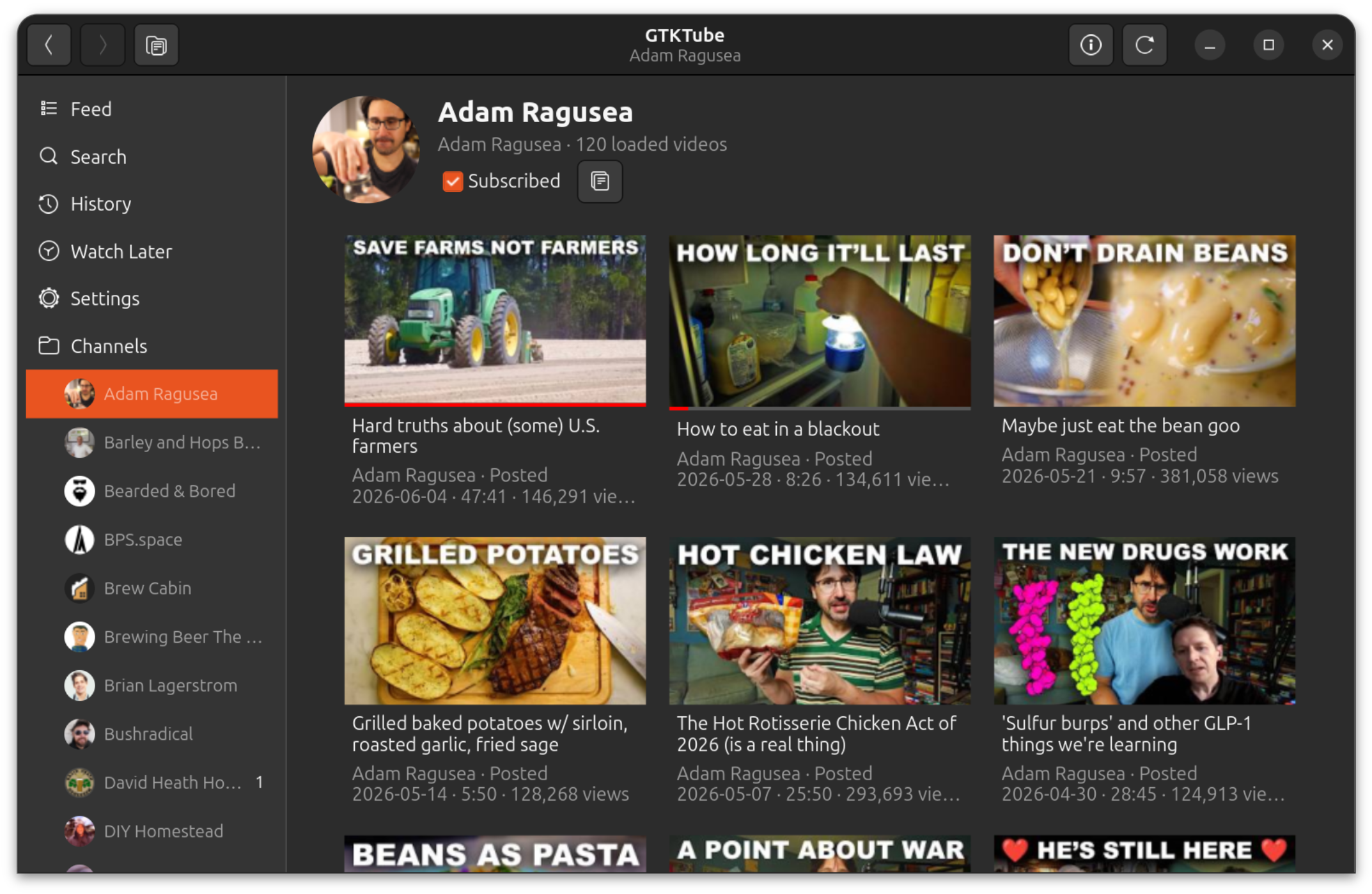
- Browse recent videos from your subscribed channels without YouTube recommendations.
- Watch without ads.
- No tracking by GTKTube.
- Search YouTube for videos and channels without signing in.
- Personalized home feed with recommended videos (requires browser cookies).
- Subscribe and unsubscribe locally; no Google account or OAuth required.
- Optionally import your YouTube subscriptions one time from browser cookies.
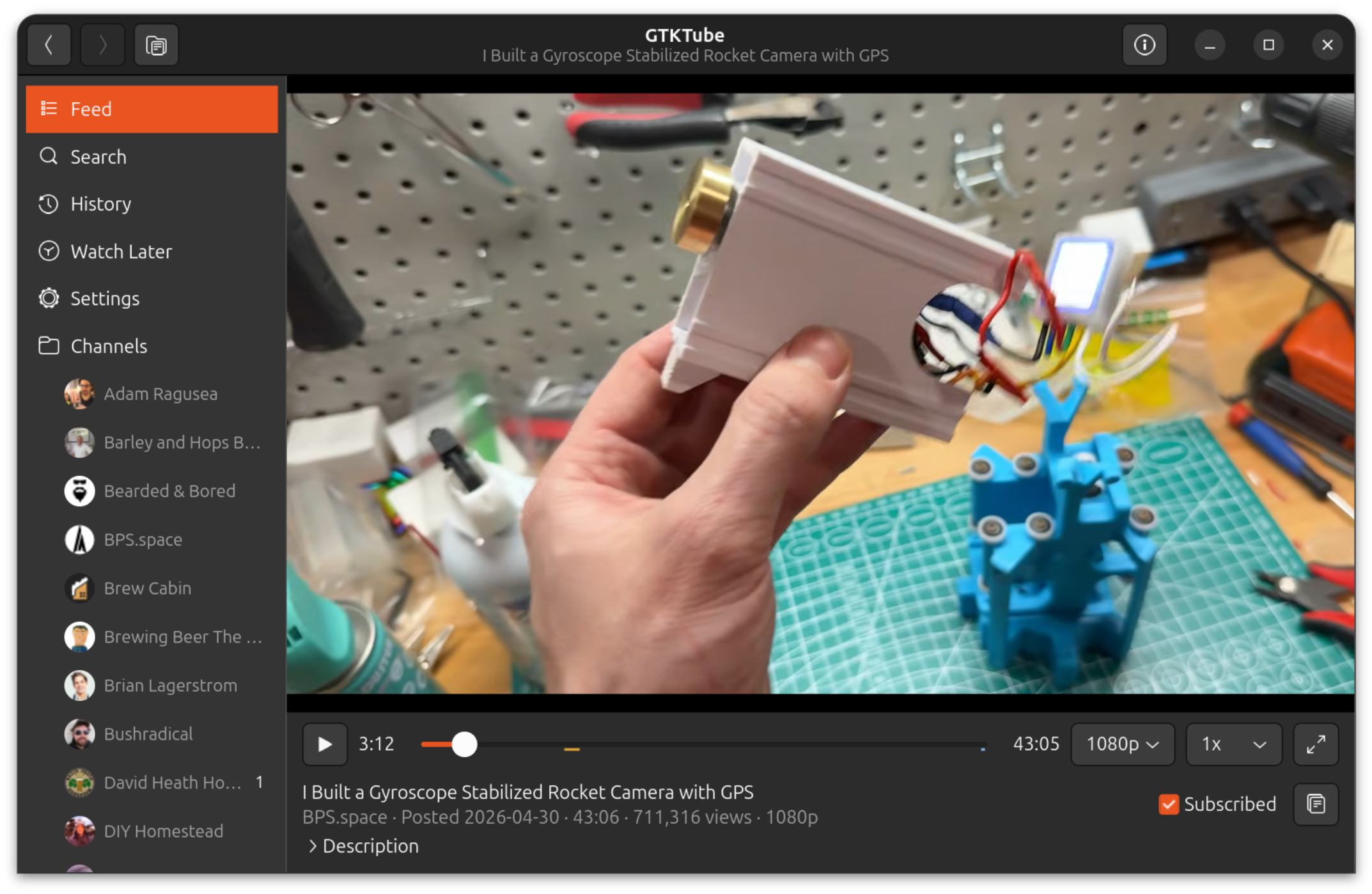
- Play videos inside the GTK app with libmpv.
- Choose playback quality and speed, including speeds up to 4x.
- Choose streaming or prefetch playback per quality/speed option; prefetch downloads the selected stream to a temporary app cache before playback to avoid throttling.
- Use normal playback shortcuts for play/pause, seeking, fullscreen, and speed changes.
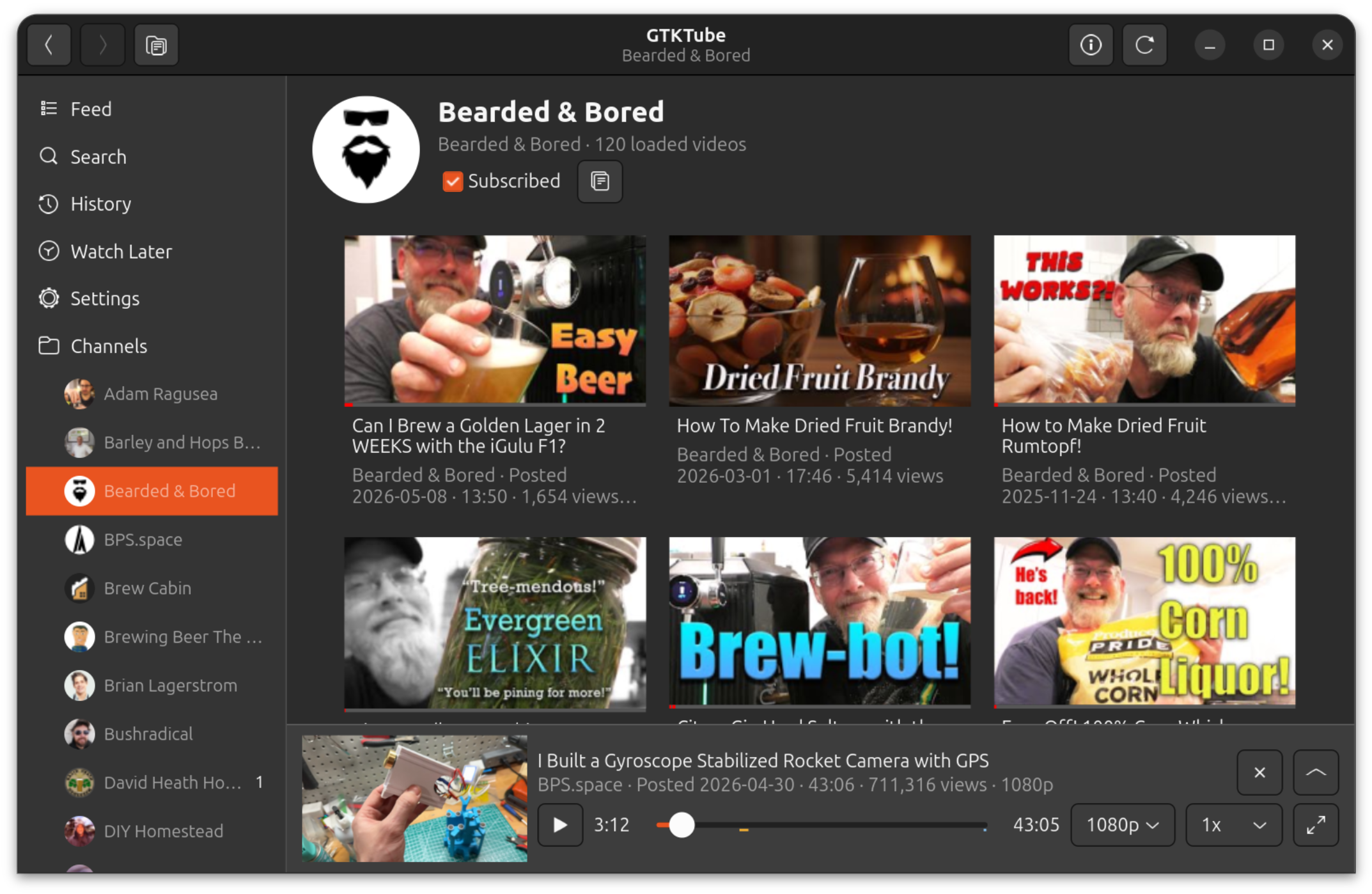
- Keep watching while browsing with a mini-player.
- Save videos to Watch Later.
- Queue videos in Up Next and optionally save remaining queued videos to Watch Later when quitting.
- Download videos into GTKTube-managed local storage and play downloaded copies automatically when available.
- Track watch history locally, including watched time ranges rather than only a last position.
- Search and review local watch history.
- Optionally configure yt-dlp to extract browser cookies for age-restricted, members-only, recommendations, watch-history import, and subscription import features.
- Optionally use SponsorBlock to show and skip community-maintained segment ranges.
- Show video chapters, captions, SponsorBlock segments, and chapter ticks in the player.
- Limit how many videos a single channel can put in each feed day.
- Refresh subscriptions in parallel with per-channel progress in the sidebar, including automatic startup refreshes for channels that are due.
- Check PyPI for updates and upgrade/restart from inside the app.
- Store thumbnails on disk and app data in SQLite.
Screenshots
Channel Browsing
Player
Mini-Player
Install
pipx ensurepath
pipx install --system-site-packages gtktube
gtktube --install-desktop
GTKTube also needs GTK4/PyGObject, libmpv, and a JavaScript runtime for yt-dlp from your Linux distribution. If required system dependencies are missing, the app can launch a small installer helper.
On Debian/Ubuntu, install the system dependencies with:
sudo apt-get update
sudo apt-get install -y \
  python3-gi \
  python3-gi-cairo \
  gir1.2-gtk-4.0 \
  gir1.2-adw-1 \
  libmpv2 \
  python3-mpv \
  nodejs
The same package list is used by scripts/install-apt-deps.sh and the in-app
dependency installer.
Python dependencies, including yt-dlp, python-mpv, and SecretStorage for browser
cookie extraction, are declared in pyproject.toml. requirements.txt installs
that same project dependency set for source checkouts.
Run
GTKTube installs a desktop app entry, so you can launch it from your normal Linux app launcher. You can also run it from a terminal:
gtktube
When launched as the installed gtktube command, GTKTube also installs or updates
its desktop launcher entry in your user application directory. If your desktop
environment does not show it immediately after installation, run gtktube once
from a terminal or run gtktube --install-desktop.
Useful startup flags:
gtktube --show-upgradeopens the upgrade dialog even when GTKTube has not detected a newer version.gtktube --show-deps-installeropens the system dependency installer even when GTKTube thinks dependencies are present.gtktube --db /path/to/gtktube.sqlite3uses a specific SQLite database file.gtktube --install-desktopinstalls the desktop launcher entry and exits.gtktube -vorgtktube --verboseprints detailed playback diagnostics to stderr.
Development runs with python -m gtktube do not auto-install a desktop launcher or check PyPI for upgrades.
Developer-only modal preview flag:
python -m gtktube --debug-modal=open-urlpython -m gtktube --debug-modal=import-subscriptionspython -m gtktube --debug-modal=sponsorblockpython -m gtktube --debug-modal=up-next-quitpython -m gtktube --debug-modal=update
Updates
When launched from an installed gtktube command, GTKTube checks PyPI for newer
releases. If an update is available, the app can run the appropriate upgrade
command and restart itself. Pipx installs use pipx upgrade gtktube; other
installs use python3 -m pip install --upgrade gtktube.
Data Storage
GTKTube keeps its state on your machine:
- subscriptions and watch history in SQLite
- thumbnails, mpv cache files, and temporary prefetch playback cache under the user cache directory
- downloaded videos under the user data directory
- optional one-time browser-cookie reads for importing YouTube subscriptions and watch history
- no cloud sync
- no analytics or tracking by GTKTube
License
GTKTube is licensed under the GNU General Public License v3.0. See LICENSE.
Project details
Verified details
These details have been verified by PyPIProject links
GitHub Statistics
Maintainers
Release history Release notifications | RSS feed


Download files
Download the file for your platform. If you're not sure which to choose, learn more about installing packages.
Source Distribution
Built Distribution
Filter files by name, interpreter, ABI, and platform.
If you're not sure about the file name format, learn more about wheel file names.
Copy a direct link to the current filters
File details
Details for the file gtktube-1.7.3.tar.gz.
File metadata
- Download URL: gtktube-1.7.3.tar.gz
- Upload date:
- Size: 1.3 MB
- Tags: Source
- Uploaded using Trusted Publishing? Yes
- Uploaded via: twine/6.1.0 CPython/3.13.12
File hashes
| Algorithm | Hash digest | |
|---|---|---|
| SHA256 |
e34f94bfad0ebb6d5b74d359a8a26558bb2552838d9274f90d579bd1e1fd3430
|
|
| MD5 |
ef5a2451ca510da95fdad1e7713d792e
|
|
| BLAKE2b-256 |
48275e6fcd06b27674c25ef7c42720db02b78a7573e6515507c823e337a3d180
|
Provenance
The following attestation bundles were made for gtktube-1.7.3.tar.gz:
Publisher:
publish.yml on keredson/gtktube
-
Statement:
-
Statement type:
https://in-toto.io/Statement/v1 -
Predicate type:
https://docs.pypi.org/attestations/publish/v1 -
Subject name:
gtktube-1.7.3.tar.gz -
Subject digest:
e34f94bfad0ebb6d5b74d359a8a26558bb2552838d9274f90d579bd1e1fd3430 - Sigstore transparency entry: 1886142329
- Sigstore integration time:
-
Permalink:
keredson/gtktube@7a7f9c2630e10c05f91470f24293c5d5b3890884 -
Branch / Tag:
refs/tags/v1.7.3 - Owner: https://github.com/keredson
-
Access:
public
-
Token Issuer:
https://token.actions.githubusercontent.com -
Runner Environment:
github-hosted -
Publication workflow:
publish.yml@7a7f9c2630e10c05f91470f24293c5d5b3890884 -
Trigger Event:
push
-
Statement type:
File details
Details for the file gtktube-1.7.3-py3-none-any.whl.
File metadata
- Download URL: gtktube-1.7.3-py3-none-any.whl
- Upload date:
- Size: 2.4 MB
- Tags: Python 3
- Uploaded using Trusted Publishing? Yes
- Uploaded via: twine/6.1.0 CPython/3.13.12
File hashes
| Algorithm | Hash digest | |
|---|---|---|
| SHA256 |
74030d0c0c01ee970d2a0748fed04e15d4d1a0eb250dbda10a0a1c9022e9979c
|
|
| MD5 |
b2e0d680c56277098918104041247d49
|
|
| BLAKE2b-256 |
af0cb6cad6f9c878091a67e06a2cc995d6283027d436c698285372ac7cc02036
|
Provenance
The following attestation bundles were made for gtktube-1.7.3-py3-none-any.whl:
Publisher:
publish.yml on keredson/gtktube
-
Statement:
-
Statement type:
https://in-toto.io/Statement/v1 -
Predicate type:
https://docs.pypi.org/attestations/publish/v1 -
Subject name:
gtktube-1.7.3-py3-none-any.whl -
Subject digest:
74030d0c0c01ee970d2a0748fed04e15d4d1a0eb250dbda10a0a1c9022e9979c - Sigstore transparency entry: 1886142332
- Sigstore integration time:
-
Permalink:
keredson/gtktube@7a7f9c2630e10c05f91470f24293c5d5b3890884 -
Branch / Tag:
refs/tags/v1.7.3 - Owner: https://github.com/keredson
-
Access:
public
-
Token Issuer:
https://token.actions.githubusercontent.com -
Runner Environment:
github-hosted -
Publication workflow:
publish.yml@7a7f9c2630e10c05f91470f24293c5d5b3890884 -
Trigger Event:
push
-
Statement type:






