

GTT · Grand Theft Token
Who stole your AI quota? GTT reads the local logs of your AI coding tools and shows which prompt, not just which day or model, ate your plan limit.
Everything stays on your machine: no proxy, no API keys, no upload. Windows, macOS and Linux, Python 3.9+, no dependencies. 21 tools: Claude Code, Codex, Antigravity, OpenCode, Kimi, Qwen, Copilot, Grok, Pi, Hermes and more.
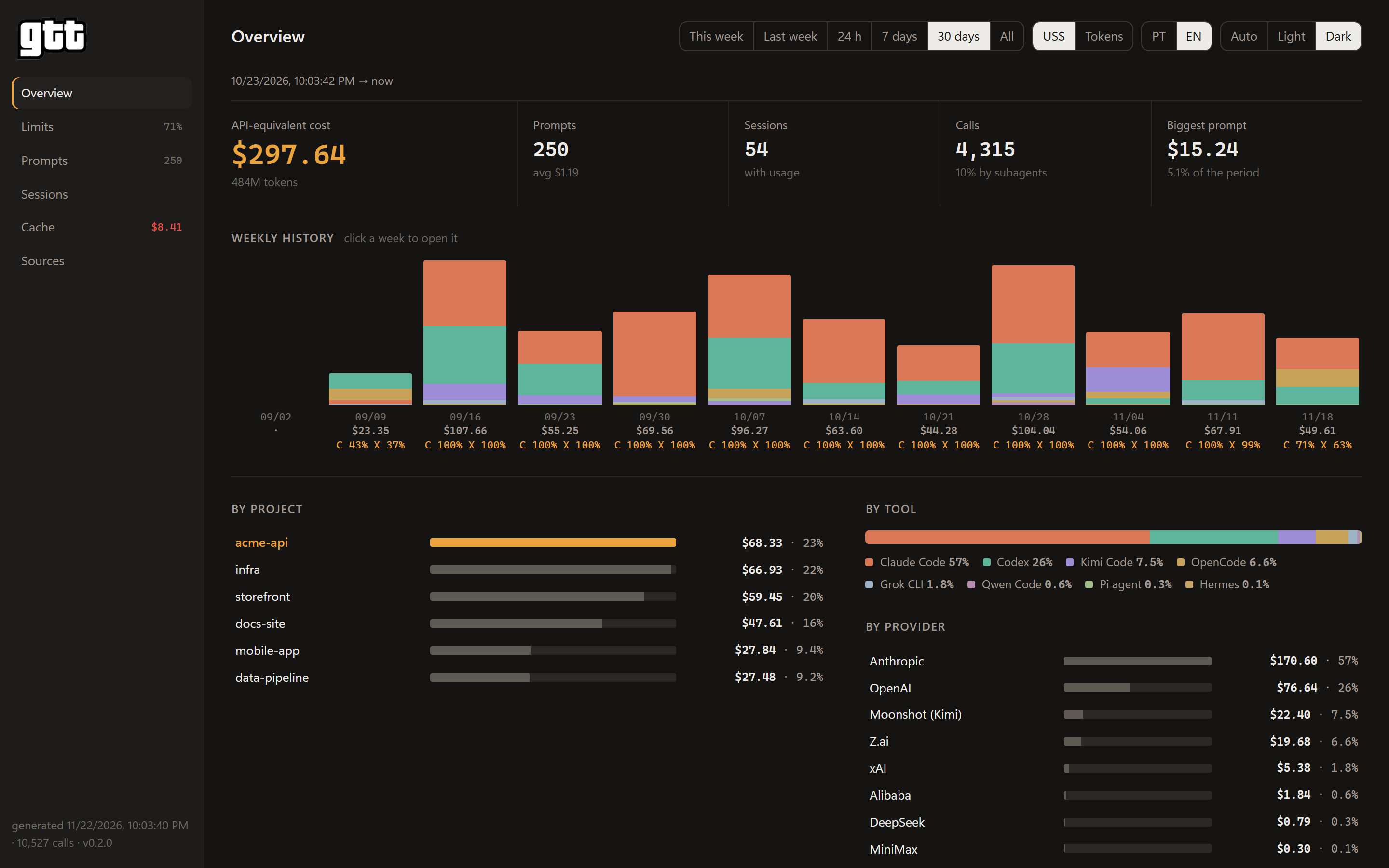
Try it
pipx install gtt                        # or: pip install gtt
gtt demo                                # a dashboard with made-up data, to look around first
gtt                                     # import your tools' logs and open the live dashboard
On Python < 3.14, pipx install "gtt[zstd]" also reads Codex sessions older than about a week (Codex
compresses them) and Zed threads.
What you get
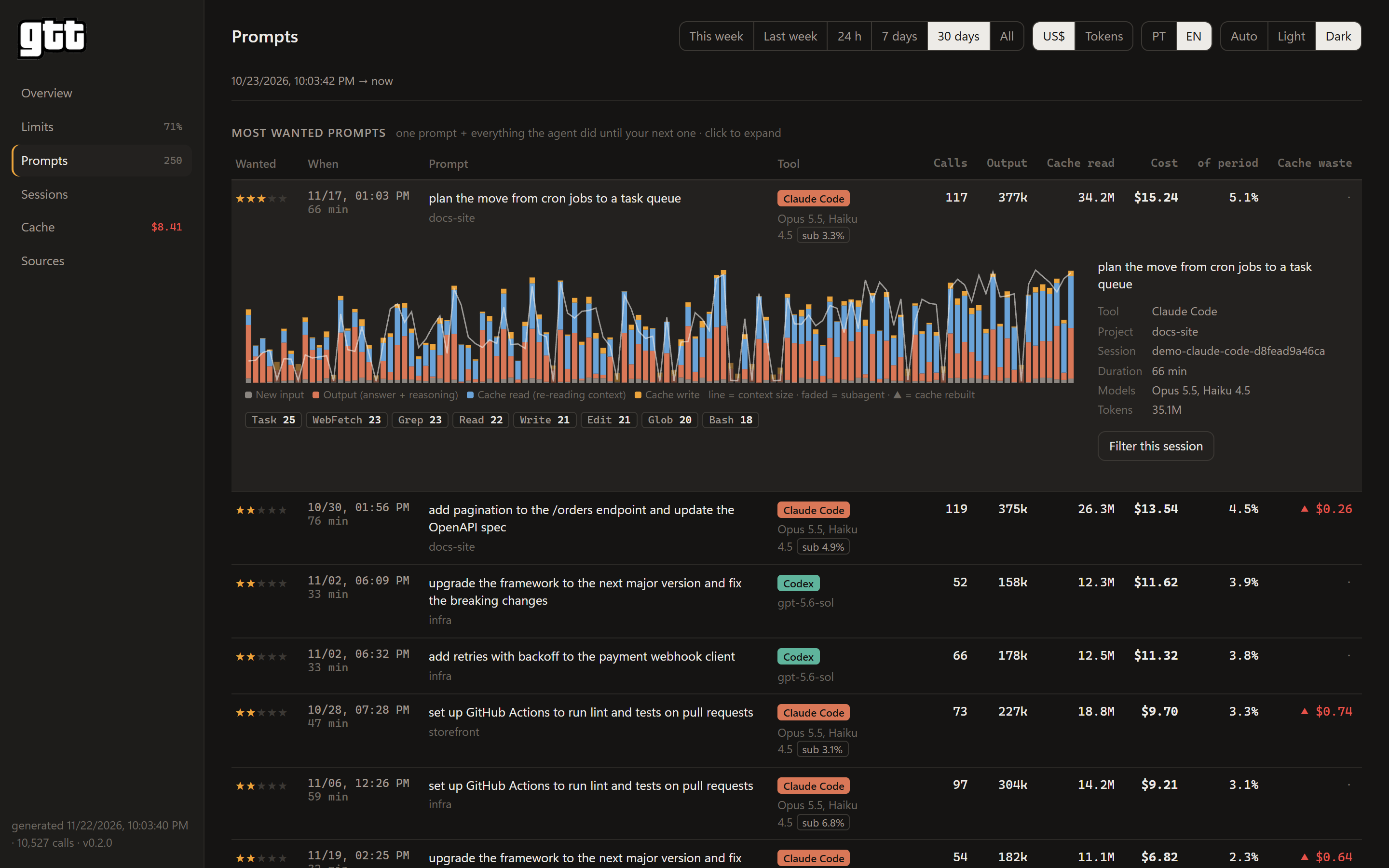
- Most wanted prompts. Every prompt you sent, plus everything the agent did until your next one (subagents included), ranked by cost. Expand a row to see each call: the context growing, cache reads and writes, the tools used, and where the cache was rebuilt.
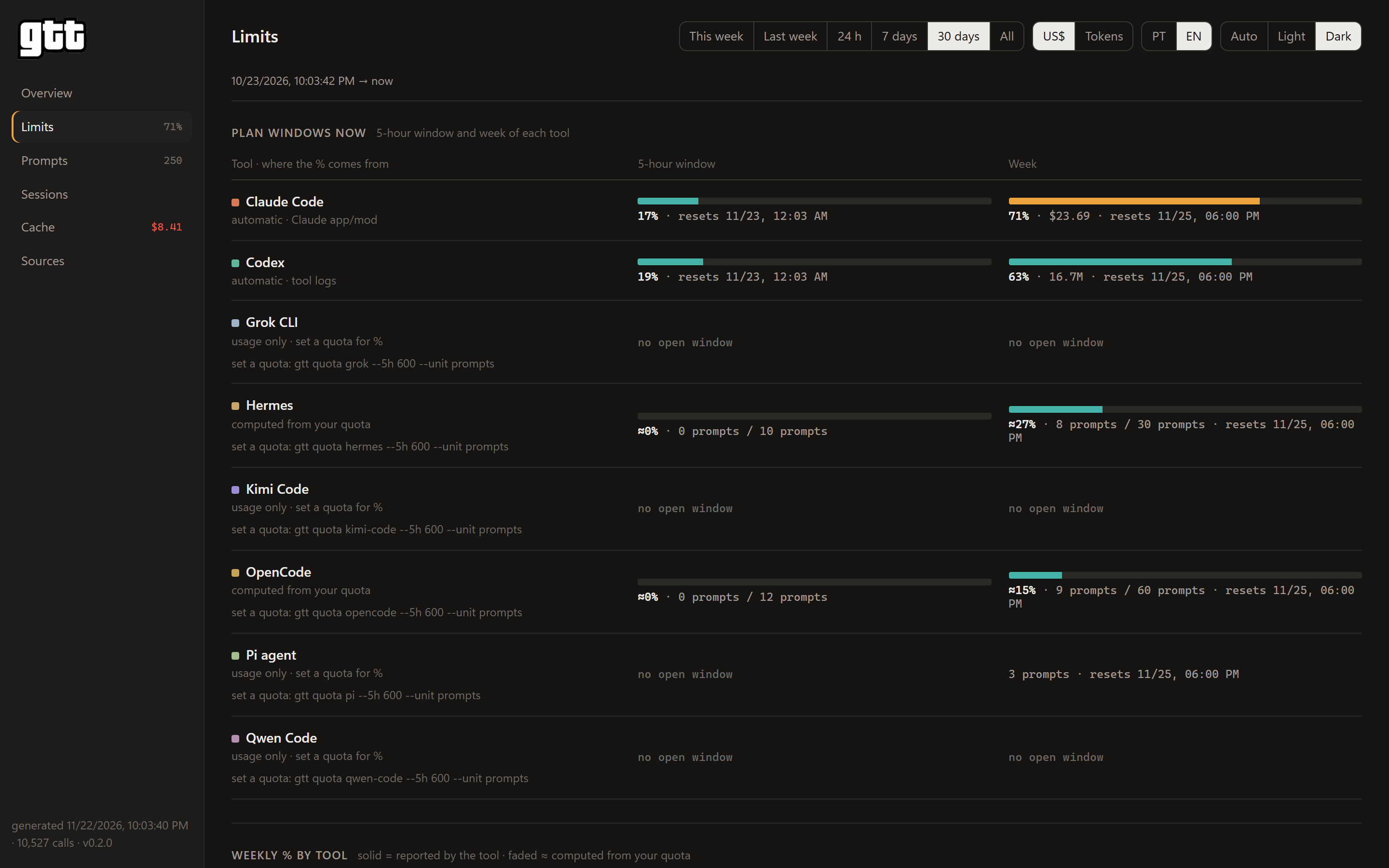
- ≈ % of your plan limit per prompt. Codex reports its own 5-hour and weekly %; Claude's comes from an optional mod; for the other tools GTT computes it from the quota you set.
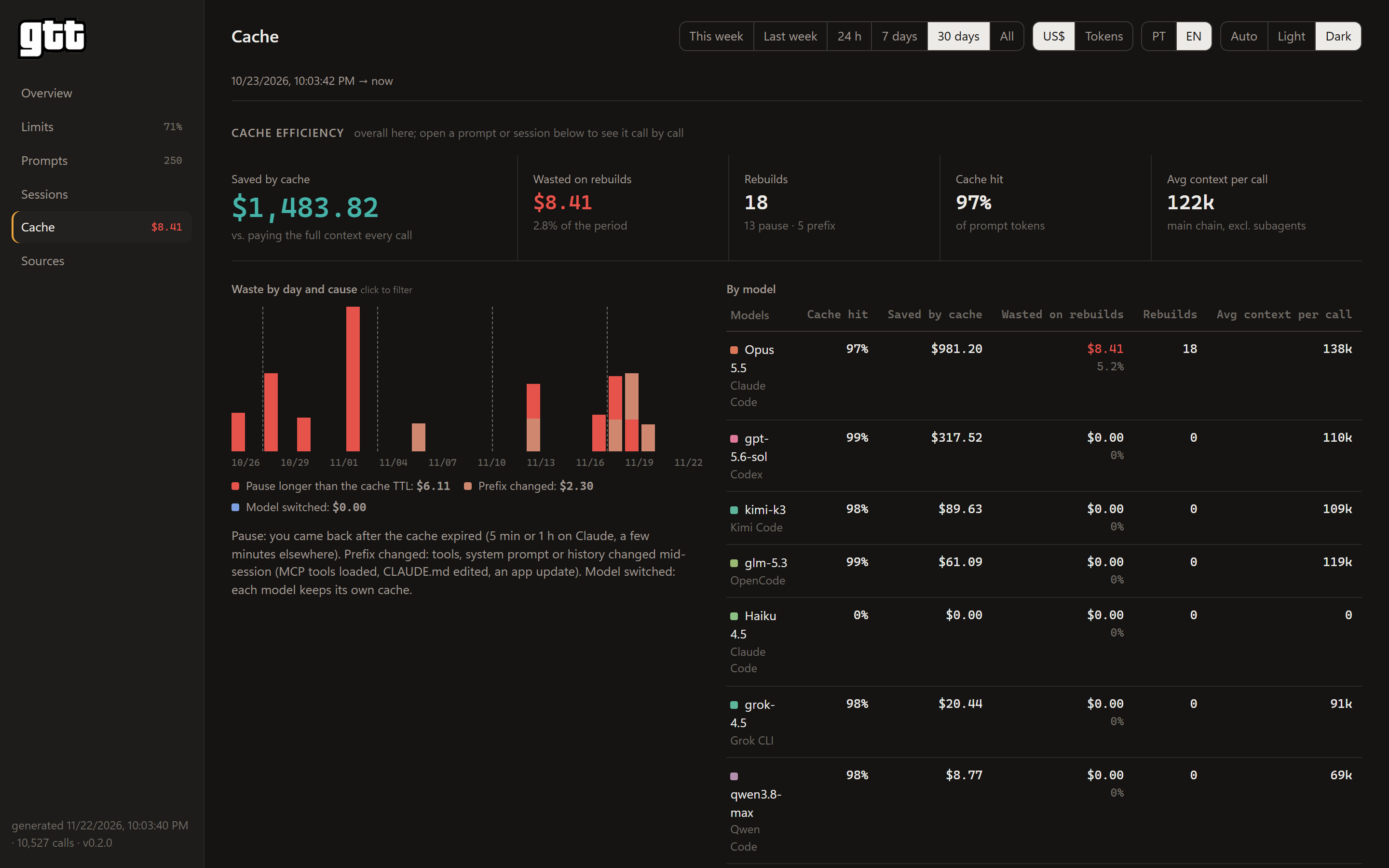
- Why it cost that much: output vs. new input vs. cache re-reads, and what expired caches cost you.
- Permanent history in SQLite, so your weeks survive the tools' own log cleanup (Claude Code deletes transcripts after 30 days by default).
- A dashboard you can click: weekly history, by tool / project / model / day / hour, filters everywhere, US$ or tokens, English or Portuguese, light or dark.
- A warning before an expensive prompt (Claude Code): when you come back to a large session after the prompt cache expired, GTT holds the prompt once and tells you what re-reading the context will cost.
| Prompts, call by call | Plan limits | Cache |
|---|---|---|
 |
 |
 |
Commands
gtt                     # sync + live dashboard at http://127.0.0.1:8777
gtt demo                # dashboard with made-up data (your data is not touched)
gtt sync                # import new usage from every detected tool
gtt top                 # most expensive prompts this week, in the terminal
gtt dashboard           # write a static HTML dashboard and open it
gtt sources             # which AI tools were found on this machine
gtt discover            # find tools with token data that GTT doesn't know yet
gtt limit 94            # record the weekly % your Claude app shows (the GTT mod does it automatically)
gtt quota opencode --5h 600 --unit prompts   # plan quota for tools that don't report their own %
gtt import export.zip   # claude.ai or ChatGPT data export (tokens estimated)
gtt hook --install      # Claude Code: warn before a prompt that would re-write an expired cache
gtt mod install         # Claude Code: record the 5-hour and weekly % the API reports
gtt prices              # models without a known price
gtt config --reset-weekday 3 --reset-hour 18   # your weekly reset (0 = Sunday)
gtt config --wsl on     # Windows: also read tools installed inside WSL (Hermes)
gtt schedule --install  # daily sync (Task Scheduler; prints the launchd/cron entry on macOS/Linux)
Supported tools
Where each tool keeps its data, and what GTT does with it: SOURCES.md.
- Ready: Claude Code, Codex, Google Antigravity (IDE and the
agyCLI), OpenCode, ZCode, Qwen Code, Pi agent, MiniMax Agent, Kimi Code, Kimi CLI, GitHub Copilot (CLI and VS Code chat), Hermes Agent, Grok CLI, OpenClaw, Aider, Goose, Crush, Continue, Cline CLI. - Experimental (format known, not yet checked against real data): Gemini CLI, Cline / Roo Code / Kilo Code (editor extensions), Amp, Zed.
- Estimated from text: claude.ai and ChatGPT exports, and Antigravity conversations from versions that don't
keep a
conversations/<id>.db.
Cursor, Windsurf and a few others keep no token counts on disk, so there is nothing local to read.
Plan limits (5-hour and weekly)
- Claude (optional):
gtt mod installadds a small Claude Code mod that records the 5-hour and weekly % every API response reports;gtt syncimports them. No login or token needed;gtt mod removetakes it out. Without it, record the % by hand (gtt limit 94or the Limits page). - Codex: read from its own logs.
- Others: GTT splits your usage into 5-hour windows (opened by the first call, like the plans do) and weeks,
and shows the % once you set the plan's quota with
gtt quotaor on the Limits page.
About "cost"
Cost is the API list price of each call. Subscription plans don't publish how much each token weighs in the
limit, but API prices weight model, output and cache the same way, so they rank the expensive prompts well. When a
tool reports real spend (OpenCode, Cline), that value is used. Built-in list prices cover Claude, GLM (Z.ai),
Kimi, MiniMax, Qwen, DeepSeek, GPT and Grok, including long-context tiers (gtt/pricing.py cites the source of
each price). gtt prices lists the models still without one; add or override prices in prices.json in the data
folder.
Claude Code: expired-cache warning
gtt hook --install adds a UserPromptSubmit hook to Claude Code. When you return to a large session after the
prompt cache has expired (5 min, or 60 min with the 1-hour cache), it holds the prompt once and says how many context
tokens the next call would re-write and what that costs at API prices. Then you can /compact, start a new
session, or send the same prompt again to go ahead. The first prompt after a /compact is never held. Sessions
below 100k tokens are ignored (--min-tokens changes that). gtt hook --remove takes it out.
Daily sync
gtt schedule --install creates a daily sync at 12:00 (--time 08:30 to change). On Windows it is "GTT sync" in
Task Scheduler, set to run later if the PC was off at that time and to run on battery. On macOS and Linux it prints
the launchd or cron entry to add. gtt schedule --remove deletes the Windows task.
Privacy and data
GTT only reads files the tools already keep on your disk. It sends nothing anywhere, reads no credentials and calls
no usage APIs. Data lives in ~/.gtt (Windows), ~/Library/Application Support/gtt (macOS) or
$XDG_DATA_HOME/gtt (Linux); GTT_HOME overrides it. On Windows the home folder is used instead of
%LOCALAPPDATA% because apps installed as MSIX packages get new AppData files redirected to a private folder,
which would split the database between a terminal and such an app.
Development
git clone https://github.com/eduardoabreu81/gtt && cd gtt
pip install -e .
python -m unittest discover -s tests -v
Every importer with a fixture runs against a small real session from that tool, anonymized (tests/fixtures/),
and its output is compared with a snapshot. The dashboard is rendered from those fixtures in Node and fails on
NaN/undefined. CI runs on Ubuntu and Windows with Python 3.9, 3.13 and 3.14. See
tests/README.md for adding a fixture, AGENTS.md for the architecture and
PROJECT_LOG.md for what each tool's data taught us. The README screenshots come from gtt demo
(tests/tools/screenshots.mjs).
License
1 maintainer

Metadata
1 maintainer
Release files for gtt 0.2.0
For a detailed explanation of source distributions (sdists) and built distributions (wheels), please see the package formats documentation.
Source distribution (sdist)
| File | Size | Uploaded | Provenance | Actions |
|---|---|---|---|---|
| gtt-0.2.0.tar.gz | 158.8 kB | With provenance | Details for gtt-0.2.0.tar.gz |
Built distribution (wheel)
| File | Interpreter | ABI | Platform | Actions Reset |
|---|---|---|---|---|
| gtt-0.2.0-py3-none-any.whl | Python 3 | none | any | Details for gtt-0.2.0-py3-none-any.whl |
Total release size: 323.8 kB
Release files / gtt-0.2.0.tar.gz
| Download URL | gtt-0.2.0.tar.gz |
|---|---|
| Size | 158.8 kB |
| Tags | Source |
|
SHA-256 checksum How to use checksums |
5fff24e290705450f1cf10974a0f9f2adb6e3d5898bb0d89a07181715702a90d
|
|
BLAKE2b-256 checksum How to use checksums |
31c1a050207127aecde24d7d4d49020d7865224bd6ceedc8a3c7b2dfdbf8b061
|
| Upload date | |
|
Uploaded using Trusted Publishing? What is trusted publishing? |
Yes |
| Uploaded via |
twine/7.0.0 CPython/3.13.16
|
Provenance
Provenance describes where a file came from. On PyPI, provenance is shared via attestations, which provide a verifiable record of the build or publishing details. View details, limitations and caveats.


PyPI Publish Attestation
PyPI verified that this artifact, at this checksum, originated from the publisher listed below.
Signed by GitHub Actions, verified by PyPI on Nov 23, 2026.
Transparency logRelease files / gtt-0.2.0-py3-none-any.whl
| Download URL | gtt-0.2.0-py3-none-any.whl |
|---|---|
| Size | 165.0 kB |
| Tags | Python 3 |
|
SHA-256 checksum How to use checksums |
b14321014d3ad40755b9b9ec3c939eb1b07d847e4952521b61d5b612e0e747a3
|
|
BLAKE2b-256 checksum How to use checksums |
268d4d21f14b46f6fabd2fe0f3a1232a35a1cad827424c3c97eb83589cd52778
|
| Upload date | |
|
Uploaded using Trusted Publishing? What is trusted publishing? |
Yes |
| Uploaded via |
twine/7.0.0 CPython/3.13.16
|
Provenance
Provenance describes where a file came from. On PyPI, provenance is shared via attestations, which provide a verifiable record of the build or publishing details. View details, limitations and caveats.
PyPI Publish Attestation
PyPI verified that this artifact, at this checksum, originated from the publisher listed below.
Signed by GitHub Actions, verified by PyPI on Nov 23, 2026.
Transparency logSecurity for gtt 0.2.0
Provenance
Provenance describes where a file came from. On PyPI, provenance is shared via attestations, which provide a verifiable record of the build or publishing details. View details, limitations and caveats.
Full provenance
Both files in this release have been uploaded with provenance metadata.
Attestation for gtt-0.2.0.tar.gz
PyPI Publish Attestation
PyPI verified that this artifact, at this checksum, originated from the publisher listed below.
Signed by GitHub Actions, verified by PyPI on Nov 23, 2026.
Transparency logA note on package security
PyPI is a repository for distributing packages, not a service for auditing them. While third-party security researchers and our staff do their best to detect and remove malicious packages, PyPI cannot guarantee the quality, security or suitability of any given package.
To learn more about protecting yourself from malicious actors, visit our package security documentation.













