
GTK Theme for Python's tkinter/ttk


Would you like to have a more native look for your Tkinter application? Are the themes provided in ttkthemes not to your liking?
This package provides a version of gtkTtk,
formerly tilegtk packaged for
usage with Python. Simply follow the installation instructions and all
required files are installed to the site package directory.
Installation
Currently, a build process for Linux and Windows is available. If you would like to use the package on OS X, please let me know so we can work on a build system.
Wheels
Currently, wheels are provided for Windows. The Linux wheels are built
with Travis-CI and are thus not manylinux wheels. Therefore, building
yourself is recommended when using Linux (either from the source dist
from PyPI or this repository). Feel free to open an issue if you
encounter any problems building!
Linux
These instructions are for Ubuntu, Python 3.5 or higher. Any lower version may work, but is not supported. On other distributions, package names may be different.
# Build Tools
sudo apt install build-essential cmake
# Required Libraries
sudo apt install libgtk2.0-dev libglib2.0-dev tcl-dev tk-dev
# Required Python packages
python -m pip install scikit-build

python setup.py install
Windows (64-bit only)
These instructions assume you have MSYS2
installed, with the MinGW toolchain. The setup.py script will check
the additional build dependencies and install them when required.
Both the MSYS bin directory as well as the MinGW bin directory must
be on the PATH to run the setup.py script. Usually, these folders
are C:\msys64\usr\bin and C:\msys64\mingw64\bin, but they may differ
for your installation.
In addition to this, the setup.py script expects the Dependencies
program found here to be
installed under deps/Dependencies.exe by default. This tool is used
to find all DLL-files necessary to run gttk without any external files.
If you have satisfied all requirements, assuming you want to install the package outside of your MSYS installation:
# Replace C:\Python with the path to your Python setup
# The MSYS version of Python is on PATH and thus you should use an abspath!
C:\Python\python.exe setup.py install
The binary distribution of gttk will come with all DLL-files known to
be required to run it. These DLL-files are generally available under
their own specific licenses, as covered in the files that are found in
the MSYS directory /share/licenses.
Usage
Simply import the package and instantiate the GTTK class. Then the
theme will become available for usage in a ttk.Style.
import tkinter as tk
from tkinter import ttk
from gttk import GTTK

window = tk.Tk()
gttk = GTTK(window)
style = ttk.Style()
style.theme_use("gttk")
print(gttk.get_current_theme()) # Prints the active GTK theme
gttk.set_gtk_theme("Yaru") # Sets GTK theme, provided by developer
ttk.Button(window, text="Destroy", command=window.destroy).pack()

window.mainloop()
If you encounter an error because you are running in the repository,
directory, make sure to disallow imports from the working directory
before importing gttk:
import sys
sys.path = sys.path[2:]
import gttk
Screenshots
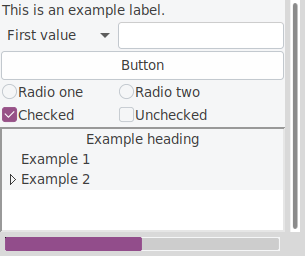
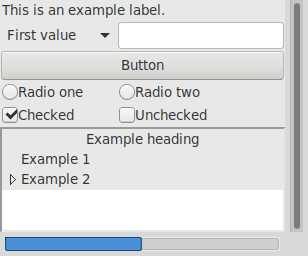
gttk should work with any GTK theme you can throw at it, but below
are the themes Yaru and Adwaita as examples.
License and Copyright
This repository provides a wrapper around gttk, which is a renamed
version of gtkTtk, which in turn is a renamed version of tile-gtk.
The original tile-gtk is available under hte MIT License. This version
is available only under GNU GPLv3.
python-gttk
Copyright (c) 2008-2012 Georgios Petasis
Copyright (c) 2012 Cheer Xiao
Copyright (c) 2019-2020 Géballin
Copyright (c) 2020 RedFantom

This program is free software: you can redistribute it and/or modify
it under the terms of the GNU General Public License as published by
the Free Software Foundation, either version 3 of the License, or
(at your option) any later version.

This program is distributed in the hope that it will be useful,
but WITHOUT ANY WARRANTY; without even the implied warranty of
MERCHANTABILITY or FITNESS FOR A PARTICULAR PURPOSE.  See the
GNU General Public License for more details.

You should have received a copy of the GNU General Public License
along with this program.  If not, see <http://www.gnu.org/licenses/>.
Project State
tile-gtk, gtkTtk and hence also gttk are far from perfect. You may
encounter various graphical artifacts when using particular themes,
while others work without flaws.
You are welcome to report any issues, and pull requests are even better. Currently the package can only be built for Linux-based systems and attempts to create a process for building on Windows using MSYS and CMake have proven unfruitful. If you would like to give it a go, feel free to contact me.
1 maintainer

Metadata
1 maintainer
Release files for gttk 0.6.1
For a detailed explanation of source distributions (sdists) and built distributions (wheels), please see the package formats documentation.
Source distribution (sdist)
| File | Size | Uploaded | |
|---|---|---|---|
| gttk-0.6.1.tar.gz | 97.1 kB | Details |
Built distribution (wheel)
| File | Interpreter | ABI | Platform | Reset |
|---|---|---|---|---|
| gttk-0.6.1-py3-none-any.whl | Python 3 | none | any | Details |
Total release size: 12.5 MB
Release files / gttk-0.6.1.tar.gz
| Download URL | gttk-0.6.1.tar.gz |
|---|---|
| Size | 97.1 kB |
| Tags | Source |
|
SHA-256 checksum How to use checksums |
6cbb1507cb8226341f274709e34ae6160f443c4c19bdca75e4899d430398c8d1
|
|
BLAKE2b-256 checksum How to use checksums |
a2b393c86aff7f337ce81a540ef625719fb0725c92ff8c61a5ac0fe9293f4651
|
| Upload date | |
|
Uploaded using Trusted Publishing? What is trusted publishing? |
No |
| Uploaded via |
twine/3.2.0 pkginfo/1.4.2 requests/2.22.0 setuptools/49.2.1 requests-toolbelt/0.8.0 tqdm/4.30.0 CPython/3.8.5
|
Release files / gttk-0.6.1-py3-none-any.whl
| Download URL | gttk-0.6.1-py3-none-any.whl |
|---|---|
| Size | 12.4 MB |
| Tags | Python 3 |
|
SHA-256 checksum How to use checksums |
49ac732f5299eb7617a6129e2bb7bc1b03b643394ac71435985ab116468b9d94
|
|
BLAKE2b-256 checksum How to use checksums |
1a260573674320d65fb2875ba6a78b1c8a0f109d3e79063575a8a54771e17042
|
| Upload date | |
|
Uploaded using Trusted Publishing? What is trusted publishing? |
No |
| Uploaded via |
twine/3.2.0 pkginfo/1.4.2 requests/2.22.0 setuptools/49.2.1 requests-toolbelt/0.8.0 tqdm/4.30.0 CPython/3.8.5
|













