
GuardDog is a CLI tool for identifying malicious open source packages
Verified details
These details have been verified by PyPIProject links
GitHub Statistics
Maintainers

Project description
GuardDog



GuardDog is a CLI tool that identifies malicious PyPI and npm packages, Go modules, GitHub actions, or VSCode extensions. It runs static analysis on package source code (through Semgrep and YARA rules) and analyzes package metadata to detect supply chain attacks.
What makes GuardDog different: Instead of just listing suspicious patterns, GuardDog correlates findings to identify actual risks based on attack chains. A package needs both the capability to perform an action (e.g., network access) and a threat indicator (e.g., suspicious domain) in the same file to be flagged as high risk.
It downloads and scans code from:
- NPM: Packages hosted in npmjs.org
- PyPI: Source files (tar.gz) packages hosted in PyPI.org
- Go: GoLang source files of repositories hosted in GitHub.com
- RubyGems: Gem packages hosted in rubygems.org
- GitHub Actions: Javascript source files of repositories hosted in GitHub.com
- VSCode Extensions: Extensions (.vsix) packages hosted in marketplace.visualstudio.com
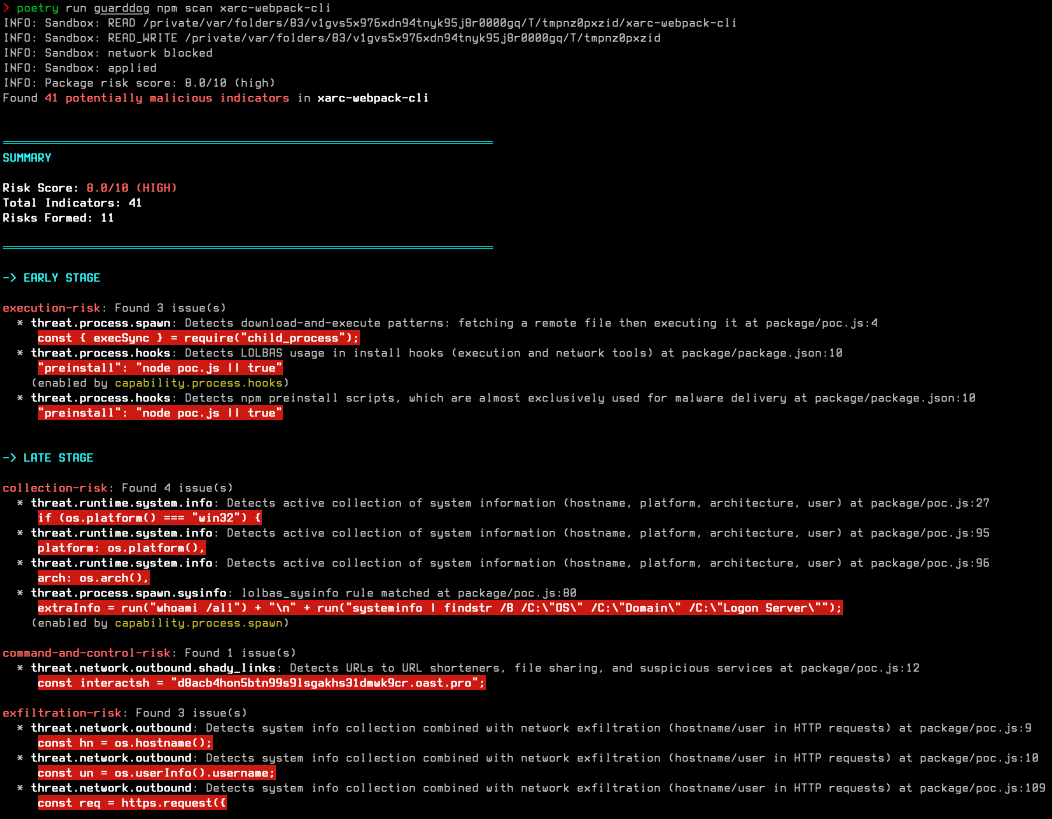
How GuardDog Works
GuardDog uses a risk-based detection model that correlates code capabilities with threat indicators:
- Detection: Rules identify either capabilities (what code can do) or threats (suspicious indicators)
- Correlation: Capabilities and threats found in the same file form risks
- Scoring: Risks are scored (0-10) based on attack chain completeness and sophistication
- Reporting: Packages receive a severity rating (low/medium/high) with detailed risk breakdown
Why This Approach?
Traditional SAST tools flag every suspicious pattern independently, leading to alert fatigue. GuardDog understands that:
- Capability alone isn't malicious (network libraries should make HTTP requests)
- Threat indicators alone might be false positives (test fixtures, documentation)
- Capability + Threat together indicates actual risk (code that can and will do something malicious)
Risk Scoring
Packages receive a score from 0-10 based on four factors:
| Factor | Weight | Description |
|---|---|---|
| Severity | 25% | Highest severity finding (low/medium/high) |
| Attack Chain | 30% | Presence of complete attack stages (early → mid/late) |
| Specificity | 25% | How specific patterns are (vs generic/common code) |
| Sophistication | 20% | Use of evasion techniques (obfuscation, anti-debugging) |
Score Labels:
- 0: No risks detected
- 1-3: Low risk (single-stage threats, low specificity)
- 3.1-7.5: Medium risk (partial attack chain, metadata indicators, or single-stage code findings)
- 7.6-10: High risk (multi-stage attack chain with source code evidence — near-certainty of compromise)
Attack Chain Stages (based on MITRE ATT&CK):
- Early: Initial access, execution capabilities
- Mid: Persistence, defense evasion, credential access
- Late: Command & control, exfiltration, impact
Check out the new Datadog Agent integration and Cloud SIEM content pack for GuardDog.
Getting started
Installation
The easiest way to run GuardDog is to use uvx:
uvx guarddog pypi scan requests
To install it locally:
uv tool install guarddog
# or
pip install guarddog
Or use the Docker image:
docker pull ghcr.io/datadog/guarddog
alias guarddog='docker run --rm ghcr.io/datadog/guarddog'
Note: On Windows, the only supported installation method is Docker.
Sample usage
# Scan the most recent version of the 'requests' package
guarddog pypi scan requests

# Scan a specific version of the 'requests' package
guarddog pypi scan requests --version 2.28.1

# Scan the 'request' package using 2 specific heuristics
guarddog pypi scan requests --rules exec-base64 --rules code-execution

# Scan the 'requests' package using all rules but one
guarddog pypi scan requests --exclude-rules exec-base64

# Scan a local package archive
guarddog pypi scan /tmp/triage.tar.gz

# Scan a local package directory
guarddog pypi scan /tmp/triage/

# Scan every package referenced in a requirements.txt file of a local folder
guarddog pypi verify workspace/guarddog/requirements.txt

# Scan every package referenced in a requirements.txt file and output a sarif file - works only for verify
guarddog pypi verify --output-format=sarif workspace/guarddog/requirements.txt

# Output JSON to standard output - works for every command
guarddog pypi scan requests --output-format=json

# All the commands also work on npm, go, rubygems
guarddog npm scan express

guarddog go scan github.com/DataDog/dd-trace-go

guarddog go verify /tmp/repo/go.mod

# Scan RubyGems packages
guarddog rubygems scan rails

guarddog rubygems verify /tmp/repo/Gemfile.lock

# Additionally can support scanning GitHub actions that are implemented in JavaScript
guarddog github_action scan DataDog/synthetics-ci-github-action

guarddog github_action verify /tmp/repo/.github/workflows/main.yml

# Scan VSCode extensions from the marketplace
guarddog extension scan ms-python.python

# Scan a specific version of a VSCode extension
guarddog extension scan ms-python.python --version 2023.20.0

# Scan a local VSCode extension directory or VSIX archive
guarddog extension scan /tmp/my-extension/

# Run in debug mode
guarddog --log-level debug npm scan express
Sandboxed Scanning
When scanning packages, GuardDog runs source code analysis inside a kernel-level sandbox (Linux via Landlock, macOS via Seatbelt, using nono). The sandbox blocks all network access and restricts filesystem operations to only the paths needed for analysis. This protects against malicious packages that attempt to execute code during archive extraction or scanning.
By default, the sandbox is used if available, with a warning if it's not. You can also force it on (hard-fail if unavailable) or off:
# Default: auto-detect, warn if unavailable
guarddog pypi scan requests

# Force sandbox on (exit with error if unavailable)
guarddog pypi scan requests --sandbox

# Explicitly disable the sandbox (not recommended)
guarddog pypi scan requests --no-sandbox
For remote packages, three phases run with different privilege levels:
- Download and metadata analysis run without sandbox (need network access)
- Archive extraction runs in a sandboxed subprocess (network blocked, filesystem restricted)
- Source code analysis (YARA/Semgrep) runs in the main process after a sandbox is applied (network blocked, filesystem restricted to extracted files)
The sandbox was introduced to mitigate path traversal and code execution vulnerabilities during archive extraction (CVE-2022-23530, CVE-2022-23531, CVE-2026-22870, CVE-2026-22871).
Rules
GuardDog uses two types of detection rules, both participating in the risk-based scoring engine:
- Source code rules (YARA/Semgrep): Static analysis of package source code detecting capabilities and threats
- Metadata rules (Python detectors): Analysis of package registry metadata detecting supply chain attack indicators
For the full list of rules per ecosystem, see RULES.md.
For guidance on writing new rules, see WRITING_RULES.md.
Running GuardDog in a GitHub Action
The easiest way to integrate GuardDog in your CI pipeline is to leverage the SARIF output format, and upload it to GitHub's code scanning feature.
Using this, you get:
- Automated comments to your pull requests based on the GuardDog scan output
- Built-in false positive management directly in the GitHub UI
Sample GitHub Action using GuardDog:
name: GuardDog

on:
  push:
    branches:
      - main
  pull_request:
    branches:
      - main

permissions:
  contents: read

jobs:
  guarddog:
    permissions:
      contents: read # for actions/checkout to fetch code
      security-events: write # for github/codeql-action/upload-sarif to upload SARIF results
    name: Scan dependencies
    runs-on: ubuntu-latest

    steps:
      - uses: actions/checkout@v4

      - uses: astral-sh/setup-uv@v7

      - run: uvx guarddog pypi verify requirements.txt --output-format sarif --exclude-rules repository_integrity_mismatch > guarddog.sarif

      - name: Upload SARIF file to GitHub
        uses: github/codeql-action/upload-sarif@v3
        with:
          category: guarddog-builtin
          sarif_file: guarddog.sarif
Development
Running a local version of GuardDog
- Ensure poetry has an env with
python >=3.10poetry env use 3.10.0 - Install dependencies
poetry install - Run guarddog
poetry run guarddogorpoetry shellthen runguarddog
Unit tests
Running all unit tests: make test
Running unit tests against Semgrep rules: make test-semgrep-rules (tests are here). These use the standard methodology for testing Semgrep rules.
Running unit tests against package metadata heuristics: make test-metadata-rules (tests are here).
Benchmarking
You can run GuardDog on legitimate and malicious packages to determine false positives and false negatives. See ./tests/samples
Code quality checks
Run the type checker with
mypy --install-types --non-interactive guarddog
and the linter with
flake8 guarddog --count --select=E9,F63,F7,F82 --show-source --statistics --exclude tests/analyzer/sourcecode,tests/analyzer/metadata/resources,evaluator/data
flake8 guarddog --count --max-line-length=120 --statistics --exclude tests/analyzer/sourcecode,tests/analyzer/metadata/resources,evaluator/data --ignore=E203,W503
Configuration via Environment Variables
GuardDog's behavior can be customized using environment variables:
General Configuration
| Environment Variable | Description | Default Value |
|---|---|---|
GUARDDOG_PARALLELISM |
Number of threads to use for parallel processing | Number of CPUs available |
GUARDDOG_VERIFY_EXHAUSTIVE_DEPENDENCIES |
Analyze all possible versions of dependencies (true/false) |
false |
GUARDDOG_TOP_PACKAGES_CACHE_LOCATION |
Location of the top packages cache directory | guarddog/analyzer/metadata/resources |
GUARDDOG_YARA_EXT_EXCLUDE |
Comma-separated list of file extensions to exclude from YARA scanning | ini,md,rst,txt,lock,json,yaml,yml,toml,xml,html,csv,sql,pdf,doc,docx,ppt,pptx,xls,xlsx,odt,changelog,readme,makefile,dockerfile,pkg-info,d.ts |
Semgrep Configuration
GuardDog uses Semgrep, a powerful static analysis tool that scans code for patterns.
| Environment Variable | Description | Default Value |
|---|---|---|
GUARDDOG_SEMGREP_MAX_TARGET_BYTES |
Maximum size of a file that Semgrep will analyze (files exceeding this will be skipped) | 10MB (10485760 bytes) |
GUARDDOG_SEMGREP_TIMEOUT |
Maximum time in seconds that Semgrep will spend running a rule on a single file | 10 seconds |
Archive Extraction Security Limits
GuardDog implements multiple security checks when extracting package archives to protect against compression bombs and file descriptor exhaustion attacks:
| Environment Variable | Description | Default Value |
|---|---|---|
GUARDDOG_MAX_UNCOMPRESSED_SIZE |
Maximum allowed uncompressed size in bytes (prevents disk space exhaustion) | 2147483648 (2 GB) |
GUARDDOG_MAX_COMPRESSION_RATIO |
Maximum allowed compression ratio (detects suspicious compression patterns) | 100 (100:1) |
GUARDDOG_MAX_FILE_COUNT |
Maximum number of files allowed in an archive (prevents file descriptor/inode exhaustion) | 100000 |
Maintainers
Authors
Acknowledgments
Inspiration:
- Backstabber’s Knife Collection: A Review of Open Source Software Supply Chain Attacks
- What are Weak Links in the npm Supply Chain?
- A Survey on Common Threats in npm and PyPi Registries
- A Benchmark Comparison of Python Malware Detection Approaches
- Towards Measuring Supply Chain Attacks on Package Managers for Interpreted Languages
Project details
Verified details
These details have been verified by PyPIProject links
GitHub Statistics
Maintainers
Release history Release notifications | RSS feed


Download files
Download the file for your platform. If you're not sure which to choose, learn more about installing packages.
Source Distribution
Built Distribution
Filter files by name, interpreter, ABI, and platform.
If you're not sure about the file name format, learn more about wheel file names.
Copy a direct link to the current filters
File details
Details for the file guarddog-3.0.0a1.tar.gz.
File metadata
- Download URL: guarddog-3.0.0a1.tar.gz
- Upload date:
- Size: 263.2 kB
- Tags: Source
- Uploaded using Trusted Publishing? Yes
- Uploaded via: twine/6.1.0 CPython/3.13.7
File hashes
| Algorithm | Hash digest | |
|---|---|---|
| SHA256 |
6541dcb57312cc71b406bec6c9e59600cfc055ac4b6d6a3f4265b9bf01fc116c
|
|
| MD5 |
5099d7dea7bb228d56b1327c2cc9d268
|
|
| BLAKE2b-256 |
bc24d25f4c6b91cf580d620f2d42bda53111fc24e217b94d905801d410139a00
|
Provenance
The following attestation bundles were made for guarddog-3.0.0a1.tar.gz:
Publisher:
tag-release.yml on DataDog/guarddog
-
Statement:
-
Statement type:
https://in-toto.io/Statement/v1 -
Predicate type:
https://docs.pypi.org/attestations/publish/v1 -
Subject name:
guarddog-3.0.0a1.tar.gz -
Subject digest:
6541dcb57312cc71b406bec6c9e59600cfc055ac4b6d6a3f4265b9bf01fc116c - Sigstore transparency entry: 1633723260
- Sigstore integration time:
-
Permalink:
DataDog/guarddog@fdc65b9d47961ca13cbba206a442924ece3a2c1b -
Branch / Tag:
refs/heads/v3 - Owner: https://github.com/DataDog
-
Access:
public
-
Token Issuer:
https://token.actions.githubusercontent.com -
Runner Environment:
github-hosted -
Publication workflow:
tag-release.yml@fdc65b9d47961ca13cbba206a442924ece3a2c1b -
Trigger Event:
push
-
Statement type:
File details
Details for the file guarddog-3.0.0a1-py3-none-any.whl.
File metadata
- Download URL: guarddog-3.0.0a1-py3-none-any.whl
- Upload date:
- Size: 323.5 kB
- Tags: Python 3
- Uploaded using Trusted Publishing? Yes
- Uploaded via: twine/6.1.0 CPython/3.13.7
File hashes
| Algorithm | Hash digest | |
|---|---|---|
| SHA256 |
6bb2f112390e1709a56f89e26b0b173c9775e2609caa38ece20dc197f381b943
|
|
| MD5 |
0212a6d89eebc1287cf671edde712ea5
|
|
| BLAKE2b-256 |
e397aefb3d05985d4821dc88ef6d68d55bcd721293c51ab71a8010d4c6351ab2
|
Provenance
The following attestation bundles were made for guarddog-3.0.0a1-py3-none-any.whl:
Publisher:
tag-release.yml on DataDog/guarddog
-
Statement:
-
Statement type:
https://in-toto.io/Statement/v1 -
Predicate type:
https://docs.pypi.org/attestations/publish/v1 -
Subject name:
guarddog-3.0.0a1-py3-none-any.whl -
Subject digest:
6bb2f112390e1709a56f89e26b0b173c9775e2609caa38ece20dc197f381b943 - Sigstore transparency entry: 1633723284
- Sigstore integration time:
-
Permalink:
DataDog/guarddog@fdc65b9d47961ca13cbba206a442924ece3a2c1b -
Branch / Tag:
refs/heads/v3 - Owner: https://github.com/DataDog
-
Access:
public
-
Token Issuer:
https://token.actions.githubusercontent.com -
Runner Environment:
github-hosted -
Publication workflow:
tag-release.yml@fdc65b9d47961ca13cbba206a442924ece3a2c1b -
Trigger Event:
push
-
Statement type:






