
Security scanner for MCP server configurations. Detects secrets, injection, auth issues, and maps to OWASP MCP Top 10.

Project description

Find security vulnerabilities in your MCP server configs before attackers do.
Maps every finding to the OWASP MCP Top 10. Zero config. Runs locally.





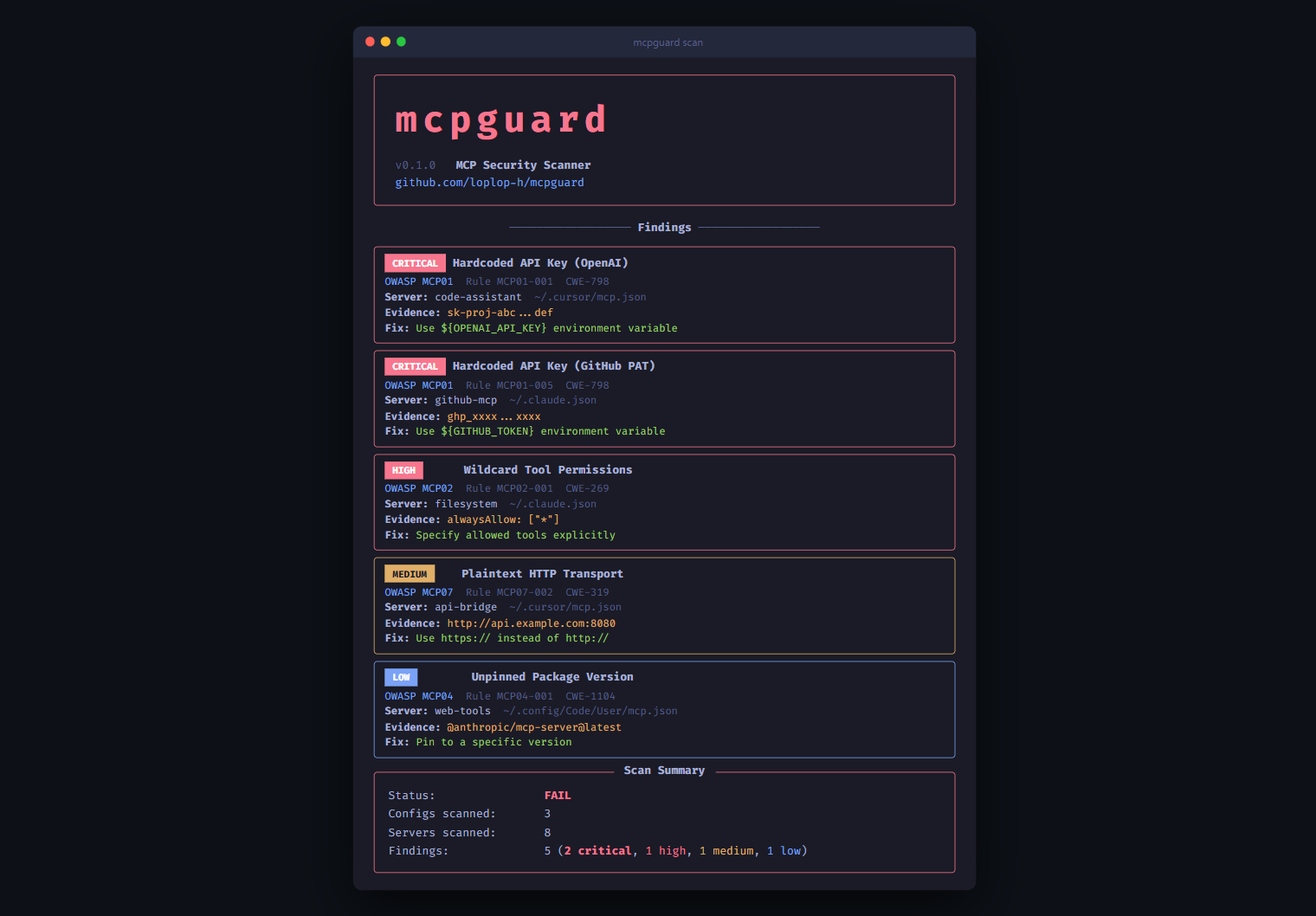
Quick Start
pip install mcpguard
mcpguard scan
That's it. mcpguard auto-detects MCP configs from Claude Desktop, Claude Code, Cursor, VS Code, and Windsurf. No API keys, no accounts, everything runs locally.
What It Scans For
mcpguard checks your MCP server configurations against the OWASP MCP Top 10:
| Risk | What mcpguard detects | |
|---|---|---|
| Y | MCP01 Token & Secret Exposure | Hardcoded API keys (AWS, OpenAI, GitHub, Anthropic, Stripe), high-entropy secrets, JWT tokens, live secret verification |
| Y | MCP02 Privilege Escalation | Wildcard alwaysAllow, overpermissioned tool scopes |
| Y | MCP03 Tool Poisoning | 14 injection patterns in tool descriptions, suspicious names, long descriptions, tool shadowing, rug pull detection |
| Y | MCP04 Supply Chain Attacks | Unpinned @latest versions, missing version locks |
| Y | MCP05 Command Injection | Shell metacharacters, dangerous commands, missing input schemas |
| Y | MCP06 Intent Subversion | SSRF-prone URLs (cloud metadata, private IPs) |
| Y | MCP07 Missing Authentication | HTTP servers without auth headers, plaintext HTTP transport |
| Y | MCP08 No Audit Logging | Unsafe shell execution, pipe/redirect in args |
| Y | MCP09 Shadow Servers | Localhost/dev URLs, unregistered servers |
| Y | MCP10 Context Over-Sharing | Docker host network, sensitive volume mounts, no rate limiting |
Features
- Zero config -- auto-discovers configs from 5 MCP clients
- OWASP mapped -- every finding links to OWASP MCP Top 10
- 16 detection rules -- secrets, auth, permissions, supply chain, injection, shadow servers
- Entropy-based secret detection -- catches secrets that don't match known patterns
- Auto-fix --
mcpguard fixreplaces hardcoded secrets with${VAR}references - Custom rules -- add your own YAML detection rules
- SARIF output -- integrates with GitHub Security tab
- GitHub Action -- drop-in CI/CD security gate
- Pre-commit hook -- catch issues before they're committed
- No network -- everything runs locally, no API calls
Usage
# Scan all auto-detected configs
mcpguard scan

# Scan a specific config file
mcpguard scan --path /path/to/mcp.json

# Auto-fix hardcoded secrets, HTTP URLs, wildcard permissions
mcpguard fix

# Preview fixes without modifying files
mcpguard fix --dry-run

# JSON output for CI/CD
mcpguard scan --format json

# SARIF output for GitHub Security tab
mcpguard scan --format sarif -o results.sarif

# Only show critical and high findings
mcpguard scan --severity high

# Connect to servers and inspect tool definitions
mcpguard inspect

# Verify detected secrets are live (makes read-only API calls)
mcpguard scan --verify

# Quick pass/fail check (exit code only)
mcpguard check

# Add custom detection rules
mcpguard scan --rules-dir ./my-rules/
Auto-Fix
mcpguard can automatically fix common security issues:
mcpguard fix
What it fixes:
- Replaces hardcoded API keys with
${VAR_NAME}environment variable references - Upgrades
http://URLs tohttps:// - Removes wildcard
alwaysAllow: ["*"] - Creates a
.mcpguard-backupbefore modifying any file
Supported Clients
| Client | Config Location |
|---|---|
| Claude Desktop | ~/Library/Application Support/Claude/claude_desktop_config.json |
| Claude Code | ~/.claude.json, .mcp.json |
| Cursor | ~/.cursor/mcp.json, .cursor/mcp.json |
| VS Code | ~/.config/Code/User/mcp.json, .vscode/mcp.json |
| Windsurf | ~/.codeium/windsurf/mcp_config.json |
Custom Rules
mcpguard uses YAML detection rules. Add your own:
id: CUSTOM-001
info:
  name: Internal API Key Pattern
  severity: critical
  owasp: MCP01
  description: Detects internal API keys
  remediation: Use vault references
  cwe: CWE-798
detection:
  target: config
  scope: env_values
  match:
    type: regex
    patterns:
      - 'internal_[a-z0-9]{32}'
mcpguard scan --rules-dir ./my-rules/
GitHub Action
name: MCP Security Scan
on: [push, pull_request]

jobs:
  mcpguard:
    runs-on: ubuntu-latest
    steps:
      - uses: actions/checkout@v4
      - uses: loplop-h/mcpguard@v1
Or manually:
      - run: pip install mcpguard
      - run: mcpguard scan --format sarif -o results.sarif
      - uses: github/codeql-action/upload-sarif@v3
        with:
          sarif_file: results.sarif
Pre-commit Hook
# .pre-commit-config.yaml
repos:
  - repo: https://github.com/loplop-h/mcpguard
    rev: v0.1.0
    hooks:
      - id: mcpguard
How It Compares
| Feature | mcpguard | mcp-scan | Tencent AI-Infra-Guard | Cisco mcp-scanner |
|---|---|---|---|---|
| Zero-config CLI | Y | Y | N (Docker/web) | N (API key) |
| Config scanning | Y | Y | Y | Y |
| Server inspection | Y | Y | Y | N |
| Tool poisoning detection | Y (14 patterns) | Y | Partial | N |
| Rug pull detection | Y (hash pinning) | Y | N | N |
Auto-fix (fix) |
Y | N | N | N |
| OWASP MCP Top 10 mapping | Y (10/10) | N | N | N |
| Secret verification | Y (GitHub, OpenAI, Anthropic, Stripe) | N | N | N |
| SARIF output | Y | N | N | N |
| GitHub Action | Y | N | N | N |
| Pre-commit hook | Y | N | N | N |
| Custom YAML rules | Y | N | N | N |
| Entropy-based detection | Y | N | N | N |
Privacy
- All data stays on your machine
- No telemetry, no tracking
scanreads config files only (no network)inspectconnects to local stdio servers only (never sends data externally)--verifymakes read-only API calls to check if secrets are live- Open source, MIT licensed
Contributing
git clone https://github.com/loplop-h/mcpguard.git
cd mcpguard
pip install -e ".[dev]"
pytest
Add detection rules in src/mcpguard/rules/ using the YAML schema above.
License
MIT
Release history Release notifications | RSS feed

Download files
Download the file for your platform. If you're not sure which to choose, learn more about installing packages.
Source Distribution
Built Distribution
Filter files by name, interpreter, ABI, and platform.
If you're not sure about the file name format, learn more about wheel file names.
Copy a direct link to the current filters
File details
Details for the file guardmcp-0.1.0.tar.gz.
File metadata
- Download URL: guardmcp-0.1.0.tar.gz
- Upload date:
- Size: 644.3 kB
- Tags: Source
- Uploaded using Trusted Publishing? No
- Uploaded via: twine/6.2.0 CPython/3.12.10
File hashes
| Algorithm | Hash digest | |
|---|---|---|
| SHA256 |
04fa3f99136f9c606eaeaed6eea19d9d4a39f03b2417ae808c541a6230b58696
|
|
| MD5 |
c337cf855c3505b73a48b35d7a27e437
|
|
| BLAKE2b-256 |
de622e4cecd0c97a06ed965efa9e01ef163caff128f476282569346041a10133
|
File details
Details for the file guardmcp-0.1.0-py3-none-any.whl.
File metadata
- Download URL: guardmcp-0.1.0-py3-none-any.whl
- Upload date:
- Size: 32.2 kB
- Tags: Python 3
- Uploaded using Trusted Publishing? No
- Uploaded via: twine/6.2.0 CPython/3.12.10
File hashes
| Algorithm | Hash digest | |
|---|---|---|
| SHA256 |
5f52b7f191bcbf3468cdd2463aa5b6c8c7eaa41c424e776de34eedda35fc7c0a
|
|
| MD5 |
21197d396040fe249d8d1f3666fcb673
|
|
| BLAKE2b-256 |
aa0c9a78cd096343c1f480f52032656e70c8fa5163f76df35e13267ebf9e4dda
|






