
guirecognizer is a Python library for recognizing on-screen patterns and driving GUI interactions.
The main goal of guirecognizer is to recognize on-screen patterns, such as retrieving a pixel color, computing an image hash over a screenshot area, or finding a specific image. It can also perform basic GUI interactions, such as clicking on screen elements.
The companion application guirecognizerapp helps you create and preview actions and preprocessing operations through a visual interface, before using them in a Python bot with guirecognizer.
See documentation with tutorials and examples: https://guirecognizer.readthedocs.io.
Quick overview
guirecognizer relies on a configuration file that defines the actions.
Let’s install the companion application guirecognizerapp to generate a configuration file. This will also install guirecognizer.
(venv) $ pip install guirecognizerappLaunch the application:
(venv) $ python -m guirecognizerappFrom the application, take a screenshot using Capture -> Take Screenshot or use the keyboard shortcut Ctrl+Alt+T.
The first step is to define the borders. The borders represent the absolute coordinates of the screen region that serve as a reference for all actions. All action selections are defined relative to these borders. This greatly improves the reusability of the configuration file across different screen resolutions or setups.

Click on the Make Selection button to define the borders.
Select an area of the screenshot using the mouse or the controls at the bottom of the interface.
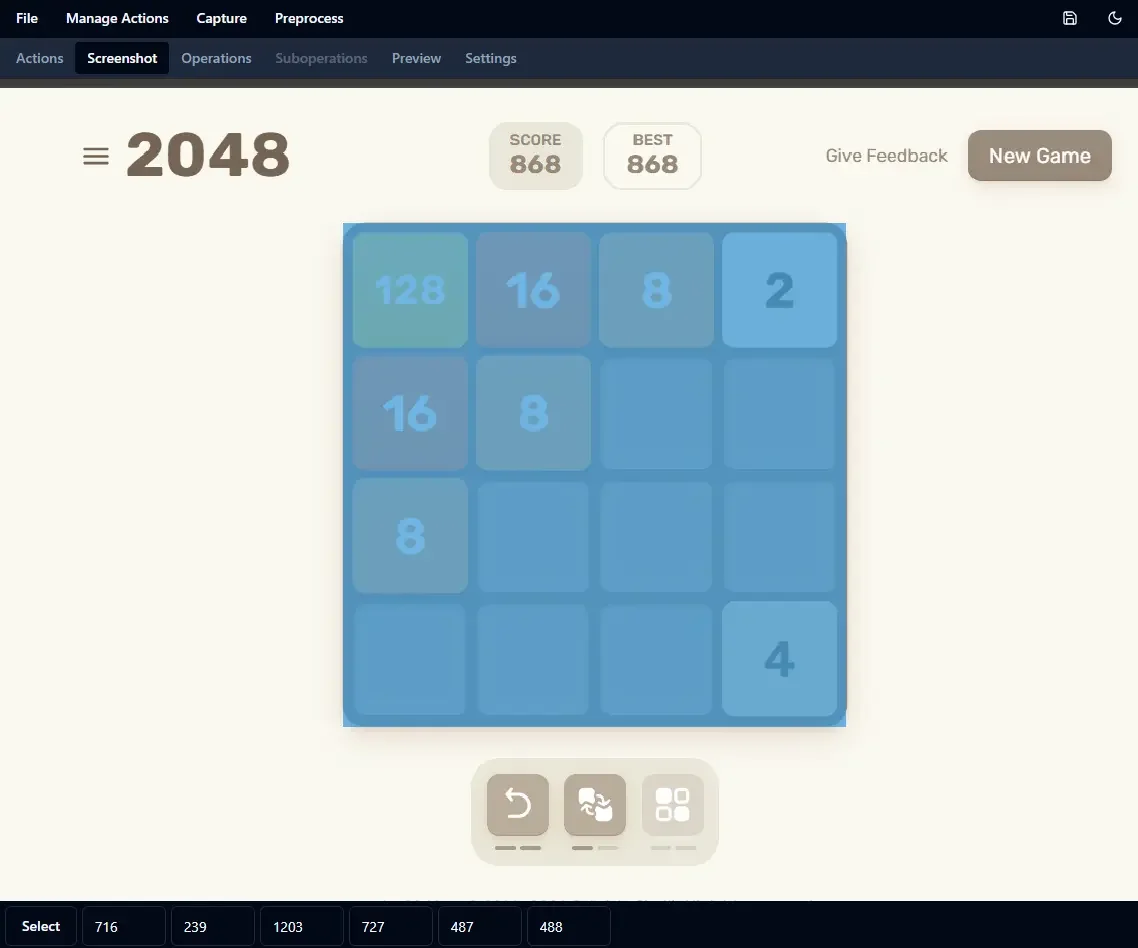
Select the borders on the screenshot.
For the sake of this tutorial, let’s retrieve the color of a single pixel. Create a new Get Pixel Color action: Manage Actions -> Add Action Get Pixel Color. Name your action getColor and select a pixel.
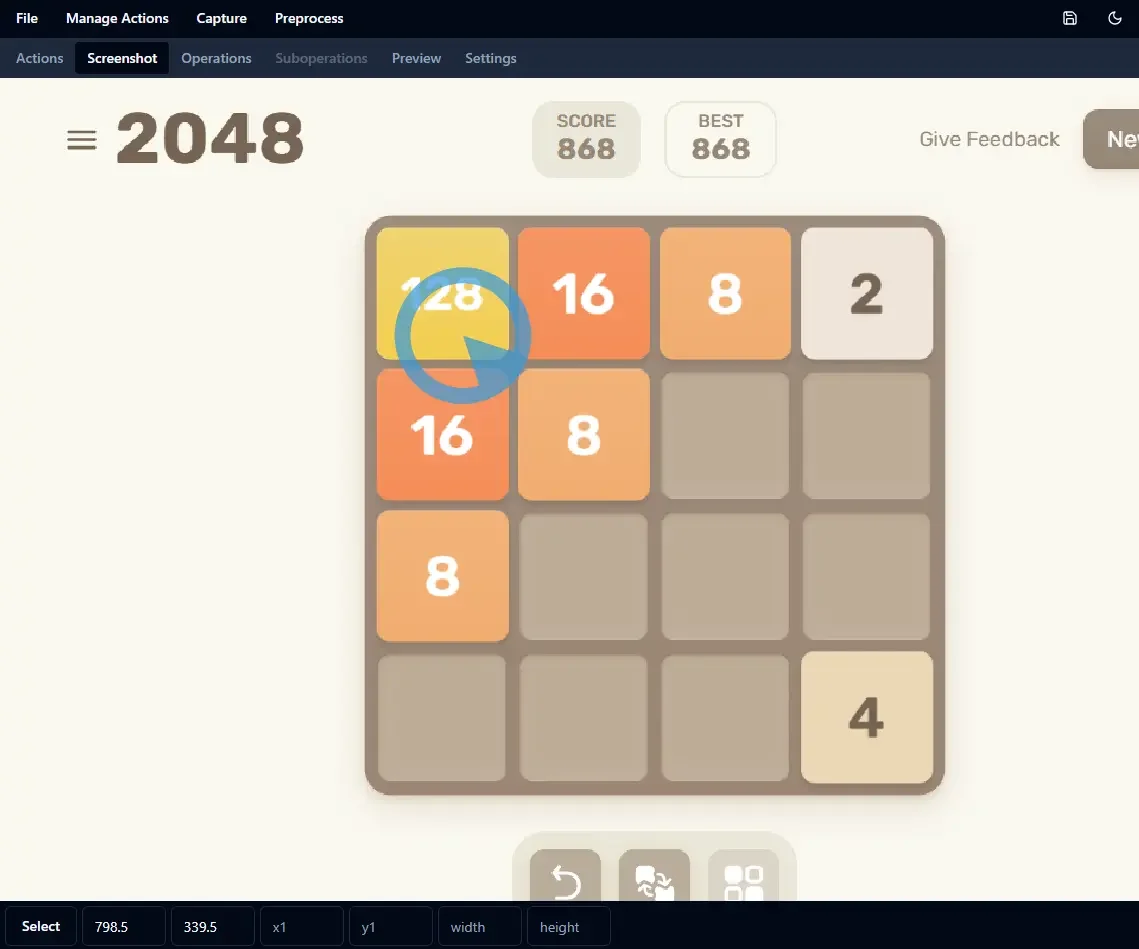
Select a point within the borders on the screenshot.
You can preview the action by clicking on the eye icon.

Preview the action getColor by clicking on the eye icon.
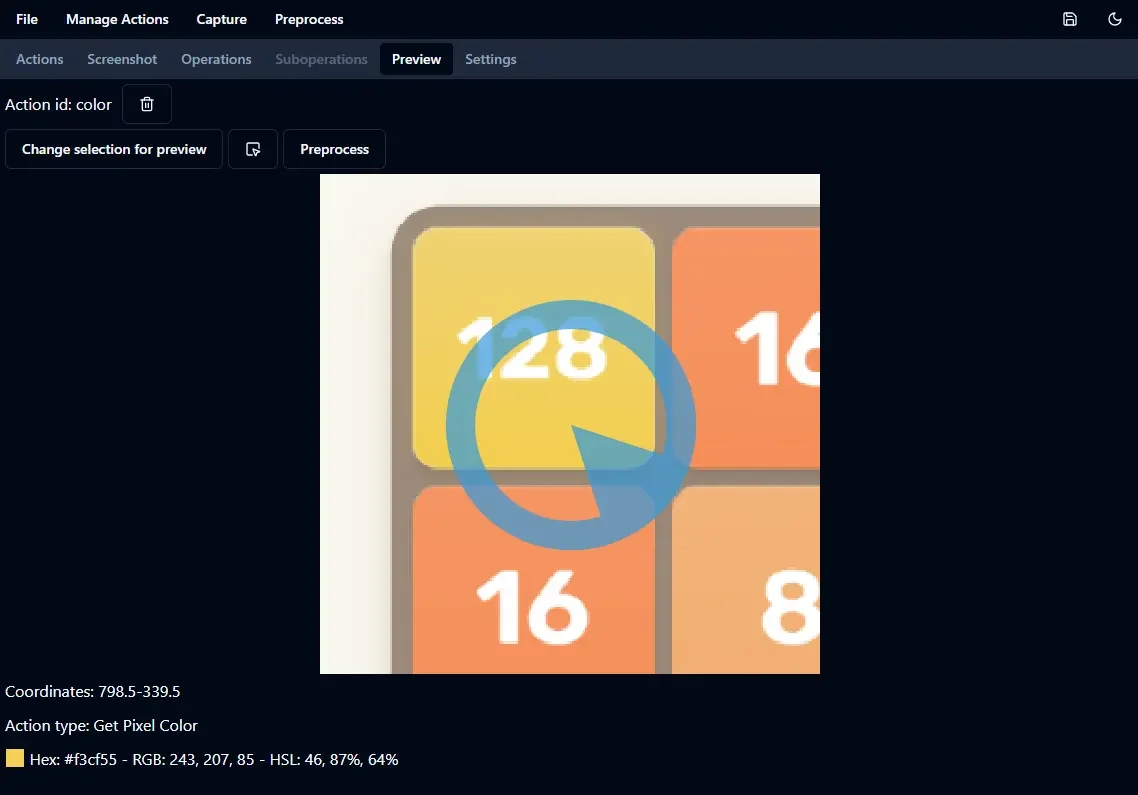
Preview of the action getColor.
The preview shows the pixel color retrieved by the getColor action.
Save the configuration file as guirecognizerConfig.json in your project folder: File -> Save or Ctrl+S. Now the configuration file can be used with guirecognizer.
In your Python script:
from guirecognizer import Recognizer

recognizer = Recognizer('guirecognizerConfig.json')
color = recognizer.executePixelColor('getColor')
print(color)
This produces the following output:
(243, 207, 85)Development
Install the dependencies
(venv) $ pip install -e ".[dev]"Create wheel
(venv) $ python -m buildOCR
Two optical character recognition libraries are supported: EasyOCR and tesseract.
Install EasyOCR (already in the dev dependencies).
(venv) $ python install easyocrInstall pytesseract (already in the dev dependencies).
(venv) $ python install easyocrInstall tesseract: follow installation instruction in https://github.com/tesseract-ocr/tesseract.
Generate full coverage report
(venv) $ coverage run
(venv) $ coverage html
Then open htmlcov/index.html
Documentation
Generate doc
(venv) $ make htmlThen open docsBuild/index.html
Use the script scripts/optimizeImages.sh in a bash console to reduce the size of images before pushing them in git. Image files are converted to webp files.
For instance:
$ ./scripts/optimizeImages.sh docs/_static/appCoding style
Some visual studio code settings of visualStudioCodeSettings.json should be used to ensure some homogeneity in the coding style.
In Visual Studio Code, install extensions
isort to sort Python automatically
Pylance for type checking
Improvements
Improve logger usage: in code and tests.
1 maintainer

Download files
Download the file for your platform. If you're not sure which to choose, learn more about installing packages.
Source Distribution
Built Distribution
Filter files by name, interpreter, ABI, and platform.
If you're not sure about the file name format, learn more about wheel file names.
Copy a direct link to the current filters
File details
Details for the file guirecognizer-0.1.1.tar.gz.
File metadata
- Download URL: guirecognizer-0.1.1.tar.gz
- Upload date:
- Size: 31.8 kB
- Tags: Source
- Uploaded using Trusted Publishing? No
- Uploaded via:
twine/6.1.0 CPython/3.13.3
File hashes
| Algorithm | Hash digest | |
|---|---|---|
| SHA256 |
0e67e5cec07f17493eceea2596a7c013e54da23ad3a0e05a7db7d0d985fbefca
|
|
| MD5 |
1615ba6dd1e31fbea32ccf0962dd29f2
|
|
| BLAKE2b-256 |
c5d0ad5a610ed92037f4f809ca706cc4bee0f7c996369b5fe40b866cfb1c5584
|
File details
Details for the file guirecognizer-0.1.1-py3-none-any.whl.
File metadata
- Download URL: guirecognizer-0.1.1-py3-none-any.whl
- Upload date:
- Size: 23.8 kB
- Tags: Python 3
- Uploaded using Trusted Publishing? No
- Uploaded via:
twine/6.1.0 CPython/3.13.3
File hashes
| Algorithm | Hash digest | |
|---|---|---|
| SHA256 |
7e4a785a037f1103c180b6da62b760cf3b6f063475cc239d6f52c5d695182c6d
|
|
| MD5 |
da6194cf1879c49af1a453843aae3aa0
|
|
| BLAKE2b-256 |
37a3643dd97297a4c06a361ccf0138c1f40b8be6303fedc19465a4f682a048cb
|













