
A System Tool-kit for Real-time Monitoring and Analysis
Verified details
These details have been verified by PyPIProject links
GitHub Statistics
Maintainers

Project description
Guro: A System Tool-kit for Real-time Monitoring and Analysis
Professional real-time monitoring, thermal analysis, and hardware benchmarking.










Overview
Guro is a sophisticated terminal-based diagnostic toolkit designed for granular system resource monitoring and hardware analysis. Built for engineers and enthusiasts, it provides a desktop-class dashboard experience within the command-line environment, delivering precise telemetry across Linux, macOS, and Windows.
🌐 Website: guro.pages.dev
Visual Presentation
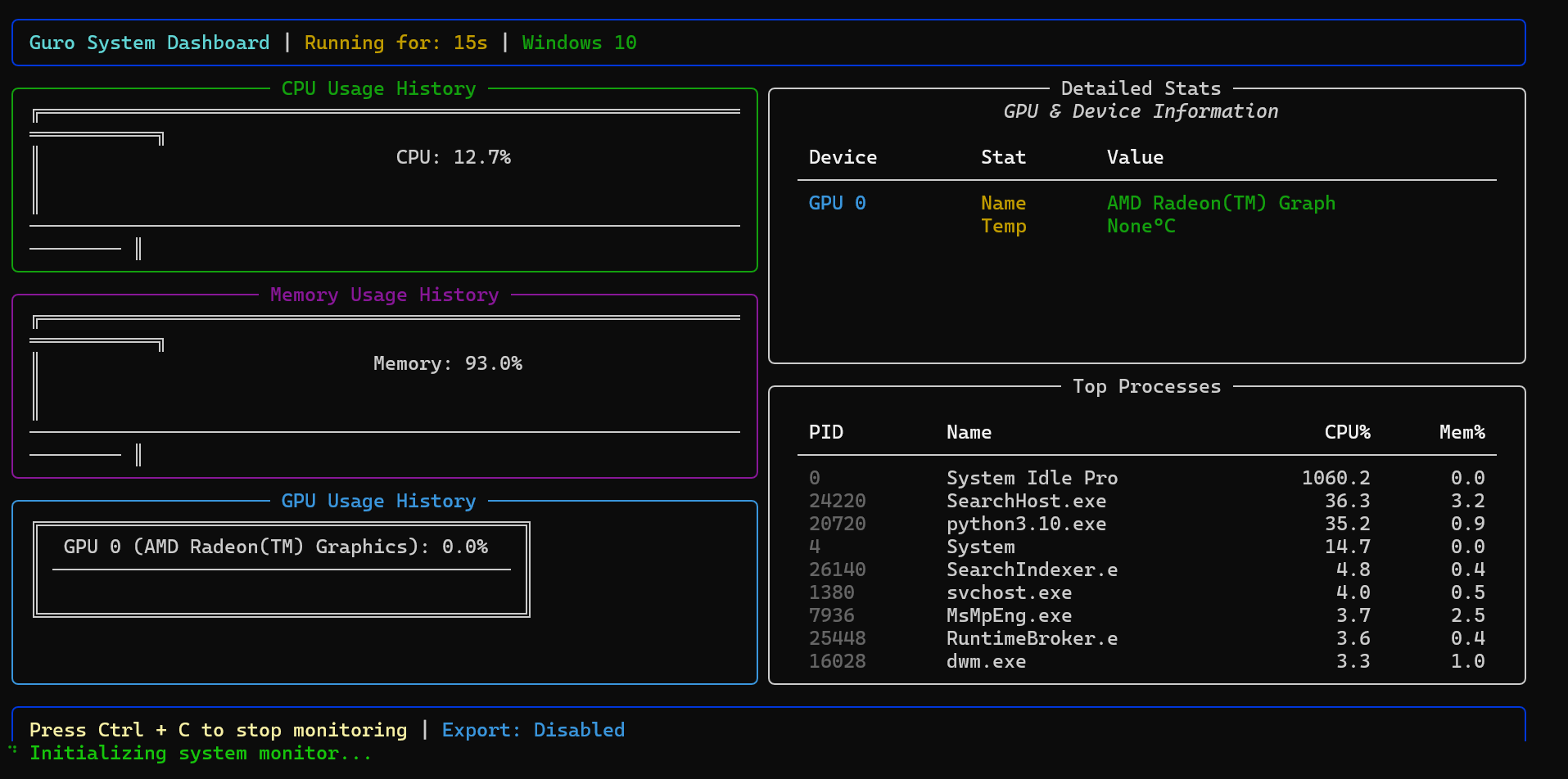
1. Performance Telemetry View
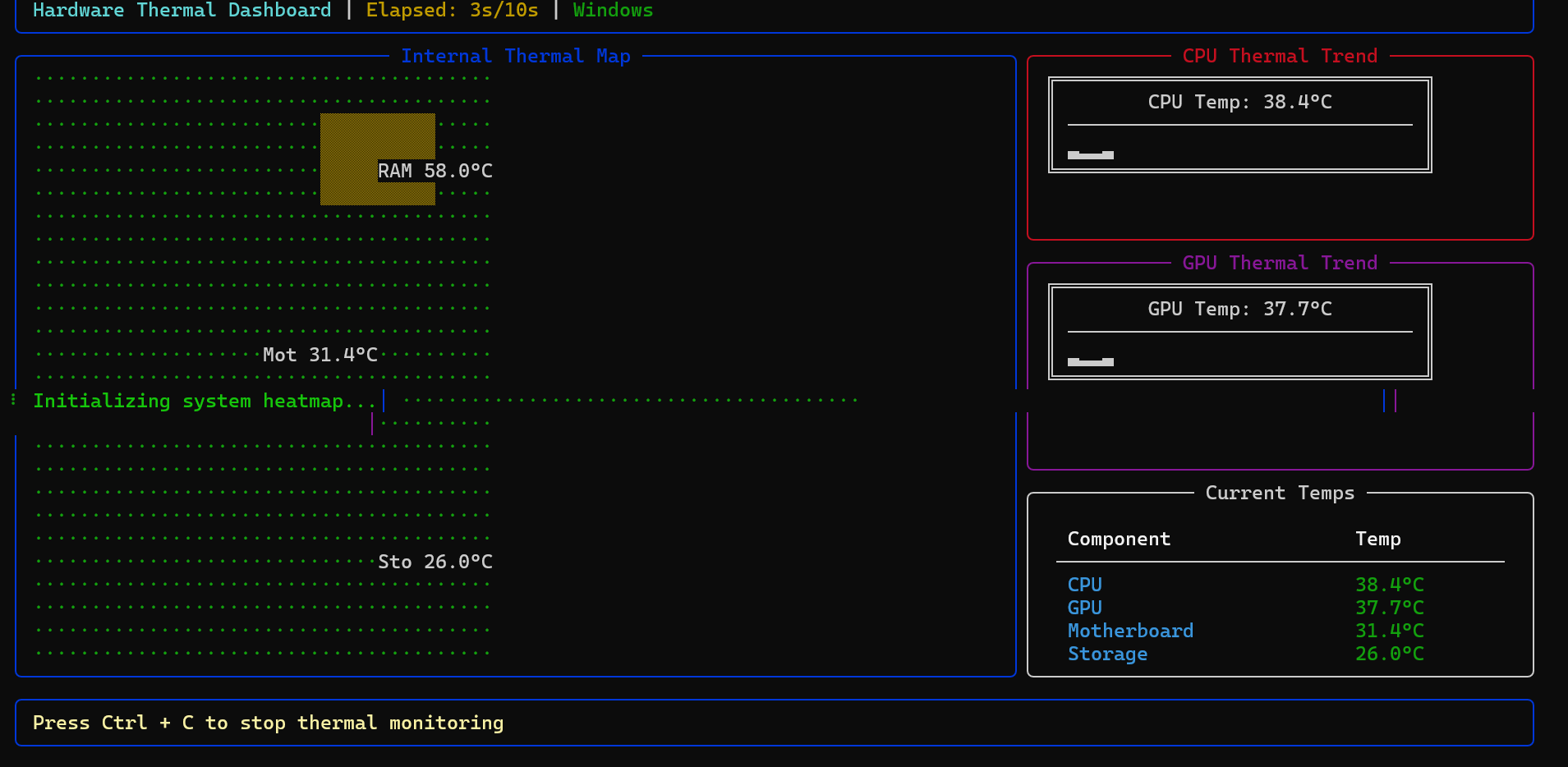
2. Hardware Thermal Schematic
Key Capabilities
Intelligent Monitoring
The performance module utilizes high-frequency sampling to provide real-time ASCII-based historic trending. It offers a comprehensive view of system load including individual core utilization and physical/virtual memory envelopes.
Thermal Intelligence
Guro implements a robust, regex-free data acquisition layer for hardware sensors. By interfacing directly with lm-sensors on Linux and WMI on Windows, it provides reliable thermal mapping even across diverse kernel and driver versions.
Hardware-Agnostic Benchmarking
The benchmarking suite is designed with hardware safety as a priority. It ensures system stability by monitoring thermal thresholds during heavy load tests. It features full awareness for NVIDIA, AMD, and Integrated graphics solutions.
Network Intelligence
Real-time bandwidth monitoring with per-interface upload/download sparklines, TCP state distribution (ESTABLISHED, LISTEN, TIME_WAIT, etc.), process-level connection tracking, and /proc/net/snmp protocol statistics — all with zero additional dependencies beyond psutil.
Installation
Standard Method
pip install guro
Isolated Environment (Recommended)
pipx install guro
Operational Interface
Access Guro via its unified command-line interface.
| Module | Command | Description |
|---|---|---|
| Monitor | guro monitor |
Launches the interactive system performance dashboard. |
| Thermal | guro heatmap |
Initiates spatial hardware heatmapping and trend analysis. |
| Graphics | guro gpu |
Executes a diagnostic status report for all detected GPUs. |
| Bench | guro benchmark |
Performs high-load system stability and speed testing. |
| Network | guro network |
Real-time dashboard: bandwidth, adapters, TCP states, connections. |
guro network --speed |
Snapshot of current upload/download speeds on all interfaces. | |
guro network --interfaces |
List all network adapters with IP, MAC, speed, and duplex. | |
guro network --connections |
Show active TCP connections with process names and states. |
Roadmap
🚀 Coming soon — PRs, ideas, and discussions are warmly welcomed!
| Area | Description |
|---|---|
| GPU Benchmarking 🎮 | ⚠️ NEEDS CONTRIBUTORS! — Native CUDA benchmarks for NVIDIA GPUs: compute performance, memory bandwidth, and thermal profiling. Want to help? |
| Network Diagnostics 🌐 | ✅ Done — Live dashboard with bandwidth sparklines, adapter specs, TCP state analysis, and active connection tracking. |
| Storage I/O 💾 | Real-time disk throughput, IOPS, and queue-depth monitoring for server environments. |
Have a feature in mind? Open an issue or start a discussion — every idea counts.
💖 Why Funding Matters
Testing system-level tooling demands real hardware — high-end GPUs, multi-CPU servers, and diverse cloud VMs for cross-platform validation. Your support helps rent these environments so Guro can be tested thoroughly across Linux, macOS, and Windows.
Community and Development
Guro is an open-source project that adheres to professional development standards.
- Website: guro.pages.dev
- Developer Guide: Comprehensive guidelines can be found in CONTRIBUTING.md.
- Architecture: In-depth module analysis is available in the project documentation.
- License: Released under the MIT License.
- Support: GitHub Sponsors · Buy Me A Coffee
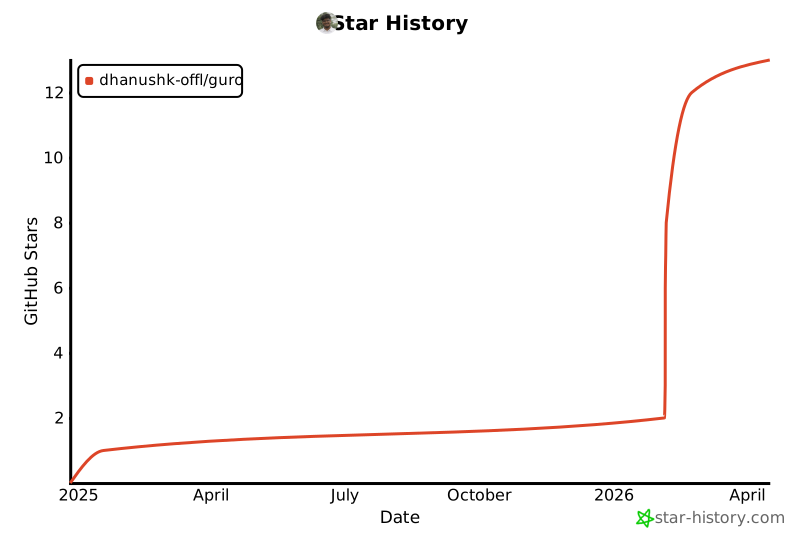
Star History
Project details
Verified details
These details have been verified by PyPIProject links
GitHub Statistics
Maintainers
Release history Release notifications | RSS feed


Download files
Download the file for your platform. If you're not sure which to choose, learn more about installing packages.
Source Distribution
Built Distribution
Filter files by name, interpreter, ABI, and platform.
If you're not sure about the file name format, learn more about wheel file names.
Copy a direct link to the current filters
File details
Details for the file guro-1.1.6.tar.gz.
File metadata
- Download URL: guro-1.1.6.tar.gz
- Upload date:
- Size: 36.1 kB
- Tags: Source
- Uploaded using Trusted Publishing? Yes
- Uploaded via: twine/6.1.0 CPython/3.13.12
File hashes
| Algorithm | Hash digest | |
|---|---|---|
| SHA256 |
ce49a4d776047ebbe6f474fed96678b2e711f8b62a35820ff36d7078732db6fd
|
|
| MD5 |
4fa5292de367afb469fd37ede1ba056e
|
|
| BLAKE2b-256 |
0c8b045e07fd5c1a342fab351fe84fc1d8cca101e210d1a2737efc1494cd19ab
|
Provenance
The following attestation bundles were made for guro-1.1.6.tar.gz:
Publisher:
python-publish.yml on dhanushk-offl/guro
-
Statement:
-
Statement type:
https://in-toto.io/Statement/v1 -
Predicate type:
https://docs.pypi.org/attestations/publish/v1 -
Subject name:
guro-1.1.6.tar.gz -
Subject digest:
ce49a4d776047ebbe6f474fed96678b2e711f8b62a35820ff36d7078732db6fd - Sigstore transparency entry: 1825698797
- Sigstore integration time:
-
Permalink:
dhanushk-offl/guro@8b51219a7171a265f36a98158e75d73220dbd039 -
Branch / Tag:
refs/tags/v1.1.6 - Owner: https://github.com/dhanushk-offl
-
Access:
public
-
Token Issuer:
https://token.actions.githubusercontent.com -
Runner Environment:
github-hosted -
Publication workflow:
python-publish.yml@8b51219a7171a265f36a98158e75d73220dbd039 -
Trigger Event:
release
-
Statement type:
File details
Details for the file guro-1.1.6-py3-none-any.whl.
File metadata
- Download URL: guro-1.1.6-py3-none-any.whl
- Upload date:
- Size: 27.5 kB
- Tags: Python 3
- Uploaded using Trusted Publishing? Yes
- Uploaded via: twine/6.1.0 CPython/3.13.12
File hashes
| Algorithm | Hash digest | |
|---|---|---|
| SHA256 |
805e5be419aeb64193a2ad794b0cd00732eabad88fefa6290b2cf654e0b8eecd
|
|
| MD5 |
bf7ca17d61d7187a157592314d3ebe7c
|
|
| BLAKE2b-256 |
7d3d04b9fae05181d6f7635415cccf00eaf2e4d442ce77c01b20547858e93ef5
|
Provenance
The following attestation bundles were made for guro-1.1.6-py3-none-any.whl:
Publisher:
python-publish.yml on dhanushk-offl/guro
-
Statement:
-
Statement type:
https://in-toto.io/Statement/v1 -
Predicate type:
https://docs.pypi.org/attestations/publish/v1 -
Subject name:
guro-1.1.6-py3-none-any.whl -
Subject digest:
805e5be419aeb64193a2ad794b0cd00732eabad88fefa6290b2cf654e0b8eecd - Sigstore transparency entry: 1825698828
- Sigstore integration time:
-
Permalink:
dhanushk-offl/guro@8b51219a7171a265f36a98158e75d73220dbd039 -
Branch / Tag:
refs/tags/v1.1.6 - Owner: https://github.com/dhanushk-offl
-
Access:
public
-
Token Issuer:
https://token.actions.githubusercontent.com -
Runner Environment:
github-hosted -
Publication workflow:
python-publish.yml@8b51219a7171a265f36a98158e75d73220dbd039 -
Trigger Event:
release
-
Statement type:






