
gutcheck
A poker reading trainer.
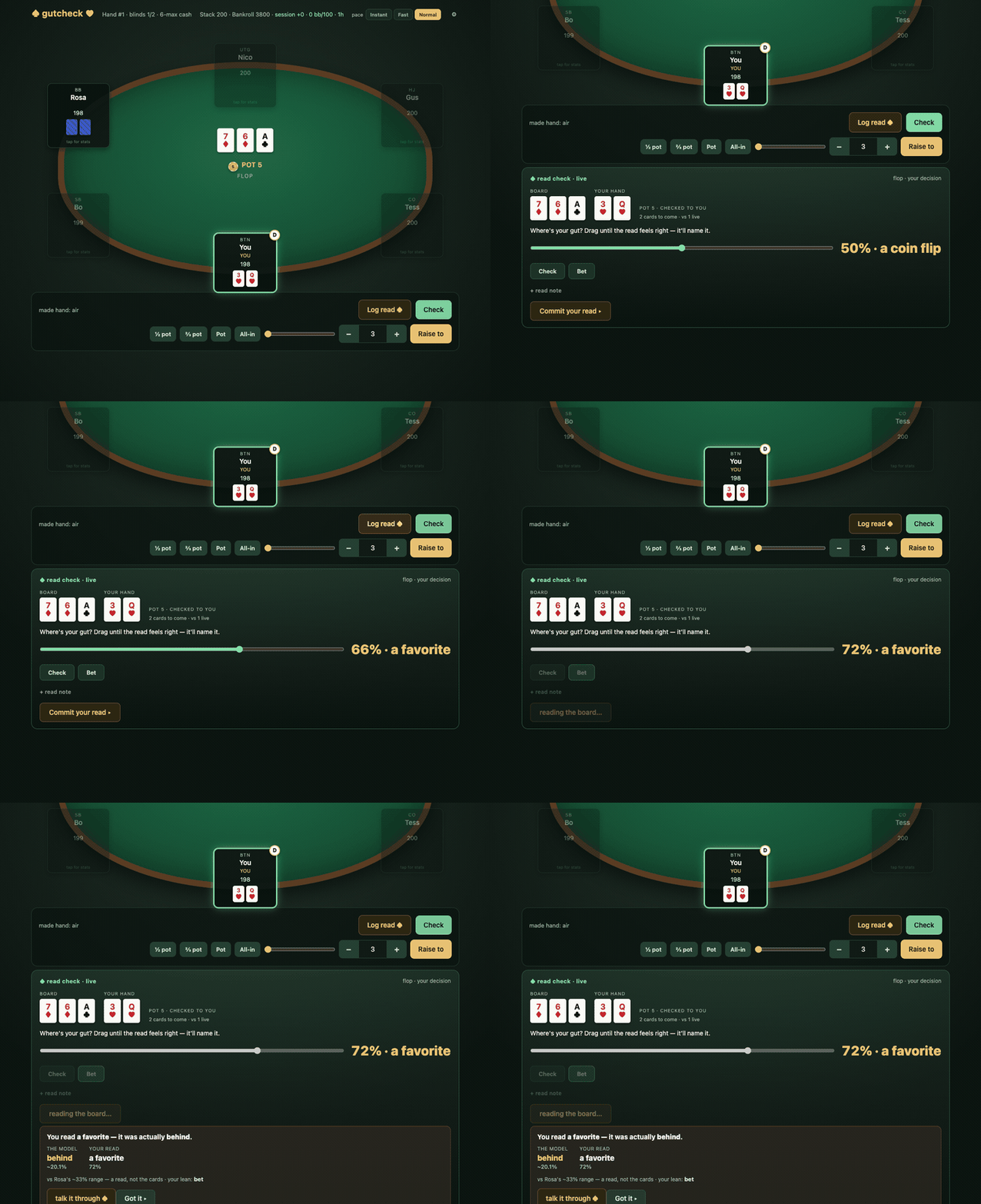
You sit at a 6-max no-limit cash table against five bots. Each one plays a real, exploitable style: the rock, the reg, the calling station. The catch is that their names get shuffled against their styles every session, so you can't memorize who's who. You have to read them from how they play.
Then, when it's your turn, you commit a read. How strong am I here? Is that guy actually on something? The trainer locks in what your gut said and shows you the real number, computed in code, never guessed. You see the gap. Do that a few hundred times and your feel for a table starts to line up with what's actually true.
No account, no API key, no LLM needed. The bots are code and the equity math is exact. There's an optional AI coach if you want someone to talk the spot through with you, but the training loop never depends on it.
pip install gutcheck
gutcheck
That opens a table in your browser at http://127.0.0.1:8777. Everything runs on your machine.
Play with Claude in the room
This is how I actually use it. Start gutcheck, then open a Claude Code session with the gutcheck MCP server added (pip install "gutcheck[mcp]", then claude mcp add gutcheck -- gutcheck-mcp, once). Now Claude can see the table you're sitting at, your hand history and your read stats, and you just talk it out while you play. What do you make of the guy who keeps check-raising? Was that fold as bad as it felt? Where are my reads drifting?
It answers from what's actually on the table and in your history, not from vibes. And it only knows what you could know: the bots' hidden styles stay hidden, and it never sees their cards mid-hand, so it can't read them for you. It has to read them with you. It can't play your hands either. The clicking stays yours.
Why this exists
I play by feel. Most of what happens at a poker table happens faster than I can do math, and I've always thought that was fine, since the gut is doing real work. But a gut that never gets checked isn't a skill. It's a mood.
Solvers tell you the right play. They don't tell you how far off your read was, and that's the part I actually wanted to train. So gutcheck is built around one loop: predict, check against ground truth, notice the gap, go again. You commit before you see the answer, every time, so you can't fudge it after the fact.
That loop isn't really about poker. It's the same thing whether you're reading a table, a codebase, or a room: say what you think is true, check it against something that can't lie to you, keep score. Poker just makes the scoring cheap and the ground truth exact.
How you train
- Sit down. A buy-in comes off your play-money bankroll and you get a fresh table.
- Play. Click any player to see what you've observed (VPIP, aggression, showdowns), never their hidden type. Guess it. There's a reveal button for checking yourself.
- Log a read. On your turn, hit Log read ♠. Set your gut equity on a slider in plain language ("behind", "a coin flip", "a favorite"), pick your lean, add a note if you want. Then the trainer shows you the modeled equity and names the gap.
- Review. After a hand, ⟳ review replays it and stops at each of your decisions. Commit your gut again, then see the exact equity with every runout enumerated against the cards they really held.
- Get up. Cash out. A session report records your results, your biggest pots, and how your reads graded out per villain.
Equity shows up as a felt band first ("a favorite") and the percentage second. The point is to train the feel, not to turn you into a calculator.
Over time the 🎯 Reads view tracks your calibration: all-time accuracy, the recent arc, and whether you're sharpening or drifting.
The optional coach
When you want the why, hit talk it through ♠ after a read and a coach walks through the spot, using the same number you just saw.
Out of the box the coach tries the claude CLI if you have it (it rides your own Claude subscription). If it can't reach anything, it falls back to a plain facts readout: your equity band, the pot odds, what you've observed about each player. That always works, and the startup line tells you which one you're getting.
Worth knowing: the claude provider runs a normal claude -p call, so your own ~/.claude/CLAUDE.md loads with it. If that file says who you are, the coach knows you. It also means the spot you're asking about goes to whichever provider you picked, same as anything else you'd send it.
Open ⚙ Settings to pick a different provider:
| Provider | What you need |
|---|---|
| Claude (default) | the claude CLI (Claude Code), logged in |
| Codex | the codex CLI, logged in |
| Anthropic API | pip install "gutcheck[api]" and your own API key |
| OpenAI API | pip install "gutcheck[api]" and your own API key |
API keys are stored locally in a file only you can read (0600) and never go back out through the settings API. Coaching can be switched off entirely in Settings if you'd rather just see the facts.
Leak memory. With pip install "gutcheck[anneal]", the coach also keeps a memory of your recurring mistakes. When the same misread shows up enough times, it gets a name ("fold reads undercount own equity"), cited back to the exact hands, and it graduates as it keeps happening. Next time you're in that spot, the coach brings it up. It's built on anneal-memory.
Use it from Claude or another MCP client
pip install "gutcheck[mcp]" adds gutcheck-mcp, an MCP server that lets an AI client read your table, your hand history and your calibration, and coach from them. It's read-mostly on purpose: the coach can see what you've observed, not the bots' hidden types, so it can't cheat for you.
Start gutcheck first (the MCP server talks to it on port 8777), then register the MCP server. For Claude Code:
claude mcp add gutcheck -- gutcheck-mcp
For Claude Desktop or any other client, add a stdio server whose command is gutcheck-mcp.
Where your data lives
~/.gutcheck/
    career.json          bankroll + lifetime stats
    session.json         the table you're sitting at
    sessions/<id>.json   session reports
    calibration.json     your read accuracy over time
    history.db           every hand you've played
    coach.db             the local coach channel
    settings.json        your settings
    secrets.json         API keys, if you add any (0600)
    leaks.db             leak memory, with the [anneal] extra
Set GUTCHECK_DATA_DIR to put it somewhere else. gutcheck --reset starts you fresh: it deletes the hand history, session reports and the current table, and keeps a one-step backup of your bankroll, read accuracy and leak memory in case you didn't mean it.
Flags
| Flag | Does |
|---|---|
--port 8777 |
change the port |
--reset |
fresh start (deletes hand history; bankroll, reads and leaks are backed up first) |
--no-browser |
don't open a browser |
--no-coach |
don't run the built-in coach (if you run your own worker) |
--host <ip> |
bind a Tailscale IP to play from another device |
Playing from a tablet
The server is single-player with no auth, so where it binds is the security boundary. It only allows loopback or a Tailscale address (100.64.0.0/10); wildcard, public and LAN binds are refused, with anti-CSRF and DNS-rebinding guards on top.
gutcheck --host <this machine's tailscale IP> --no-browser
# then open http://<that IP>:8777 on the iPad
Don't put it on the open internet. It has no login, by design.
Development
git clone https://github.com/phillipclapham/gutcheck
cd gutcheck
python3 -m venv venv && source venv/bin/activate
pip install -e ".[mcp,anneal]" pytest
GUTCHECK_DATA_DIR="$(mktemp -d)" python -m pytest -q
Always point tests and smoke runs at a throwaway data dir, or they'll play hands against your real bankroll.
The package is gutcheck/: server.py (HTTP), game.py (the table), engine.py and archetypes.py (the hand engine and bot styles), equity.py and ranges.py (the equity oracle and the villain range model), coach*.py (the coach channel and workers), leakstore.py (leak memory), mcp_server.py, and static/index.html with doctrine.md (the table UI and the coaching doctrine). The doctrine is a plain markdown file, so you can read exactly what the coach is told.
Python 3.11+. The only required dependency is pokerkit.
License
Apache-2.0. See LICENSE.
1 maintainer

Metadata
1 maintainer
Release files for gutcheck 0.1.1
For a detailed explanation of source distributions (sdists) and built distributions (wheels), please see the package formats documentation.
Source distribution (sdist)
| File | Size | Uploaded | Provenance | |
|---|---|---|---|---|
| gutcheck-0.1.1.tar.gz | 209.7 kB | Without provenance | Details |
Built distribution (wheel)
| File | Interpreter | ABI | Platform | Reset |
|---|---|---|---|---|
| gutcheck-0.1.1-py3-none-any.whl | Python 3 | none | any | Details |
Total release size: 425.0 kB
Release files / gutcheck-0.1.1.tar.gz
| Download URL | gutcheck-0.1.1.tar.gz |
|---|---|
| Size | 209.7 kB |
| Tags | Source |
|
SHA-256 checksum How to use checksums |
9f41d520709246e7616e624a931083fd17702250801085bbed2de06408870ae2
|
|
BLAKE2b-256 checksum How to use checksums |
aeb6398e315387887cdde17fc7fcc1bc17d0b5d564f3e53cc777583bbf86bd76
|
| Upload date | |
|
Uploaded using Trusted Publishing? What is trusted publishing? |
No |
| Uploaded via |
twine/7.0.0 CPython/3.13.13
|
Release files / gutcheck-0.1.1-py3-none-any.whl
| Download URL | gutcheck-0.1.1-py3-none-any.whl |
|---|---|
| Size | 215.3 kB |
| Tags | Python 3 |
|
SHA-256 checksum How to use checksums |
3236353bc6835c8cbf9450f654aeda142ae1eb00043041cb5713f19900b5c518
|
|
BLAKE2b-256 checksum How to use checksums |
879b6ec821a745b3ccdd55ed41f700dd3ade128170663686f845206626c3a9aa
|
| Upload date | |
|
Uploaded using Trusted Publishing? What is trusted publishing? |
No |
| Uploaded via |
twine/7.0.0 CPython/3.13.13
|
Security for gutcheck 0.1.1
Provenance
Provenance describes where a file came from. On PyPI, provenance is shared via attestations, which provide a verifiable record of the build or publishing details. View details, limitations and caveats.
No provenance found
None of the files in this release were uploaded with provenance metadata.
A note on package security
PyPI is a repository for distributing packages, not a service for auditing them. While third-party security researchers and our staff do their best to detect and remove malicious packages, PyPI cannot guarantee the quality, security or suitability of any given package.
To learn more about protecting yourself from malicious actors, visit our package security documentation.














