
GutenbergPy

GutenbergPy makes it easy to find and download books from Project Gutenberg in Python.
It's aimed at people building machine learning / NLP datasets, but anybody can use it.
The package:
- builds a local cache (SQLite by default, or MongoDB) of the metadata for every Gutenberg book, which you query to find book ids by author, title, subject, language, bookshelf...
- downloads the text of a book and strips the Project Gutenberg header and footer.
It's a faster, smaller alternative to https://github.com/c-w/Gutenberg with fewer third-party dependencies.
About development: http://www.raduangelescu.com/gutenbergpy.html
Contents
- Installation
- Quick start: download a book
- Build the metadata cache
- Tutorial 1: find books
- Tutorial 2: build a text dataset
- Tutorial 3: custom SQL queries
- Tutorial 4: MongoDB
- Settings
- Troubleshooting
- Development
Installation
pip install gutenbergpy
or install it from source:
git clone https://github.com/raduangelescu/gutenbergpy
cd gutenbergpy
pip install .
Requires Python 3.6+.
Quick start: download a book
If you already know a book's Gutenberg id (it's the number in the book's URL, e.g. https://www.gutenberg.org/ebooks/2701 is Moby Dick), you don't need the cache at all:
import gutenbergpy.textget

raw_book   = gutenbergpy.textget.get_text_by_id(2701)  # bytes, with the Project Gutenberg header and license
clean_book = gutenbergpy.textget.strip_headers(raw_book)  # bytes, just the book

text = clean_book.decode('utf-8')
print(text[:200])
Both functions work on bytes; call .decode('utf-8') to get a str.
Downloaded books are kept gzipped in a local texts/ folder, so asking for the same book again doesn't download it again.
Where Project Gutenberg provides one, the clean UTF-8 version of the book is downloaded (https://www.gutenberg.org/cache/epub/<id>/pg<id>.txt). The legacy files are used as fallbacks.
Build the metadata cache
To search for books you first build a local cache of the Gutenberg catalog. You only need to do this once (rebuild it when you want the newest books).
You can build the cache from one of two sources:
from gutenbergpy.gutenbergcache import GutenbergCache

# fast: downloads the ~6MB csv catalog, the cache is ready in a few seconds
GutenbergCache.create(source='csv')

# full: downloads the ~130MB rdf archive, takes 5 to 25 minutes, has more metadata
GutenbergCache.create()  # same as source='rdf'
source='csv' |
source='rdf' (default) |
|
|---|---|---|
| Download size | ~6 MB | ~130 MB |
| Build time (full catalog, ~80,000 books) | a few seconds | 5 to 25 minutes, depending on the disk and CPU |
| Titles, authors, subjects, languages, types, bookshelves, issue date | yes | yes |
| Every language of multi-language books | yes | yes |
Download links and formats (downloadtype queries) |
no | yes |
| Download counts (popularity) | no | yes |
| Author aliases (e.g. Melville, Hermann) | no | yes |
| Alternative titles and full subtitles | no, short title only (Peter Pan) | yes (Peter Pan : $b [Peter and Wendy], Alice in Wonderland) |
| Publisher, rights | no | yes |
Both sources produce the same database layout, so all the queries below work with either one (except the ones that use the fields marked no).
Use source='csv' unless you need download counts, download links or aliases. Downloading a book's text with get_text_by_id works the same way with either source.
create takes these options:
- source
'rdf'(default) or'csv', see above - type
GutenbergCacheTypes.CACHE_TYPE_SQLITE(default) orGutenbergCacheTypes.CACHE_TYPE_MONGODB - refresh delete the old cache and build a new one (default
True). Withrefresh=False, an existing SQLite cache is kept - download download the catalog from Project Gutenberg
- unpack unpack the rdf archive (ignored for the csv source)
- parse parse the catalog in memory
- cache write the cache
- deleteTemp delete the downloaded and unpacked files when done
GutenbergCache.create(refresh=True, download=True, unpack=True, parse=True, cache=True, deleteTemp=True)
To build the cache only if it doesn't exist yet:
if not GutenbergCache.exists():
    GutenbergCache.create(source='csv')
Tutorial 1: find books
Get the cache and query it. query returns a list of Gutenberg book ids, which you can pass straight to get_text_by_id.
from gutenbergpy.gutenbergcache import GutenbergCache

cache = GutenbergCache.get_cache()

# all the books by an author (author names are "Last, First" as on gutenberg.org)
print(cache.query(authors=['Melville, Herman']))

# a book by its exact title
print(cache.query(titles=['Moby Dick; Or, The Whale']))  # [2701, ...]

# several filters are combined with AND, several values for one filter with OR
english_scifi = cache.query(subjects=['Science fiction'], languages=['en'])
print(len(english_scifi))

# books on a gutenberg.org bookshelf
print(cache.query(bookshelves=['Category: Adventure'])[:10])

# books that have a plain text download (rdf source only)
print(cache.query(downloadtype=['text/plain; charset=utf-8'])[:10])
The query fields are:
- languages (ISO codes like
'en','fr','de') - authors
- types (
'Text','Sound','Image'...) - titles
- subjects
- publishers
- bookshelves
- downloadtype (mime types like
'text/plain; charset=utf-8','application/epub+zip'; rdf source only)
The values must match exactly. To search for part of a name or title, use SQL with LIKE (see Tutorial 3).
Tutorial 2: build a text dataset
This saves the cleaned text of every English science fiction book to a folder, one file per book:
import os
import gutenbergpy.textget
from gutenbergpy.gutenbergcache import GutenbergCache

if not GutenbergCache.exists():
    GutenbergCache.create(source='csv')
cache = GutenbergCache.get_cache()

book_ids = cache.query(subjects=['Science fiction'], languages=['en'], types=['Text'])

os.makedirs('dataset', exist_ok=True)
for book_id in book_ids[:20]:  # remove [:20] to get all of them
    path = os.path.join('dataset', '%d.txt' % book_id)
    if os.path.exists(path):
        continue
    try:
        raw = gutenbergpy.textget.get_text_by_id(book_id)
    except gutenbergpy.textget.UnknownDownloadUri:
        continue  # this book has no plain text version
    text = gutenbergpy.textget.strip_headers(raw).decode('utf-8')
    with open(path, 'w', encoding='utf-8') as f:
        f.write(text)
    print('saved', path)
Please be gentle with the Project Gutenberg servers when downloading many books: download each book once (the texts/ folder already does this for you) and don't run downloads in parallel.
Tutorial 3: custom SQL queries
native_query runs any SQL on the SQLite cache and returns a cursor. Use ? placeholders for values:
cache = GutenbergCache.get_cache()

# titles containing a word, with their gutenberg ids
rows = cache.native_query(
    "SELECT DISTINCT books.gutenbergbookid, titles.name FROM books, titles "
    "WHERE titles.bookid = books.id AND titles.name LIKE ?", ('%whale%',)).fetchall()

# number of books per language
rows = cache.native_query(
    "SELECT languages.name, COUNT(*) AS n FROM books, languages "
    "WHERE books.languageid = languages.id GROUP BY languages.name ORDER BY n DESC").fetchall()

# the 10 most downloaded books (rdf source only, the csv has no download counts)
rows = cache.native_query(
    "SELECT books.gutenbergbookid, titles.name, books.numdownloads FROM books, titles "
    "WHERE titles.bookid = books.id ORDER BY books.numdownloads DESC LIMIT 10").fetchall()
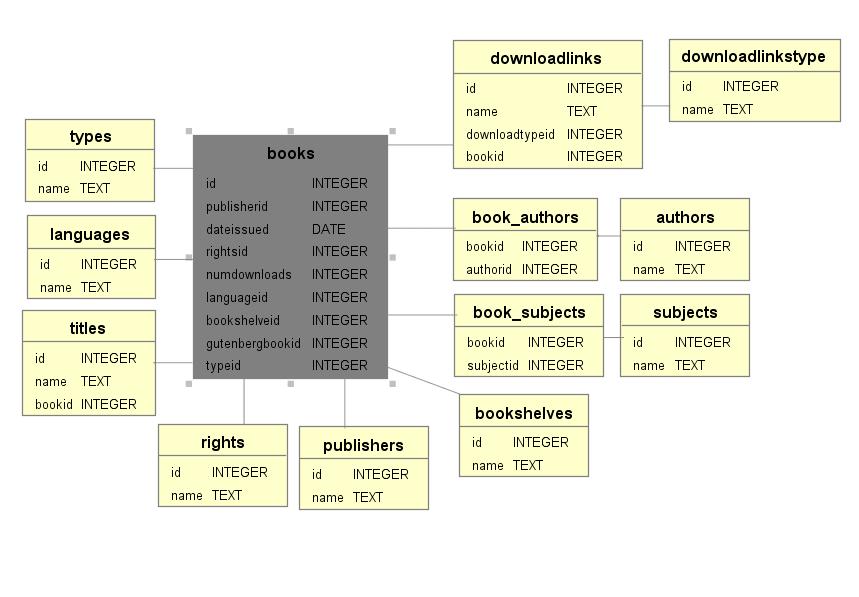
Important: the Gutenberg book id is books.gutenbergbookid. books.id is only the internal row id used to join the tables. Pass gutenbergbookid to get_text_by_id.
The tables:
| Table | Columns | Notes |
|---|---|---|
books |
id, gutenbergbookid, dateissued, numdownloads, languageid, typeid, bookshelveid, publisherid, rightsid |
one row per book; numdownloads is -1 with the csv source |
titles |
id, name, bookid |
bookid → books.id; a book can have several titles |
authors |
id, name |
linked through book_authors(bookid, authorid) |
aliases |
id, name |
author aliases, linked through book_aliases(bookid, authorid) (rdf source only) |
subjects |
id, name |
linked through book_subjects(bookid, subjectid) |
languages, types, bookshelves, publishers, rights |
id, name |
referenced from the books columns of the same name |
downloadlinks |
id, name (the url), downloadtypeid, bookid |
rdf source only |
downloadlinkstype |
id, name (the mime type) |
rdf source only |
Tutorial 4: MongoDB
You need a running MongoDB server (by default mongodb://localhost:27017, see Settings).
from gutenbergpy.gutenbergcache import GutenbergCache, GutenbergCacheTypes

GutenbergCache.create(type=GutenbergCacheTypes.CACHE_TYPE_MONGODB, source='csv')
cache = GutenbergCache.get_cache(GutenbergCacheTypes.CACHE_TYPE_MONGODB)

# the same query fields as SQLite, but the MongoDB cache combines all of them with OR
print(cache.query(authors=['Melville, Herman']))

# native MongoDB query on the books collection
for book in cache.native_query({'type': 'Text', 'language': 'en'}).limit(5):
    print(book['gutenberg_book_id'], book['titles'])
Each document in the books collection has the fields: gutenberg_book_id, titles, authors, subjects, language, type, book_shelf, date_issued, num_downloads, publisher, rights, files.
Settings
Change the settings before calling create or get_cache:
from gutenbergpy.gutenbergcachesettings import GutenbergCacheSettings

GutenbergCacheSettings.set(CacheFilename='gutenbergindex.db', TextFilesCacheFolder='texts')
- CacheFilename SQLite cache file (default
gutenbergindex.db) - CacheUnpackDir where the rdf archive is unpacked (default
cache/epub) - CacheArchiveName file name for the downloaded rdf archive
- CacheRDFDownloadLink url of the rdf archive
- CacheCSVArchiveName file name for the downloaded csv catalog
- CacheCSVDownloadLink url of the csv catalog
- TextFilesCacheFolder where downloaded books are kept (default
texts) - ProgressBarMaxLength width of the progress bars
- MongoDBCacheServer MongoDB connection string (default
mongodb://localhost:27017)
All paths are relative to the current working directory.
Troubleshooting
query()returns nothing for an author or title. The values must match exactly, e.g.'Melville, Herman'and not'Herman Melville'. Use aLIKESQL query to find the exact spelling.downloadtypequeries ornumdownloadsreturn nothing. You built the cache withsource='csv', which doesn't have that data. Rebuild it withGutenbergCache.create().UnknownDownloadUrithe book has no plain text version (e.g. audio books or images).- "Cache already exists" you called
create(refresh=False)and a cache is already there. Userefresh=Trueto rebuild it.
Development
git clone https://github.com/raduangelescu/gutenbergpy
cd gutenbergpy
pip install -e .[test]
pytest              # offline tests, they use small generated rdf/csv catalogs
pytest -m network   # tests that download from gutenberg.org
Every push and pull request runs the tests on Linux, Windows and macOS with Python 3.9 to 3.14 (see .github/workflows/ci.yml). The network tests run weekly, so changes on the Project Gutenberg side get caught.
To release a new version, bump version in setup.cfg, commit, then push a matching tag:
git tag v0.4.0
git push origin master v0.4.0
The CI runs all the tests and builds the package. If everything passes, its deploy job publishes the package to PyPI.
1 maintainer

Metadata
1 maintainer
Release files for gutenbergpy 0.4.0
For a detailed explanation of source distributions (sdists) and built distributions (wheels), please see the package formats documentation.
Source distribution (sdist)
| File | Size | Uploaded | |
|---|---|---|---|
| gutenbergpy-0.4.0.tar.gz | 31.1 kB | Details |
Built distribution (wheel)
| File | Interpreter | ABI | Platform | Reset |
|---|---|---|---|---|
| gutenbergpy-0.4.0-py3-none-any.whl | Python 3 | none | any | Details |
Total release size: 58.3 kB
Release files / gutenbergpy-0.4.0.tar.gz
| Download URL | gutenbergpy-0.4.0.tar.gz |
|---|---|
| Size | 31.1 kB |
| Tags | Source |
|
SHA-256 checksum How to use checksums |
2dd31cc194f065460fbb18ab89086a8c0a94927236ed3d34e11b7d8be81e67fd
|
|
BLAKE2b-256 checksum How to use checksums |
bd483c6b7f84bf22bba76cfc0b77db1c9bd02e8473e3fb099693db405c66d6f6
|
| Upload date | |
|
Uploaded using Trusted Publishing? What is trusted publishing? |
Yes |
| Uploaded via |
twine/7.0.0 CPython/3.13.14
|
Provenance
Provenance describes where a file came from. On PyPI, provenance is shared via attestations, which provide a verifiable record of the build or publishing details. View details, limitations and caveats.


PyPI Publish Attestation
PyPI verified that this artifact, at this checksum, originated from the publisher listed below.
Signed by GitHub Actions, verified by PyPI on Oct 16, 2026.
Transparency logRelease files / gutenbergpy-0.4.0-py3-none-any.whl
| Download URL | gutenbergpy-0.4.0-py3-none-any.whl |
|---|---|
| Size | 27.3 kB |
| Tags | Python 3 |
|
SHA-256 checksum How to use checksums |
a44e98976c9d76afb3fd461b7c57cb72eb6a75698f42d35f4807cf50a9ab9bf7
|
|
BLAKE2b-256 checksum How to use checksums |
f080ea56ad75b853a08fe51b844aed276340db8346cfa23e4afeb9f9ecd0c877
|
| Upload date | |
|
Uploaded using Trusted Publishing? What is trusted publishing? |
Yes |
| Uploaded via |
twine/7.0.0 CPython/3.13.14
|
Provenance
Provenance describes where a file came from. On PyPI, provenance is shared via attestations, which provide a verifiable record of the build or publishing details. View details, limitations and caveats.
PyPI Publish Attestation
PyPI verified that this artifact, at this checksum, originated from the publisher listed below.
Signed by GitHub Actions, verified by PyPI on Oct 16, 2026.
Transparency log













