
Flexible, portable, and efficient geospatial evaluations for a variety of data.

Project description




GVAL (pronounced "g-val") is a high-level Python framework to evaluate the skill of geospatial datasets by comparing candidates to benchmark maps producing agreement maps and metrics.
GVAL is intended to work on raster and vector files as xarray and geopandas objects, respectively. Abilities to prepare or homogenize maps for comparison are included. The comparisons are based on scoring philosophies for three statistical data types including categorical, continuous, and probabilistic.
See the full documentation.
WARNING:
- Our current public API and output formats are likely to change in the future.
- Software is provided "AS-IS" without any guarantees. Please QA/QC your metrics carefully until this project matures.
Installation
General Use
To use this package:
pip install gval
Or for bleeding edge updates install from the repository:
pip install 'git+https://github.com/NOAA-OWP/gval'
Using GVAL
Categorical Example
An example of running the entire process for two-class categorical rasters with one function using minimal arguments is demonstrated below:
import gval
import rioxarray as rxr

candidate = rxr.open_rasterio('candidate_map_two_class_categorical.tif', mask_and_scale=True)
benchmark = rxr.open_rasterio('benchmark_map_two_class_categorical.tif', mask_and_scale=True)

(agreement_map,
 crosstab_table,
 metric_table) = candidate.gval.categorical_compare(benchmark,
                                                   positive_categories=[2],
                                                   negative_categories=[0, 1])
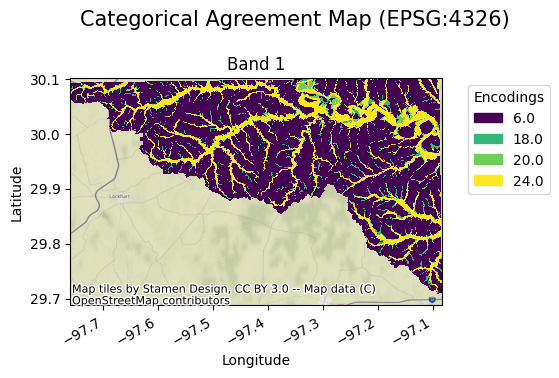
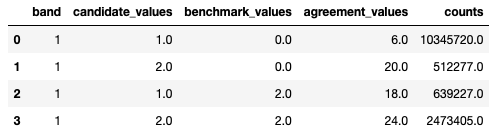
Categorical Outputs
agreement_map
crosstab_table
metric_table

Continuous Example
The same can be done for rasters with continuous valued statistical data types as shown below (in this case only a subset of the default statistics will be run):
import gval
import rioxarray as rxr

candidate = rxr.open_rasterio('livneh_2011_precip.tif', mask_and_scale=True) # VIC
benchmark = rxr.open_rasterio('prism_2011_precip.tif', mask_and_scale=True) # PRISM

agreement, metric_table = candidate.gval.continuous_compare(
    benchmark,
    metrics=[
        "coefficient_of_determination",
        "mean_percentage_error",
        "mean_absolute_percentage_error",
        "mean_normalized_mean_absolute_error"
    ]
)
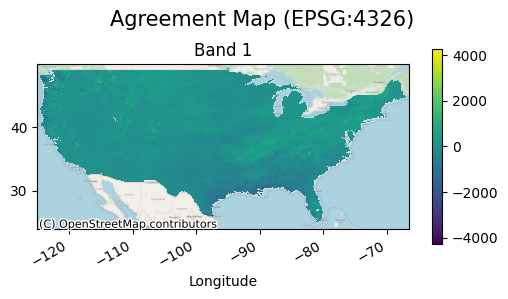
Continuous Outputs
agreement_map
metric_table

Catalog Example
Entire catalogs can be compared in GVAL, which are represented by dataframes of maps. The following is a candidate and benchmark catalog for continuous datasets:
candidate_catalog

benchmark_catalog

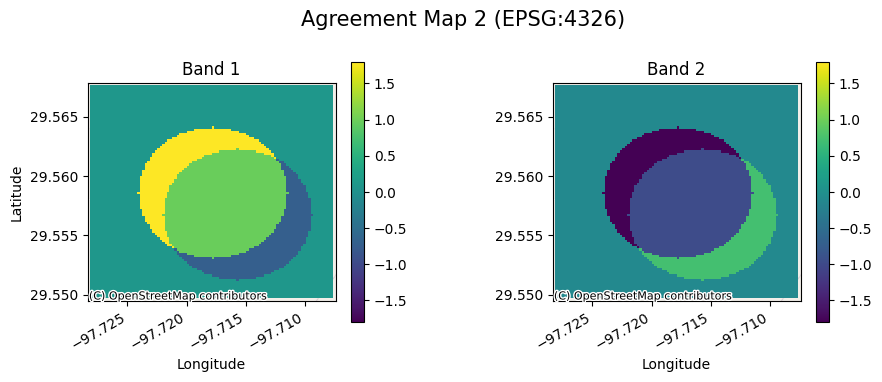
With the following code a comparison of each pair of maps can be run
with the following code. Since the parameter agreement_map_field is
provided the column agreement_maps found in the candidate catalog will
be used to export the agreement map to that location. (Note the first
pair of candidate and benchmark maps are single band rasters while the
second pair are multiband rasters):
import pandas as pd

from gval.catalogs.catalogs import catalog_compare

candidate_continuous_catalog = pd.read_csv('candidate_catalog_0.csv')
benchmark_continuous_catalog = pd.read_csv('benchmark_catalog_0.csv')

arguments = {
    "candidate_catalog": candidate_continuous_catalog,
    "benchmark_catalog": benchmark_continuous_catalog,
    "on": "compare_id",
    "agreement_map_field": "agreement_maps",
    "map_ids": "map_id",
    "how": "inner",
    "compare_type": "continuous",
    "compare_kwargs": {
        "metrics": (
            "coefficient_of_determination",
            "mean_absolute_error",
            "mean_absolute_percentage_error",
        ),
        "encode_nodata": True,
        "nodata": -9999,
    },
    "open_kwargs": {
        "mask_and_scale": True,
        "masked": True
    }
}

agreement_continuous_catalog = catalog_compare(**arguments)
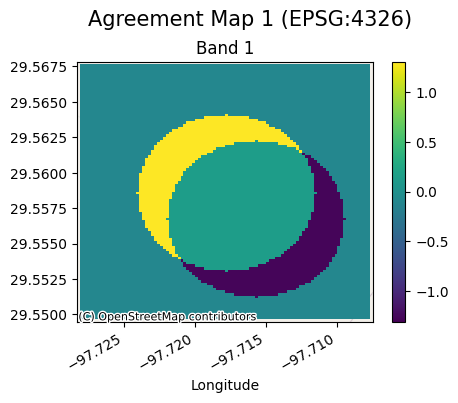
Catalog Outputs
agreement_map
catalog_metrics
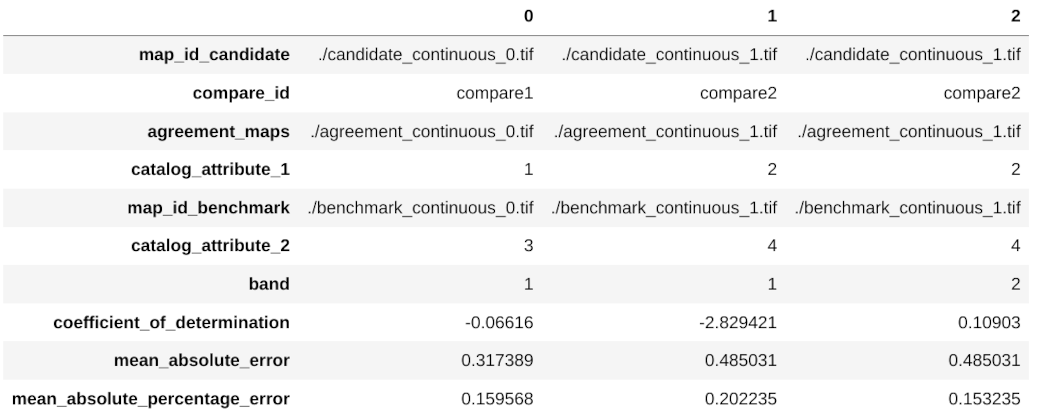
(Note that both catalog level attributes in the candidate and benchmark catalogs are present in the catalog metrics table.)
For more detailed examples of how to use this software, check out these notebook tutorials.
Contributing
Guidelines for contributing to this repository can be found at CONTRIBUTING.
Citation
Please cite our work if using this package. See 'cite this repository' in the about section on GitHub or refer to CITATION.cff
Release history Release notifications | RSS feed


Download files
Download the file for your platform. If you're not sure which to choose, learn more about installing packages.
Source Distribution
Built Distribution
Filter files by name, interpreter, ABI, and platform.
If you're not sure about the file name format, learn more about wheel file names.
Copy a direct link to the current filters
File details
Details for the file gval-0.2.14.tar.gz.
File metadata
- Download URL: gval-0.2.14.tar.gz
- Upload date:
- Size: 76.9 kB
- Tags: Source
- Uploaded using Trusted Publishing? No
- Uploaded via: twine/3.4.2 importlib_metadata/9.0.0 pkginfo/1.12.1.2 requests/2.34.2 requests-toolbelt/1.0.0 tqdm/4.67.3 CPython/3.12.13
File hashes
| Algorithm | Hash digest | |
|---|---|---|
| SHA256 |
0fbfb24c790c070511a6ed96f9f65b28ad2f8dea33a1cbf710121130b647643c
|
|
| MD5 |
f18b71f732204e5b23f15144d488eeef
|
|
| BLAKE2b-256 |
3cb4e159660c8c0e7d8905e4613b24a887683733352f4ec530cf006cbfc9ca7e
|
File details
Details for the file gval-0.2.14-py3-none-any.whl.
File metadata
- Download URL: gval-0.2.14-py3-none-any.whl
- Upload date:
- Size: 73.2 kB
- Tags: Python 3
- Uploaded using Trusted Publishing? No
- Uploaded via: twine/3.4.2 importlib_metadata/9.0.0 pkginfo/1.12.1.2 requests/2.34.2 requests-toolbelt/1.0.0 tqdm/4.67.3 CPython/3.12.13
File hashes
| Algorithm | Hash digest | |
|---|---|---|
| SHA256 |
30977649d09b32fb0a42a4109b3a88898a87f068e6755cf8bc902e485045beda
|
|
| MD5 |
a6fe2ae09333ff1d6157d2c290b41902
|
|
| BLAKE2b-256 |
ea548876661af3d9c47a8d6b351d68e7995fdd05afe5d723d44ccea7c35d6a71
|






