




Generate and render Graphviz diagrams with clear, maintainable code by separating presentation from structure.
The heart of gvdot is the class Dot, a DOT language builder. Applications
create diagrams using Dot methods, then either convert the instance to DOT
language text or render it as SVG or an image. Users can also interactively
display Dot objects in notebooks.
Example
Suppose we want to generate diagrams of nondeterministic finite automata like this:
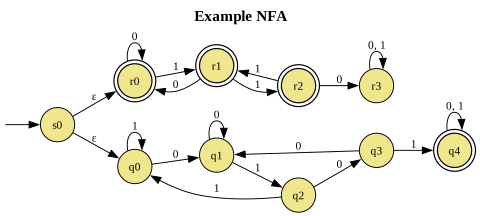
represented by instances of
@dataclass
class NFA:
    alphabet : str
    delta    : dict[str, list[list[str]]]
    final    : list[str]
    start    : str
where delta["q"][0] is the list of states reached from state q by epsilon
transitions, and delta["q"][i] is the list of states reached from q by
symbol alphabet[i-1].
We start by defining a theme, a normal Dot object from which other dot
objects can inherit graph attributes, default attributes, and roles.
nfa_theme = (Dot()
    .all_default(fontsize=12)
    .node_default(shape="circle", style="filled", fillcolor="khaki")
    .node_role("init", label="", shape="none", width=0, height=0)
    .node_role("final", shape="doublecircle", penwidth=1.25)
    .graph(rankdir="LR", labelloc="t", fontsize=16))
The theme defines two gvdot roles, collections of Graphviz attribute values that applications can assign to diagram elements by name.
Having isolated presentation attributes in a theme, our generation code is straightforward.
def nfa_diagram(nfa:NFA, title:str):
dot = Dot(directed=True).use_theme(nfa_theme)
dot.graph(label=Markup(f"<b>{title}</b>"))
init_id = Nonce()
dot.node(init_id, role="init")
dot.edge(init_id, nfa.start)
for state in nfa.final:
dot.node(state, role="final")
for state, transitions in nfa.delta.items():
merged = defaultdict(list)
for index, targets in enumerate(transitions):
for target in targets:
merged[target].append(
nfa.alphabet[index-1] if index > 0 else 'ε')
for target, symbols in merged.items():
dot.edge(state, target, label=", ".join(symbols))
return dot
We can render and save the diagram above with
example = NFA("01", {
    "s0": [["q0", "r0"], [], []],
    "q0": [[], ["q1"], ["q0"]],
    "q1": [[], ["q1"], ["q2"]],
    "q2": [[], ["q3"], ["q0"]],
    "q3": [[], ["q1"], ["q4"]],
    "q4": [[], ["q4"], ["q4"]],
    "r0": [[], ["r0"], ["r1"]],
    "r1": [[], ["r0"], ["r2"]],
    "r2": [[], ["r3"], ["r1"]],
    "r3": [[], ["r3"], ["r3"]],
}, ["q4","r0","r1","r2"], "s0")

nfa_diagram(example,"Example NFA").save("example.svg")
In a notebook, we can directly display the diagram from a cell containing
nfa_diagram(example,"Example NFA").show()
You can find this NFA example and others in the examples directory. The documentation includes a Quick Tour
Installation
Using Python 3.12 or greater, you can install gvdot with
$ pip install gvdot
To ensure the optional notebook support is enabled, use
$ pip install gvdot[ipython]
Rendering
requires a Graphviz installation. You can determine if one is in your PATH
with
$ dot -V
To install Graphviz, see https://graphviz.org/download.
Reliability
gvdot includes automated tests with 100% code coverage, which are run on MacOS, Linux, and Windows with Python 3.12, 3.13, and 3.14. See the GitHub workflow for details.
1 maintainer

Metadata
1 maintainer
Release files for gvdot 1.2.3
For a detailed explanation of source distributions (sdists) and built distributions (wheels), please see the package formats documentation.
Source distribution (sdist)
| File | Size | Uploaded | |
|---|---|---|---|
| gvdot-1.2.3.tar.gz | 18.8 kB | Details |
Built distribution (wheel)
| File | Interpreter | ABI | Platform | Reset |
|---|---|---|---|---|
| gvdot-1.2.3-py3-none-any.whl | Python 3 | none | any | Details |
Total release size: 37.4 kB
Release files / gvdot-1.2.3.tar.gz
| Download URL | gvdot-1.2.3.tar.gz |
|---|---|
| Size | 18.8 kB |
| Tags | Source |
|
SHA-256 checksum How to use checksums |
31cbd464fecfd97c42a936054e7bd5a19be27afd1117f45c8dad693b6b1941bb
|
|
BLAKE2b-256 checksum How to use checksums |
69bc66ece8074d48d9bb9cb65fc2b1f3a956063c98d95ab6614cddaeb4dce726
|
| Upload date | |
|
Uploaded using Trusted Publishing? What is trusted publishing? |
No |
| Uploaded via |
twine/7.0.0 CPython/3.12.10
|
Release files / gvdot-1.2.3-py3-none-any.whl
| Download URL | gvdot-1.2.3-py3-none-any.whl |
|---|---|
| Size | 18.6 kB |
| Tags | Python 3 |
|
SHA-256 checksum How to use checksums |
41b6d830a69eea072721f1a2dbcfbac4f8f01e96240419f3964158b1a07017ce
|
|
BLAKE2b-256 checksum How to use checksums |
7bab429a9026e1aec49c3b0462cdbb7945be27d33977c21f938c661865cd370a
|
| Upload date | |
|
Uploaded using Trusted Publishing? What is trusted publishing? |
No |
| Uploaded via |
twine/7.0.0 CPython/3.12.10
|














