
gxhash-py






Python bindings for GxHash, a blazingly fast and robust non-cryptographic hashing algorithm.
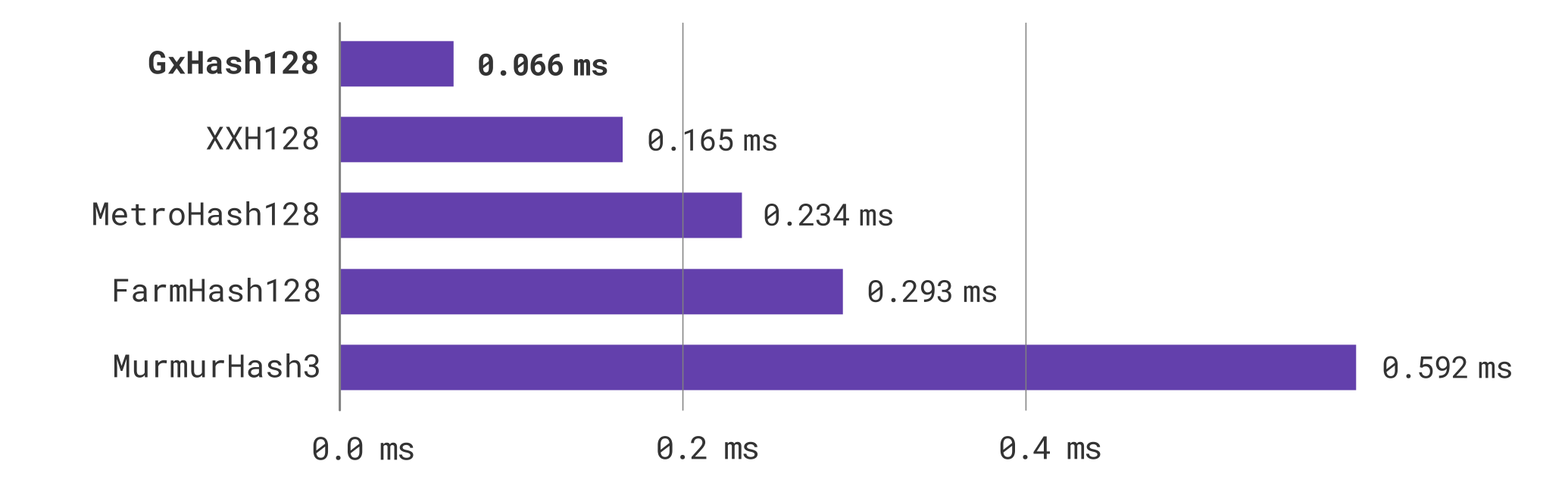
Hashing a 4 MiB payload
Highlights
- Fastest non-cryptographic hash algorithm of its class1.
- 100x faster than MD5 and up to 3x faster than xxHash on larger payloads.
- Support for async hashing with multithreaded parallelism for non-blocking applications.
- Provides a performant, drop-in replacement for the built-in hashlib module.
- Guaranteed stable hashes across all supported platforms.
- Passes all SMHasher tests and produces high-quality, hardware-accelerated 32/64/128-bit hashes.
- Fully-typed, clean API with uncompromising strict-mode conformance across all major type checkers.
- Pure Rust backend with zero additional Python runtime overhead.
- Zero-copy data access across the FFI boundary via the buffer protocol.
- SIMD-accelerated hexdigest encoding with SSSE3/NEON intrinsics.
- Zero-dependency installations on all platforms supported by maturin and puccinialin.
Installation
gxhash is available on PyPI and can be installed via pip.
pip install gxhash
For the best throughput, you can allow gxhash to use wider registers by installing with the MATURIN_PEP517_ARGS variable.
MATURIN_PEP517_ARGS="--features hybrid" pip install gxhash
By default, gxhash attempts to detect and use your system's vectorisation features. You can manually control this by setting the specific RUSTFLAGS for your machine. For x64 systems, the minimum required features are aes and ssse3.
RUSTFLAGS="-C target-feature=+aes,+ssse3" pip install gxhash
For ARM64 systems, the minimum required features are aes and neon.
RUSTFLAGS="-C target-feature=+aes,+neon" pip install gxhash
gxhash compiles with a pinned nightly toolchain. If you are restricted to a minimum Rust version, you can override the default toolchain with the RUSTUP_TOOLCHAIN variable.
RUSTUP_TOOLCHAIN="1.83.0" pip install gxhash
Supported Platforms
gxhash is well supported across a wide range of platforms, thanks in part to maturin, and more specifically puccinialin. Therefore, gxhash supports all platforms that maturin and puccinialin support. gxhash is also actively tested on the following platforms:
- Ubuntu 24.04 x64
- Ubuntu 24.04 ARM64
- macOS 26 x64
- macOS 15 ARM64
- Windows Server 2025 x64
- Windows 11 ARM64
Usage
Hashing bytes.
from gxhash import GxHash32


def main() -> None:
    gxhash = GxHash32(seed=0)
    result = gxhash.hash(b"Hello, world!")


if __name__ == "__main__":
    main()
Hashing bytes asynchronously.
from asyncio import run
from gxhash import GxHash128


async def main() -> None:
    gxhash = GxHash128(seed=0)
    result = await gxhash.hash_async(b"Hello, world!")


if __name__ == "__main__":
    run(main())
As a drop-in replacement for hashlib, hash computations are deferred and only computed when digest or hexdigest is called
from gxhash.hashlib import gxhash128


def main() -> None:
    hasher = gxhash128(data=b"Hello, world!", seed=0)
    result = hasher.hexdigest()


if __name__ == "__main__":
    main()
Contribute
Read the CONTRIBUTING.md docs for development setup and guidelines.
-
Highest throughput across every payload size, compared against non-cryptographic hash algorithms that pass the SMHasher quality tests. ↩
1 maintainer

Metadata
1 maintainer
Release files for gxhash 0.7.1
For a detailed explanation of source distributions (sdists) and built distributions (wheels), please see the package formats documentation.
Source distribution (sdist)
| File | Size | Uploaded | |
|---|---|---|---|
| gxhash-0.7.1.tar.gz | 12.4 kB | Details |
Release files / gxhash-0.7.1.tar.gz
| Download URL | gxhash-0.7.1.tar.gz |
|---|---|
| Size | 12.4 kB |
| Tags | Source |
|
SHA-256 checksum How to use checksums |
178c9121d566c550bc0565196bdc82517ee7ded64a2d4630b9023bb17bd7cfdd
|
|
BLAKE2b-256 checksum How to use checksums |
9af5974c5182bbd67863cd557706861769da829be3f4c856655914a2bc2a8689
|
| Upload date | |
|
Uploaded using Trusted Publishing? What is trusted publishing? |
Yes |
| Uploaded via |
uv/0.13.0 {"installer":{"name":"uv","version":"0.13.0","subcommand":["publish"]},"python":null,"implementation":{"name":null,"version":null},"distro":{"name":"Ubuntu","version":"24.04","id":"noble","libc":null},"system":{"name":null,"release":null},"cpu":null,"openssl_version":null,"setuptools_version":null,"rustc_version":null,"ci":true}
|














