
h1grep 
Search HackerOne's disclosed reports from your terminal.
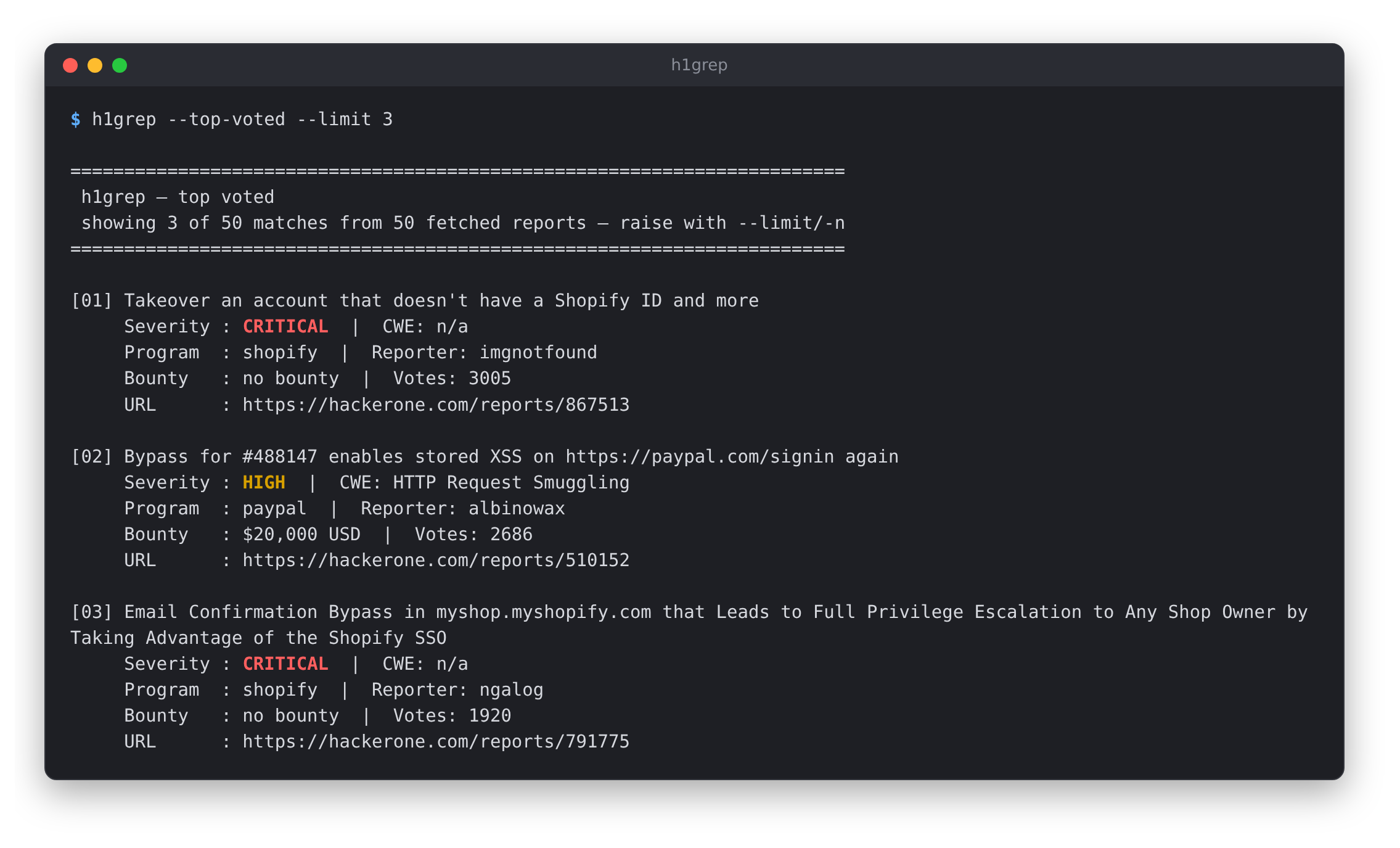
h1grep queries the public Hacktivity feed and lets you filter it by keyword, severity, CWE and program, or sort it by votes or bounty. It's handy for checking what has already been reported against a program, and for reading the reports that paid well or that other hunters rated highly.
You don't need an API key or an account. It only reads public data, and it's a single Python file with no dependencies.
Install
pip install h1grep
Or run it from a clone. There's nothing to install:
git clone https://github.com/sonnycroco/h1grep
cd h1grep
python3 h1grep.py --top-voted --limit 25
Needs Python 3.9 or newer.
Examples
Find reports on a bug class
Keyword, severity and CWE filters run on your machine after the results are downloaded, so fetch a few pages when you filter. Here are the top-voted critical and high SSRF reports from the first 250 results:
h1grep --top-voted --query "SSRF" --severity critical high --pages 5
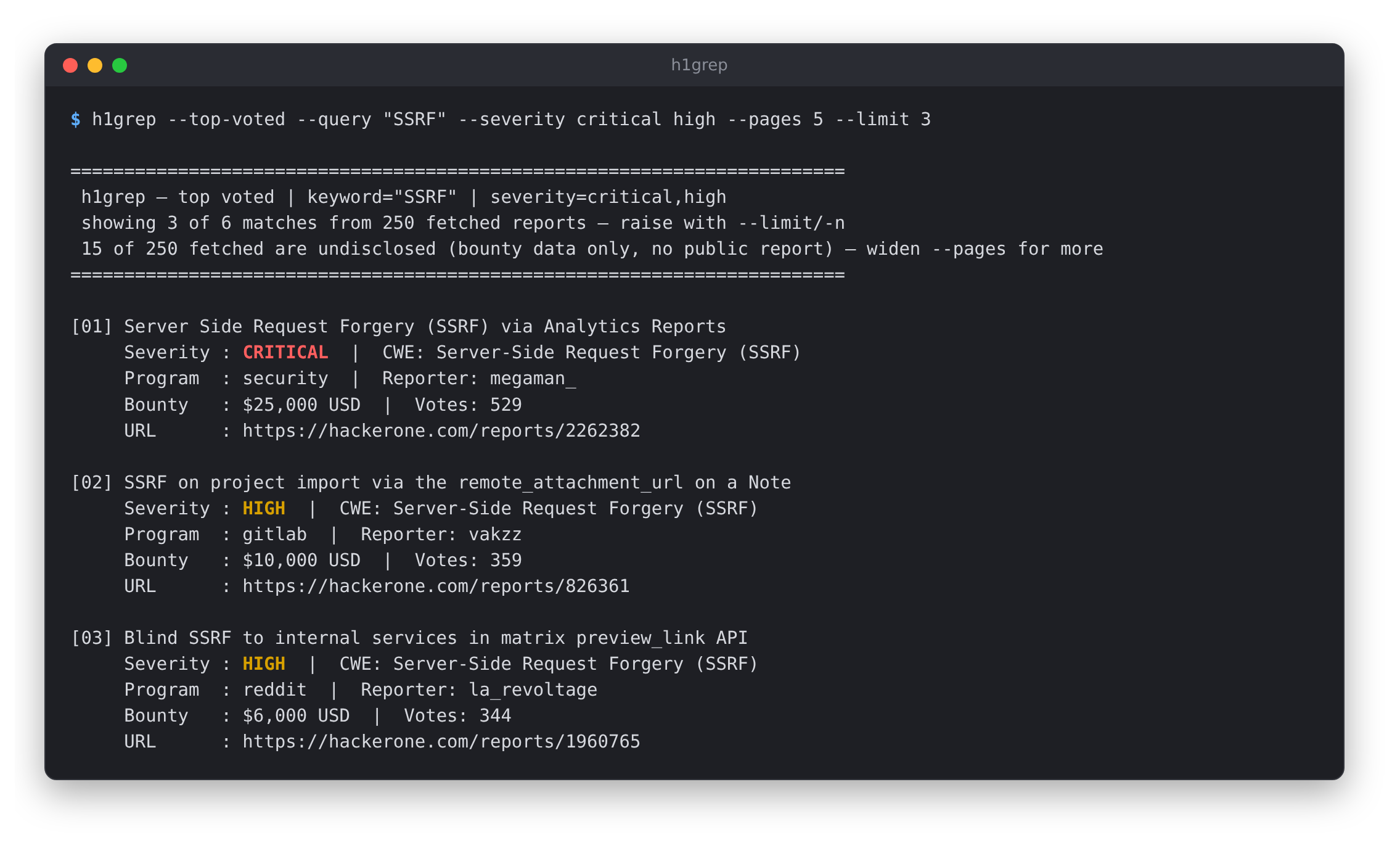
--query and --cwe take regular expressions, so --query "OAuth|SAML"
works.
Look at one program
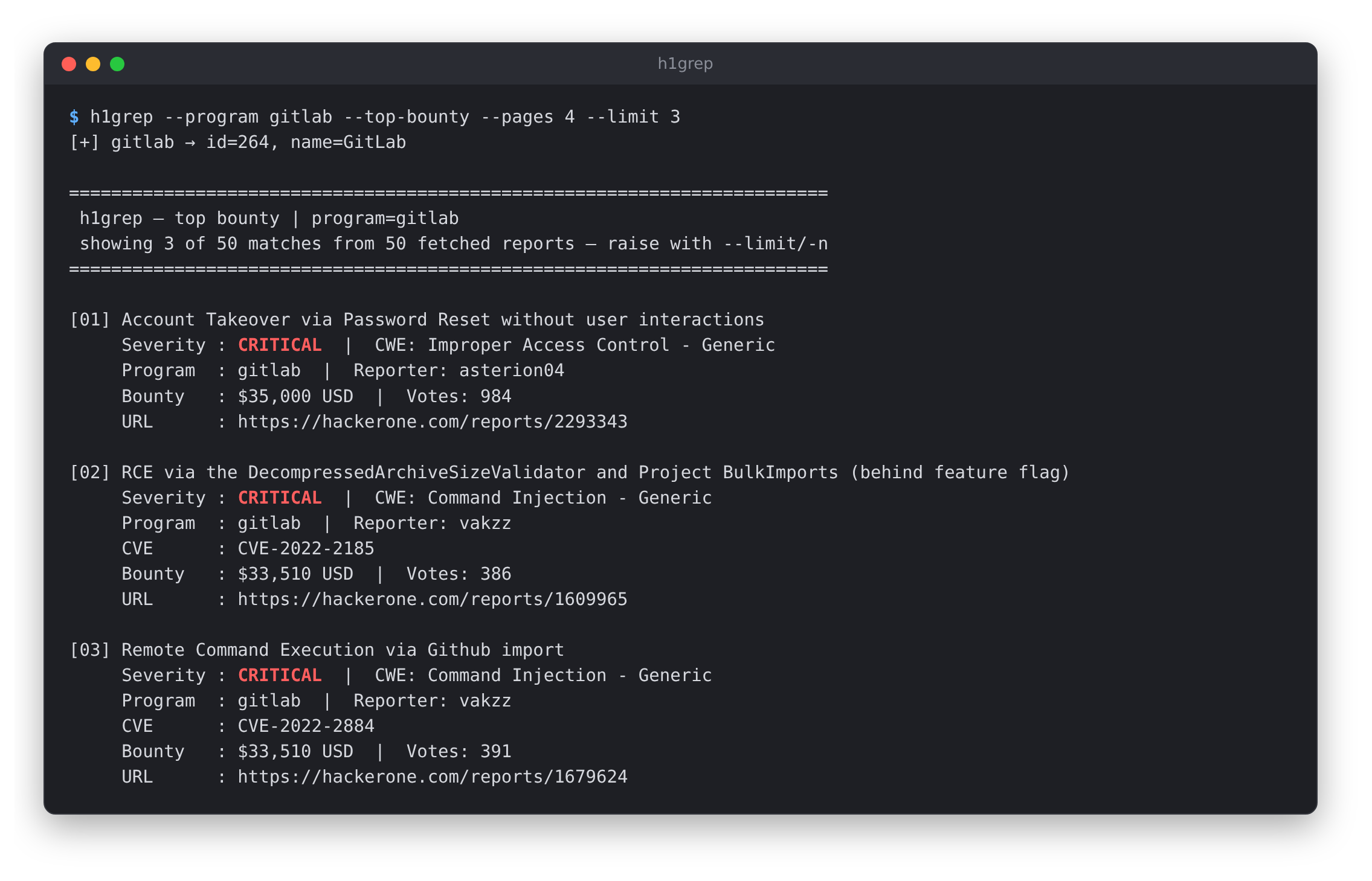
Use --program before you start on a target, to see what has already been
found and paid for there. Handles aren't case-sensitive.
h1grep --program gitlab --top-bounty --pages 4
Pipe it into other tools
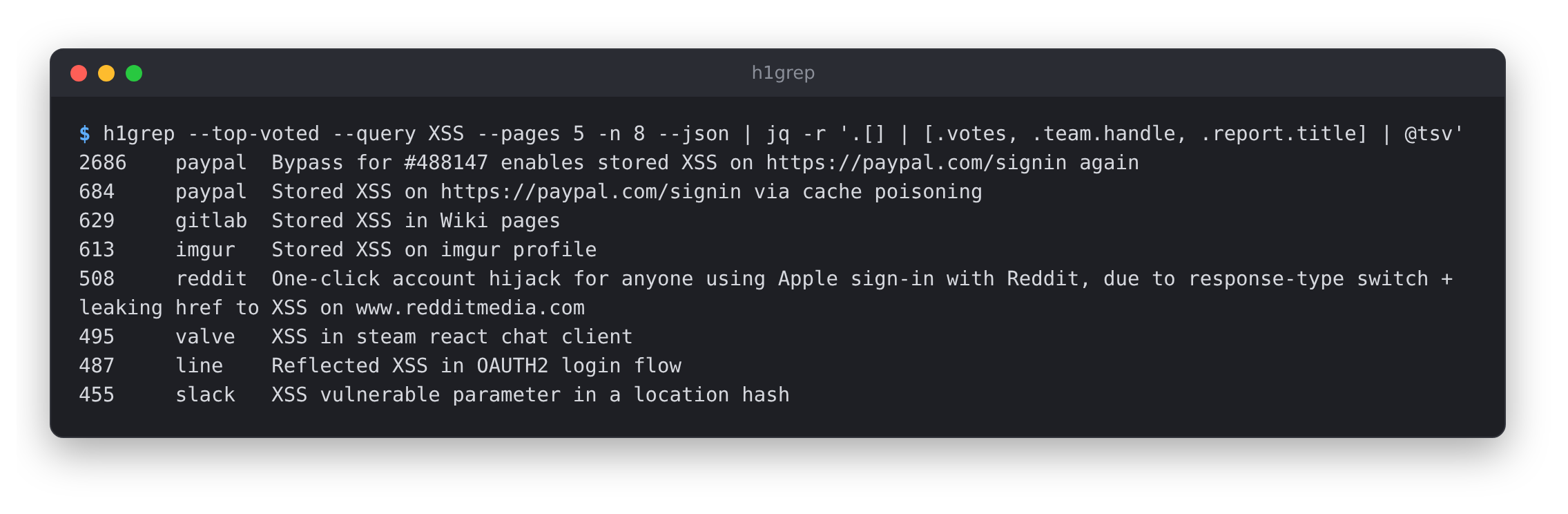
--json prints the raw results as a JSON array, so you can process them with
jq or your own scripts:
h1grep --top-voted --query XSS --pages 5 -n 8 --json \
  | jq -r '.[] | [.votes, .team.handle, .report.title] | @tsv'
More
h1grep                                    # newest disclosures first
h1grep --top-bounty --limit 10            # biggest payouts
h1grep --top-voted --cwe "SSRF" "Request Forgery"
h1grep --lookup-program gitlab            # handle -> numeric team ID
Options
| Flag | What it does |
|---|---|
-q, --query |
Regex matched against report titles |
-s, --severity |
Keep only these severities: none low medium high critical |
--cwe |
Regex(es) matched against the CWE name, e.g. "SSRF" "Traversal" |
-p, --program |
Only reports from this program handle, e.g. shopify |
--lookup-program |
Print a program's numeric team ID and exit |
--top-voted |
Sort by community votes |
--top-bounty |
Sort by bounty paid (can't be combined with --top-voted) |
-n, --limit |
How many results to print (default 20) |
--pages |
How many pages of 50 to fetch (default 1) |
--json |
Print JSON instead of text |
Without --top-voted or --top-bounty you get the newest disclosures first.
Colour is only used when printing to a terminal. Set NO_COLOR to turn it
off. Status messages go to stderr, so --json output is always valid JSON.
Exit codes: 0 on success, including when nothing matched. 1 for a network
or API error, or an unknown program. 2 for bad arguments or an unexpected
API response. 130 if interrupted.
Things to know
This uses an undocumented API. h1grep calls the same GraphQL endpoint the
Hacktivity page uses. It's not an official API and HackerOne changes it
without notice. It has already broken program filtering once, when the
team_id field stopped being searchable. If the response stops looking the way
h1grep expects, it says so and exits instead of printing garbage. If you see
that, please open an issue.
--top-bounty needs more pages. Most of the highest-paid reports were
never made public. HackerOne still lists them with a bounty amount but no
report, and h1grep drops them. Often only 2 to 5 of the first 50 results
survive. The header tells you how many were dropped, so raise --pages.
Ties can be skipped deep in sorted results. HackerOne pages by position
and doesn't break ties. Far down a --top-voted or --top-bounty list, a
report with the same vote count or bounty as its neighbours can fall between
two pages. The order you see is still correct, and the top of the list isn't
affected. Reports that show up on more than one page are only printed once.
It only sees public data. Disclosed, resolved reports only. Nothing private.
Be gentle with it. h1grep waits 0.3 seconds between pages and only reads. Please don't turn it into a scraper.
License
1 maintainer

Metadata
1 maintainer
Release files for h1grep 0.2.1
For a detailed explanation of source distributions (sdists) and built distributions (wheels), please see the package formats documentation.
Source distribution (sdist)
| File | Size | Uploaded | Provenance | Actions |
|---|---|---|---|---|
| h1grep-0.2.1.tar.gz | 14.5 kB | With provenance | Details for h1grep-0.2.1.tar.gz |
Built distribution (wheel)
| File | Interpreter | ABI | Platform | Actions Reset |
|---|---|---|---|---|
| h1grep-0.2.1-py3-none-any.whl | Python 3 | none | any | Details for h1grep-0.2.1-py3-none-any.whl |
Total release size: 29.5 kB
Release files / h1grep-0.2.1.tar.gz
| Download URL | h1grep-0.2.1.tar.gz |
|---|---|
| Size | 14.5 kB |
| Tags | Source |
|
SHA-256 checksum How to use checksums |
367306eecc8f29ee5228cf7c0c0cfd22320d53d3261d8807679bfa0a9dbbef82
|
|
BLAKE2b-256 checksum How to use checksums |
616c8085aeada9e798f686df8d37d025842c03667fe0697ca4345e0768c74882
|
| Upload date | |
|
Uploaded using Trusted Publishing? What is trusted publishing? |
Yes |
| Uploaded via |
twine/7.0.0 CPython/3.13.14
|
Provenance
Provenance describes where a file came from. On PyPI, provenance is shared via attestations, which provide a verifiable record of the build or publishing details. View details, limitations and caveats.


PyPI Publish Attestation
PyPI verified that this artifact, at this checksum, originated from the publisher listed below.
Signed by GitHub Actions, verified by PyPI on Oct 15, 2026.
Transparency logRelease files / h1grep-0.2.1-py3-none-any.whl
| Download URL | h1grep-0.2.1-py3-none-any.whl |
|---|---|
| Size | 14.9 kB |
| Tags | Python 3 |
|
SHA-256 checksum How to use checksums |
563ec56e628e66fad01fa9521af2ed64ea49f4cca5b0904de3c622d1a8883d24
|
|
BLAKE2b-256 checksum How to use checksums |
9a80969f8f1c2fba231e71ef29112e4c88b1c0e0da567c4f7a88ba6e2ae3f315
|
| Upload date | |
|
Uploaded using Trusted Publishing? What is trusted publishing? |
Yes |
| Uploaded via |
twine/7.0.0 CPython/3.13.14
|
Provenance
Provenance describes where a file came from. On PyPI, provenance is shared via attestations, which provide a verifiable record of the build or publishing details. View details, limitations and caveats.
PyPI Publish Attestation
PyPI verified that this artifact, at this checksum, originated from the publisher listed below.
Signed by GitHub Actions, verified by PyPI on Oct 15, 2026.
Transparency logSecurity for h1grep 0.2.1
Provenance
Provenance describes where a file came from. On PyPI, provenance is shared via attestations, which provide a verifiable record of the build or publishing details. View details, limitations and caveats.
Full provenance
Both files in this release have been uploaded with provenance metadata.
Attestation for h1grep-0.2.1.tar.gz
PyPI Publish Attestation
PyPI verified that this artifact, at this checksum, originated from the publisher listed below.
Signed by GitHub Actions, verified by PyPI on Oct 15, 2026.
Transparency logA note on package security
PyPI is a repository for distributing packages, not a service for auditing them. While third-party security researchers and our staff do their best to detect and remove malicious packages, PyPI cannot guarantee the quality, security or suitability of any given package.
To learn more about protecting yourself from malicious actors, visit our package security documentation.














