
h2kvm
Any hypervisor → KVM. Convert offline. Fix the guest. Deploy with confidence.
Export, convert, and deploy VMs from VMware, Hyper-V, Nutanix, AWS, Azure, GCP and more —
with offline guest fixes, a web control plane, and a Kubernetes-native operator.
First-boot science for hypervisor exit · day-2 on Zeus OS · part of the Zyvor suite






How it works · No VDDK · Install · Quick start · GuestKit · Remote deploy · Demos · CE vs Enterprise · Docs · Product
How it works
The disk is fixed before it is powered on. Then you watch it boot, and you can run it on Zeus OS or Machina. The public pages are on zyvor.dev.

  source disk
      →  GuestKit     inspect the disk before power-on     zyvor.dev/guestkit
      →  h2kvm        any hypervisor to KVM                zyvor.dev/h2kvm
      →  Zorvia       KubeVirt VMs, no hand-written CRDs   zyvor.dev/zorvia
      →  Zeus OS      visual OS for KubeVirt               zyvor.dev/zeus-os
      →  Machina      control plane for libvirt hosts      zyvor.dev/machina

  First boot is planned, and you can see it.
flowchart LR
  Disk["Source disk"] --> GK["GuestKit"]
  GK --> H["h2kvm"]
  H --> Z["Zorvia"]
  Z --> Zeus["Zeus OS"]
  Z --> Machina["Machina"]
| Product | What zyvor.dev says | Site | Repo |
|---|---|---|---|
| GuestKit | Inspects the disk offline so you know it is safe before power-on | zyvor.dev/guestkit | zyvorai/guestkit |
| h2kvm | Any hypervisor to KVM. The guest is fixed so the VM boots the first time | zyvor.dev/h2kvm | zyvorai/h2kvm |
| Zorvia | Craft and run KubeVirt VMs without hand-written CRDs | zyvor.dev/zorvia | zyvorai/zorvia |
| Zeus OS | The visual infrastructure OS for KubeVirt | zyvor.dev/zeus-os | zyvorai/zeus-os |
| Machina | One control plane for the libvirt hosts you already run | zyvor.dev/machina | zyvorai/machina |
Hypervisor exit fails when the bootloader is wrong, or Windows still points at the old hypervisor, after you cut over. GuestKit and h2kvm do that work before power-on. Zorvia is where you watch the VM. Zeus OS and Machina are where you keep running it.
No VDDK
Public downloads of VMware’s Virtual Disk Development Kit ended on 10 September 2026. That SDK is what most VMware-to-KVM tools used to open disks. The use VMware still defends is backup and recovery for select partners — not migration, and not a customer entitlement.
h2kvm and Transiva do not take that path. Disks leave through the vSphere API and NFS, then convert offline.
  vSphere                          Nutanix AHV
     │                                  │
     ▼                                  ▼
  NFC lease (HTTPS)                 NFS pickup
  govc export.ovf / .ova            storage containers
  datastore /folder
     │                                  │
     └──────────────┬───────────────────┘
                    ▼
              h2kvm + GuestKit
           convert · repair · deploy
                    │
                    ▼
         libvirt · KubeVirt · Zeus OS

  VDDK  —  not on this path
| Path | How disks move | VDDK |
|---|---|---|
| Transiva NFC | govmomi HTTP NFC lease writes OVF plus disks | No |
h2kvm govc |
export.ovf, then export.ova — the same NFC lease |
No |
| Datastore HTTPS | /folder download of datastore files |
No |
| Nutanix | Transiva NFS pickup of storage containers | No |
| Disk already on disk | h2kvmctl local converts VMDK, VHDX, raw, and the other formats |
No |
Copying the disk was never the hard part. GuestKit still has to fix VirtIO, GRUB, and Windows before power-on.
Install
v1.2.1 — on PyPI. GuestKit is installed with it.
pip install "h2kvm==1.2.1"
From source (extras / development):
git clone https://github.com/zyvorai/h2kvm.git
cd h2kvm
pip install -e ".[full]"
Host needs Linux with qemu-img, qemu-nbd, and losetup. Repair and NBD mounts often need root or H2KVM_USE_SUDO=1.
| Artifact | Where |
|---|---|
| h2kvm 1.2.1 | PyPI |
| hypersdk-guestkit ≥ 1.1.0 | PyPI |
| Operator image | ghcr.io/zyvorai/h2kvm/operator:v1.2.0 |
Quick start
# Local VMDK → qcow2 (GuestKit repair is the default backend)
h2kvmctl local --vmdk ubuntu.vmdk --to-output ubuntu.qcow2 --backend guestkit

# Live migration from vSphere
h2kvmctl migrate --source vmware --vm web-prod-01 --target kvm

# Web dashboard
h2kweb
# → https://localhost:5070

# Kubernetes operator
kubectl apply -f operator/deploy/
| Surface | What you get |
|---|---|
| CLI | h2kvmctl / h2k |
| Web | h2kweb dashboard — web/ |
| Operator | K8s / OpenShift — operator/, olm/ |
| Helm | Production charts — helm/ |
| Fix engine | GuestKit run_migrate_repair + h2kvm injectors |
| You want… | Go here |
|---|---|
| Full docs | docs/README.md |
| Remote SSH deploy | docs/deployment/deploy-remote.md |
| GuestKit wiring | docs/architecture/GUESTKIT.md |
| Examples | examples/ |
| CE vs Enterprise | docs/ce-vs-enterprise.md |
GuestKit
Offline inspect and repair run through GuestKit — fstab, bootloader, initramfs, and hypervisor-aware fixes via guestkit.run_migrate_repair(). h2kvm does not re-implement that engine in pure Python.
from h2kvm.core import guestkit_client

report = guestkit_client.doctor("ubuntu.qcow2", target="kvm", explain=True)
result = guestkit_client.migrate_repair("ubuntu.qcow2", target="kvm", apply=True)
# Pre-flight with the GuestKit CLI
guestkit doctor ubuntu.vmdk --target kvm --explain
Debian/Ubuntu libvirt: after convert, chown libvirt-qemu:kvm on the output qcow2 before virsh start. See troubleshooting.
More: GUESTKIT.md · API · GuestKit repo · Zorvia
Remote lab deploy
One SSH command installs system deps, h2kvm, GuestKit (from PyPI), and optionally h2kweb:
./scripts/deploy-remote.sh 175.110.122.71 sus --keep-sources

# GuestKit CLI binary (separate repo)
cd /path/to/guestkit
GUESTKIT_ZYVOR_ACCEPT=1 ./scripts/deploy-remote.sh 175.110.122.71 sus --quick --key
End-to-end demo on the target (osboxes Ubuntu VMDK):
sudo bash ~/.deployments/h2kvm/scripts/demo-libvirt.sh \
  ~/demo/ubuntu2404.vmdk ubuntu-test --memory 4096 --vcpus 2
Full guide: docs/deployment/deploy-remote.md
See it in action

▶ Live console tour h2kweb — progress, migrate, deploy |
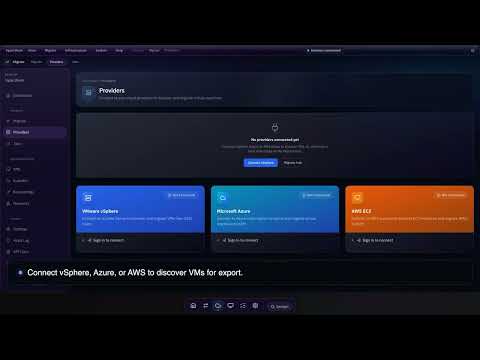
▶ Full tutorial End-to-end conversion walkthrough |

▶ Feature deep dive Offline fix · Windows · targets |

▶ Product page Architecture · editions · PoC |
Recorded against real deployments — more demos →
Why teams switch
| Before h2kvm | With h2kvm |
|---|---|
| 18-month “migration project” | One pipeline: browse → migrate → deploy |
| Guest drivers break on first KVM boot | GuestKit offline fix for 35+ OS versions |
| Windows needs a war room of tribal scripts | Automated VirtIO / hivex / RDP path |
| No visibility mid-conversion | h2kweb progress · webhooks · email |
| K8s teams stuck on libvirt YAML | Libvirt → KubeVirt one-click path |
| Cutover outcomes unowned | Enterprise: 96.8% automated first-boot + PS |
Community vs Enterprise
Community proves convert. Enterprise owns cutover night.
CE is for labs and single-cluster PoC. Moving a Windows estate, SAN-backed waves, or multi-site fleets? No war-room, no HA fabric, no LTS/CVE contract on CE. Buy Enterprise.
| Community / public CE (this repo) | Enterprise | |
|---|---|---|
| Who it is for | Labs · DIY pipelines | Migration leads · multi-wave cutovers |
| Convert + GuestKit offline fix | ✅ | ✅ + validated fleet playbooks |
| CLI · h2kweb · operator | ✅ Eval / single-cluster | ✅ HA · multi-namespace tenancy |
| Windows path | Automated VirtIO / registry | ✅ + war-room / PS runbooks |
| Storage pipelines | Local / libvirt / KubeVirt / Glance | ✅ + SAN / Ceph / NetApp |
| Pre-flight | GuestKit planner | ✅ + GuestKit fleet risk scoring |
| First-boot | Strong offline fix | 96.8% automated path + PS |
| Support | Community | SLA · LTS · CVE · hypervisor-exit programs |
| Day-2 | Hand off to Zeus OS | ✅ Licensed suite path |
Why teams upgrade
- A lab operator is not a multi-wave cutover fabric
- Windows estates need war-room playbooks — VirtIO alone is not enough
- Production needs HA, tenancy, and CVE/LTS under contract
- Storage teams need SAN/Ceph pipelines with a named owner
- You want Zyvor accountable for first-boot — not Issues at 2 a.m.
Bring us your worst wave. 30-day PoC on your estate.



Where this fits: the Zyvor suite
The buyer path matches zyvor.dev: GuestKit → h2kvm → Zorvia, then Zeus OS or Machina. See How it works.
| Product | Role |
|---|---|
| GuestKit | Offline disk repair before power-on |
| h2kvm (this repo) | Convert and land the VM on KVM and KubeVirt |
| Zorvia | Console where you watch the VM boot |
| Transiva | vSphere · Nutanix export |
| Zeus OS | Visual infrastructure OS for KubeVirt |
| Machina | Control plane for the libvirt hosts you already run |
| PacketWolf | Kernel-native network intelligence |
→ zyvor.dev · hypervisor exit program
Support
| Enterprise / PoC | Book a demo · sales@zyvor.dev |
| Community | GitHub Issues |
| Product | zyvor.dev/h2kvm |
License
See LICENSE and docs/legal/ for terms. Community / eval builds are for labs and integration — production fleets and SLAs are Enterprise.
1 maintainer

Metadata
1 maintainer
Release files for h2kvm 1.2.1
For a detailed explanation of source distributions (sdists) and built distributions (wheels), please see the package formats documentation.
Source distribution (sdist)
| File | Size | Uploaded | |
|---|---|---|---|
| h2kvm-1.2.1.tar.gz | 2.3 MB | Details |
Built distribution (wheel)
| File | Interpreter | ABI | Platform | Reset |
|---|---|---|---|---|
| h2kvm-1.2.1-py3-none-any.whl | Python 3 | none | any | Details |
Total release size: 3.8 MB
Release files / h2kvm-1.2.1.tar.gz
| Download URL | h2kvm-1.2.1.tar.gz |
|---|---|
| Size | 2.3 MB |
| Tags | Source |
|
SHA-256 checksum How to use checksums |
f37c85cfaa196af82464e7f0416a1c03f53196470a118365316b3a52146584b4
|
|
BLAKE2b-256 checksum How to use checksums |
60e245e2b604c06f04e2f20327c1727d7e17f151896bfe3405f90bf1e4b39eee
|
| Upload date | |
|
Uploaded using Trusted Publishing? What is trusted publishing? |
No |
| Uploaded via |
twine/7.0.0 CPython/3.14.7
|
Release files / h2kvm-1.2.1-py3-none-any.whl
| Download URL | h2kvm-1.2.1-py3-none-any.whl |
|---|---|
| Size | 1.5 MB |
| Tags | Python 3 |
|
SHA-256 checksum How to use checksums |
5eebdf4aedc5603ed326095176e5daf721e2ca1401bfa84fed0294954f3f79d8
|
|
BLAKE2b-256 checksum How to use checksums |
894f7c10887573507d929730e4d001c8ca71711a8f579bd05eb92cb65fbba607
|
| Upload date | |
|
Uploaded using Trusted Publishing? What is trusted publishing? |
No |
| Uploaded via |
twine/7.0.0 CPython/3.14.7
|














