
h3sed
h3sed is a Heroes3 Savegame Editor, written in Python.
It opens savegame files from Heroes of Might and Magic III, allowing to see an overview of all heroes, and edit any and all hero attributes:
- primary skills, like Attack
- other primary attributes, like level, experience points, spell points etc
- war machines, like Ballista
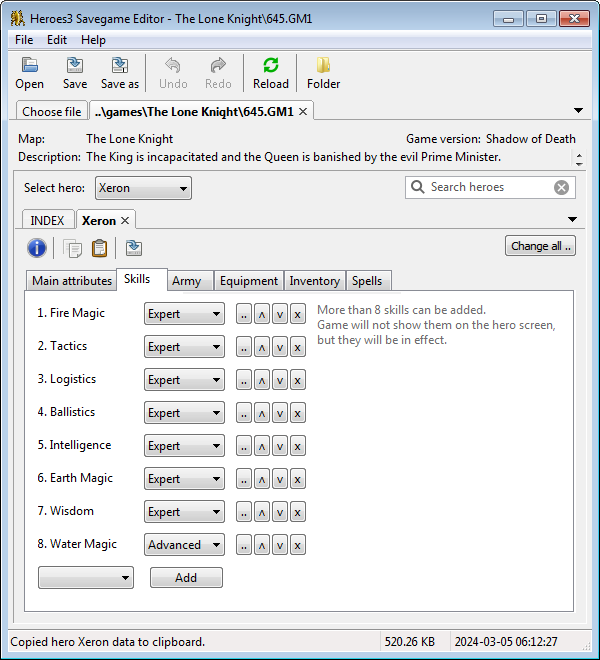
- secondary skills, like Logistics (more than 8 skills can be added)
- artifacts, like Boots of Speed, both equipment and inventory items
- spells, like Slow
- army creatures, like Golden Dragons
Attributes can be copied from one hero and pasted to another.
Hero data can be exported as HTML or spreadsheet or JSON/YAML data.
Supports savegames from: Restoration of Erathia, Armageddon's Blade, Shadow of Death, Heroes Chronicles, and Horn of the Abyss.
Usable as a graphical program, command-line program, or library.
Downloads at https://suurjaak.github.io/h3sed.
Graphical Usage
Navigate the file view to Heroes3 games-folder and open a savegame file to edit, or drag and drop a savegame file onto the program window.
Choose a hero to modify, change attributes to your liking, and save the file. Changes will be available in Heroes3 after loading the changed savegame.
Attributes from one hero can be copied to clipboard as text, and pasted onto another hero, overwriting their data.
A timestamped daily backup copy is automatically created of the savegame file, one per day.
Note: savegames from different releases of Armageddon's Blade may have different structure for equipment and inventory. For working with savegames from an earlier version, uncheck "New format in Armageddon's Blade" in program menu File -> Options.
Warning: as Heroes3 savefile format is not publicly known, loaded data and saved results may be invalid and cause problems in game. This program is based on unofficial information gathered from observation and online forums.
Interface language
h3sed supports translating all texts in the user interface, especially all game-related content, including creatures and artifacts like Water Elemental and Boots of Speed.
Some languages have been included with the program, and more can be added via program menu File -> Options -> Interface language -> Add language. For creating a new translation, use the template file etc/i18n/h3sed.en.pot as basis; this contains all translatable texts in the user interface.
Please contact the author to include your language file with the program, or to amend an included one.
Command-line Interface
$ h3sed -h

usage: h3sed [-h] [-v] {gui,info,export} ...

h3sed - Heroes3 Savegame Editor.

positional arguments:
  {gui,info,export}
    gui              launch h3sed graphical program (default option)
    info             print information on savegame
    export           export heroes from savegame

optional arguments:
  -h, --help         show this help message and exit
  -v, --version      show program's version number and exit
$ h3sed -h gui

usage: h3sed gui [SAVEGAME [SAVEGAME ...]]

Launch h3sed graphical program (default option).

positional arguments:
  SAVEGAME    Heroes3 savegames(s) to open on startup, if any (supports * wildcards)
$ h3sed -h info

usage: h3sed info SAVEGAME [SAVEGAME ...]

Print information on given savegame(s).

positional arguments:
  SAVEGAME    Heroes3 savegame(s) to read (supports * wildcards)
$ h3sed -h export

usage: h3sed export [-f {csv,html,json,yaml}] [-s [TEXT [TEXT ...]]] [-o [OUTFILE]]
                    SAVEGAME [SAVEGAME ...]

Export heroes from savegame as CSV, HTML, JSON or YAML.

positional arguments:
  SAVEGAME              Heroes3 savegame(s) to read (supports * wildcards)

optional arguments:
  -h, --help            show this help message and exit
  -f {csv,html,json,yaml}, --format {csv,html,json,yaml}
                        output format (defaults to "yaml")
  -s [TEXT [TEXT ...]], --search [TEXT [TEXT ...]]
                        filter heroes by name or any matching properties
                        (supports keyword search like "skill=Luck")
  -o [FILE], --output [FILE]
                        write output to file instead of printing to console;
                        filename will be auto-generated if not given;
                        automatic for non-printable formats (csv, html)
Library usage
import h3sed

savefile = h3sed.Savefile("path/to/my.CGM")

hero = next(savefile.find_heroes(name="Solmyr"))
hero.stats.attack += 10
hero.skills.append(name="Logistics", level="Expert")
hero.army.append(name="Master Gremlin", count=1000)
hero.equipment.feet = "Boots of Speed"
hero.inventory.append("Spyglass")
hero.spells.add("Haste")

for hero in savefile.find_heroes(skill="Earth Magic"):
    hero.equipment.side1 = "Orb of Silt"

savefile.realize()
savefile.write()
Installation
Windows: download and launch the latest setup from https://suurjaak.github.io/h3sed/downloads.html.
Mac/Linux/other: install Python and pip, run pip install h3sed.
The pip installation will add the h3sed command to path.
Windows installers have been provided for convenience. The program itself is stand-alone, can work from any directory, and does not need additional installation. The installed program can be copied to a USB stick and used elsewhere, same goes for the source code.
If running from pip installation, run h3sed from the command-line.
If running straight from source code, open a terminal to h3sed/src
and run python -m h3sed.
Source Dependencies
If running from source code, h3sed needs Python 3.6 or higher, and the following 3rd-party Python packages:
- polib (https://github.com/izimobil/polib/)
- pyyaml (https://pyyaml.org)
- step (https://pypi.org/project/step-template)
- wxPython 4.0+ (https://wxpython.org) (optional, required for graphical interface)
Attribution
Knowledge on Heroes3 savegames gathered mostly from Heroes Community forum, http://heroescommunity.com/viewthread.php3?TID=18817.
Contains several icons from Heroes of Might and Magic III, (c) 1999 3DO.
Binaries compiled with PyInstaller, https://www.pyinstaller.org.
Installers created with Nullsoft Scriptable Install System, https://nsis.sourceforge.net/.
License
Copyright (c) 2020 by Erki Suurjaak. Released as free open source software under the MIT License, see LICENSE.md for full license text.
1 maintainer

Download files
Download the file for your platform. If you're not sure which to choose, learn more about installing packages.
Source Distributions
Built Distribution
Filter files by name, interpreter, ABI, and platform.
If you're not sure about the file name format, learn more about wheel file names.
Copy a direct link to the current filters
File details
Details for the file h3sed-3.8-py2.py3-none-any.whl.
File metadata
- Download URL: h3sed-3.8-py2.py3-none-any.whl
- Upload date:
- Size: 257.3 kB
- Tags: Python 2, Python 3
- Uploaded using Trusted Publishing? No
- Uploaded via:
twine/6.1.0 CPython/3.13.3
File hashes
| Algorithm | Hash digest | |
|---|---|---|
| SHA256 |
b4eacddcc84b76de80791058005b7b860a7ce39eb99413c4e1edd82d77629ca3
|
|
| MD5 |
0b633e52fbf1587d4c1042aac8a6db72
|
|
| BLAKE2b-256 |
284ff269297cce044e79d07e05af1d523dc3868fb6eccf0f36f4569415221446
|














