
h5pandas : out-of-core pandas DataFrames with h5py.
h5pandas is a thin overlay on top of h5py that provides pandas DataFrames instead of h5py datasets.
The purpose of this library is to combine the power of Pandas' data manipulation with the efficiency of h5py and the HDF5 format. It also has convenient methods to write DataFrames directly into an HDF5 file.
Note : h5pandas is still experimental and may contain some bugs. Please tell us if you notice one.
Table of Contents
FAQ
Why should I use it ?
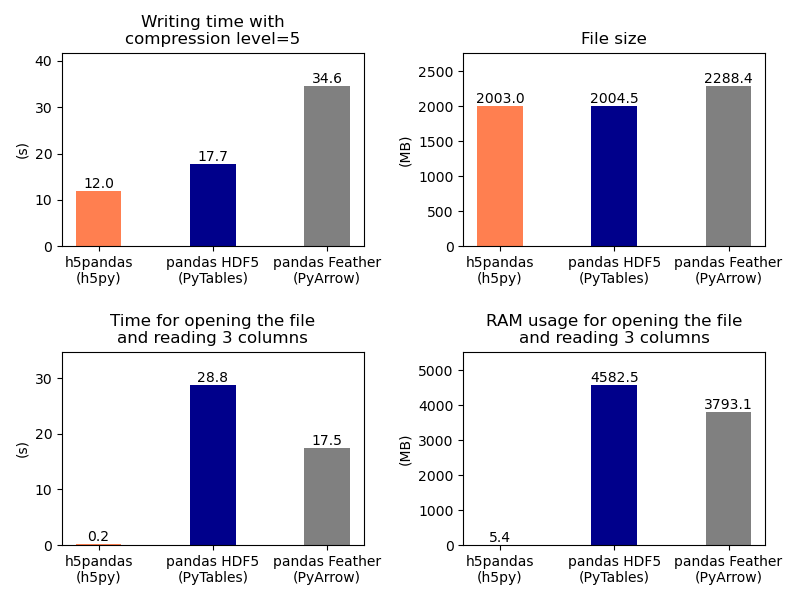
Opening a HDF5 file with h5pandas is extremely fast and is very low memory consumming !
Here is a small benchmark with a DataFrame containing 2.4GB of data splitted into 3000 Series.
What can it do ?
With h5pandas can save pandas DataFrame into HDF5 files and read them very efficiently.
You can use h5pandas the same way you use h5py. The main difference is that h5pandas gives pandas DataFrame objects instead of dataset objects, even if the file has not been written with h5pandas. Once you have the dataFrame, it works exactly as any other pandas DataFrame.
What is the difference with Pandas native HDF5 ?
Pandas already has a support for HDF5 files (with PyTables) but it requires to load all the data at file opening and that can be very time and memory consuming for large dataset/DataFrame.
Instead, this library opens a file and create a Pandas DataFrame without actually reading the data. The data are read only when needed, this behavior is called "out-of-core DataFrame". It allows to open very huge files (even larger than memory) instantaneously and with a very memory footprint (less than 1 MB).
How it works ?
Since pandas DataFrame are columnar we use h5py ability to save the data as vertical to chuncks. This means we can read and extract each column individually without the others.
The particularity of these DataFrames is that they deeply rely on the underlying file object. Each time a data is accessed it reads it from this file object. That means you need to make sure the underlying file is never closed.
When to use it ?
- When you have columnar data (Series).
- When you have huge datasets and only want to read a few columns.
- When you want to save a Dataframe into a HDF5 file.
When not to use it ?
- If your data is scattered over thousands of small hdf5 files and you want to open them all.
- When your data are not columns and therefore they cannot be represented by series.
How can it be faster than PyTables ?
Pandas uses PyTables to read and write to/from HDF5 files. PyTables is an excellent package that allows extremely fast writing and reading. However PyTables is well suited for row-sorted data, it stores all data as consecutive rows while pandas need data separated as columns (one for each Serie). This means PyTables has to load all the data into memory and then pandas as to rearrange it to fit its columns paradigm. On the opposite, h5pandas stores arrays and dataframes into HDF5 files by separating each columns from each others. That means it can retrieves them independently and only when needed. This is what makes h5pandas well-suited from pandas.
Files compatibility
h5pandas is fully compatible with h5py: you can write a dataset with one library and read with the other.
h5pandas is able to open HDF5 file written with :
- h5pandas
- h5py
pandas.to_hdfifformat='fixed'was used.
h5pandas is NOT able to open HDF5 files written with pandas.to_hdf if format='table' was used.
If a dataframe was written with h5py, columns names, indexes and attributes are lost but with h5pandas they are saved.
Readthedoc
Full API documentation is still being written but a draft is available at : https://h5pandas.readthedocs.io/en/latest/
Installation
pip install h5pandas
Getting started
For those familiar with pandas, the function dataframe_to_hdf is the easiest way to write a DataFrame into a HDF5.
Saving a Pandas' dataFrame into a file
import h5pandas as h5pd
import pandas as pd

df0 = pd.DataFrame(
    [
        [0.09, 0.91, 0.23, 0.01, 0.02, 0.06],
        [0.85, 0.67, 0.17, 0.25, 0.19, 0.11],
        [0.92, 0.14, 0.52, 0.50, 0.43, 0.26],
        [0.47, 0.47, 0.48, 0.72, 0.71, 0.12],
        [0.05, 0.60, 0.12, 0.19, 0.20, 0.69],
        [0.08, 0.64, 0.31, 0.98, 0.63, 0.05],
        [0.74, 0.93, 0.76, 0.54, 0.03, 0.07],
        [0.79, 0.98, 0.51, 0.73, 0.13, 0.31],
    ],
    columns=["f", "o", "o", "ß", "a", "r"],
    index=["a", "b", "c", "d", "e", "f", "g", "h"],
)

# The function dataframe_to_hdf is the easiest way to write a DataFrame into a HDF5
h5pd.dataframe_to_hdf(df0, "foo.h5", "foo")
Saving an array into a file
The function ndarray_to_hdf is the easiest way to write an array into a HDF5.
columns=["f", "o", "o", "ß", "a", "r"]
index=["a", "b", "c", "d", "e", "f", "g", "h"]
h5pd.ndarray_to_hdf(array, "foo.h5", "foo")
h5pd.ndarray_to_hdf(array, "foo.h5", "foo", columns=columns)
h5pd.ndarray_to_hdf(array, "foo.h5", "foo", columns=columns, index=index)
Reading a file
Later you can retrieve your DataFrame with exactly the same columns names, index and attributes. You can use the DataFrame as any other other DataFrame. However, since the data are not loaded into memory, you must make sure the file is always opened when you acess it.
with h5pd.File("foo.h5", "r") as file:
    df = file["bar"]
These DataFrames can operate with "classic" DataFrames
delta = df - df0
h5py API
Since h5pd is based on h5py, it has the same API.
Therefore you can use h5pandas the same way you use h5py except that it provides pandas.DataFrame instead of h5py.dataset objects, even if the file has not been written with h5pandas.
h5pandas is fully compatible with h5py: you can write a dataset with one library and read with the other indifferently. However, h5py does not deal with indexes and attributes while h5pandas does.
Saving a file with h5py syntax
If you are more familiar with h5py syntax, you can write a DataFrame into a HDF5 file with create_dataset.
Inside the file, the columns names are saved as attribute of the dataset.
import h5pandas as h5pd
import pandas as pd

df0 = pd.DataFrame(
    [
        [0.09, 0.91, 0.23, 0.01, 0.02, 0.06],
        [0.85, 0.67, 0.17, 0.25, 0.19, 0.11],
        [0.92, 0.14, 0.52, 0.50, 0.43, 0.26],
        [0.47, 0.47, 0.48, 0.72, 0.71, 0.12],
        [0.05, 0.60, 0.12, 0.19, 0.20, 0.69],
        [0.08, 0.64, 0.31, 0.98, 0.63, 0.05],
        [0.74, 0.93, 0.76, 0.54, 0.03, 0.07],
        [0.79, 0.98, 0.51, 0.73, 0.13, 0.31],
    ],
    columns=["f", "o", "o", "ß", "a", "r"],
    index=["a", "b", "c", "d", "e", "f", "g", "h"],
)

with h5pd.File("foo.h5", "a") as file:
    df = file.create_dataset("bar", data=df0)
If you already have a dataset from h5py you can convert it into a DataFrame with dataset_to_dataframe
with h5py.File("foo.h5", "r") as file:
    dataset = file["/bar"]
    df = h5pd.dataset_to_dataframe(dataset, ["a", "b", "c", "d", "e", "g"])

os.remove("foo.h5")
These DataFrames can operate with "classic" DataFrames
delta = df - df0
With the "h5" accessor you can access to the file object, the name of the dataset, dataset object (h5py), dataset object (h5py)
    df.h5.file
    df.h5.name
    df.h5.dataset
    df.h5.attrs
1 maintainer

Release files for h5pandas 0.23
For a detailed explanation of source distributions (sdists) and built distributions (wheels), please see the package formats documentation.
Source distribution (sdist)
| File | Size | Uploaded | |
|---|---|---|---|
| h5pandas-0.23.tar.gz | 27.2 kB | Details |
Built distribution (wheel)
| File | Interpreter | ABI | Platform | Reset |
|---|---|---|---|---|
| h5pandas-0.23-py3-none-any.whl | Python 3 | none | any | Details |
Total release size: 50.4 kB
Release files / h5pandas-0.23.tar.gz
| Download URL | h5pandas-0.23.tar.gz |
|---|---|
| Size | 27.2 kB |
| Tags | Source |
|
SHA-256 checksum How to use checksums |
313f57edcc12ae671dc58d95c3c25d70934fb6a74bed1c00fb6dcc0d84f36949
|
|
BLAKE2b-256 checksum How to use checksums |
1e76815d28c53fe0588e44b3061afba33dac084be70229b25deb599306bcdb4a
|
| Upload date | |
|
Uploaded using Trusted Publishing? What is trusted publishing? |
Yes |
| Uploaded via |
twine/6.1.0 CPython/3.13.12
|
Provenance
Provenance describes where a file came from. On PyPI, provenance is shared via attestations, which provide a verifiable record of the build or publishing details. View details, limitations and caveats.


PyPI Publish Attestation
PyPI verified that this artifact, at this checksum, originated from the publisher listed below.
Signed by GitHub Actions, verified by PyPI on Jun 27, 2026.
Transparency logRelease files / h5pandas-0.23-py3-none-any.whl
| Download URL | h5pandas-0.23-py3-none-any.whl |
|---|---|
| Size | 23.2 kB |
| Tags | Python 3 |
|
SHA-256 checksum How to use checksums |
89077ceda298b9399eb265f9e5dd13002ddbe3f30fcb42822da831d54e09713c
|
|
BLAKE2b-256 checksum How to use checksums |
43ed991656c4af1d69ef260a6e546eff08ddad3642d5e3f7bec2b49bc1078c38
|
| Upload date | |
|
Uploaded using Trusted Publishing? What is trusted publishing? |
Yes |
| Uploaded via |
twine/6.1.0 CPython/3.13.12
|
Provenance
Provenance describes where a file came from. On PyPI, provenance is shared via attestations, which provide a verifiable record of the build or publishing details. View details, limitations and caveats.
PyPI Publish Attestation
PyPI verified that this artifact, at this checksum, originated from the publisher listed below.
Signed by GitHub Actions, verified by PyPI on Jun 27, 2026.
Transparency log













