
HA Voice Label Sync

Manage once in Home Assistant. Sync everywhere.
Automatically generate voice assistant configurations from Home Assistant labels.
HVLS turns Home Assistant labels into the single source of truth for exposing entities to your voice assistants. Preview the generated configuration, verify it, then generate it safely.
Native Home Assistant integration
✓ CLI
✓ Google Assistant backend
✨ Features
✔ Automatic backups ✔ HACS support (coming soon)
🚧 Actively developed — feedback and contributions are welcome.
Feedback and ideas are welcome.
✨ Why HA Voice Label Sync?
Managing large entity_config files manually quickly becomes tedious and error-prone.
HA Voice Label Sync lets you manage everything directly from Home Assistant:
- 🏷️ Choose which entities to expose using labels
- 👀 Preview the generated configuration before writing anything
- 💾 Create automatic backups
- 🏠 Integrate natively with Home Assistant
- ⚡ Generate configuration in seconds
- 🔌 Designed to support multiple voice assistants
📸 Screenshots
(Screenshots will be updated with the latest UI.)
Home Assistant Configuration

Preview Panel

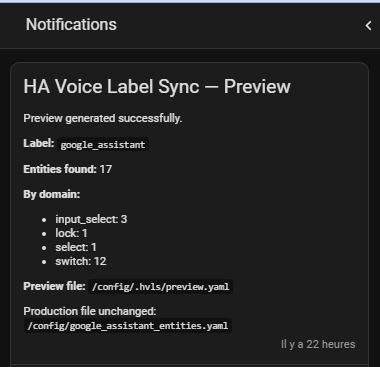
Generated YAML

Google Home synchronization
🚀 Typical workflow
              🏷 Label
                    ↓
              👀 Preview
                    ↓
              ✅ Review
                    ↓
              ⚡ Generate
                    ↓
              🔄 Restart HA
                    ↓
              🎤 Sync Voice Assistant
Features
🏠 Home Assistant Integration
- Native Config Flow
- Options Flow
- Preview Panel
- Generate action
- Preview action
- Automatic backups
- Secure WebSocket API
- English & French translations
🐍 Python Engine
- Reusable Python package
- Standalone CLI
- Atomic file generation
- Dry-run support
- Automatic backup retention
- Backend-independent architecture
🎤 Supported Voice Assistants
| Backend | Status |
|---|---|
| Google Assistant | ✅ Supported |
| Amazon Alexa | 🚧 Planned |
| Apple HomeKit | 📋 Planned |
Architecture
                Home Assistant
                       │
                       ▼
                    Labels
                       │
                       ▼
             HA Voice Label Sync
                       │
         ┌─────────────┴─────────────┐
         │                           │
         ▼                           ▼
 Google Assistant           Future Backends
                               • Alexa
                               • HomeKit
                Home Assistant
                      │
                      ▼
         Official Google Assistant integration
                      │
                      ▼
        entity_config (generated by HVLS)
                      ▲
                      │
         Home Assistant Labels (managed by you)
Installation
Home Assistant (HACS)
Official HACS listing: Pending review.
Until the integration is available in the official HACS repository, install it as a custom repository:
-
Open HACS
-
Open the menu ⋮ → Custom repositories
-
Add:
https://github.com/flimo44/ha-voice-label-sync
-
Select the category Integration
-
Search for HA Voice Label Sync
-
Install it
-
Restart Home Assistant
Home Assistant configuration
HVLS generates the entity exposure configuration in a separate YAML file.
Add the following entry to your configuration.yaml:
google_assistant:
  entity_config: !include google_assistant_entities.yaml
Home Assistant configuration
google_assistant:
  project_id: YOUR_PROJECT_ID
  service_account: !include google_key.json
  report_state: true
  expose_by_default: false
  entity_config: !include google_assistant_entities.yaml
By default, HVLS generates:
/config/google_assistant_entities.yaml
After generating or updating the file, restart Home Assistant so the new Google Assistant configuration is loaded.
Home Assistant (Manual)
Documentation coming soon.
Python package
pip install ha-voice-label-sync
Quick Start
- Create a label in Home Assistant.
- Assign this label to the entities you want to expose.
- Configure the integration.
- Click Preview.
- Review the generated configuration.
- Click Generate.
- Restart Home Assistant.
- Synchronize your voice assistant.
CLI
HVLS also provides a standalone CLI for advanced users and automation.
hvls --help
Documentation
Additional documentation will be available in the docs/ directory.
Roadmap
See ROADMAP.md.
Contributing
Contributions are welcome!
Bug reports, feature requests and pull requests help improve the project.
If you have ideas, don't hesitate to open an issue or start a discussion.
License
MIT
1 maintainer

Metadata
1 maintainer
Release files for ha-voice-label-sync 0.3.1
For a detailed explanation of source distributions (sdists) and built distributions (wheels), please see the package formats documentation.
Source distribution (sdist)
| File | Size | Uploaded | |
|---|---|---|---|
| ha_voice_label_sync-0.3.1.tar.gz | 11.9 kB | Details |
Built distribution (wheel)
| File | Interpreter | ABI | Platform | Reset |
|---|---|---|---|---|
| ha_voice_label_sync-0.3.1-py3-none-any.whl | Python 3 | none | any | Details |
Total release size: 26.6 kB
Release files / ha_voice_label_sync-0.3.1.tar.gz
| Download URL | ha_voice_label_sync-0.3.1.tar.gz |
|---|---|
| Size | 11.9 kB |
| Tags | Source |
|
SHA-256 checksum How to use checksums |
836ee8493499227837eb07fbb252d890a29dc3737409462cacb93ba89f955b77
|
|
BLAKE2b-256 checksum How to use checksums |
152712f8319719c7d927596d10feb56bf5d05688f882e9e41fbb741c48a4bec4
|
| Upload date | |
|
Uploaded using Trusted Publishing? What is trusted publishing? |
No |
| Uploaded via |
twine/6.2.0 CPython/3.11.15
|
Release files / ha_voice_label_sync-0.3.1-py3-none-any.whl
| Download URL | ha_voice_label_sync-0.3.1-py3-none-any.whl |
|---|---|
| Size | 14.8 kB |
| Tags | Python 3 |
|
SHA-256 checksum How to use checksums |
49270abe04885ddddf90dd76d07c91addfe934d78dee74a52ad4cca95dfdc332
|
|
BLAKE2b-256 checksum How to use checksums |
6582261b27ad7d1c04069a14da0a5f359af85b7ccc44fcca3232ac900f84298a
|
| Upload date | |
|
Uploaded using Trusted Publishing? What is trusted publishing? |
No |
| Uploaded via |
twine/6.2.0 CPython/3.11.15
|














