
Cross-platform Exapunks HACK*MATCH bot
Yet another bot for Exapunks' amazing (and annoyingly hard) HACK*MATCH arcade minigame.
Want to score 100,000 points and grab the hardest of its achievements and join the 0,7% club? Look no further!
Don't feel frustrated if you, like me, have no skills for a NES-like reflex game and think such arcade game have no place in a logic/puzzle programming game such as Exapunks.
Why create another bot? Well, I felt it would not be cheating if I programmed the bot myself! Exapunks is all about coding and hacking, so creating a bot to hack it fits in perfectly!
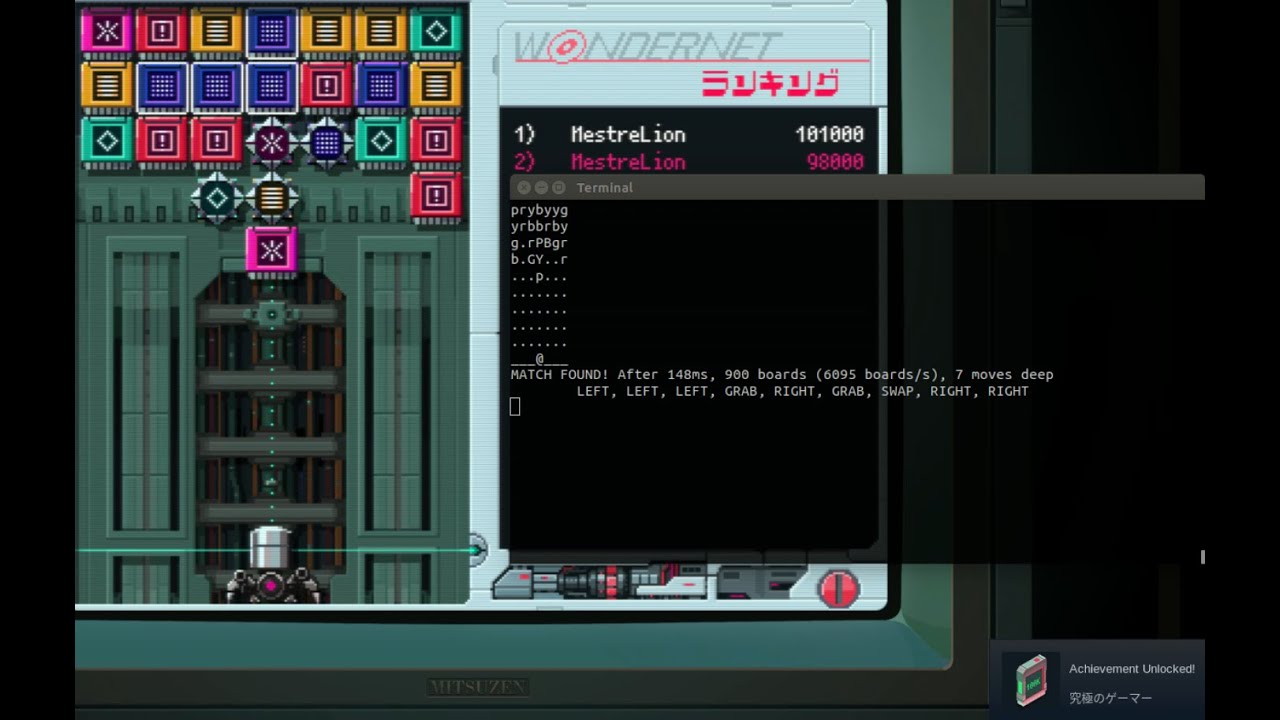
Features
- Cross Platform, works on Windows, macOS and Linux
- Works on several resolutions, from 1920x1200 to 1366x768
- Read and write game settings to get user's current keyboard mapping and to automatically turn off CRT effects.
- Launch the game if needed, using Steam's
steam://rungameid/716490game URI. - Pure Python: easy to understand, install and run, no compiler or other tools needed.
- Command-line arguments to benchmark, debug, watch-only and more.
Heavily inspired by and adapted from:
-
Fidel-solver's exapunks-hack-match bot
- C++, X11 and 1600x900 only, requires custom keys, has fuzzy tolerance on colors.
- Arguably the most well-known reference, possibly the first bot published.
- +500K points recorded on YouTube.
-
- Rust, X11 and 1920x1080 only, requires default keys and no CRT, no fuzziness.
- An elegant code with great insights on image parsing and board solving.
- +8M points recorded on YouTube.
Special thanks to Dissecting fidelSolver's Game Bot for Playing Hack*Match, an amazing presentation by Alan Shen that helped me understand the basic concepts and building blocks of both above projects.
Installing
Run this to install the bot and its dependencies, preferably in a virtual environment:
pip3 install hackmatch
This bot is written in Python and uses PyAutoGUI, which has some pre-requisites
beyond its pip install. For Debian, Ubuntu and derivatives, just run:
sudo apt install python3-tk
For instructions on all platforms, see the PyAutoGUI documentation.
I've also included a tool to automatically create the python virtual environment,
apt-install the requirements and pip-install dependencies and the bot itself,
all in a single step:
./install.sh
Note: even if code itself is compatible with earlier Python versions, some dependencies require Python 3.7. It was fully tested on Python 3.8.
Usage
For basic usage, just run:
hackmatch-bot
- If the game is installed in Steam, it will automatically launch Exapunks if not already running.
- Keep the bot running (i.e., leave the terminal open), and manually enter and start the HACK*MATCH minigame.
- Profit!
Debugging, testing or fine-tuning?
$ hackmatch-bot --help
usage: hackmatch-bot [-h] [-q | -v] [--benchmark] [--watch] [--solve-time TIME]
                                    [--board TEXT | IMAGE]

positional arguments:
  IMAGE              Ignore game window and solve IMAGE instead.
                     Useful when debugging with --verbose.

optional arguments:
  -h, --help         show this help message and exit
  -q, --quiet        Suppress informative messages.
  -v, --verbose      Verbose mode, output extra info.
  --benchmark        Benchmark mode, run for 30 seconds.
                       Best used with --quiet and game already launched.
  --watch            Watch mode, read and solve board but do not play.
  --solve-time TIME  Time in milliseconds to solve each parsed board,
                       0 for unlimited. [Default: 850 ms]
  --board TEXT       Ignore game window and solve TEXT instead.

Copyright (C) 2023 Rodrigo Silva (MestreLion) <linux@rodrigosilva.com>
License: GPLv3 or later, at your choice. See <http://www.gnu.org/licenses/gpl>
Contributing
Patches are welcome! Fork, hack, request pull!
See the To-Do List for more updated technical information and planned features.
If you find a bug or have any enhancement request, please to open a new issue
Author
Rodrigo Silva (MestreLion) linux@rodrigosilva.com
License and Copyright
Copyright (C) 2023 Rodrigo Silva (MestreLion) <linux@rodrigosilva.com>.
License GPLv3+: GNU GPL version 3 or later <http://gnu.org/licenses/gpl.html>.
This is free software: you are free to change and redistribute it.
There is NO WARRANTY, to the extent permitted by law.
1 maintainer

Metadata
1 maintainer
Release files for hackmatch 1.3
For a detailed explanation of source distributions (sdists) and built distributions (wheels), please see the package formats documentation.
Source distribution (sdist)
| File | Size | Uploaded | Provenance | Actions |
|---|---|---|---|---|
| hackmatch-1.3.tar.gz | 35.9 kB | Without provenance | Details for hackmatch-1.3.tar.gz |
Built distribution (wheel)
| File | Interpreter | ABI | Platform | Actions Reset |
|---|---|---|---|---|
| hackmatch-1.3-py3-none-any.whl | Python 3 | none | any | Details for hackmatch-1.3-py3-none-any.whl |
Total release size: 72.4 kB
Release files / hackmatch-1.3.tar.gz
| Download URL | hackmatch-1.3.tar.gz |
|---|---|
| Size | 35.9 kB |
| Tags | Source |
|
SHA-256 checksum How to use checksums |
ef6a639a949bc3eee1b972ca81dcd5e80e9e97e7009476d811c17860c0b1b9d0
|
|
BLAKE2b-256 checksum How to use checksums |
e1bb39c2818474a1ef07c52db09cbe047618edb34370181e018618d0fe234d9e
|
| Upload date | |
|
Uploaded using Trusted Publishing? What is trusted publishing? |
No |
| Uploaded via |
twine/4.0.2 CPython/3.8.0
|
Release files / hackmatch-1.3-py3-none-any.whl
| Download URL | hackmatch-1.3-py3-none-any.whl |
|---|---|
| Size | 36.5 kB |
| Tags | Python 3 |
|
SHA-256 checksum How to use checksums |
7a88f60fedcd6f78f3bd301511c1711f1bee346197ab912336902a094b189cdc
|
|
BLAKE2b-256 checksum How to use checksums |
dbbdb07de94f04abe2670607c2e42518343d84518cab89c5a74cacbee66a1df5
|
| Upload date | |
|
Uploaded using Trusted Publishing? What is trusted publishing? |
No |
| Uploaded via |
twine/4.0.2 CPython/3.8.0
|
Security for hackmatch 1.3
Provenance
Provenance describes where a file came from. On PyPI, provenance is shared via attestations, which provide a verifiable record of the build or publishing details. View details, limitations and caveats.
No provenance found
None of the files in this release were uploaded with provenance metadata.
A note on package security
PyPI is a repository for distributing packages, not a service for auditing them. While third-party security researchers and our staff do their best to detect and remove malicious packages, PyPI cannot guarantee the quality, security or suitability of any given package.
To learn more about protecting yourself from malicious actors, visit our package security documentation.














