
MUP for Haiku
This is a (very preliminary) port of Yang and Hu et al.'s μP repo to Haiku and JAX. It's not feature complete, and I'm very open to suggestions on improving the usability.
Installation
pip install haiku-mup
Learning rate demo
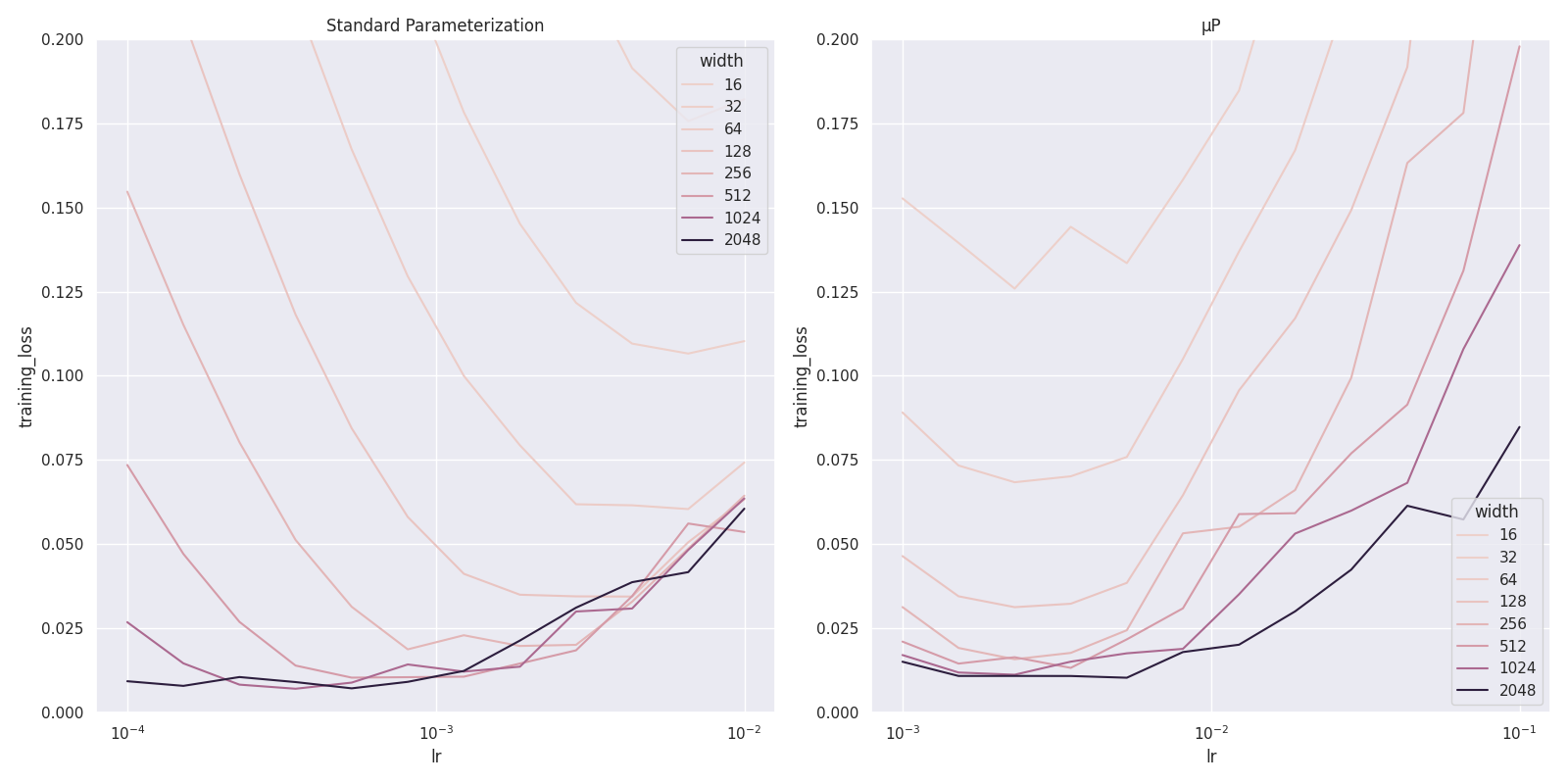
These plots show the evolution of the optimal learning rate for a 3-hidden-layer MLP on MNIST, trained for 10 epochs (5 trials per lr/width combination).
With standard parameterization, the learning rate optimum (w.r.t. training loss) continues changing as the width increases, but μP keeps it approximately fixed:
Here's the same kind of plot for 3 layer transformers on the Penn Treebank, this time showing Validation loss instead of training loss, scaling both the number of heads and the embedding dimension simultaneously:
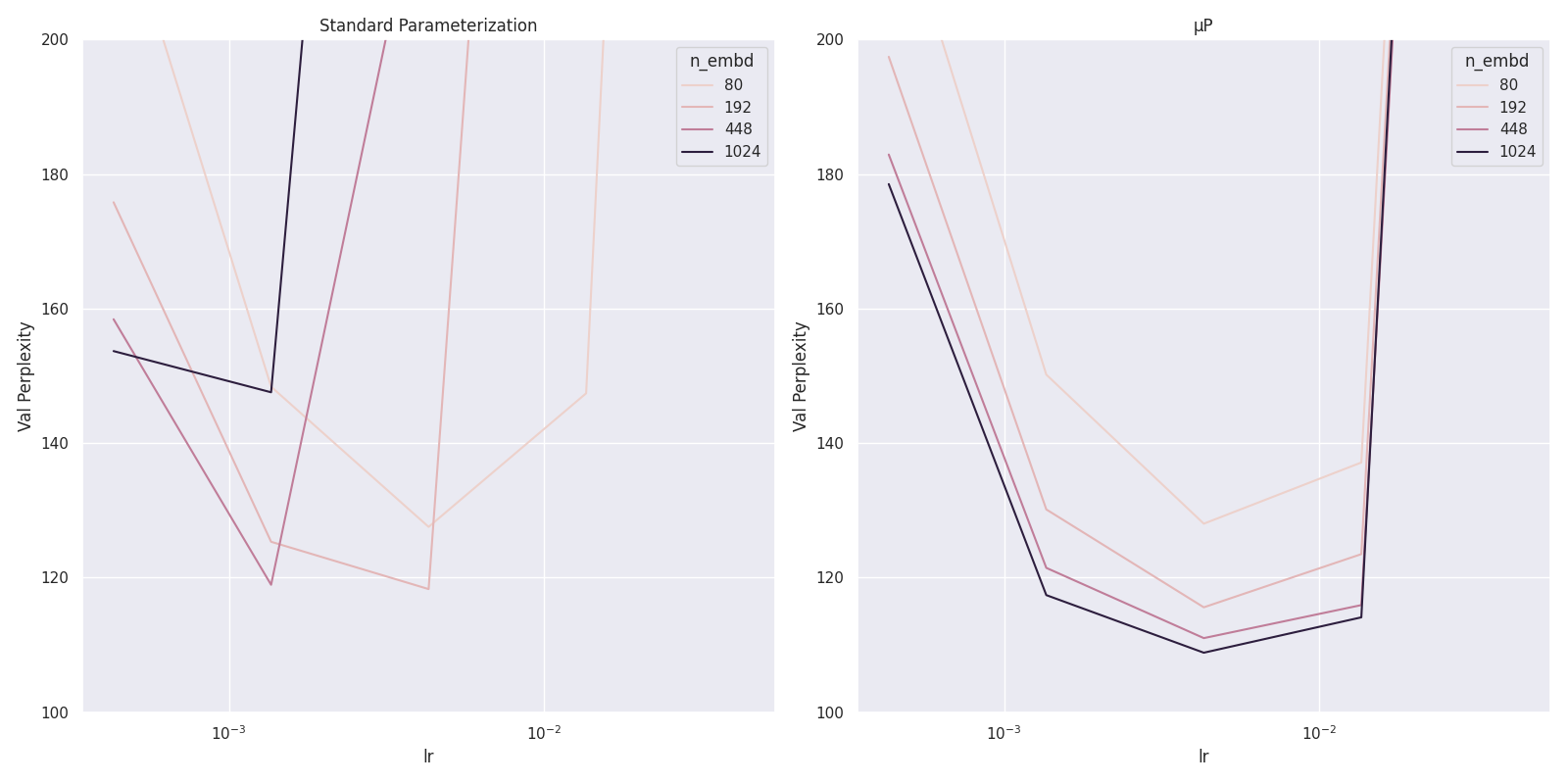
Note that the optima have the same value for n_embd=80. That's because the other hyperparameters were tuned using an SP model with that width, so this shouldn't be biased in favor of μP.
Usage
from functools import partial

import jax
import jax.numpy as jnp
import haiku as hk
from optax import adam, chain

from haiku_mup import apply_mup, Mup, Readout

class MyModel(hk.Module):
    def __init__(self, width, n_classes=10):
        super().__init__(name='model')
        self.width = width
        self.n_classes = n_classes

    def __call__(self, x):
        x = hk.Linear(self.width)(x)
        x = jax.nn.relu(x)
        return Readout(2)(x) # 1. Replace output layer with Readout layer

def fn(x, width=100):
    with apply_mup(): # 2. Modify parameter creation with apply_mup()
        return MyModel(width)(x)

mup = Mup()

init_input = jnp.zeros(123)
base_model = hk.transform(partial(fn, width=1))

with mup.init_base(): # 3. Use this context manager when initializing the base model
    hk.init(fn, jax.random.PRNGKey(0), init_input)

model = hk.transform(fn)

with mup.init_target(): # 4. Use this context manager when initializng the target model
    params = model.init(jax.random.PRNGKey(0), init_input)

model = mup.wrap_model(model) # 5. Modify your model with Mup

optimizer = optax.adam(3e-4)
optimizer = mup.wrap_optimizer(optimizer, adam=True) # 6. Use wrap_optimizer to get layer specific learning rates

# Now the model can be trained as normal
Summary
- Replace output layers with
Readoutlayers - Modify parameter creation with the
apply_mup()context manager - Initialize a base model inside a
Mup.init_base()context - Initialize the target model inside a
Mup.init_target()context - Wrap the model with
Mup.wrap_model - Wrap optimizer with
Mup.wrap_optimizer
Shared Input/Output embeddings
If you want to use the input embedding matrix as the output layer's weight matrix make the following two replacements:
# old: embedding_layer = hk.Embed(*args, **kwargs)
# new:
embedding_layer = haiku_mup.SharedEmbed(*args, **kwargs)
input_embeds = embedding_layer(x)

#old: output = hk.Linear(n_classes)(x)
# new:
output = haiku_mup.SharedReadout()(embedding_layer.get_weights(), x)
1 maintainer

Metadata
1 maintainer
Release files for haiku-mup 0.1.5
For a detailed explanation of source distributions (sdists) and built distributions (wheels), please see the package formats documentation.
Source distribution (sdist)
| File | Size | Uploaded | Provenance | Actions |
|---|---|---|---|---|
| haiku-mup-0.1.5.tar.gz | 6.3 kB | Without provenance | Details for haiku-mup-0.1.5.tar.gz |
Built distribution (wheel)
| File | Interpreter | ABI | Platform | Actions Reset |
|---|---|---|---|---|
| haiku_mup-0.1.5-py3-none-any.whl | Python 3 | none | any | Details for haiku_mup-0.1.5-py3-none-any.whl |
Total release size: 13.3 kB
Release files / haiku-mup-0.1.5.tar.gz
| Download URL | haiku-mup-0.1.5.tar.gz |
|---|---|
| Size | 6.3 kB |
| Tags | Source |
|
SHA-256 checksum How to use checksums |
0c063a94d0869ffac18dbf9b17d05d04b569616a28da6e6d548b80590ce9da75
|
|
BLAKE2b-256 checksum How to use checksums |
e6736c9ece6253601452474ba9e7c2d073f3ad98025193ca1a1a72e5f2eb67f4
|
| Upload date | |
|
Uploaded using Trusted Publishing? What is trusted publishing? |
No |
| Uploaded via |
poetry/1.1.13 CPython/3.10.8 Linux/6.0.2-arch1-1
|
Release files / haiku_mup-0.1.5-py3-none-any.whl
| Download URL | haiku_mup-0.1.5-py3-none-any.whl |
|---|---|
| Size | 7.0 kB |
| Tags | Python 3 |
|
SHA-256 checksum How to use checksums |
c0f150c75ad8b1687d781fc969ffe5ac6744afd29fec8fb55e8ad395538c6c71
|
|
BLAKE2b-256 checksum How to use checksums |
62b717c3a75e98500c5d54a93fa565eb527a710ebeecb31056059b07c713640a
|
| Upload date | |
|
Uploaded using Trusted Publishing? What is trusted publishing? |
No |
| Uploaded via |
poetry/1.1.13 CPython/3.10.8 Linux/6.0.2-arch1-1
|
Security for haiku-mup 0.1.5
Provenance
Provenance describes where a file came from. On PyPI, provenance is shared via attestations, which provide a verifiable record of the build or publishing details. View details, limitations and caveats.
No provenance found
None of the files in this release were uploaded with provenance metadata.
A note on package security
PyPI is a repository for distributing packages, not a service for auditing them. While third-party security researchers and our staff do their best to detect and remove malicious packages, PyPI cannot guarantee the quality, security or suitability of any given package.
To learn more about protecting yourself from malicious actors, visit our package security documentation.














