
Python SDK for Haiqu quantum cloud — circuit analytics, error mitigation, and hybrid quantum application execution

Project description
Haiqu SDK: Quantum Performance Middleware for Python
Haiqu is a middleware platform that bridges the gap between quantum hardware and practical applications. Haiqu SDK gives you programmatic access to the full Haiqu cloud stack: error mitigation, circuit compression, hardware integration, and experiment tracking - so you can run quantum circuits that actually work on today's noisy hardware.

📖 Full documentation: docs.haiqu.ai
What You Can Do with Haiqu
- Error Shield: automatic noise reduction preserves circuit fidelity without manual calibration
- Circuit Compression: run circuits that would otherwise exceed hardware qubit and gate limits
- Data Loading: linear-depth quantum data loading at practical scale
- Hardware Integration: connect to major quantum processors and cloud platforms through a single API
- Experiment Tracking: monitor job history, circuit measurements, and results across runs
For example, using Haiqu SDK for a utility-scale Floquet dynamics simulation of the kicked Ising model on 103 qubits reduces quantum processor runtime from ~3.1 hours to ~1 minute, and lowers the estimated quantum cloud bill from ~$17,856 to ~$34, while preserving accuracy close to the ideal result.
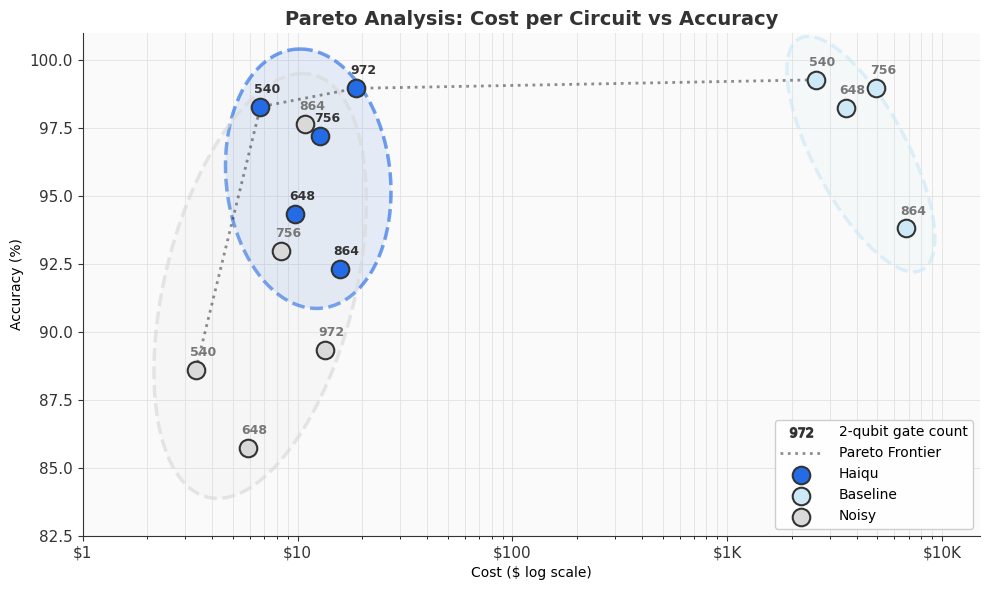
Want to see this in action? Book a demo to get access to this example and more.
Research results
Haiqu's technology is backed by peer-reviewed research:
- Matrix Product States for shallow quantum circuit synthesis
- Hamiltonian simulation via sub-block partitioning and state reconstruction
- Rivet transpiler: caching and reuse for iterative quantum workloads
- Fluid dynamics simulation without increasing circuit complexity
- Large Hamiltonian evolution across multiple quantum processors
See also the Haiqu Blog for more exciting research from us.
Installation
This repository contains the source code for the Haiqu SDK Python package. For users, It is recommended to install it from PyPI via pip install haiqu-sdk rather than to build from source. Refer to Haiqu SDK Docs / Local Installation guide for more details.
[!TIP] Alternatively, you can request access to Haiqu Lab: a pre-built, hosted JupyterLab environment with everything pre-installed and no local setup required. This can be done through your Haiqu account after sign-up.
Prerequisites
- Python 3.10+ or Conda
Step 1: Set up a Python environment (recommended)
Creating a virtual environment is optional, but highly recommended to avoid system-wide install and update of package dependencies.
Venv (available by default with Python)
python -m venv haiqu-env
source haiqu-env/bin/activate
Note: on Windows systems, instead of the shell command on the last line above, run .\haiqu-env\Scripts\activate.bat to activate the environment.
Conda
conda create -y --name haiqu-sdk python=3.13
conda activate haiqu-sdk
Virtualenv
virtualenv haiqu-env --python ">=3.10"
source haiqu-env/bin/activate
Step 2: Install the SDK
The latest version is available from PyPI
pip install haiqu-sdk
Getting Access
To use the Haiqu SDK you need an API key.
Request access here → haiqu.ai
After sign-up, your API key and access instructions will be delivered by email.
Once you have a key, authenticate in your code:
from haiqu.sdk import haiqu

# Login with your API key
haiqu.login(api_access_key="ENTER_YOUR_API_KEY_HERE")  # or set the HAIQU_API_KEY env variable

# Initialize your first experiment
haiqu.init("My First Quantum Experiment")
On success you will see:
Success: Welcome to the Quantum World, you@example.com!
You're all set. Refer to the Getting Started section to learn what you can do with Haiqu SDK.
Getting Started
SDK example notebooks are coming soon — we will be releasing the sdk-examples repository shortly. It will act as a tutorial for basic Haiqu SDK features with ready-to-run notebooks.
In the meantime, see the Core Features section of the Haiqu SDK docs for guides, as well as the full Haiqu SDK Reference.
AI-Assisted Development (MCP)
Haiqu exposes MCP (Model Context Protocol) servers so you can use AI assistants like Claude or Cursor to execute circuits, query results, and browse documentation directly from your editor.
See MCP.md for configuration instructions for VS Code + Claude Code and Cursor.
Feedback and Support
- Documentation: docs.haiqu.ai
- Email: info@haiqu.ai
- Issues and feature requests: open an issue in this repository or visit feedback.haiqu.ai
Release history Release notifications | RSS feed

Download files
Download the file for your platform. If you're not sure which to choose, learn more about installing packages.
Source Distribution
Built Distribution
Filter files by name, interpreter, ABI, and platform.
If you're not sure about the file name format, learn more about wheel file names.
Copy a direct link to the current filters
File details
Details for the file haiqu_sdk-1.0.5.tar.gz.
File metadata
- Download URL: haiqu_sdk-1.0.5.tar.gz
- Upload date:
- Size: 123.6 kB
- Tags: Source
- Uploaded using Trusted Publishing? No
- Uploaded via: twine/6.2.0 CPython/3.11.15
File hashes
| Algorithm | Hash digest | |
|---|---|---|
| SHA256 |
59257fe681c2aa55e4caaec6f5bc921daf223f6096b5cc98a58970dd3e320cee
|
|
| MD5 |
0fb835476fa722a49797605b18104a12
|
|
| BLAKE2b-256 |
ec15631dafdd2041f0f949f17491be069e9b8b41963d9a8723e91730cc4410c6
|
File details
Details for the file haiqu_sdk-1.0.5-py3-none-any.whl.
File metadata
- Download URL: haiqu_sdk-1.0.5-py3-none-any.whl
- Upload date:
- Size: 129.6 kB
- Tags: Python 3
- Uploaded using Trusted Publishing? No
- Uploaded via: twine/6.2.0 CPython/3.11.15
File hashes
| Algorithm | Hash digest | |
|---|---|---|
| SHA256 |
f752110498ed9b4e37bee98c658ee8055f606dd24f161999b7b73187fcfdcd76
|
|
| MD5 |
40de5c371106f7b9daf323e1b5585810
|
|
| BLAKE2b-256 |
628765d9990dfe1c0a5b7b35f5630b0baac8806ef73cf324479544d29cafadd1
|






