

HamLeT



HamLeT (Hamiltonian Learning Toolkit) is an experimental-facing framework for inferring Hamiltonians and physical parameters from scanning tunnelling microscopy and spectroscopy data. It connects raw-data inspection and preprocessing to simulated dataset generation, supervised model training, model matching, inference, and reproducible reports.
Spin chains are HamLeT's first fully implemented application. Its modular experiment → simulation → learning → inference workflow is designed for Hamiltonian-learning problems based on STM/STS measurements.
HamLeT 0.1.0 is a complete, working toolkit for spin-chain Hamiltonian
inference. Its spin-chain workflows are implemented end to end and extensively
tested: experimentalists can import site-resolved STM/STS measurements, inspect
and crop spectra, match compatible pretrained models, generate simulated
training data, train their own estimators, infer couplings, and export results.
Physical energies are expressed in meV; at the DMRGPy simulator boundary,
1 DMRGPy energy unit = 10 meV.
How it works, in one picture
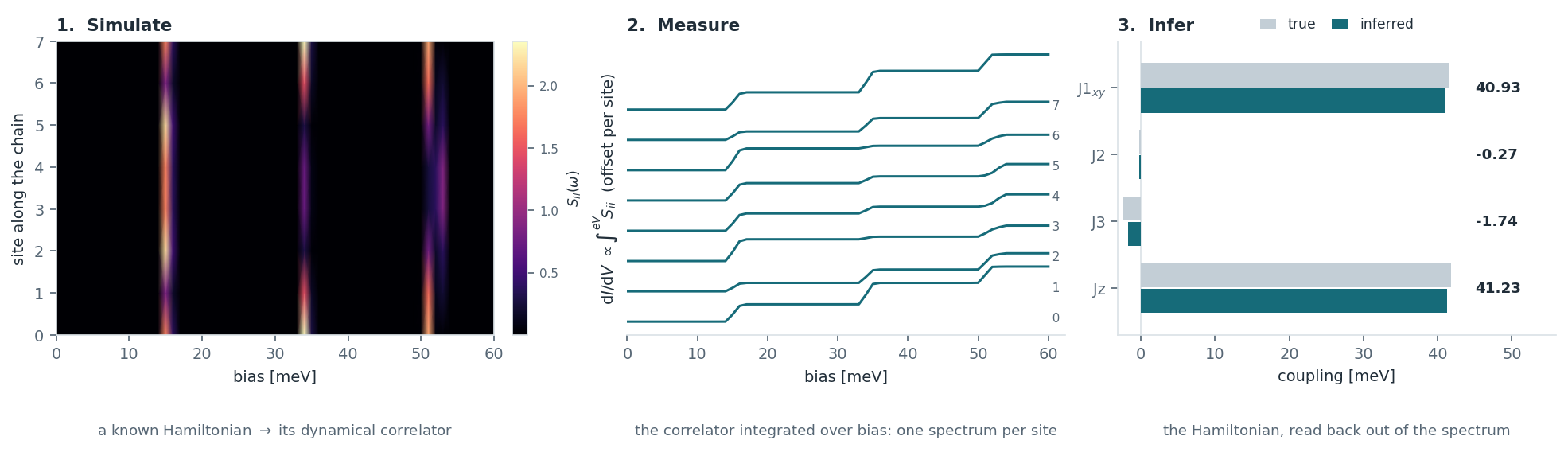
Simulate. For a spin chain whose couplings you choose, exact diagonalisation or DMRG gives the site-resolved dynamical spin correlator Sii(ω) — the left panel, sites up the axis and bias across it. Each bright band is an excitation of the chain, and where it sits and how much weight it carries at each site is what the couplings determine.
Measure. An STM integrates that correlator: dI/dV at bias V collects every excitation below eV, so each band in the left panel becomes a step in the middle one. This is the form your own data arrives in, and the form the simulated dataset is built to match.
Infer. A model trained on thousands of such simulated chains reads the couplings back out of a single measured spectrum. The right panel recovers J1xy, J2, J3 and Jz for a chain the model never saw during training — grey is the truth, teal what it returned.
Every number in that figure is produced by this package; regenerate it with
python scripts/make_readme_figures.py.
Start with the interface
HamLeT needs Python 3.10 or newer. Check what you have with
python --version.
python -m pip install hamlet-toolkit
hamlet gui
The local browser interface guides the full workflow:
- select a prepared measurement or a folder containing one Nanonis
.dat/.txtspectrum per site; - inspect every site and choose the visible bias cutoff;
- check whether a shipped or locally trained model matches the system, chain length, view, cutoff, and preprocessing contract;
- reuse it, or generate a dataset and train ridge, random-forest, MLP, or CNN models from the interface;
- inspect held-out simulated-test fidelity and per-parameter errors before applying a newly trained model;
- infer the couplings and export a LaTeX/PDF summary for a colleague, an HTML report, a plot, a CSV, and a JSON result.
It binds to localhost and does not upload measurements elsewhere. Long jobs run
in the background. Close it with the Stop server button or Ctrl+C.
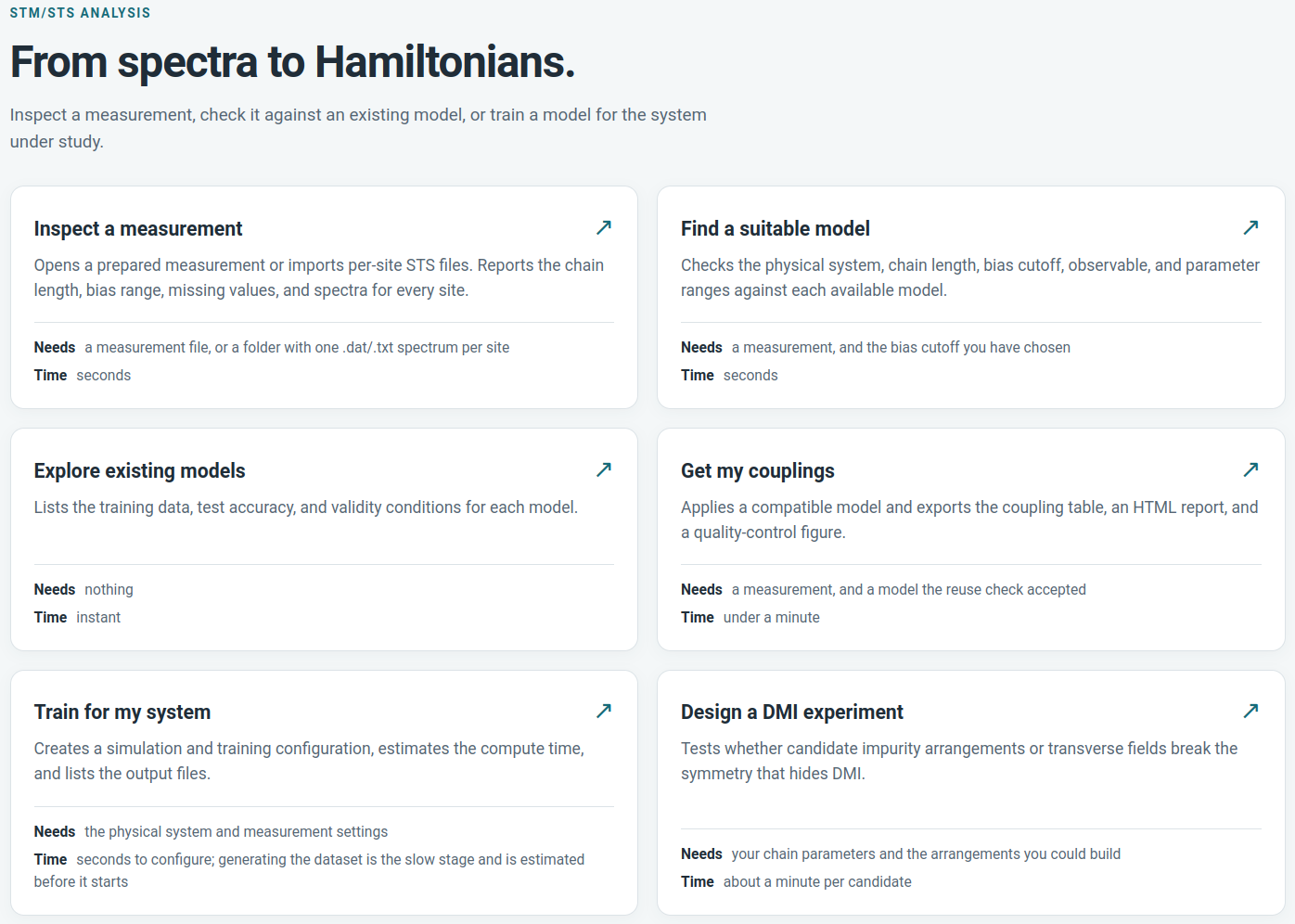
Every page says what it needs and how long it will take before you start, so a long run is never a surprise.
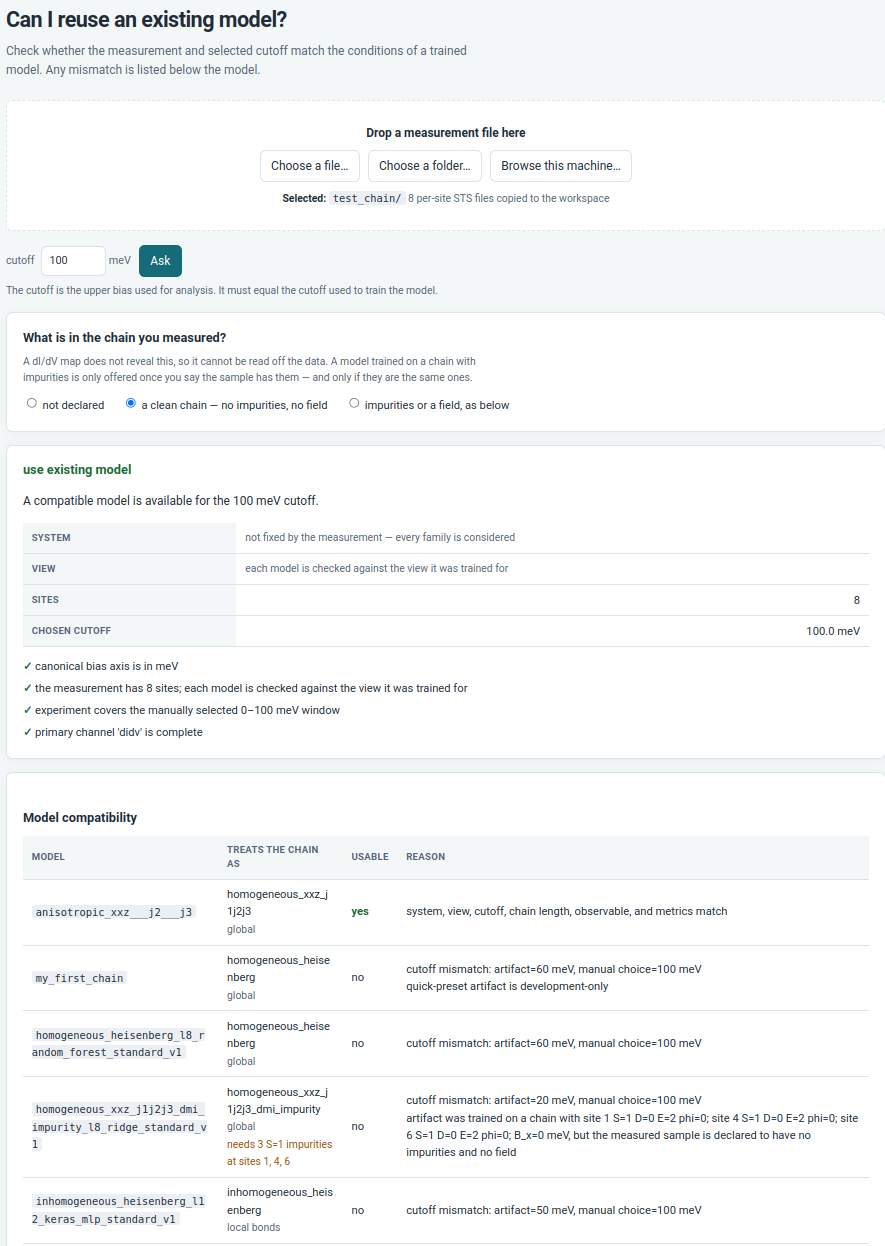
A model is refused with a reason, not silently applied. Each one is listed with the family of Hamiltonian it assumes and what it needs of the sample: the wrong bias cutoff, a chain length it was never trained on, or — for a model trained with impurities at specific sites — a sample that has not been declared to have them. Which family to assume is yours to choose, since spectra do not decide it; what a model requires of the sample is not.
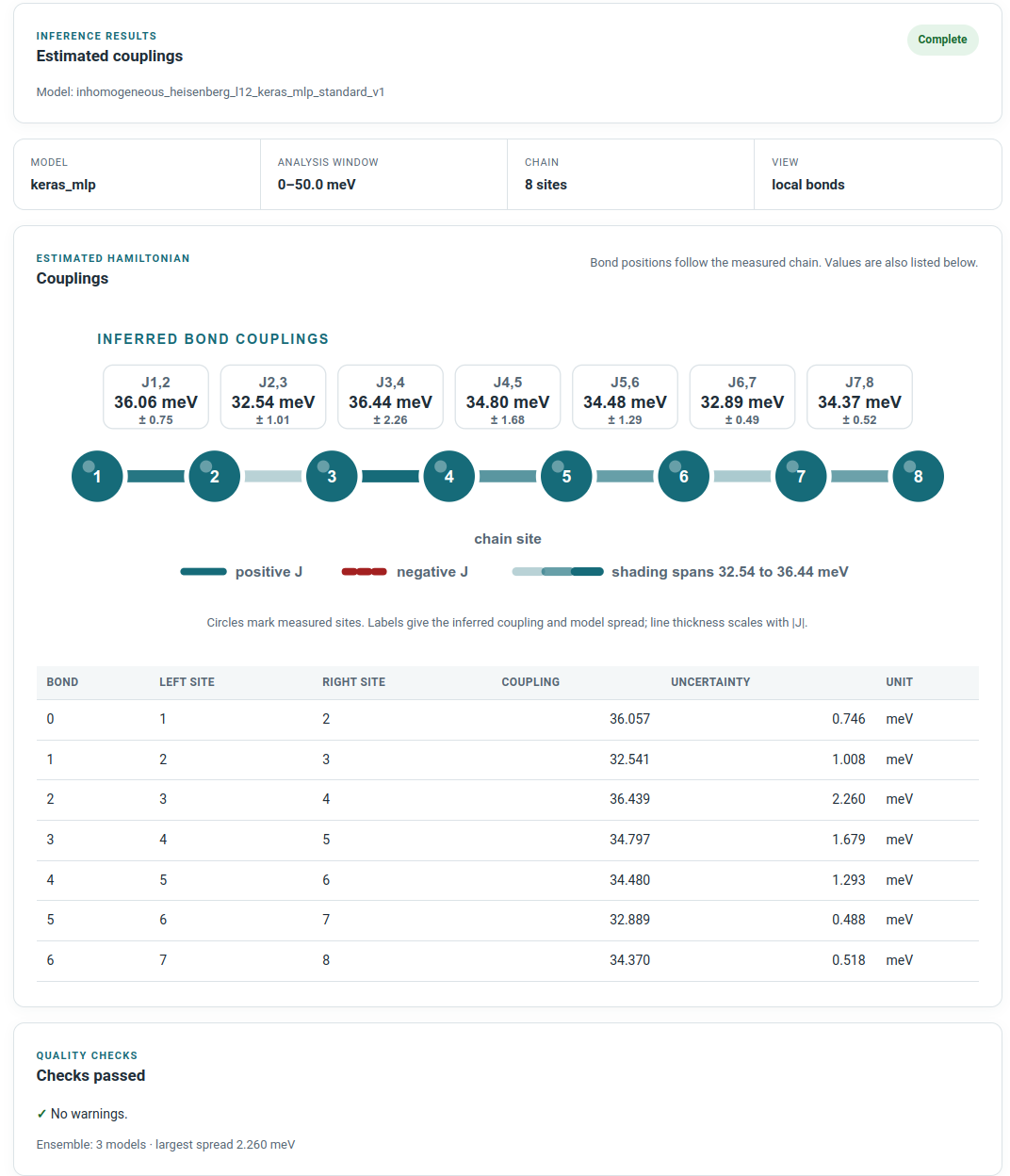
The couplings come back with the spread across ensemble members, a table you can export, and the analysis window and chain length the model was applied under. Read that spread as disagreement between trained members, not as a calibrated error bar — the theory notes say why.
The Start here page lists every folder it writes to, and hamlet where
prints the same layout from the terminal: results/ beside a source checkout,
~/.hamlet/workspace/ for an installed package, or HAMLET_WORKSPACE.
Dataset generation is the stage that costs hours, and every chain is independent. Local runs can use several cores; cluster runs use a scheduler array with one job per simulated chain and start training only after the whole array succeeds. The result does not depend on execution order. See Making generation faster, which also covers why a GPU makes this stage slower.
Installation options
The base installation includes the interface, experimental I/O, plotting, ridge and random-forest models, and the published reference-model catalog.
python -m pip install "hamlet-toolkit[ml]"          # Keras MLP and CNN
python -m pip install "hamlet-toolkit[simulation]"  # DMRGPy generation
python -m pip install "hamlet-toolkit[tune]"        # Optuna search
python -m pip install "hamlet-toolkit[all]"         # all optional features
python -m pip install "hamlet-toolkit[gpu]"         # CUDA TensorFlow, Linux only
[gpu] is not part of [all], and is worth reading about before installing:
the CUDA wheels are several gigabytes, only the Keras models can use a card,
and dataset generation — the long stage — is CPU-bound and gains nothing from
one. hamlet compute reports what this machine will actually use for each
stage, and why. See Using a GPU.
For development from a clone:
python -m pip install -e ".[dev,ml,simulation,tune]"
pytest
Supported workflows
| Workflow | Model view | Current status |
|---|---|---|
| Bond-inhomogeneous Heisenberg | three-site local windows; variable chain length | validated workflow; published Keras ensemble |
Homogeneous Heisenberg J1-J2 |
complete chain; exactly L=8 | published random-forest reference model; simulation-validated |
XXZ J1-J2-J3 with impurity-assisted DMI |
complete chain; exactly L=8 | published ridge reference model; experimental-design workflow |
Global models are chain-length specific. Local sliding-window models can be applied to other lengths when the stored model contract is otherwise compatible. HamLeT reports a mismatch instead of padding spectra or silently changing the cutoff.
Each shipped artifact has a model card under
src/hamlet/resources/models documenting its
training distribution, expected observable, accuracy, and limitations.
The pretrained bond-inhomogeneous model is the model developed for:
G. Lupi, S. Ravuri, C. Zhao, W. Zhang, C. Roncaglia, R. Liu, X. Feng, D. Passerone, P. Ruffieux, R. Fasel, J. L. Lado and G. Catarina, Learning Inhomogeneous Heisenberg Hamiltonians in Nanographene Spin Chains, (2026), arXiv:2606.29281.
Please cite that work when using this model. Its model card contains the full author list, BibTeX entry, training provenance, and validity range.
Work this package builds on
The uniform spin-chain Hamiltonians and the impurity-tomography route to parameters that are otherwise hidden come from:
G. Lupi and J. L. Lado, Hamiltonian-learning quantum magnets with nonlocal impurity tomography, Phys. Rev. Applied 23, 054077 (2025).
N. Karjalainen, G. Lupi, R. Koch, A. O. Fumega and J. L. Lado, Hamiltonian learning quantum magnets with dynamical impurity tomography, Phys. Rev. Research 8, 033281 (2026).
The models trained for those papers are not distributed with this package.
HamLeT implements the same families of Hamiltonians and the same measurement
logic, so you can generate a dataset and train an equivalent model yourself,
but any pretrained artifact shipped here is listed under
src/hamlet/resources/models and is not one of
theirs. Please cite these papers if you use the impurity route or the uniform
chain families; the estimators you train are your own.
Command line
The same workflow can be scripted with YAML configurations:
hamlet modes
hamlet inspect-experiment path/to/measurement.csv
hamlet run examples/quickstart_l8.yaml --dry-run
hamlet run examples/quickstart_l8.yaml
See the user guide for raw-file import, cutoff selection, dataset generation, model tuning, cluster execution, inference, and reports, and the theory notes for the Hamiltonians, the measurement model, and what the reported scores mean. The small L=8 notebook is the reproducible Python example; notebooks are tutorials, not the test suite.
Scientific scope
The theory notes state the Hamiltonians, the correlator and dI/dV relation, the metric definitions, and the assumptions behind all of them.
Reference-model scores describe held-out simulated data unless a model card explicitly says otherwise. Ensemble spread measures disagreement between trained members; it is not a calibrated confidence interval. A measurement must satisfy the artifact contract before its predictions are physically interpretable.
Uniform z-directed DMI cannot be identified from the supported on-site autocorrelator in a symmetry-preserving chain. HamLeT therefore exposes the impurity-assisted design route instead of offering a misleading ordinary DMI model. See the DMI experiment specification.
Project information
- Theory and assumptions: docs/theory.md
- Changes: CHANGELOG.md
- Contributing: CONTRIBUTING.md
- Releasing: docs/releasing.md
- Security reports: SECURITY.md
- Citation metadata: CITATION.cff
HamLeT is distributed under the GNU General Public License v3.0 or later.
1 maintainer

Metadata
1 maintainer
Release files for hamlet-toolkit 0.1.0
For a detailed explanation of source distributions (sdists) and built distributions (wheels), please see the package formats documentation.
Source distribution (sdist)
| File | Size | Uploaded | |
|---|---|---|---|
| hamlet_toolkit-0.1.0.tar.gz | 37.8 MB | Details |
Built distribution (wheel)
| File | Interpreter | ABI | Platform | Reset |
|---|---|---|---|---|
| hamlet_toolkit-0.1.0-py3-none-any.whl | Python 3 | none | any | Details |
Total release size: 75.3 MB
Release files / hamlet_toolkit-0.1.0.tar.gz
| Download URL | hamlet_toolkit-0.1.0.tar.gz |
|---|---|
| Size | 37.8 MB |
| Tags | Source |
|
SHA-256 checksum How to use checksums |
3b96d428716875fb142b59abafd075bf2a7dcc496e9fe19a859259acc4ec8e4a
|
|
BLAKE2b-256 checksum How to use checksums |
da8caf1320150612ee1a45e83a55ff6337897f7d7a07c48dc321105872c974a1
|
| Upload date | |
|
Uploaded using Trusted Publishing? What is trusted publishing? |
Yes |
| Uploaded via |
twine/7.0.0 CPython/3.13.14
|
Provenance
Provenance describes where a file came from. On PyPI, provenance is shared via attestations, which provide a verifiable record of the build or publishing details. View details, limitations and caveats.


PyPI Publish Attestation
PyPI verified that this artifact, at this checksum, originated from the publisher listed below.
Signed by GitHub Actions, verified by PyPI on Sep 16, 2026.
Transparency logRelease files / hamlet_toolkit-0.1.0-py3-none-any.whl
| Download URL | hamlet_toolkit-0.1.0-py3-none-any.whl |
|---|---|
| Size | 37.5 MB |
| Tags | Python 3 |
|
SHA-256 checksum How to use checksums |
f4886305638de931bdcf6474912b8a514fdd9275223dd4f7509b510146f2e1e4
|
|
BLAKE2b-256 checksum How to use checksums |
3797e7f2573e0fcfb2724dffab1f5986c5c3cb3f0ea125fe27db0e0d4e8647b9
|
| Upload date | |
|
Uploaded using Trusted Publishing? What is trusted publishing? |
Yes |
| Uploaded via |
twine/7.0.0 CPython/3.13.14
|
Provenance
Provenance describes where a file came from. On PyPI, provenance is shared via attestations, which provide a verifiable record of the build or publishing details. View details, limitations and caveats.
PyPI Publish Attestation
PyPI verified that this artifact, at this checksum, originated from the publisher listed below.
Signed by GitHub Actions, verified by PyPI on Sep 16, 2026.
Transparency log













