
A library for recognizing hand gestures using 2D CNN

Project description
hand-gesture-recognition 2D CNN
This is a sample program that recognizes hand signs and finger gestures with a simple 2D CNN using the detected key points..
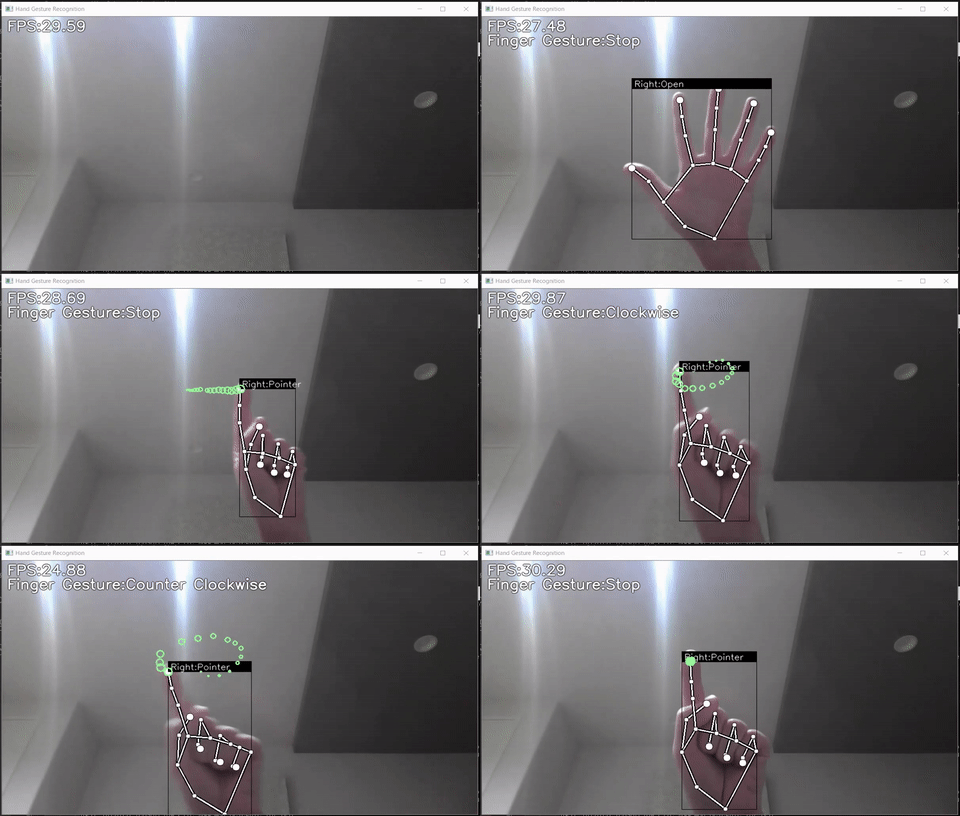
- Sample program
- Hand sign recognition model(TFLite)
- Finger gesture recognition model(TFLite)
- Learning data for hand sign recognition and notebook for learning
- Learning data for finger gesture recognition and notebook for learning
Requirements
- mediapipe 0.8.1
- OpenCV 3.4.2 or Later
- Tensorflow 2.3.0 or Later<br>tf-nightly 2.5.0.dev or later (Only when creating a TFLite for an LSTM model)
- scikit-learn 0.23.2 or Later (Only if you want to display the confusion matrix)
- matplotlib 3.3.2 or Later (Only if you want to display the confusion matrix)
Demo
Here's how to install the project.
pip install hand-gesture-recognizer
The following options can be specified when running the demo.
- --device<br>Specifying the camera device number (Default:0)
- --width<br>Width at the time of camera capture (Default:960)
- --height<br>Height at the time of camera capture (Default:540)
- --use_static_image_mode<br>Whether to use static_image_mode option for MediaPipe inference (Default:Unspecified)
- --min_detection_confidence<br> Detection confidence threshold (Default:0.5)
- --min_tracking_confidence<br> Tracking confidence threshold (Default:0.5)
Directory
<pre> │ app.py │ keypoint_classification.ipynb │ point_history_classification.ipynb │
├─model │ ├─keypoint_classifier │ │ │ keypoint.csv │ │ │ keypoint_classifier.hdf5 │ │ │ keypoint_classifier.py │ │ │ keypoint_classifier.tflite │ │ └─ keypoint_classifier_label.csv │ │
│ └─point_history_classifier │ │ point_history.csv │ │ point_history_classifier.hdf5 │ │ point_history_classifier.py │ │ point_history_classifier.tflite │ └─ point_history_classifier_label.csv │
└─utils └─cvfpscalc.py </pre>
keypoint_classification.ipynb
This is a model training script for hand sign recognition.
point_history_classification.ipynb
This is a model training script for finger gesture recognition.
model/keypoint_classifier
This directory stores files related to hand sign recognition.<br> The following files are stored.
- Training data(keypoint.csv)
- Trained model(keypoint_classifier.tflite)
- Label data(keypoint_classifier_label.csv)
- Inference module(keypoint_classifier.py)
model/point_history_classifier
This directory stores files related to finger gesture recognition.<br> The following files are stored.
- Training data(point_history.csv)
- Trained model(point_history_classifier.tflite)
- Label data(point_history_classifier_label.csv)
- Inference module(point_history_classifier.py)
utils/cvfpscalc.py
This is a module for FPS measurement.
Training
Hand sign recognition and finger gesture recognition can add and change training data and retrain the model.
Hand sign recognition training
1.Learning data collection
Press "k" to enter the mode to save key points(displayed as 「MODE:Logging Key Point」)<br> <img src="https://user-images.githubusercontent.com/37477845/102235423-aa6cb680-3f35-11eb-8ebd-5d823e211447.jpg" width="60%"><br><br> If you press "0" to "9", the key points will be added to "model/keypoint_classifier/keypoint.csv" as shown below.<br> 1st column: Pressed number (used as class ID), 2nd and subsequent columns: Key point coordinates<br> <img src="https://user-images.githubusercontent.com/37477845/102345725-28d26280-3fe1-11eb-9eeb-8c938e3f625b.png" width="80%"><br><br> The key point coordinates are the ones that have undergone the following preprocessing up to ④.<br> <img src="https://user-images.githubusercontent.com/37477845/102242918-ed328c80-3f3d-11eb-907c-61ba05678d54.png" width="80%"> <img src="https://user-images.githubusercontent.com/37477845/102244114-418a3c00-3f3f-11eb-8eef-f658e5aa2d0d.png" width="80%"><br><br> In the initial state, three types of learning data are included: open hand (class ID: 0), close hand (class ID: 1), and pointing (class ID: 2).<br> If necessary, add 3 or later, or delete the existing data of csv to prepare the training data.<br> <img src="https://user-images.githubusercontent.com/37477845/102348846-d0519400-3fe5-11eb-8789-2e7daec65751.jpg" width="25%"> <img src="https://user-images.githubusercontent.com/37477845/102348855-d2b3ee00-3fe5-11eb-9c6d-b8924092a6d8.jpg" width="25%"> <img src="https://user-images.githubusercontent.com/37477845/102348861-d3e51b00-3fe5-11eb-8b07-adc08a48a760.jpg" width="25%">
2.Model training
Open "keypoint_classification.ipynb" in Jupyter Notebook and execute from top to bottom.<br> To change the number of training data classes, change the value of "NUM_CLASSES = 3" <br>and modify the label of "model/keypoint_classifier/keypoint_classifier_label.csv" as appropriate.<br><br>
X.Model structure
The image of the model prepared in "keypoint_classification.ipynb" is as follows. <img src="https://user-images.githubusercontent.com/37477845/102246723-69c76a00-3f42-11eb-8a4b-7c6b032b7e71.png" width="50%"><br><br>
Finger gesture recognition training
1.Learning data collection
Press "h" to enter the mode to save the history of fingertip coordinates (displayed as "MODE:Logging Point History").<br> <img src="https://user-images.githubusercontent.com/37477845/102249074-4d78fc80-3f45-11eb-9c1b-3eb975798871.jpg" width="60%"><br><br> If you press "0" to "9", the key points will be added to "model/point_history_classifier/point_history.csv" as shown below.<br> 1st column: Pressed number (used as class ID), 2nd and subsequent columns: Coordinate history<br> <img src="https://user-images.githubusercontent.com/37477845/102345850-54ede380-3fe1-11eb-8d04-88e351445898.png" width="80%"><br><br> The key point coordinates are the ones that have undergone the following preprocessing up to ④.<br> <img src="https://user-images.githubusercontent.com/37477845/102244148-49e27700-3f3f-11eb-82e2-fc7de42b30fc.png" width="80%"><br><br> In the initial state, 4 types of learning data are included: stationary (class ID: 0), clockwise (class ID: 1), counterclockwise (class ID: 2), and moving (class ID: 4). <br> If necessary, add 5 or later, or delete the existing data of csv to prepare the training data.<br> <img src="https://user-images.githubusercontent.com/37477845/102350939-02b0c080-3fe9-11eb-94d8-54a3decdeebc.jpg" width="20%"> <img src="https://user-images.githubusercontent.com/37477845/102350945-05131a80-3fe9-11eb-904c-a1ec573a5c7d.jpg" width="20%"> <img src="https://user-images.githubusercontent.com/37477845/102350951-06444780-3fe9-11eb-98cc-91e352edc23c.jpg" width="20%"> <img src="https://user-images.githubusercontent.com/37477845/102350942-047a8400-3fe9-11eb-9103-dbf383e67bf5.jpg" width="20%">
2.Model training
Open "point_history_classification.ipynb" in Jupyter Notebook and execute from top to bottom.<br> To change the number of training data classes, change the value of "NUM_CLASSES = 4" and <br>modify the label of "model/point_history_classifier/point_history_classifier_label.csv" as appropriate. <br><br>
X.Model structure
The image of the model prepared in "point_history_classification.ipynb" is as follows. <img src="https://user-images.githubusercontent.com/37477845/102246771-7481ff00-3f42-11eb-8ddf-9e3cc30c5816.png" width="50%"><br> The model using "LSTM" is as follows. <br>Please change "use_lstm = False" to "True" when using (tf-nightly required (as of 2020/12/16))<br> <img src="https://user-images.githubusercontent.com/37477845/102246817-8368b180-3f42-11eb-9851-23a7b12467aa.png" width="60%">
Reference
- Dynamic gesture recognition based on 2D convolutional neural network and feature fusion
- Fine-Grained Gesture Control for Mobile Devices in Driving Environments
Contributors
- Umesh Singh Verma
- Ankit Yadav
- Manan Patel
- Sukrit Malpani
- Siddhant Mukund
Release history Release notifications | RSS feed


Download files
Download the file for your platform. If you're not sure which to choose, learn more about installing packages.
Source Distribution
Built Distribution
Filter files by name, interpreter, ABI, and platform.
If you're not sure about the file name format, learn more about wheel file names.
Copy a direct link to the current filters
File details
Details for the file hand_gesture_recognizer_2dcnn-1.3.1.tar.gz.
File metadata
- Download URL: hand_gesture_recognizer_2dcnn-1.3.1.tar.gz
- Upload date:
- Size: 6.1 kB
- Tags: Source
- Uploaded using Trusted Publishing? No
- Uploaded via: twine/5.1.1 CPython/3.12.2
File hashes
| Algorithm | Hash digest | |
|---|---|---|
| SHA256 |
2dfcb45000d24b5f40b5fa69909c1e82fca6d2f3d6aea40a0f27971bb594d563
|
|
| MD5 |
41aacc697604ee4b77de94b39d21bb60
|
|
| BLAKE2b-256 |
4aada569f1cf1ff47657829fc0ec35286f0735e8f55bc38f5475f7995115c677
|
File details
Details for the file hand_gesture_recognizer_2DCNN-1.3.1-py3-none-any.whl.
File metadata
- Download URL: hand_gesture_recognizer_2DCNN-1.3.1-py3-none-any.whl
- Upload date:
- Size: 6.7 kB
- Tags: Python 3
- Uploaded using Trusted Publishing? No
- Uploaded via: twine/5.1.1 CPython/3.12.2
File hashes
| Algorithm | Hash digest | |
|---|---|---|
| SHA256 |
0d97349461b71c1a88a4b487a1bab77011746f59ad72708021761ffeec1dc6e8
|
|
| MD5 |
ca09c96f296f237264e0899ee7b69b17
|
|
| BLAKE2b-256 |
d87b1569f573a29501ff531d1e3c946112f3f1fc373e5799bcefe10ccea6dab5
|









