
A modular bot for teaching new developers

Project description
HangoutCore Bot Framework
HangoutCore Version:  | using
  | License
Join the discord below for quicker support.
Assign yourself the Bot Developer Role in the #pick-your-roles channel in order to access the #bot-support channel.

TODO
- use slash commands
- Add support for various database types in util.database.
- Add support for specifying which config to load from like our current implementation for tokens.
- Further Optimize base script while prioritizing eazy readability for new developers.
- Create Example Cog for new developers to be able to build off of.
- Create webhook example.
- Add Guild registration function in util.database. to begin supporting database saved data.
- Add Ticket Cog for new devs to be able to build off of.
- Create static page to display more detailed information on HangoutCore Project Status
- Add per bot(config) directory specification. (each bot should be alowed to have it's own cog, log directory to avoid mixing bots)
Features
- Config Support: Quickly swap bot information such as Description, Tokens, Intents, Prefixes, etc.
- Config File Setup Process: HangoutCore streamlines config file creation by walking the user through a short setup process, allowing the user to quickly and efficiently create multiple config files for quick bot swapping.
- Automated config Swapping: By simply running
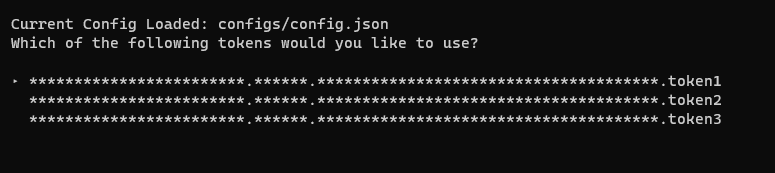
py hangoutcore -config ConfigNameHangoutCore will automatically swap over to the desired config and store the selection for future use. Once you run the command above you can simply run the bot like normal until you're ready to swap once again. - Automated Token Swapping: Multiple tokens in your config file? HangoutCore will automatically prompt the user to ensure the right token is chosen every time. Want to skip the prompt? Simply run
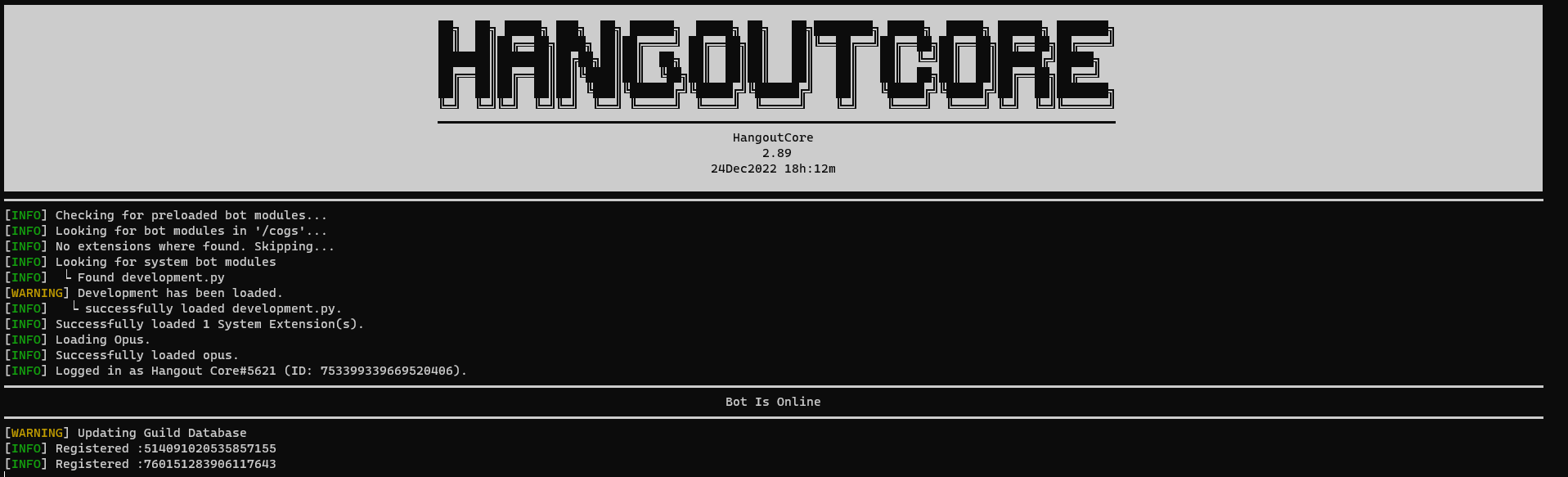
py hangoutcore -token [INTEGER]to choose from the list of tokens. - Detailed Terminal Output: With a simple glance you're able to tell if your bot is running as it should. With colored terminal classes you can very easily tell apart Errors from normal output.
Installation
Please note it is assumed you already have Python, and VirtualEnv installed prior to this installation. If you do not have both installed please do so before continuing.
-
Environment Setup:
- Create and CD into your desired directory via
cd /path/to/directory - Create a Virtual Environment via
python -m venv --upgrade-deps /path/to/venv
- [Linux] Activate your Virtual Environment via
source venv/bin/activate - [Windows] Activate your Virtual Environment via
.\venv\Scripts\activate
- Install hangoutcore via
pip install hangoutcore
- Create and CD into your desired directory via
-
HangoutCore Bot Setup:
- Start HangoutCore via
hangoutcore - The initial prompt will ask you to start the setup process
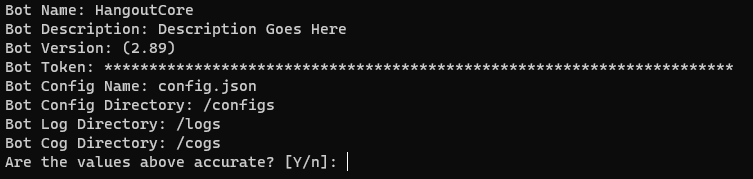
- The setup process will ask you various questions pertaining to the handling of your bot.
- Once you've entered the necessary info the bot will ask you to verify the information one last time before proceeding
- After confirming, the bot will then create the necessary directories and add your provided info to the config file that you named.
- The bot will now attempt to login with the provided token
- Start HangoutCore via
-
Starting HangoutCore
- Starting HangoutCore with one token specified in your config will not require any other input before starting.
- Starting HangoutCore normally with more than one token specified will cause HangoutCore to prompt you in the terminal to specify which token you'd like to use.
-
Starting HangoutCore Via
hangoutcore -t intorhangoutcore --token intwill use the number specifed to choose which token to start with ultimately skipping the prompt for token choice.If setting up HangoutCore to be run automatically or with no human interaction with the terminal please make sure to:
- Specify which token to use if multiple tokens are present in your config
- Start HangoutCore in silent mode using '-S True' or '-Silent True'


Contributers
A special thank you to the following for contributing to this project.
Release history Release notifications | RSS feed


Download files
Download the file for your platform. If you're not sure which to choose, learn more about installing packages.
Source Distribution
Built Distribution
Filter files by name, interpreter, ABI, and platform.
If you're not sure about the file name format, learn more about wheel file names.
Copy a direct link to the current filters
File details
Details for the file HangoutCore-2.91.5.tar.gz.
File metadata
- Download URL: HangoutCore-2.91.5.tar.gz
- Upload date:
- Size: 51.5 kB
- Tags: Source
- Uploaded using Trusted Publishing? No
- Uploaded via: twine/4.0.2 CPython/3.10.8
File hashes
| Algorithm | Hash digest | |
|---|---|---|
| SHA256 |
6325c71696b9e369148a6ee9eb0a2af03b8f6680bc91e252491ff13958a30a7a
|
|
| MD5 |
d70f506f4b262fd0033ee392f2496a69
|
|
| BLAKE2b-256 |
406f37a628a4d8505f1fd3ff7f685882ff8c911d7f9362244356c6c9114bef10
|
File details
Details for the file HangoutCore-2.91.5-py3-none-any.whl.
File metadata
- Download URL: HangoutCore-2.91.5-py3-none-any.whl
- Upload date:
- Size: 53.5 kB
- Tags: Python 3
- Uploaded using Trusted Publishing? No
- Uploaded via: twine/4.0.2 CPython/3.10.8
File hashes
| Algorithm | Hash digest | |
|---|---|---|
| SHA256 |
4cfa8b611d3b5405298f9e516773148b412fbdd101086f6df11268c847bc2718
|
|
| MD5 |
09fabfa404646a8f152b931f08384f14
|
|
| BLAKE2b-256 |
ef0d0577fcee373a4adb1f8da981fdfd7fa808c064d0f4c98fbdd78f4e0c8afa
|






