
Typhoon Animation Generator

Project description
Hanuman
Hanuman is a Python tool designed to generate animated videos of typhoon seasons. It processes typhoon data from a CSV file and overlays the trajectories on a world map, creating visually engaging animations that depict the paths and intensities of typhoons over time.
Features
- Visualize Typhoon Trajectories: Overlay typhoon paths on an equirectangular world map.
- Dynamic Animation: Generate smooth animations showing the progression of typhoons.
- Categorization: Categorize typhoons based on wind speeds, with distinct visual markers.
- Customizable Parameters: Adjust map cropping, frame rates, icon sizes, and more.
- Command-Line Interface: Easy-to-use CLI for generating animations with custom configurations.
Installation
Ensure you have Python 3.6 or higher installed. You can install Hanuman directly from PyPI using pip:
pip install hanuman
Alternatively, if you prefer to install from source, clone the repository and install the package:
git clone https://github.com/yourusername/Hanuman.git
cd Hanuman
pip install .
Usage
Hanuman provides a command-line interface to generate typhoon animation videos. Below is a basic example of how to use the tool.
Basic Command
hanuman --csv typhoon202411.csv --map world_map.png --output typhoon_season_a13.mp4
And the detailed command-line arguments is below:
hanuman \
    --csv typhoon202411.csv \
    --map world_map.png \
    --output typhoon_season_a13.mp4 \
    --nw_min_lat 0.0 \
    --nw_max_lat 45.0 \
    --nw_min_lon 100.0 \
    --nw_max_lon 180.0 \
    --crop_width 1280 \
    --crop_height 720 \
    --frames_per_3h 15 \
    --fps 30 \
    --ty_icon_radius 24 \
    --ex_threshold_lat 22.0 \
    --empty_speedup_factor 25 \
    --static_frames_after_end 300
Arguments Description
--csv: (Required) Path to the typhoon data CSV file.--map: (Required) Path to the world map image file (e.g., PNG).--output: (Optional) Name of the output video file. Default istyphoon_season_a13.mp4.--nw_min_lat: (Optional) NW Pacific minimum latitude. Default is 0.0.--nw_max_lat: (Optional) NW Pacific maximum latitude. Default is 45.0.--nw_min_lon: (Optional) NW Pacific minimum longitude. Default is 100.0.--nw_max_lon: (Optional) NW Pacific maximum longitude. Default is 180.0.--crop_width: (Optional) Output canvas width in pixels. Default is 1280.--crop_height: (Optional) Output canvas height in pixels. Default is 720.--frames_per_3h: (Optional) Frames per 3-hour interpolation interval. Default is 15.--fps: (Optional) Video frame rate. Default is 30.--ty_icon_radius: (Optional) Radius of the typhoon icon in pixels. Default is 24.--ex_threshold_lat: (Optional) Latitude threshold to change category to EX. Default is 22.0.--empty_speedup_factor: (Optional) Speedup factor when no typhoon is present. Default is 25.--static_frames_after_end: (Optional) Number of static frames after the video ends. Default is 300.
Example
Assuming you have a CSV file named typhoon202411.csv and a world map image world_map.png, you can generate a video as follows:
hanuman --csv typhoon202411.csv --map world_map.png --output typhoon_season_a13.mp4
An MP4 file will then be generated using the 2024 Northwest Pacific typhoon season as an example. The final video size is approximately 200 MB and will conclude with a complete path still frame, making it convenient for users to continue editing.
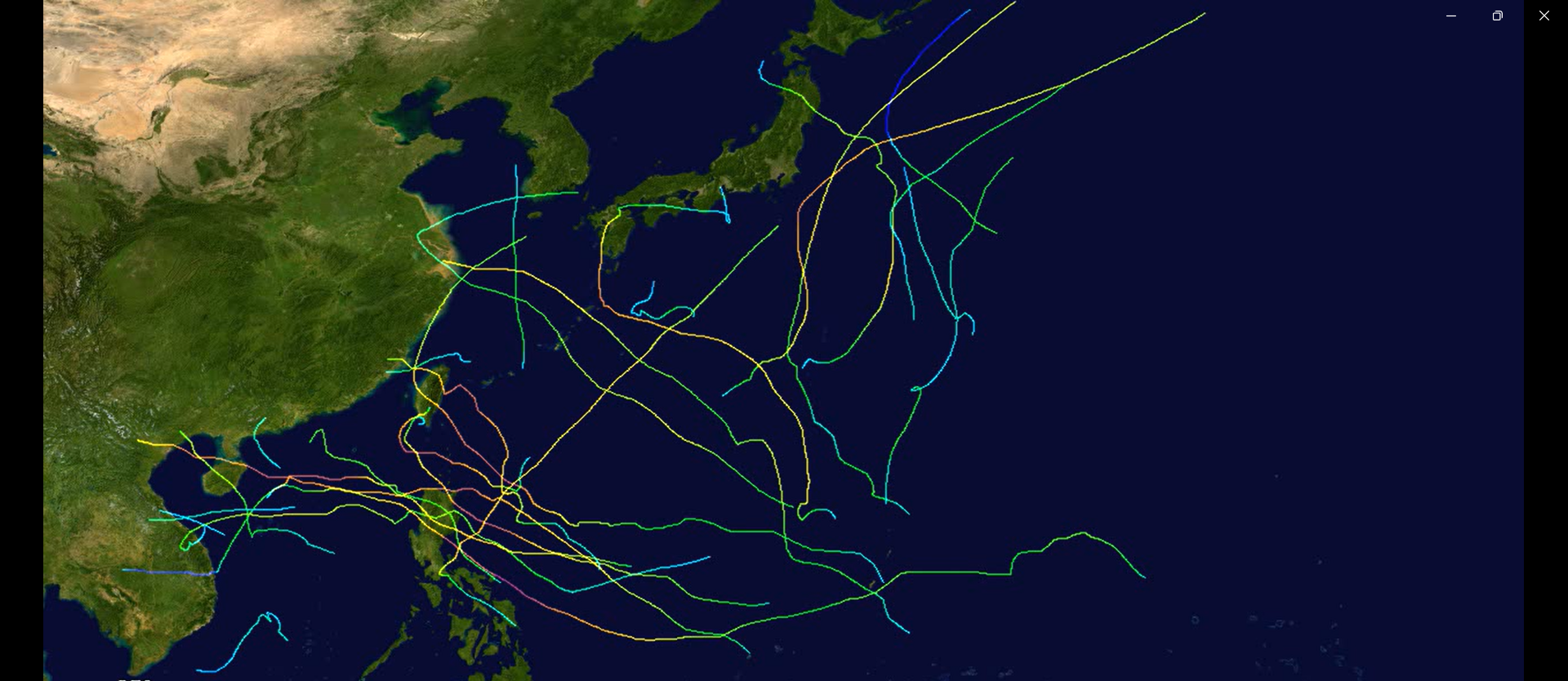
2024 Typhoon Season Animation by hanuman
Dependencies
Hanuman relies on the following Python packages:
- OpenCV (
opencv-python) - NumPy
- tqdm
These dependencies are automatically installed when you install Hanuman via pip.
License
This project is licensed under the MIT License. See the LICENSE file for details.
Contributing
Contributions are welcome! Please fork the repository and submit a pull request for any enhancements or bug fixes.
Acknowledgements
Hanuman was created by CZHanoi in memory of a friend of Hinnamnor. Special thanks to the contributors and the open-source community for their invaluable tools and libraries.


Download files
Download the file for your platform. If you're not sure which to choose, learn more about installing packages.
Source Distribution
Built Distribution
Filter files by name, interpreter, ABI, and platform.
If you're not sure about the file name format, learn more about wheel file names.
Copy a direct link to the current filters
File details
Details for the file hanuman-0.1.6.tar.gz.
File metadata
- Download URL: hanuman-0.1.6.tar.gz
- Upload date:
- Size: 13.4 kB
- Tags: Source
- Uploaded using Trusted Publishing? No
- Uploaded via: twine/6.0.1 CPython/3.12.4
File hashes
| Algorithm | Hash digest | |
|---|---|---|
| SHA256 |
90791a01230e8e0c92228025b17b06b673c43db2302200ccaa1c1501ea575593
|
|
| MD5 |
5d93b8fb14af183e60b77a4e78a821c4
|
|
| BLAKE2b-256 |
0b6007dfda0ec5c7d653dda46d384f2cbb61e05128f7abdb850b11f582a51604
|
File details
Details for the file hanuman-0.1.6-py3-none-any.whl.
File metadata
- Download URL: hanuman-0.1.6-py3-none-any.whl
- Upload date:
- Size: 11.9 kB
- Tags: Python 3
- Uploaded using Trusted Publishing? No
- Uploaded via: twine/6.0.1 CPython/3.12.4
File hashes
| Algorithm | Hash digest | |
|---|---|---|
| SHA256 |
26bec67205792213e54ca95006927a35c5334170c4f2e1e75f7d819c54ff23f8
|
|
| MD5 |
95f56a5faa8e80df99ea5d3a54e6d828
|
|
| BLAKE2b-256 |
0983405a554eb73d74f412db7837781be0eec23c3c630eb014ce9060a56e5cfd
|






