
HappyHorse by Ace Data Cloud — CLI
A command-line tool for AI video generation using HappyHorse through the AceDataCloud platform.
Install the published Ace integration
This CLI is maintained by Ace Data Cloud for HappyHorse. It is not an official client published by the model owner. The first public release, happyhorse-cli 2026.10.19.4, was published and verified on 2026-10-20 Asia/Shanghai. The version uses the release workflow's UTC date.
python -m pip install happyhorse-cli
happyhorse --help
happyhorse models
The local help/model-reference commands do not send a generation request or need a key. Check the package's source is AceDataCloud/HappyHorseCli. Canonical source remains Clis/happyhorse; do not edit the mirror directly. The independently published HappyHorse MCP is also available for MCP hosts.
中文安装与密钥指南 · Exact first-release receipt and maintenance sequence
API key and free local checks
Register/sign in at Applications, initialize General application if needed, and copy or create an API Key with HappyHorse generation and task-query access. Check expiration, limits, balance and current pricing. Store only the raw token in ACEDATACLOUD_API_TOKEN, never a prompt or commit. A platform account-management token is different.
happyhorse --help
happyhorse models
These are local reference commands. Generation is charged under your current account terms. Save its task ID; use happyhorse task <task-id> or happyhorse wait <task-id> for that same task instead of generating again.
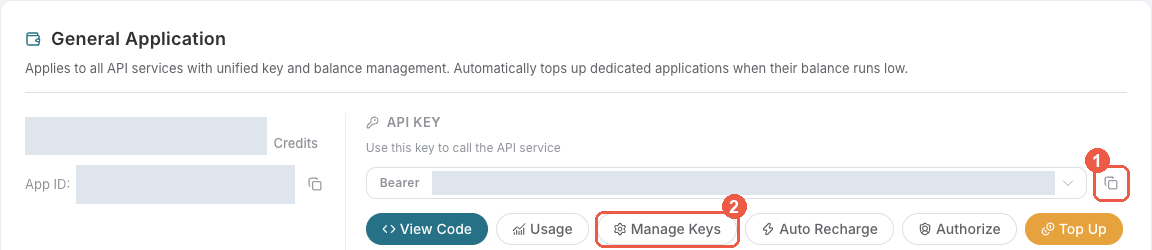
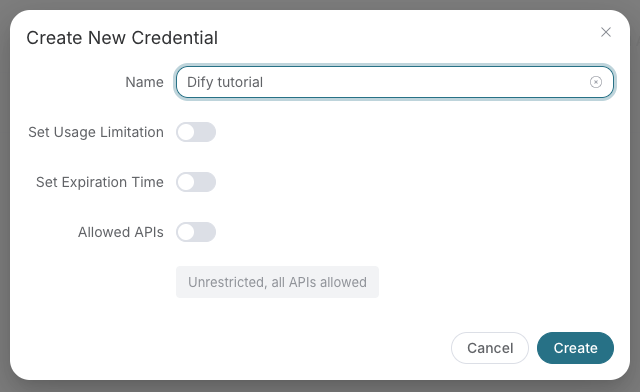
These are existing redacted platform screenshots from the SunoDify source archived on 2026-10-08, reused for the same key flow. The original name “Dify tutorial” is an example. They show only shared key management, not a HappyHorse generation. Original capture time/frontend version is not established.
Usage
# Set API token
export ACEDATACLOUD_API_TOKEN=your_token_here

# Generate video from text
happyhorse generate "A horse galloping through a field"

# Generate video from image
happyhorse image-to-video "Animate this scene" --image-url https://example.com/photo.jpg

# Generate video from reference images
happyhorse reference-to-video "Create scene" --image-urls https://example.com/ref.jpg

# Edit a video
happyhorse video-edit "Add dramatic music" --video-url https://example.com/video.mp4

# Check task status
happyhorse task abc123-def456

# Wait for task completion
happyhorse wait abc123 --interval 5

# List available models
happyhorse models

# Show configuration
happyhorse config
Options
generate
| Option | Default | Description |
|---|---|---|
--model |
happyhorse-1.1-t2v |
Model to use |
--resolution |
1080P |
Video resolution (720P, 1080P) |
--ratio |
16:9 |
Aspect ratio (16:9, 9:16, 1:1, 4:3, 3:4) |
--duration |
5 |
Duration in seconds |
--watermark |
False |
Add watermark |
--audio-setting |
auto |
Audio setting (auto, origin) |
--seed |
None | Random seed |
--callback-url |
None | Webhook callback URL |
--async |
False |
Submit asynchronously |
--json |
False |
Output raw JSON |
Models
| Model | Type |
|---|---|
happyhorse-1.0-t2v |
Text-to-Video |
happyhorse-1.1-t2v |
Text-to-Video (default) |
happyhorse-1.0-i2v |
Image-to-Video |
happyhorse-1.1-i2v |
Image-to-Video |
happyhorse-1.0-r2v |
Reference-to-Video |
happyhorse-1.1-r2v |
Reference-to-Video |
happyhorse-1.0-video-edit |
Video Edit |
License
MIT
1 maintainer

Metadata
1 maintainer
Release files for happyhorse-cli 2026.10.19.5
For a detailed explanation of source distributions (sdists) and built distributions (wheels), please see the package formats documentation.
Source distribution (sdist)
| File | Size | Uploaded | |
|---|---|---|---|
| happyhorse_cli-2026.10.19.5.tar.gz | 13.9 kB | Details |
Built distribution (wheel)
| File | Interpreter | ABI | Platform | Reset |
|---|---|---|---|---|
| happyhorse_cli-2026.10.19.5-py3-none-any.whl | Python 3 | none | any | Details |
Total release size: 28.2 kB
Release files / happyhorse_cli-2026.10.19.5.tar.gz
| Download URL | happyhorse_cli-2026.10.19.5.tar.gz |
|---|---|
| Size | 13.9 kB |
| Tags | Source |
|
SHA-256 checksum How to use checksums |
d723192842ecc64b82afd3c21914e2e14cf22aed4ecf5297446b85ec5a7871f4
|
|
BLAKE2b-256 checksum How to use checksums |
adc2bf91e8adc1373e1c32c6faca37eafdd16239ef5bc521ba57ce3c923be5c3
|
| Upload date | |
|
Uploaded using Trusted Publishing? What is trusted publishing? |
No |
| Uploaded via |
twine/7.0.0 CPython/3.12.3
|
Release files / happyhorse_cli-2026.10.19.5-py3-none-any.whl
| Download URL | happyhorse_cli-2026.10.19.5-py3-none-any.whl |
|---|---|
| Size | 14.3 kB |
| Tags | Python 3 |
|
SHA-256 checksum How to use checksums |
e7762610d6fae2de59391765cbe04f3e92f4e7d07f7a11a39e93200ed1512f64
|
|
BLAKE2b-256 checksum How to use checksums |
ed2ad4e55964132fefa62862410cbdaa32265cbc05bc6fbc99ab0568e736f23a
|
| Upload date | |
|
Uploaded using Trusted Publishing? What is trusted publishing? |
No |
| Uploaded via |
twine/7.0.0 CPython/3.12.3
|














