
HAR capture and PII sanitization library for network traffic analysis
Verified details
These details have been verified by PyPIProject links
GitHub Statistics
Maintainers

Project description
har-capture





Capture and sanitize HAR (HTTP Archive) files with deep PII removal. Perfect for support diagnostics, security reviews, and test fixtures.
Quick Start
Windows
- Install Python from the Microsoft Store or python.org
- Open PowerShell and run:
pip install har-capture[full]
python -m har_capture get https://example.com --patterns network-device
macOS / Linux
pip install har-capture[full]
har-capture get https://example.com --patterns network-device
Already have a HAR file?
pip install har-capture
har-capture sanitize myfile.har --patterns network-device
Why har-capture?
Chrome DevTools now sanitizes cookies and auth headers, but HAR files contain much more sensitive data: IP addresses, MAC addresses, emails, passwords in form bodies, serial numbers, device names, WiFi credentials, session tokens, and API keys.
How har-capture compares:
| Feature | har-capture | DevTools | Google/Cloudflare |
|---|---|---|---|
| Deep sanitization (IPs, MACs, emails) | ✅ | ❌ | ❌ |
| Correlation-preserving hashes | ✅ | ❌ | ❌ |
| Interactive review | ✅ | ❌ | Varies |
| Custom patterns | ✅ | ❌ | Limited |
| Local + CLI automation | ✅ | No CLI | Varies |
Key benefits:
- Zero dependencies - Core sanitization uses only Python stdlib
- Format-preserving hashes - Track the same device across requests without exposing real values
- One-command workflow - Capture, sanitize, and compress in a single step
- Interactive browser flows preserved - Handle browser auth, popups, and dialogs while still recording the resulting traffic
See detailed comparison with all tools →
See It In Action
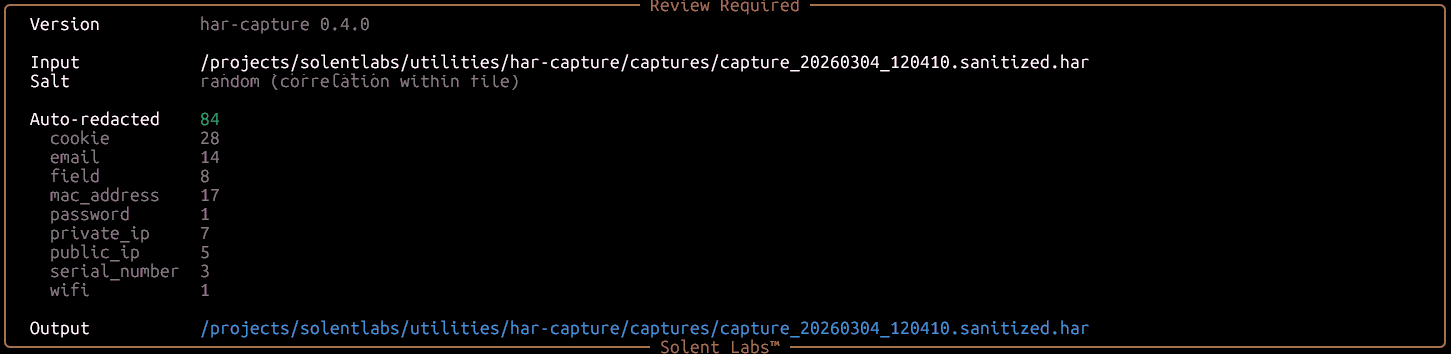
1. Sanitization report — 84 values auto-redacted across 9 PII categories:
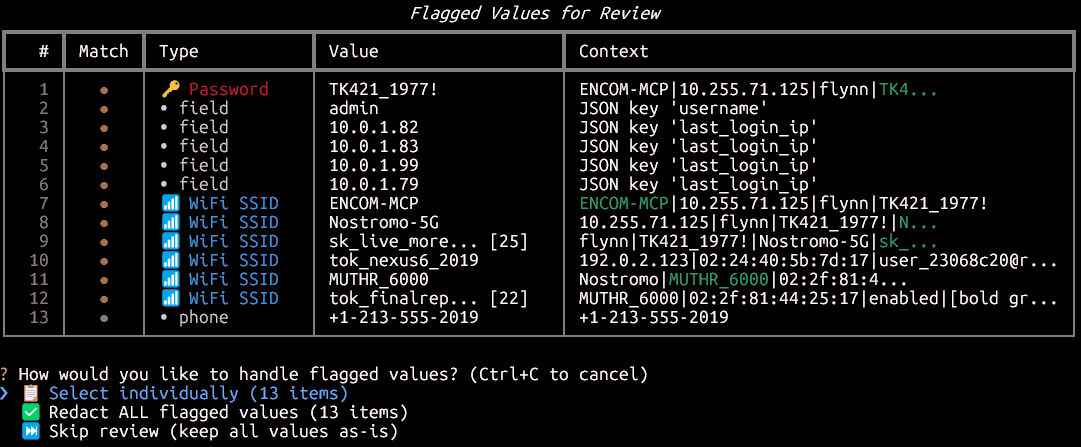
2. Flagged values for review — passwords, fields, WiFi SSIDs, and phone numbers detected automatically:
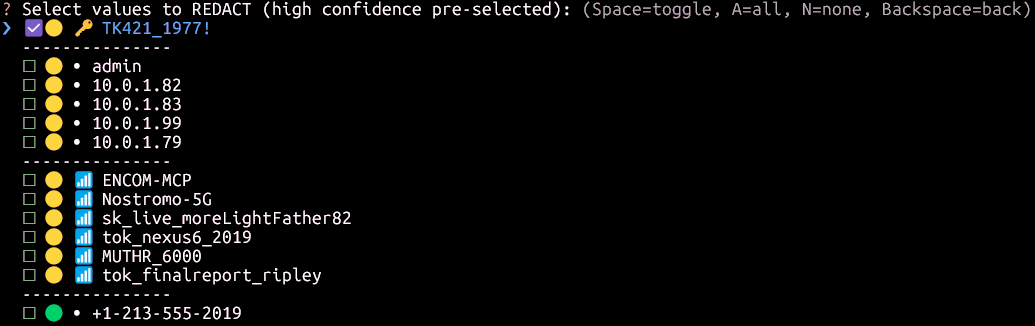
3. Interactive redaction picker — high-confidence items pre-selected, you choose the rest:
Installation
# Core only (sanitization - zero dependencies)
pip install har-capture

# With browser capture support
pip install har-capture[capture]
playwright install chromium

# Full installation (recommended)
pip install har-capture[full]
Usage
Command Line
# Capture and sanitize a network device (cable modem, router, AP)
har-capture get https://192.168.100.1 --patterns network-device

# Sanitize an existing HAR with universal PII rules only (no device domain)
har-capture sanitize capture.har --patterns base

# Validate for PII leaks
har-capture validate capture.har --patterns network-device
--patterns is required as of 0.9.0 — pick network-device for cable modems/routers/APs, base for generic web/API
captures, or a custom JSON path. Run har-capture patterns for the full list.
Python API
from har_capture.sanitization import sanitize_html, sanitize_har_file
from har_capture.sanitization.report import HeuristicMode

# Sanitize HTML (correlation-preserving by default)
clean_html = sanitize_html(raw_html)

# Sanitize with consistent salt (correlate across captures)
clean_html = sanitize_html(raw_html, salt="my-secret-key")

# Enable heuristic detection for WiFi, SSIDs, device names
clean_html = sanitize_html(raw_html, heuristics=HeuristicMode.REDACT)

# Sanitize HAR file
sanitize_har_file("capture.har")  # → capture.sanitized.har

# Custom patterns (e.g., modem serials, customer IDs)
custom = {"patterns": {"modem_sn": {"regex": r"SN[0-9]{10}", "replacement_prefix": "MODEM"}}}
sanitize_har_file("capture.har", custom_patterns=custom)

# Redact device-specific credential FIELD NAMES (not just value patterns).
# See docs/CUSTOM_PATTERNS.md#extending-sensitive-field-detection.
device_fields = {"fields": {"auto_redact_patterns": ["pws"]}}
sanitize_har_file("capture.har", custom_patterns=device_fields)
Documentation
- Comparison with Other Tools - DevTools, Google, Cloudflare, Edgio
- Correlation-Preserving Redaction - How format-preserving hashing works
- PII Categories - What gets sanitized
- Custom Patterns - Add organization-specific patterns
- CLI Reference - Detailed command documentation
- Interactive Sanitization - Review edge cases manually
Use Cases
- Support diagnostics - Users submit sanitized HAR files without exposing credentials
- Security review - Validate HAR files for PII leaks before sharing
- Test fixtures - Generate reproducible traffic captures
- Modem debugging - Capture router/modem traffic with sensitive data removed
What Gets Sanitized
| Category | Examples | Output |
|---|---|---|
| Network | IPs, MACs | 192.168.1.1 → 10.255.42.17 (private), 8.8.8.8 → 192.0.2.42 (public) |
| Personal | Emails, phones | user@example.com → user_a1b2@redacted.invalid |
| Credentials | Passwords, tokens | password=secret → password=PASS_a1b2c3d4 |
| Device | Serials, WiFi, SSIDs | SN123456 → SERIAL_a1b2c3d4 |
| HTTP | Auth headers, cookies | Cookie: session=xyz → Cookie: session=TOKEN_a1b2 |
See complete PII categories list →
Platform Support
| Component | Windows | macOS | Linux |
|---|---|---|---|
| Sanitization | ✅ | ✅ | ✅ |
| Validation | ✅ | ✅ | ✅ |
| CLI | ✅ | ✅ | ✅ |
| Capture | ✅ | ✅ | ✅ |
Contributing
Contributions welcome! See CONTRIBUTING.md for guidelines.
License
MIT License - see LICENSE for details.
Project details
Verified details
These details have been verified by PyPIProject links
GitHub Statistics
Maintainers
Release history Release notifications | RSS feed


Download files
Download the file for your platform. If you're not sure which to choose, learn more about installing packages.
Source Distribution
Built Distribution
Filter files by name, interpreter, ABI, and platform.
If you're not sure about the file name format, learn more about wheel file names.
Copy a direct link to the current filters
File details
Details for the file har_capture-0.10.2.tar.gz.
File metadata
- Download URL: har_capture-0.10.2.tar.gz
- Upload date:
- Size: 552.6 kB
- Tags: Source
- Uploaded using Trusted Publishing? Yes
- Uploaded via: twine/6.1.0 CPython/3.13.12
File hashes
| Algorithm | Hash digest | |
|---|---|---|
| SHA256 |
f020ab08b7e3541960334c32d01f894a7afb0fe8daeaa6b19db18233be998752
|
|
| MD5 |
43c2ebbeb2bd4f4cce6d2cd0131d3f3f
|
|
| BLAKE2b-256 |
9906cc74673956f860124202af0dc7df0cdfd62ee828d128234702267175bdba
|
Provenance
The following attestation bundles were made for har_capture-0.10.2.tar.gz:
Publisher:
publish.yml on solentlabs/har-capture
-
Statement:
-
Statement type:
https://in-toto.io/Statement/v1 -
Predicate type:
https://docs.pypi.org/attestations/publish/v1 -
Subject name:
har_capture-0.10.2.tar.gz -
Subject digest:
f020ab08b7e3541960334c32d01f894a7afb0fe8daeaa6b19db18233be998752 - Sigstore transparency entry: 2106875891
- Sigstore integration time:
-
Permalink:
solentlabs/har-capture@d8a9aa8082b0eec7f78e99332d1f272bc63d312b -
Branch / Tag:
refs/tags/v0.10.2 - Owner: https://github.com/solentlabs
-
Access:
public
-
Token Issuer:
https://token.actions.githubusercontent.com -
Runner Environment:
github-hosted -
Publication workflow:
publish.yml@d8a9aa8082b0eec7f78e99332d1f272bc63d312b -
Trigger Event:
push
-
Statement type:
File details
Details for the file har_capture-0.10.2-py3-none-any.whl.
File metadata
- Download URL: har_capture-0.10.2-py3-none-any.whl
- Upload date:
- Size: 118.5 kB
- Tags: Python 3
- Uploaded using Trusted Publishing? Yes
- Uploaded via: twine/6.1.0 CPython/3.13.12
File hashes
| Algorithm | Hash digest | |
|---|---|---|
| SHA256 |
f31855462ce2274815fb2a407ce08a5ba7b58aafac3becb6d113c8c4b039661e
|
|
| MD5 |
6186d5da8daf91c8a7432be39495962d
|
|
| BLAKE2b-256 |
6b529e1d93c2a3c1031be69951310f35fa31a4d75d6122a35bca6abfbb2020a6
|
Provenance
The following attestation bundles were made for har_capture-0.10.2-py3-none-any.whl:
Publisher:
publish.yml on solentlabs/har-capture
-
Statement:
-
Statement type:
https://in-toto.io/Statement/v1 -
Predicate type:
https://docs.pypi.org/attestations/publish/v1 -
Subject name:
har_capture-0.10.2-py3-none-any.whl -
Subject digest:
f31855462ce2274815fb2a407ce08a5ba7b58aafac3becb6d113c8c4b039661e - Sigstore transparency entry: 2106876017
- Sigstore integration time:
-
Permalink:
solentlabs/har-capture@d8a9aa8082b0eec7f78e99332d1f272bc63d312b -
Branch / Tag:
refs/tags/v0.10.2 - Owner: https://github.com/solentlabs
-
Access:
public
-
Token Issuer:
https://token.actions.githubusercontent.com -
Runner Environment:
github-hosted -
Publication workflow:
publish.yml@d8a9aa8082b0eec7f78e99332d1f272bc63d312b -
Trigger Event:
push
-
Statement type:






