
No project description provided

Project description
Hardeneks




Runs checks to see if an EKS cluster follows EKS Best Practices.
Quick Start:
python3 -m venv /tmp/.venv
source /tmp/.venv/bin/activate
pip install hardeneks
hardeneks
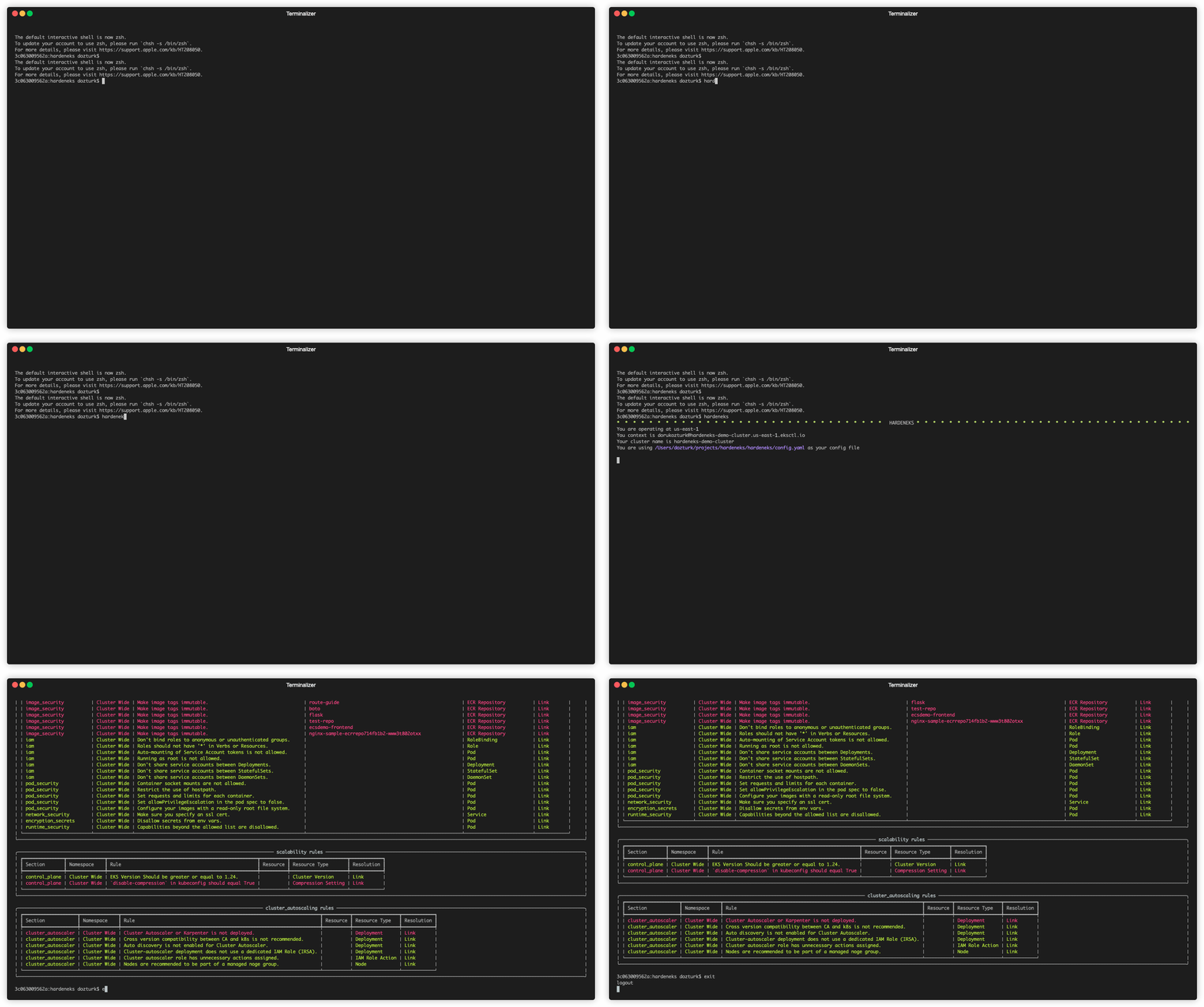
Usage:
hardeneks [OPTIONS]
Options:
--region TEXT: AWS region of the cluster. Ex: us-east-1--context TEXT: K8s context--cluster TEXT: EKS Cluster name--namespace TEXT: Namespace to be checked (default is all namespaces)--config TEXT: Path to a hardeneks config file--export-txt TEXT: Export the report in txt format--export-csv TEXT: Export the report in csv format--export-html TEXT: Export the report in html format--export-json TEXT: Export the report in json format--export-security-hub: Export failed checks to AWS Security Hub--insecure-skip-tls-verify: Skip TLS verification--width: Width of the output (defaults to terminal size)--height: Height of the output (defaults to terminal size)--help: Show this message and exit.
-
K8S_CONTEXT
You can get the contexts by running:
kubectl config get-contextsor get the current context by running:
kubectl config current-context -
CLUSTER_NAME
You can get the cluster names by running:
aws eks list-clusters --region us-east-1
Configuration File:
Default behavior is to run all the checks. If you want to provide your own config file to specify list of rules to run, you can use the --config flag.You can also add namespaces to be skipped.
Following is a sample config file:
ignore-namespaces:
  - kube-node-lease
  - kube-public
  - kube-system
  - kube-apiserver
  - karpenter
  - kubecost
  - external-dns
  - argocd
  - aws-for-fluent-bit
  - amazon-cloudwatch
  - vpa
rules:
  cluster_wide:
    security:
      iam:
        - disable_anonymous_access_for_cluster_roles
        - check_endpoint_public_access
        - check_aws_node_daemonset_service_account
        - check_access_to_instance_profile
        - restrict_wildcard_for_cluster_roles
      multi_tenancy:
        - ensure_namespace_quotas_exist
      detective_controls:
        - check_logs_are_enabled
      network_security:
        - check_vpc_flow_logs
        - check_awspca_exists
        - check_default_deny_policy_exists
      encryption_secrets:
        - use_encryption_with_ebs
        - use_encryption_with_efs
        - use_efs_access_points
      infrastructure_security:
        - deploy_workers_onto_private_subnets
        - make_sure_inspector_is_enabled
      pod_security:
        - ensure_namespace_psa_exist
      image_security:
        - use_immutable_tags_with_ecr
    reliability:
      applications:
        - check_metrics_server_is_running
        - check_vertical_pod_autoscaler_exists
    cluster_autoscaling:
      cluster_autoscaler:
        - check_any_cluster_autoscaler_exists
        - ensure_cluster_autoscaler_and_cluster_versions_match
        - ensure_cluster_autoscaler_has_autodiscovery_mode
        - use_separate_iam_role_for_cluster_autoscaler
        - employ_least_privileged_access_cluster_autoscaler_role
        - use_managed_nodegroups
    scalability:
      control_plane:
        - check_eks_version
        - check_kubectl_compression
  namespace_based:
    security:
      iam:
        - disable_anonymous_access_for_roles
        - restrict_wildcard_for_roles
        - disable_service_account_token_mounts
        - disable_run_as_root_user
        - use_dedicated_service_accounts_for_each_deployment
        - use_dedicated_service_accounts_for_each_stateful_set
        - use_dedicated_service_accounts_for_each_daemon_set
      pod_security:
        - disallow_container_socket_mount
        - disallow_host_path_or_make_it_read_only
        - set_requests_limits_for_containers
        - disallow_privilege_escalation
        - check_read_only_root_file_system
      network_security:
        - use_encryption_with_aws_load_balancers
      encryption_secrets:
        - disallow_secrets_from_env_vars
      runtime_security:
        - disallow_linux_capabilities
    reliability:
      applications:
        - check_horizontal_pod_autoscaling_exists
        - schedule_replicas_across_nodes
        - run_multiple_replicas
        - avoid_running_singleton_pods
        - check_readiness_probes
        - check_liveness_probes
RBAC
In order to run hardeneks we need to have some permissions both on AWS side and k8s side.
Minimal IAM role policy for all checks
{
    "Version": "2012-10-17",
    "Statement": [
        {
            "Effect": "Allow",
            "Action": [
                "eks:ListClusters",
                "eks:DescribeCluster",
                "eks:ListPodIdentityAssociations",
                "eks:DescribePodIdentityAssociation",
                "eks:DescribeClusterVersions",
                "ecr:DescribeRepositories",
                "inspector2:BatchGetAccountStatus",
                "ec2:DescribeFlowLogs",
                "ec2:DescribeInstances",
                "iam:ListAttachedRolePolicies",
                "iam:ListRolePolicies",
                "iam:GetPolicy",
                "iam:GetPolicyVersion",
                "iam:GetRolePolicy"
            ],
            "Resource": "*"
        }
    ]
}
Minimal ClusterRole for all checks
kind: ClusterRole
apiVersion: rbac.authorization.k8s.io/v1
metadata:
  name: hardeneks-runner
rules:
- apiGroups: [""]
  resources: ["namespaces", "resourcequotas", "persistentvolumes", "pods", "services", "nodes"]
  verbs: ["list"]
- apiGroups: [""]
  resources: ["serviceaccounts"]
  verbs: ["get"]
- apiGroups: ["rbac.authorization.k8s.io"]
  resources: ["clusterroles", "clusterrolebindings", "roles", "rolebindings"]
  verbs: ["list"]
- apiGroups: ["networking.k8s.io"]
  resources: ["networkpolicies"]
  verbs: ["list"]
- apiGroups: ["storage.k8s.io"]
  resources: ["storageclasses"]
  verbs: ["list"]
- apiGroups: ["apps"]
  resources: ["deployments", "daemonsets", "statefulsets"]
  verbs: ["list", "get"]
- apiGroups: ["autoscaling"]
  resources: ["horizontalpodautoscalers"]
  verbs: ["list"]
For Developers
Prerequisites:
- This cli uses poetry. Follow instructions that are outlined here to install poetry.
Installation:
git clone git@github.com:aws-samples/hardeneks.git
cd hardeneks
poetry install
Running Tests:
poetry shell
pytest --cov=hardeneks tests/ --cov-report term-missing
Release history Release notifications | RSS feed


Download files
Download the file for your platform. If you're not sure which to choose, learn more about installing packages.
Source Distribution
Built Distribution
Filter files by name, interpreter, ABI, and platform.
If you're not sure about the file name format, learn more about wheel file names.
Copy a direct link to the current filters
File details
Details for the file hardeneks-1.0.0.tar.gz.
File metadata
- Download URL: hardeneks-1.0.0.tar.gz
- Upload date:
- Size: 20.9 kB
- Tags: Source
- Uploaded using Trusted Publishing? No
- Uploaded via: poetry/2.3.2 CPython/3.10.19 Linux/6.14.0-1017-azure
File hashes
| Algorithm | Hash digest | |
|---|---|---|
| SHA256 |
421fafd32ed40ee6ddecce0dc7a5a0f5c17da3118014ab73c19a4bfe5f3e6e0e
|
|
| MD5 |
222f0c0937e2488e1c1bbfeeb74801f5
|
|
| BLAKE2b-256 |
0b5ec80a2b80028607db316c45c104393383f1fc73fefb5a13aa9f01b8c0e749
|
File details
Details for the file hardeneks-1.0.0-py3-none-any.whl.
File metadata
- Download URL: hardeneks-1.0.0-py3-none-any.whl
- Upload date:
- Size: 31.9 kB
- Tags: Python 3
- Uploaded using Trusted Publishing? No
- Uploaded via: poetry/2.3.2 CPython/3.10.19 Linux/6.14.0-1017-azure
File hashes
| Algorithm | Hash digest | |
|---|---|---|
| SHA256 |
f4cf232d0a3bf48c1265bd7b8f4d879e75111667b411ee788a786f5dfd57fc99
|
|
| MD5 |
365abb52727f0446cfd692888c9c61e1
|
|
| BLAKE2b-256 |
983de2482b56341f72def108fe6c047b1bc58eb78efeef02293f3bf8d5596057
|






