
Production-Ready AI Agent Development Framework Powered by Claude Agent SDK
基于 Claude Agent SDK 构建的生产级 AI 智能体开发框架




📖 Introduction
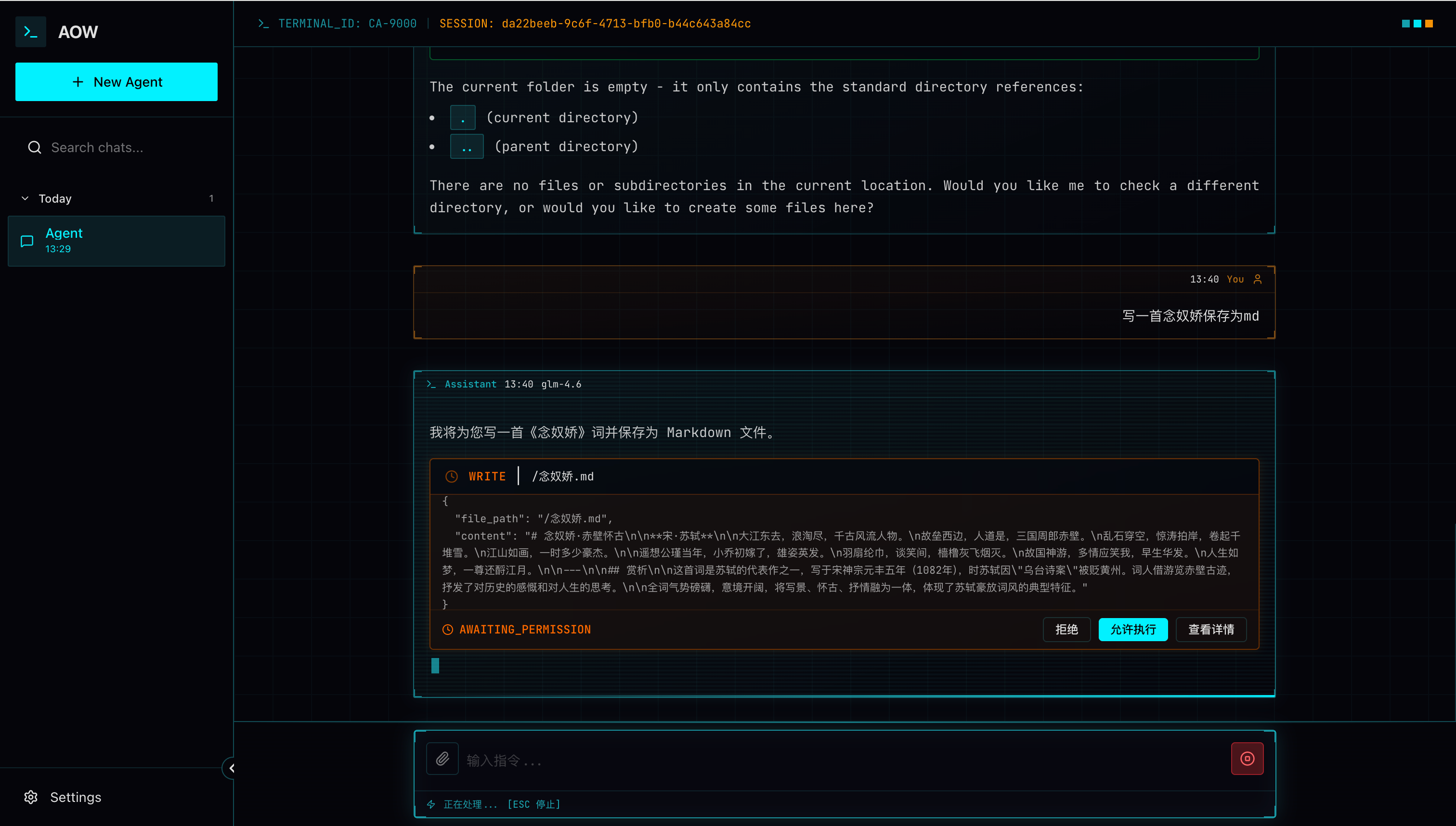
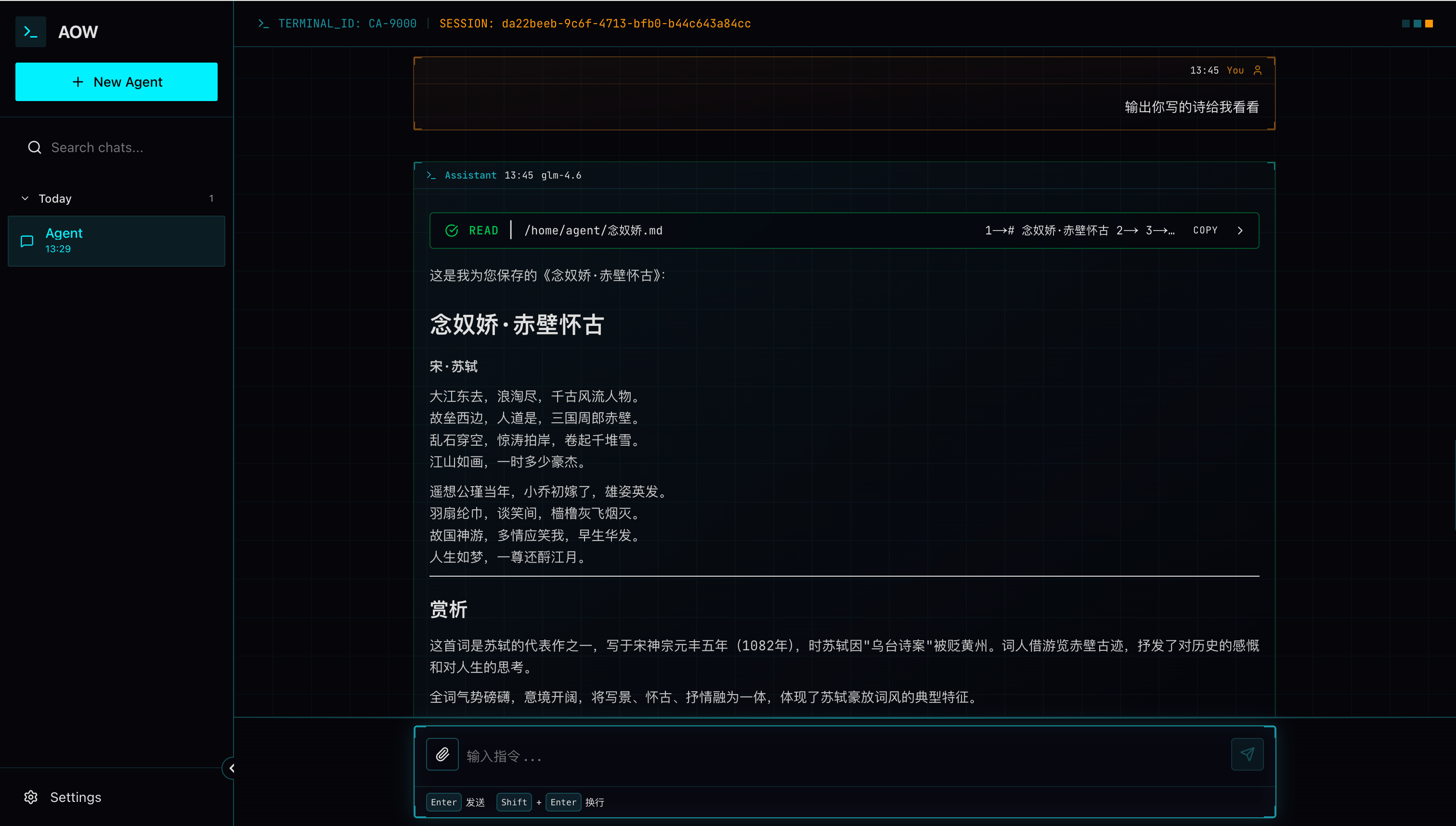
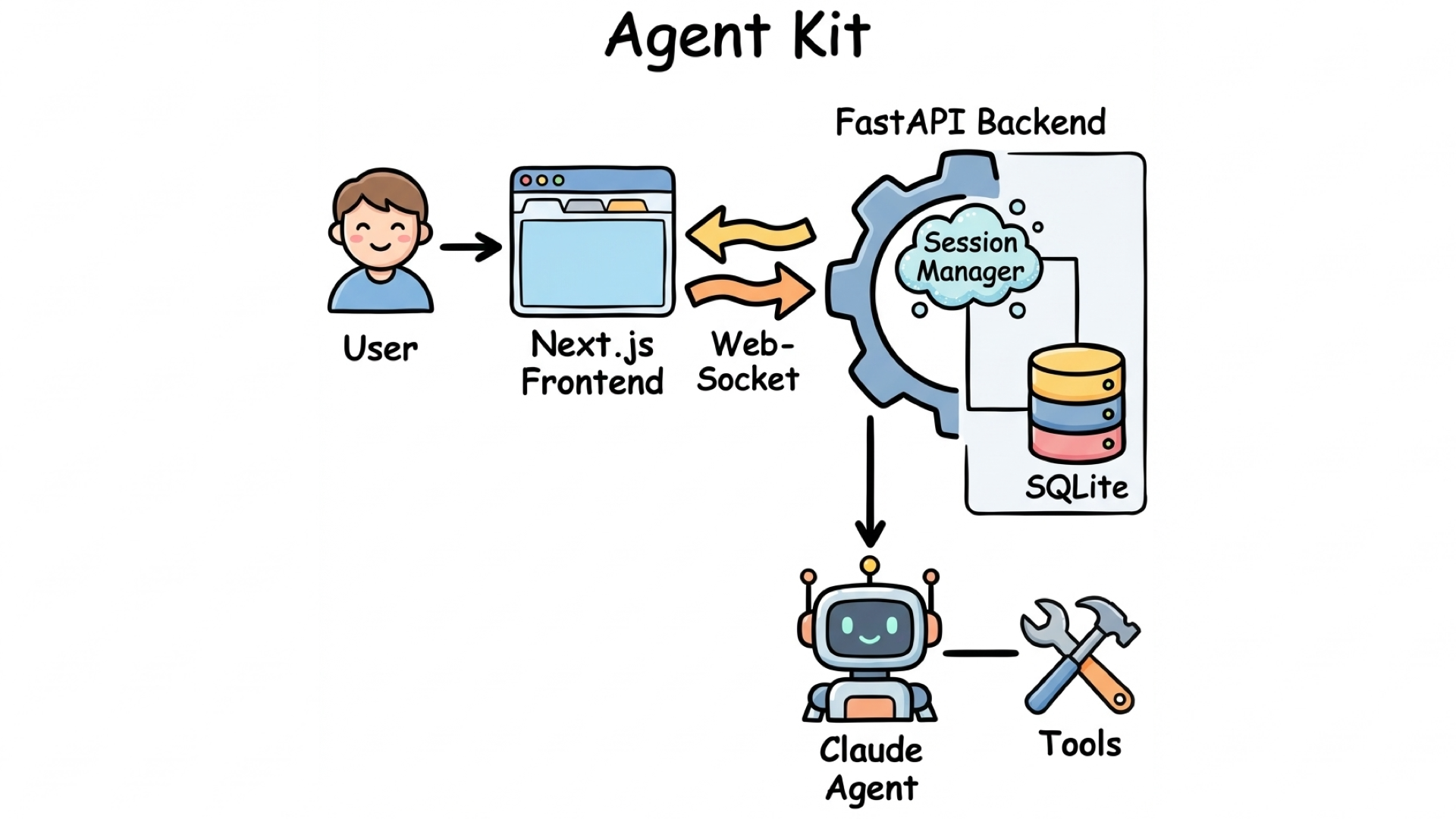
Agent Kit is a comprehensive AI agent development framework that integrates Claude Agent SDK, providing a complete solution from frontend to backend. This project aims to help developers quickly build, deploy, and scale production-grade AI Agent applications. It includes built-in multi-channel access via WebSocket, Discord, and Telegram, with unified session routing and message handling.
✨ Core Features
🏗️ Architecture
📋 Table of Contents
- Introduction
- Architecture
- Quick Start
- Project Structure
- Core Features
- Agent Management
- Configuration
- Third-Party IM Integration
- API Documentation
- Development Guide
- Contributing
- License
🚀 Quick Start
Prerequisites
- Python: 3.11 or higher
- Node.js: 20 or higher
- Docker & Docker Compose: Latest version
- Agent API Key: Get from Anthropic or Bigmodel
Installation
Option 1: Docker Deployment (Recommended)
1️⃣ Clone the repository
git clone https://github.com/leemysw/agent-kit.git
cd agent-kit
2️⃣ Configure environment variables
# Copy environment variable template
cp example.env .env
# Edit .env file and add your API key
3️⃣ Start services
make start
4️⃣ Access the application
- Application URL: http://localhost
- Persistent runtime data:
./datain the repository is mounted to/home/agent/.agent-kitinside the container
Option 2: Local Development
1️⃣ Clone the repository
git clone https://github.com/leemysw/agent-kit.git
cd agent-kit
2️⃣ Backend setup
# Install backend dependencies and CLI
pip install -e .

# Configure environment variables
cp example.env .env
# Edit .env file and add your API key
If you install the package with pip install harness-agent-kit, only the backend service and CLI are included. The Web frontend is not bundled in the Python package. Use Docker deployment or run the repository source if you need the Web UI.
Configure .env file:
# Claude API configuration
ANTHROPIC_AUTH_TOKEN=your_auth_token_here
ANTHROPIC_BASE_URL=https://api.anthropic.com or https://open.bigmodel.cn/api/anthropic
ANTHROPIC_MODEL=claude-3-5-sonnet-20241022 or glm-5

# Server configuration
HOST=0.0.0.0
PORT=8010
DEBUG=true
WORKERS=1
WORKSPACE_PATH=
Storage initialization:
The backend now uses workspace-based file storage by default. Session metadata is stored in meta.json, and message history is appended to messages.jsonl under each Agent workspace. On first startup, legacy SQLite history in cache/data/agent-kit.db is migrated automatically if it exists.
3️⃣ Frontend setup
cd web

# Install dependencies
npm install

# Configure environment variables
cp example.env .env.local
# Edit .env.local file
Configure .env.local file:
# Development environment configuration
NEXT_PUBLIC_API_URL=http://localhost:8010/agent/v1
NEXT_PUBLIC_WS_URL=ws://localhost:8010/agent/v1/chat/ws
NEXT_PUBLIC_DEFAULT_MODEL=glm-5
4️⃣ Run the project
# Start backend (in project root directory)
agent-kit run

# Start frontend (in web directory)
npm run dev
You can also run both backend and frontend from the project root:
make dev
If you only install dependencies without editable install, use python main.py to start the backend instead.
5️⃣ Access the application
- Application URL: http://localhost:3000
📁 Project Structure
agent-kit/
├── agent/                         # Backend service
│   ├── api/                       # API routes
│   ├── core/                      # Core configuration
│   ├── service/                   # Business logic
│   │   ├── agent/                 # Agent workspace and templates
│   │   ├── db/                    # File-based repositories
│   │   ├── process/               # Message processing pipeline
│   │   ├── session/               # Session routing
│   │   └── storage/               # JSON/JSONL storage layer
│   ├── shared/                    # Shared modules
│   └── utils/                     # Utility functions
├── web/                           # Frontend application
│   ├── src/
│   │   ├── app/                   # Next.js pages
│   │   ├── components/            # React components
│   │   ├── hooks/                 # Custom Hooks
│   │   ├── lib/                   # Utility library
│   │   ├── store/                 # Zustand state management
│   │   └── types/                 # TypeScript types
├── deploy/                        # Deployment files
├── docs/                          # Documentation
│   ├── websocket-session-flow.md  # WebSocket flow
│   └── guides/                    # Claude Agent SDK guides
├── main.py                        # Application entry point
└── README.md                      # This file
🎯 Core Features
1. Real-time Conversation System
- ✅ WebSocket real-time communication
- ✅ Streaming response support
- ✅ Session persistence
- ✅ Message history management
Storage Model
- Agent metadata is stored under
~/.agent-kit/agents/index.json - Each Agent workspace keeps its own
agent.json - Each session uses
sessions/<encoded_session_key>/meta.json - Message history is stored in
sessions/<encoded_session_key>/messages.jsonl - Legacy SQLite data is migrated automatically on first startup when detected
2. Intelligent Session Management
- ✅ Multi-session support
- ✅ Session search and filtering
3. Powerful AI Capabilities
- ✅ Claude Agent SDK integration
- ❌ Custom tool calling (in development)
- ❌ Slash command system (in development)
- ❌ Skills system (in development)
- ❌ MCP protocol support (in development)
4. Permissions & Security
- ✅ Fine-grained tool permission control
- ✅ User confirmation mechanism
5. Agent Management System
- ✅ Multi-Agent creation and management
- ✅ Independent workspace per Agent
- ✅ Agent-level configuration (model, permissions, tools)
- ✅ Workspace templates (AGENTS.md, USER.md, MEMORY.md, RUNBOOK.md)
⚙️ Configuration
Backend Configuration
| Config Item | Description | Default Value |
|---|---|---|
ANTHROPIC_AUTH_TOKEN |
Claude auth token | - |
ANTHROPIC_BASE_URL |
API base URL | https://api.anthropic.com |
ANTHROPIC_MODEL |
Model to use | glm-5 |
HOST |
Server host | 0.0.0.0 |
PORT |
Server port | 8010 |
DEBUG |
Debug mode | true |
WORKERS |
Number of workers | 1 |
WORKSPACE_PATH |
Workspace root path | ~/.agent-kit/workspace |
Frontend Configuration
| Config Item | Description | Default Value |
|---|---|---|
NEXT_PUBLIC_API_URL |
Backend API URL | http://localhost:8010/agent/v1 |
NEXT_PUBLIC_WS_URL |
WebSocket URL | ws://localhost:8010/agent/v1/chat/ws |
NEXT_PUBLIC_DEFAULT_MODEL |
Default model | glm-5 |
🔌 Third-Party IM Integration
The backend currently supports three message entry channels:
WebSocket(Web UI)Discord(agent/service/channel/discord_channel.py)Telegram(agent/service/channel/telegram_channel.py)
1) Configure environment variables (.env)
# Discord
DISCORD_ENABLED=true
DISCORD_BOT_TOKEN=your_discord_bot_token
DISCORD_ALLOWED_GUILDS=123456789012345678,987654321098765432
DISCORD_TRIGGER_WORD=@agent-kit

# Telegram
TELEGRAM_ENABLED=true
TELEGRAM_BOT_TOKEN=your_telegram_bot_token
TELEGRAM_ALLOWED_USERS=12345678,87654321
Channels are registered automatically at app startup based on DISCORD_ENABLED/TELEGRAM_ENABLED.
2) Session routing rule
All IM channels share the same session key pattern:
agent:<agentId>:<channel>:<chatType>:<ref>[:topic:<threadId>]
Examples:
- Discord group chat:
agent:main:dg:group:<guild_id>:<channel_id> - Telegram direct message:
agent:main:tg:dm:<user_id>
3) Troubleshooting
- Discord not responding: ensure Message Content Intent is enabled for the bot.
- Telegram not receiving messages: check privacy mode and make sure the current user is included in
TELEGRAM_ALLOWED_USERS. DISCORD_TRIGGER_WORD: the current implementation strips the trigger word if present, but does not require it.
📚 Documentation
For detailed guides and API documentation, please visit:
- Frontend API Documentation - React components, types, and API interfaces
- WebSocket Session Flow - WebSocket session and data flow
- Guides - Comprehensive guides for various features
Development Guides
- Session Management - Session creation, management, and message handling
- Streaming vs Single Mode - AI response mode comparison
- Custom Tools - Creating and using custom AI tools
- Slash Commands - Custom slash command development
- Skills Guide - Skill system usage and development
- MCP Integration - Model Context Protocol integration
- Hosting Guide - Production deployment and configuration
- Permissions Management - Permission control and security settings
🤝 Contributing
All forms of contributions are welcome!
Bug Reports & Feature Requests
If you find a bug or have a new feature suggestion, please submit it through GitHub Issues.
📄 License
This project is licensed under the Apache License 2.0 - see the LICENSE file for details.
🙏 Acknowledgments
- Claude Agent SDK - Core AI framework
by leemysw
If this project helps you, please give it a ⭐️ Star!
1 maintainer

Metadata
1 maintainer
Release files for harness-agent-kit 0.3.2
For a detailed explanation of source distributions (sdists) and built distributions (wheels), please see the package formats documentation.
Source distribution (sdist)
| File | Size | Uploaded | |
|---|---|---|---|
| harness_agent_kit-0.3.2.tar.gz | 104.2 kB | Details |
Built distribution (wheel)
| File | Interpreter | ABI | Platform | Reset |
|---|---|---|---|---|
| harness_agent_kit-0.3.2-py3-none-any.whl | Python 3 | none | any | Details |
Total release size: 242.5 kB
Release files / harness_agent_kit-0.3.2.tar.gz
| Download URL | harness_agent_kit-0.3.2.tar.gz |
|---|---|
| Size | 104.2 kB |
| Tags | Source |
|
SHA-256 checksum How to use checksums |
3e969bf2edda8582144680ddc6aa03fe71c6a522ac7725cb6296be318a038bf4
|
|
BLAKE2b-256 checksum How to use checksums |
879593d6631bcf4e30818068c0afb7172b76e7f9f56a38deb03c5e98466b4bcb
|
| Upload date | |
|
Uploaded using Trusted Publishing? What is trusted publishing? |
No |
| Uploaded via |
twine/6.2.0 CPython/3.11.14
|
Release files / harness_agent_kit-0.3.2-py3-none-any.whl
| Download URL | harness_agent_kit-0.3.2-py3-none-any.whl |
|---|---|
| Size | 138.3 kB |
| Tags | Python 3 |
|
SHA-256 checksum How to use checksums |
5e1ff285d29a1789a20f215f68fefb9a2561cee9bfdccab59a78f4d9cea8f088
|
|
BLAKE2b-256 checksum How to use checksums |
e16c4fa7efc90b97a2c9bbb872d178b2c61261beedd8ac94fa733846560cf287
|
| Upload date | |
|
Uploaded using Trusted Publishing? What is trusted publishing? |
No |
| Uploaded via |
twine/6.2.0 CPython/3.11.14
|













