
Hashenv
CLI tool for populating envs in secure systems. Built for security and speed.
Local Setup
Prerequisites
- Python 3.8 or newer
- Git (optional if you already have the repository locally)
Install dependencies and package
-
Open a terminal in the repository root:
cd C:\Users\chestor\Documents\GitHub\hashenv
-
Create and activate a virtual environment:
python -m venv venv
venv/Scripts/Activate
-
Upgrade
pipand install project dependencies:python -m pip install --upgrade pip python -m pip install -r requirements.txt
-
Install the package in editable mode:
python -m pip install -e .
Verify installation
Run the built CLI help to confirm the command is available:
hashenv --help
Usage Examples
-
Print a quick hello message:
hashenv hello
-
Verify the CLI is working:
hashenv ping
-
Log in with a token (writes
.envin the repository root):hashenv login <token>
-
Show repository data using the
--alloption:hashenv show-repository --all
-
Run environment installation logic:
hashenv install
Project Structure
pyproject.toml- package metadata and dependenciesrequirements.txt- development/runtime dependency listsrc/hashenv/cli.py- CLI entry point and commandssrc/helpers/- helper modules used by the CLI
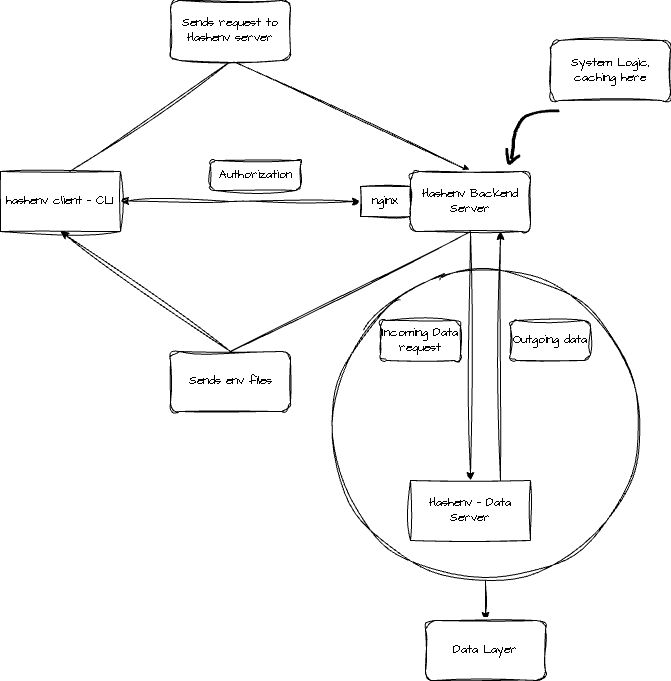
Architecture for Hashenv including integration with data server
1 maintainer

Metadata
1 maintainer
Release files for hashenv 0.1.10
For a detailed explanation of source distributions (sdists) and built distributions (wheels), please see the package formats documentation.
Source distribution (sdist)
| File | Size | Uploaded | Provenance | |
|---|---|---|---|---|
| hashenv-0.1.10.tar.gz | 8.0 kB | Without provenance | Details |
Built distribution (wheel)
| File | Interpreter | ABI | Platform | Reset |
|---|---|---|---|---|
| hashenv-0.1.10-py3-none-any.whl | Python 3 | none | any | Details |
Total release size: 19.9 kB
Release files / hashenv-0.1.10.tar.gz
| Download URL | hashenv-0.1.10.tar.gz |
|---|---|
| Size | 8.0 kB |
| Tags | Source |
|
SHA-256 checksum How to use checksums |
9febc1dbf5a508225152a001e83365cca0cb6cb2d38a5689a2033d98f683fcb5
|
|
BLAKE2b-256 checksum How to use checksums |
ddb41281190d69c1b681ae262fccc5404a9dfaa05e384af19f065df124a05b97
|
| Upload date | |
|
Uploaded using Trusted Publishing? What is trusted publishing? |
No |
| Uploaded via |
twine/7.0.0 CPython/3.11.9
|
Release files / hashenv-0.1.10-py3-none-any.whl
| Download URL | hashenv-0.1.10-py3-none-any.whl |
|---|---|
| Size | 11.9 kB |
| Tags | Python 3 |
|
SHA-256 checksum How to use checksums |
0a3011ada96f25bdc5ca622a7fc5c7021bdfbf3ab201e54b9deab50d5686de0b
|
|
BLAKE2b-256 checksum How to use checksums |
2c448b66d6155eaa73bff1872dadc207810c869b6bb38cba20dae5e411c0c761
|
| Upload date | |
|
Uploaded using Trusted Publishing? What is trusted publishing? |
No |
| Uploaded via |
twine/7.0.0 CPython/3.11.9
|
Security for hashenv 0.1.10
Provenance
Provenance describes where a file came from. On PyPI, provenance is shared via attestations, which provide a verifiable record of the build or publishing details. View details, limitations and caveats.
No provenance found
None of the files in this release were uploaded with provenance metadata.
A note on package security
PyPI is a repository for distributing packages, not a service for auditing them. While third-party security researchers and our staff do their best to detect and remove malicious packages, PyPI cannot guarantee the quality, security or suitability of any given package.














