
Hashiwokakero
Generator and solver algorithm repertoire for the Japanese logic puzzle Hashiwokakero - aka Hashi - created by Nikoli.
License
This project is licensed under the GNU GPL-3.0 license.
Main purpose is to provide a free and open-source software for puzzle enthusiasts. Feel free to use the source code. Referring to the repository would be very much appreciated.
The Puzzle
Simplyfied rules from Wikipedia.
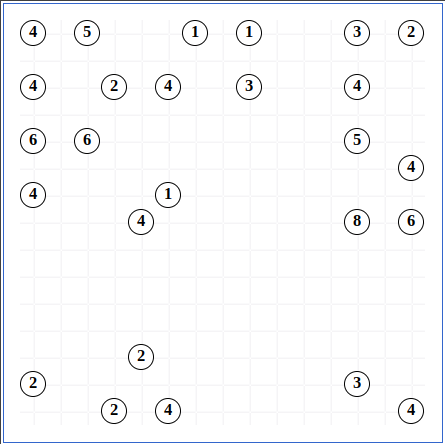
Played in rectangular grid. Encircled cells are islands numbers from 1 to 8 inclusive. The rest of the cells are empty.
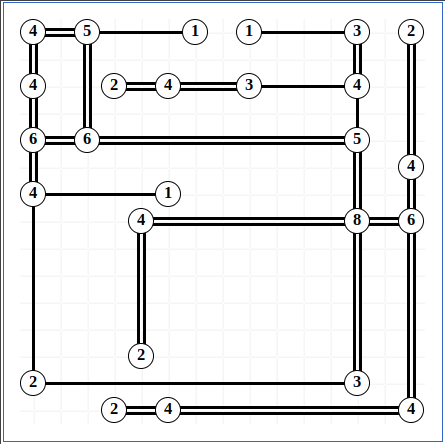
The goal is to connect all of the islands by drawing a series of bridges between the islands.
The bridges must follow certain criteria:
- All islands must be connected.
- Bridged cannot cross.
- Bridges are only established orthogonally, never diagonally.
- At most two bridges connect a pair of islands.
- An island must hold bridges that mathces it's own number.
Plot-twist is that there may not be only 1 solution. Sometimes the structure of the board allows to have 2 different ways to go and still fulfill all the rules.
Install
The project is written in Python 3.11.6, although should work on any Python Interpreter above 3.10.x. To install the CLI tool:
pip install -e .
# or
make install
This installs the hashi console script and the only third-party dependency (matplotlib).
Quick start
# Generate one 10x10 puzzle:
hashi generate 10 10 -o puzzle.csv

# Solve it (default: stop at the first solution found):
hashi solve puzzle.csv

# Score it on the calibrated difficulty scale:
hashi score puzzle.csv

# Render it as a PNG (use --solution to render the solved board):
hashi render puzzle.csv -o puzzle.png

# Mass-produce 30 puzzles into easy/intermediate/hard buckets:
hashi produce 10 10 30 -d output/database

# Assemble a printable PDF from a directory of produced puzzles:
hashi book output/database -o output/book.pdf
hashi --help lists every subcommand; each subcommand has its own --help
with full flag details.
Subcommands
| Command | What it does |
|---|---|
generate |
Generate one puzzle and write it to CSV. |
solve |
Solve a puzzle CSV; --all to enumerate every valid solution. |
score |
Print the normalised difficulty score in [0, 1]. |
render |
Render a puzzle to a matplotlib window or save to PNG. |
produce |
Mass-generate scored puzzles into bucketed subdirectories. |
book |
Assemble a printable PDF from a produced puzzle directory (v1: 10×10 + 10×20). |
calibrate |
Regenerate hashi/data/difficulty_map.json from scratch. |
How difficulty is computed
hashi score returns a float in [0, 1] derived from five factors, weighted: brute-force step count (0.55), structural metrics (0.50 across island density, average island count, and small-island prevalence), and rule-pass step count (0.05). Each metric is normalised against per-geometry 5th/95th percentile ranges stored in hashi/data/difficulty_map.json.
The map ships pre-calibrated for square geometries 5×5 … 50×50. Off-grid geometries fall back to the nearest available geometry. To regenerate the map (e.g. after changing weights or geometries):
hashi calibrate
The mapper uses every available CPU core minus two, takes ~2 minutes on a 20-core box at ITERATION_COUNT = 1000, and reports live per-worker progress.
Repo layout
hashi/
├── cli.py                # argparse subcommands
├── core.py               # Node, direction helpers
├── solver.py             # rules-first recursive search
├── generator.py          # random puzzle construction
├── formats.py            # CSV import/export
├── render.py             # matplotlib rendering
├── production.py         # mass-produce + bucket
├── book.py               # PDF book assembly
├── categorize/
│   ├── categorize.py     # scoring + bucket function
│   └── mapper.py         # calibration runner (multiprocessing)
└── data/
    └── difficulty_map.json
tests/
└── test_solver.py        # solves every fixture; matches stored solutions
The output/ directory is gitignored and is where runtime artifacts go
(output/puzzles/, output/images/, output/database/, output/pdfs/).
1 maintainer

Metadata
1 maintainer
Release files for hashiwokakero 1.0.0
For a detailed explanation of source distributions (sdists) and built distributions (wheels), please see the package formats documentation.
Source distribution (sdist)
| File | Size | Uploaded | |
|---|---|---|---|
| hashiwokakero-1.0.0.tar.gz | 112.5 kB | Details |
Built distribution (wheel)
| File | Interpreter | ABI | Platform | Reset |
|---|---|---|---|---|
| hashiwokakero-1.0.0-py3-none-any.whl | Python 3 | none | any | Details |
Total release size: 212.9 kB
Release files / hashiwokakero-1.0.0.tar.gz
| Download URL | hashiwokakero-1.0.0.tar.gz |
|---|---|
| Size | 112.5 kB |
| Tags | Source |
|
SHA-256 checksum How to use checksums |
76f80186c7af5e96f6b38fc9c1cf078e33f2fc7b780bfedab8175c98949f51cc
|
|
BLAKE2b-256 checksum How to use checksums |
3812dc309c320f519447c8023b15a35675da72b62bfd6cc5dd69c4755f00d44f
|
| Upload date | |
|
Uploaded using Trusted Publishing? What is trusted publishing? |
No |
| Uploaded via |
twine/6.2.0 CPython/3.12.6
|
Release files / hashiwokakero-1.0.0-py3-none-any.whl
| Download URL | hashiwokakero-1.0.0-py3-none-any.whl |
|---|---|
| Size | 100.4 kB |
| Tags | Python 3 |
|
SHA-256 checksum How to use checksums |
c2473729a7df8907217b6e1c6afb24c8209c7bf0e1dffdbbc1b391d045f5b3fd
|
|
BLAKE2b-256 checksum How to use checksums |
d4a41485c70447b5fbb1fe83e72185e8617149410c7dc5ea4e819cb3faff1458
|
| Upload date | |
|
Uploaded using Trusted Publishing? What is trusted publishing? |
No |
| Uploaded via |
twine/6.2.0 CPython/3.12.6
|













