
hashtray






Intro
hashtray is an OSINT (Open Source Intelligence) tool designed to find a Gravatar account associated with an email address and to locate an email address using a Gravatar account username or hash. A Gravatar account can provide substantial information for pivoting purposes.
Versions
- v 0.1.0
- sha256 hash support
- Scrap the details no longer available due to the new Gravatar API
- Simplify some data keys
- Add domains found in the links sections to the domains list
- Add Bluesky support and fix some website handling
- Refactor some code
- v 0.0.1.
- First release of hashtray.
Features
hashtray comes with the following features:
- Find a Gravatar account using an email address
- Locate the primary email associated with a Gravatar account using a Gravatar username or hash
- Display Gravatar account information
If the profile is public and the information available, the following can be retrieved:
- Hash
- Profile URL
- Avatar
- Activity (Last profile edit)
- Location
- Preferred username
- Pronunciation
- Display name
- Given name
- Family name
- Pronouns
- Bio (About)
- Job title
- Company
- Contact information
- Emails
- Phone numbers
- Verified accounts (Instagram, Twitter, Facebook, TikTok,...)
- Payment information (PayPal, Venmo,...)
- Wallets (Bitcoin, Ethereum,...)
- Photos
- Interests (Links)
Installation
Python 3.8+ is required.
pipx (recommended)
Install with pipx
pipx install hashtray
Run hashtray with pipx without installing it
pipx run hashtray [argumens]
uv (recommended)
Install with uv
uv tool install hashtray
Run hashtray with uv without installing it
uvx hashtray [arguments]
pip
pip install hashtray
Usage
Find Gravatar account with an email
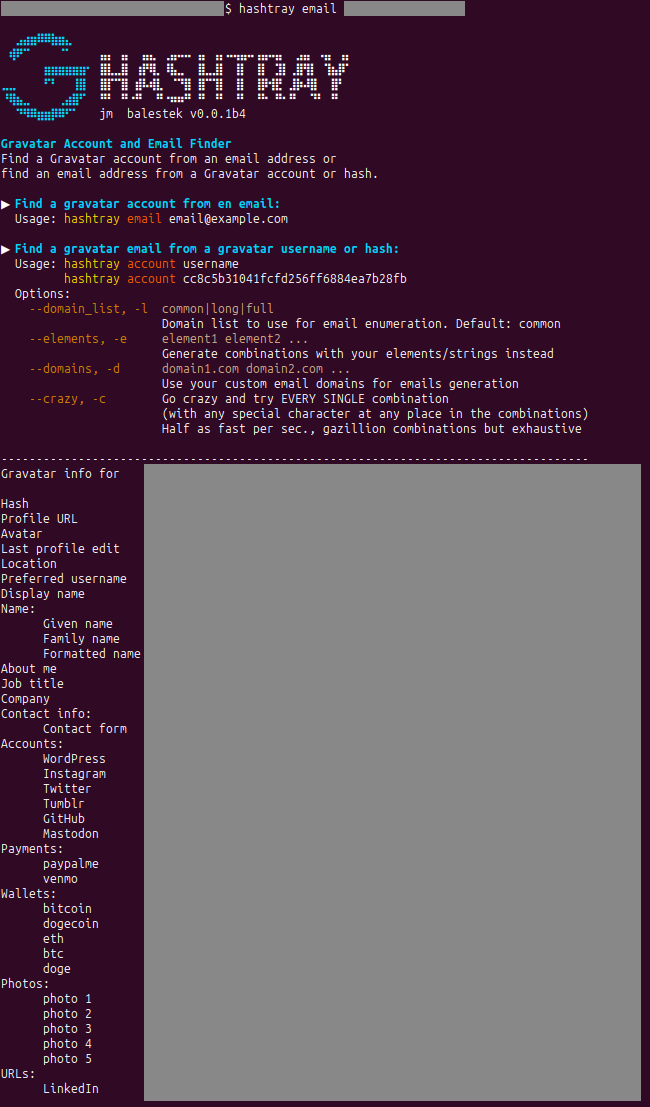
Pretty straightforward. The command is email .
It converts the email address into its MD5 hash. hashtray then checks if a public profile associated with the hash exists on Gravatar. If found, it displays the profile information.
hashtray email user@domain.tld
In some cases, the email hash may not match the one found on the Gravatar profile, yet a profile is still displayed. This is because Gravatar profiles only show the hash of the primary email address. Consequently, the email address used for the search is not the primary one but is registered as a secondary email. This indicates that there is at least one more email address associated with the Gravatar account to be found.
In such cases, hashtray alerts you. You can then attempt to find the primary email address using its second command, account.
Find an email from a Gravatar username or hash
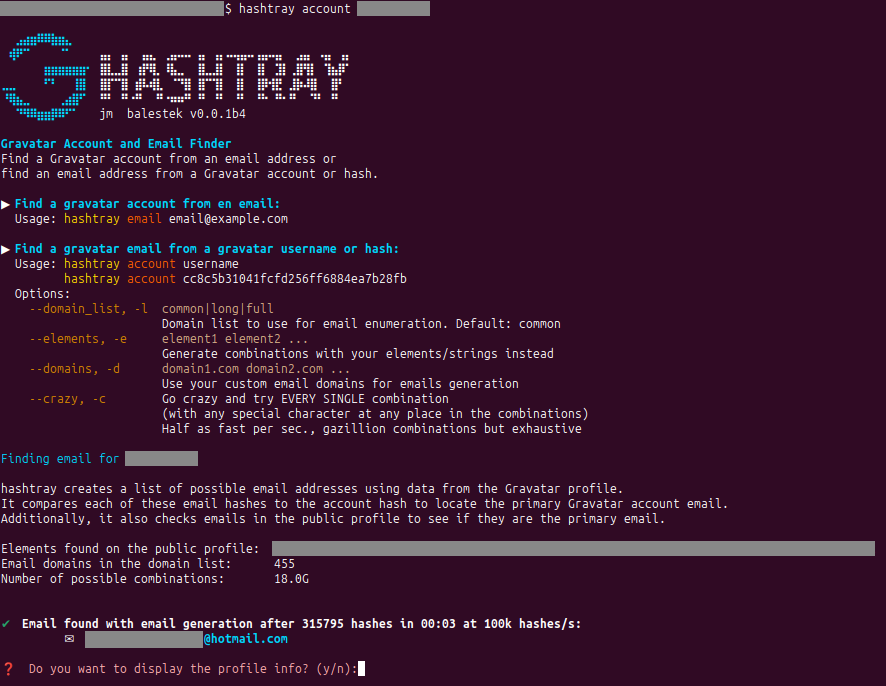
To find an email address associated with a Gravatar username or hash, use the account command.
hashtray creates a list of possible email addresses using data from the Gravatar profile.
Both the username and hash can be used with the account command. The username is the last part of the Gravatar profile page URL (e.g., https://gravatar.com/username), while the hash is the MD5 hash of the Gravatar account email.
If you come across a Gravatar avatar, you can find its MD5 hash within the avatar's URL, which follows this pattern: https://1.gravatar.com/avatar/437e4dc6d001f2519bc9e7a6b6412923. This hash represents the account hash.
It compares each of these email hashes to the account hash to locate the primary Gravatar account email.
Additionally, it also checks emails in the public profile to see if they are the primary email.
hashtray account username # with username
hashtray account 437e4dc6d001f2519bc9e7a6b6412923 # with the hash
Options
--domain_list
--domain_list or -l to choose the domain list to use:
common: 455 domains (default)long: 5334 domainsfull: 118062 domains
The domains lists need to be refined in the future.
hashtray account jondo --domain_list long
hashtray account 437e4dc6d001f2519bc9e7a6b6412923 -l long
--elements
--elements or -e to manually provide strings for email generation instead of relying on the built-in logic. The more strings you add, the longer the hash generation process will take. Please refer to the notes for more information.
hashtray account jondo --elements john doe j d jondo 2001
hashtray account 437e4dc6d001f2519bc9e7a6b6412923 -e john doe j d jondo 2001
--domains
--domains or -d to use custom email domains instead of the built-in domain lists. This allows you to tailor the search to specific domains relevant to your investigation.
hashtray account jondo --custom_domains domain1.com domain2.com
hashtray account 437e4dc6d001f2519bc9e7a6b6412923 -c domain1.com domain2.com
--crazy
--crazy or -c to go crazy and try EVERY SINGLE combination (with any special character at any place in the combinations). See Notes.
hashtray account jondo --custom_domains domain1.com domain2.com
hashtray account 437e4dc6d001f2519bc9e7a6b6412923 -c domain1.com domain2.com
Notes
hashtray retrieves emails in two ways:
- extracting emails from the profile page, if it's available and public, and verifying if they are the emails linked to the account.
- generating potential email addresses from the available information and comparing their MD5 hashes to the account hash.
For the latter, it uses several elements if available:
- the username chunk of the profile page URL
- the preferred username
- the given name and the family name, as well as their initials
- the display name
- the verified accounts URL usernames chunks
The elements list is then deduplicated, and elements that can be combined from already present elements are discarded.
All possible combinations, including a few special characters (._-) and a domain list, are generated, without any repetitive element and with a unique special character per combination.
The more elements to combine, the longer the processing time will be. To give you an idea of the scale, here's a table showing the number of combinations for a single domain and 455 domains, based on different numbers of elements, for the normal mode (one unique special character allowed per combination):
| elements | 1 | 2 | 3 | 4 | 5 | 6 | 7 | 8 | 9 | 10 |
|---|---|---|---|---|---|---|---|---|---|---|
| 1 domain | 1 | 10 | 51 | 244 | 1.2k | 7.8k | 54.7k | 438.3k | 3.9M | 39.5M |
| 455 domains | 455 | 4.5k | 23.2k | 111k | 584.6k | 3.5M | 24.9M | 199.4M | 1.7B | 17.9B |
Here is the same table for the crazy mode --crazy, -c (any special characters allowed at any place per combination):
| elements | 1 | 2 | 3 | 4 | 5 | 6 | 7 | 8 | 9 | 10 |
|---|---|---|---|---|---|---|---|---|---|---|
| 1 domain | 1 | 10 | 123 | 1.97k | 39.4k | 947k | 26.5M | 848M | 30.5B | 1.22T |
| 455 domains | 455 | 4.5k | 56k | 897k | 17.9M | 431M | 12.1B | 386B | 13.9T | 556T |
Next steps for future versions
- Improve the domain lists (better ranking by users) and add a "small" one.
- Add an intermediate mode between normal and crazy for "" and any special character at any place.
- Add multi-processing
Contributions
Suggestions and contributions are welcomed, especially for the "Next steps" section tasks.
Credits
about the technique:
email domain sources:
- https://github.com/derhuerst/email-providers
- https://github.com/Kikobeats/free-email-domains
- https://github.com/mstfknn/email-providers
+ some personal additions
Requirements
httpx
unidecode
tqdm
rich
scrapling
License
GPLv3
1 maintainer

Metadata
1 maintainer
Release files for hashtray 0.1.1
For a detailed explanation of source distributions (sdists) and built distributions (wheels), please see the package formats documentation.
Source distribution (sdist)
| File | Size | Uploaded | |
|---|---|---|---|
| hashtray-0.1.1.tar.gz | 98.8 MB | Details |
Built distribution (wheel)
| File | Interpreter | ABI | Platform | Reset |
|---|---|---|---|---|
| hashtray-0.1.1-py3-none-any.whl | Python 3 | none | any | Details |
Total release size: 99.6 MB
Release files / hashtray-0.1.1.tar.gz
| Download URL | hashtray-0.1.1.tar.gz |
|---|---|
| Size | 98.8 MB |
| Tags | Source |
|
SHA-256 checksum How to use checksums |
427f63afcb179023c6da7bba266d018ae5c62f6ab3adecb2809892e2fa345fe4
|
|
BLAKE2b-256 checksum How to use checksums |
d8048e33c455f6b072095f6602374dcca2f3ff3cd3ac346b6ea8fc21283db0ed
|
| Upload date | |
|
Uploaded using Trusted Publishing? What is trusted publishing? |
No |
| Uploaded via |
python-httpx/0.28.1
|
Release files / hashtray-0.1.1-py3-none-any.whl
| Download URL | hashtray-0.1.1-py3-none-any.whl |
|---|---|
| Size | 776.9 kB |
| Tags | Python 3 |
|
SHA-256 checksum How to use checksums |
df4cca28597b49bb5b060915fc4ca49d33e7c116e2104951d28df4eb5626f908
|
|
BLAKE2b-256 checksum How to use checksums |
12ba6811e766297ba3ec2d9c36e6109ff4b8d044a970a91c663df9fda69d0dee
|
| Upload date | |
|
Uploaded using Trusted Publishing? What is trusted publishing? |
No |
| Uploaded via |
python-httpx/0.28.1
|














