
hasmtools
A small tool to help me working with the Finite State Machine Sensor for Home Assistant by generating a png and converting the definition between JSON and YAML.
See https://github.com/edalquist/ha_state_machine for the Sensor.
Features
- write your definition in YAML instead of JSON
- convert from YAML to JSON and back
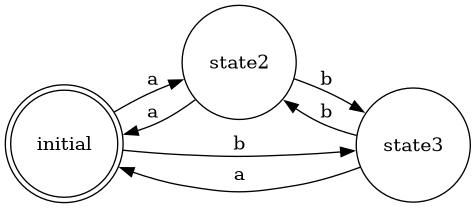
- generate an image of the state machine using graphviz
Examples
YAML input file
initial:
  a: state2
  b: state3
state2:
  a: initial
  b: state3
state3:
  a: initial
  b: state2
Note that in yaml the first state is the default/initial state.
Converted to JSON
$ hasmtool example.yaml example.json
{
    "state": {
        "status": "initial"
    },
    "transitions": {
        "initial": {
            "a": "state2",
            "b": "state3"
        },
        "state2": {
            "a": "initial",
            "b": "state3"
        },
        "state3": {
            "a": "initial",
            "b": "state2"
        }
    }
}
Finally converted to PNG
$ hasmtool example.json example.png
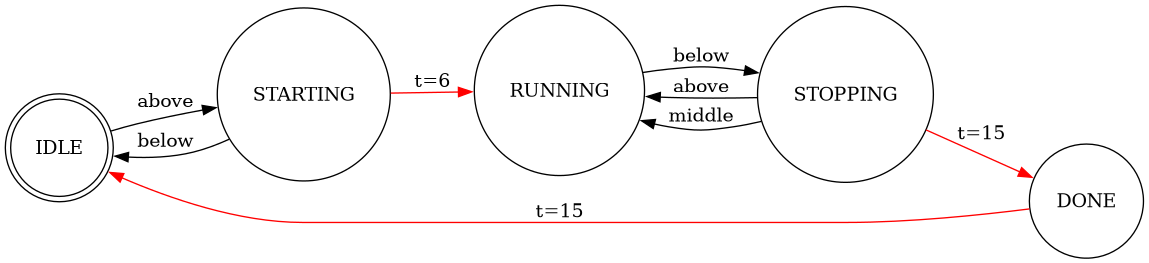
An example with timeouts
source: https://github.com/edalquist/ha_state_machine/blob/main/example.json
{
  "state": {
    "status": "IDLE"
  },
  "transitions": {
    "IDLE": {
      "above": "STARTING"
    },
    "STARTING": {
      "timeout": { "after": 6, "to": "RUNNING" },
      "below": "IDLE"
    },
    "RUNNING": {
      "below": "STOPPING"
    },
    "STOPPING": {
      "timeout": { "after": 15, "to": "DONE" },
      "above": "RUNNING",
      "middle": "RUNNING"
    },
    "DONE": {
      "timeout": { "after": 15, "to": "IDLE" }
    }
  }
}
Status
Working MVP.
Why Did I Do This?
It started with the desire to have a visualization of the FSM, then I realised I like yaml more than json for it, so one thing led to another...
1 maintainer

Release files for hasmtools 0.0.3
For a detailed explanation of source distributions (sdists) and built distributions (wheels), please see the package formats documentation.
Source distribution (sdist)
| File | Size | Uploaded | |
|---|---|---|---|
| hasmtools-0.0.3.tar.gz | 90.4 kB | Details |
Built distribution (wheel)
| File | Interpreter | ABI | Platform | Reset |
|---|---|---|---|---|
| hasmtools-0.0.3-py3-none-any.whl | Python 3 | none | any | Details |
Total release size: 100.4 kB
Release files / hasmtools-0.0.3.tar.gz
| Download URL | hasmtools-0.0.3.tar.gz |
|---|---|
| Size | 90.4 kB |
| Tags | Source |
|
SHA-256 checksum How to use checksums |
d8471a1e1cc97e5e0b5c1fa7f3d42f3d25531fb14fb1f1183bbd3f81d692d6eb
|
|
BLAKE2b-256 checksum How to use checksums |
84a280f59dbcd77403f3c1d65ace7e08a3cf7b8238423b8e998cac78f1bb3c14
|
| Upload date | |
|
Uploaded using Trusted Publishing? What is trusted publishing? |
Yes |
| Uploaded via |
twine/5.1.1 CPython/3.12.7
|
Provenance
Provenance describes where a file came from. On PyPI, provenance is shared via attestations, which provide a verifiable record of the build or publishing details. View details, limitations and caveats.


PyPI Publish Attestation
PyPI verified that this artifact, at this checksum, originated from the publisher listed below.
Signed by GitHub Actions, verified by PyPI on Dec 9, 2024.
Transparency logRelease files / hasmtools-0.0.3-py3-none-any.whl
| Download URL | hasmtools-0.0.3-py3-none-any.whl |
|---|---|
| Size | 10.0 kB |
| Tags | Python 3 |
|
SHA-256 checksum How to use checksums |
52f395258b46830d434d1d114f7eb810020b966339c829c1be9738a234ceb1a4
|
|
BLAKE2b-256 checksum How to use checksums |
072159b0ba73c200f3ae36f5f632d7028b3ad55d72288d69cf413bb5e7bc80c5
|
| Upload date | |
|
Uploaded using Trusted Publishing? What is trusted publishing? |
Yes |
| Uploaded via |
twine/5.1.1 CPython/3.12.7
|
Provenance
Provenance describes where a file came from. On PyPI, provenance is shared via attestations, which provide a verifiable record of the build or publishing details. View details, limitations and caveats.
PyPI Publish Attestation
PyPI verified that this artifact, at this checksum, originated from the publisher listed below.
Signed by GitHub Actions, verified by PyPI on Dec 9, 2024.
Transparency log













