

Hassette




A simple, modern, async-first Python framework for building Home Assistant automations.
Documentation: https://hassette.readthedocs.io
✨ Why Hassette?
- Type Safe: Full type annotations with Pydantic models and comprehensive IDE support
- Async-First: Built for modern Python with async/await throughout
- Dependency Injection: Clean handler signatures with FastAPI style dependency injection
- Persistent Storage: Built-in disk cache for storing data across restarts, intelligent rate-limiting, and more
- Simple & Focused: Just Home Assistant automations - no complexity creep
- Web UI: Monitor and manage your automations from the browser
- Developer Experience: Clear error messages, proper logging, hot-reloading, and intuitive APIs
See the Getting Started guide for detailed instructions.
🖥️ Web UI
Hassette includes a web UI for monitoring and managing your automations: Apps (app status, health, and detailed per-app views), Handlers (registered event handlers across all apps), Logs (real-time log streaming with filtering), and Config (runtime configuration and diagnostics).
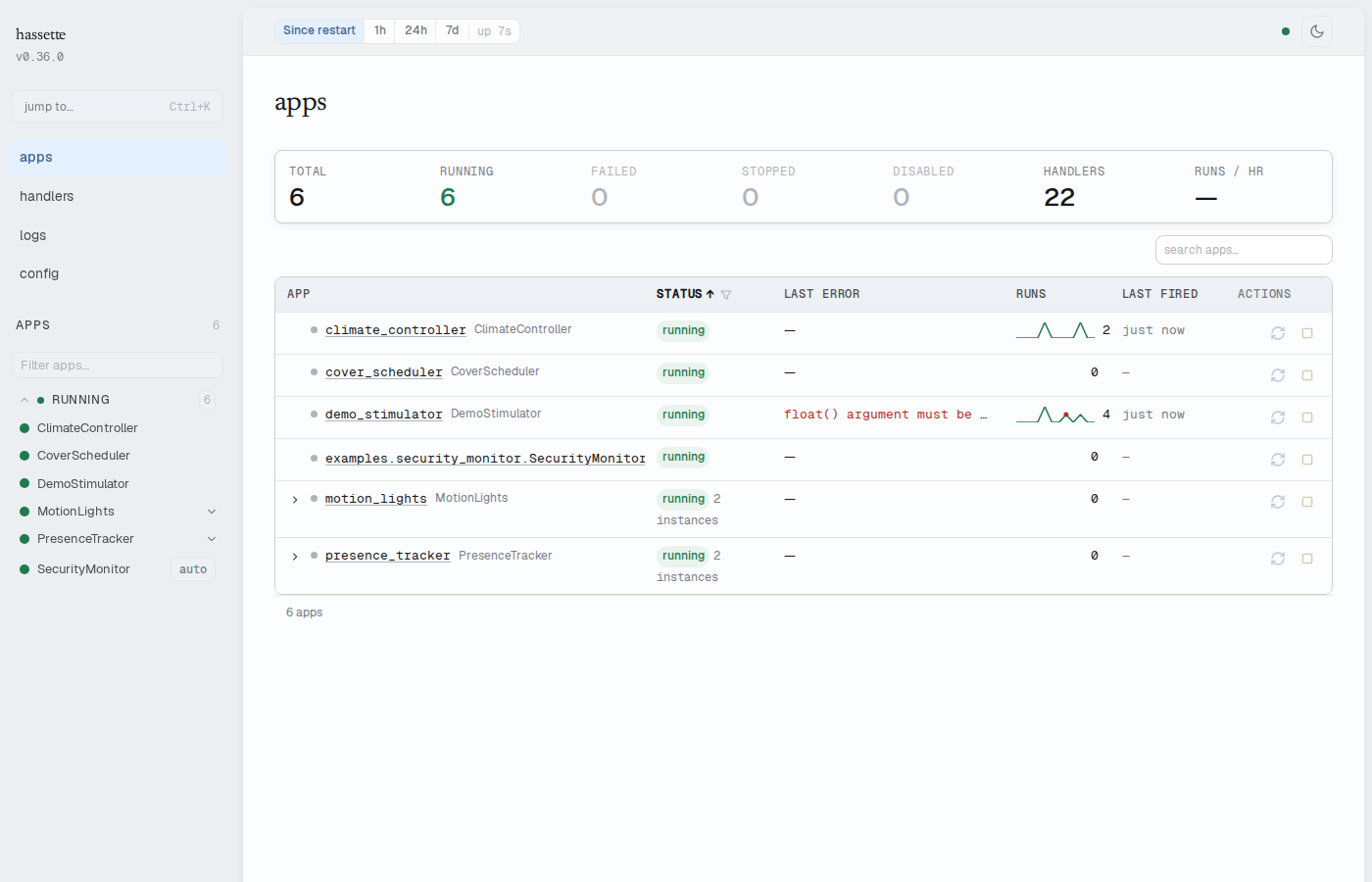
The web UI is enabled by default at http://<host>:8126/. See the Web UI documentation for details.
Terminal CLI
Query a running Hassette instance from the terminal — no browser required:
# Check system health
hassette status

# List all apps and their status
hassette app

# Investigate a specific app
hassette app health my-app
hassette listener --app my-app --since 1h
hassette log --app my-app --since 1h --limit 20

# Pipe structured output to jq
hassette listener --app my-app --json | jq '.[] | select(.failed > 0)'
See the CLI documentation for the full command reference, scripting patterns, and shell completion setup.
🤔 Is Hassette Right for You?
New to automation frameworks?
- Is Hassette Right for You? - Decide if Hassette is right for your needs
Coming from AppDaemon?
- AppDaemon Migration Guide - See what's different and how to migrate
📖 Examples
Check out the examples/ directory for complete working examples:
- motion_lights.py - Motion-activated lights with debounce
- climate_controller.py - Temperature monitoring with glob patterns
- cover_scheduler.py - Cron/daily scheduling for blinds
- presence_tracker.py - Dynamic subscription management
- security_monitor.py - Synchronous app with throttle
Configuration examples:
- Docker Compose Guide - Docker deployment setup
- HassetteConfig - Complete configuration reference
🛣️ Status
Hassette is under active development. We follow semantic versioning and recommend pinning a minor version (e.g., hassette~=0.x.0) while the API stabilizes.
Open an issue or PR if you'd like to contribute!
Recent Highlights
- Typed state models - Generated Python models for 45+ Home Assistant entity domains
- Entity classes - Rich entity objects with built-in async methods (e.g.,
await light.turn_on()) - Test harness -
AppTestHarnessfor writing tests against your automations with simulated state and time control
🤝 Contributing
Contributions are welcome! Whether you're:
- 🐛 Reporting bugs or issues
- 💡 Suggesting features or improvements
- 📝 Improving documentation
- 🔧 Contributing code
See CONTRIBUTING.md for guidelines on getting started.
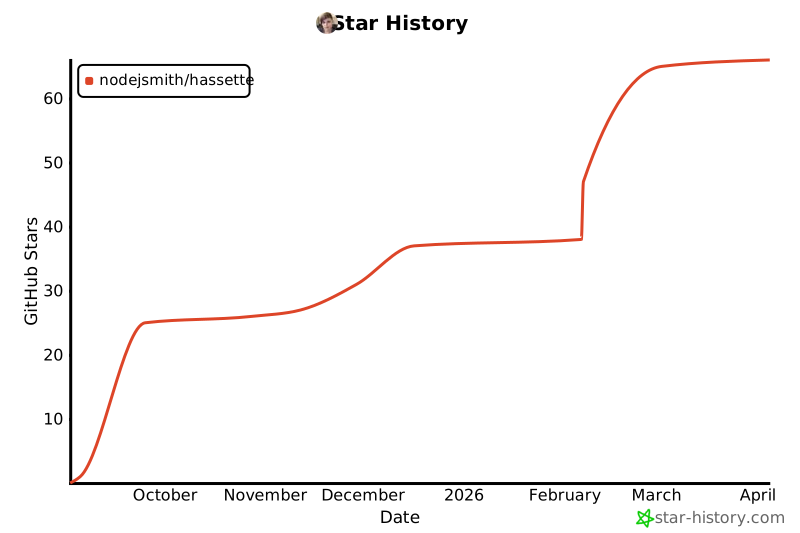
⭐ Star History
📄 License
1 maintainer

Metadata
1 maintainer
Release files for hassette 0.56.0
For a detailed explanation of source distributions (sdists) and built distributions (wheels), please see the package formats documentation.
Source distribution (sdist)
| File | Size | Uploaded | |
|---|---|---|---|
| hassette-0.56.0.tar.gz | 3.0 MB | Details |
Built distribution (wheel)
| File | Interpreter | ABI | Platform | Reset |
|---|---|---|---|---|
| hassette-0.56.0-py3-none-any.whl | Python 3 | none | any | Details |
Total release size: 6.3 MB
Release files / hassette-0.56.0.tar.gz
| Download URL | hassette-0.56.0.tar.gz |
|---|---|
| Size | 3.0 MB |
| Tags | Source |
|
SHA-256 checksum How to use checksums |
0e1baeaae1d2b646942427c07a643076cbd729ebdc7fd36d015fd1f170cf371b
|
|
BLAKE2b-256 checksum How to use checksums |
07784dd5b9274900f71921b672ac22fb4c933a111209dcf30e2cff530fcbb2f6
|
| Upload date | |
|
Uploaded using Trusted Publishing? What is trusted publishing? |
Yes |
| Uploaded via |
twine/6.1.0 CPython/3.13.13
|
Provenance
Provenance describes where a file came from. On PyPI, provenance is shared via attestations, which provide a verifiable record of the build or publishing details. View details, limitations and caveats.


PyPI Publish Attestation
PyPI verified that this artifact, at this checksum, originated from the publisher listed below.
Signed by GitHub Actions, verified by PyPI on Oct 8, 2026.
Transparency logRelease files / hassette-0.56.0-py3-none-any.whl
| Download URL | hassette-0.56.0-py3-none-any.whl |
|---|---|
| Size | 3.3 MB |
| Tags | Python 3 |
|
SHA-256 checksum How to use checksums |
95abb714e7de421e0e081b8a0e33bbb24f1f710ce4e59e7810058a104456c7e2
|
|
BLAKE2b-256 checksum How to use checksums |
17c4731d1a5765bd0550aec99a8d85bac69eeecd02abd1a550d84bd00dd8fed5
|
| Upload date | |
|
Uploaded using Trusted Publishing? What is trusted publishing? |
Yes |
| Uploaded via |
twine/6.1.0 CPython/3.13.13
|
Provenance
Provenance describes where a file came from. On PyPI, provenance is shared via attestations, which provide a verifiable record of the build or publishing details. View details, limitations and caveats.
PyPI Publish Attestation
PyPI verified that this artifact, at this checksum, originated from the publisher listed below.
Signed by GitHub Actions, verified by PyPI on Oct 8, 2026.
Transparency log













