
PostgreSQL TUI monitoring dashboard

Project description
hastin
A TUI for real-time analytics into PostgreSQL

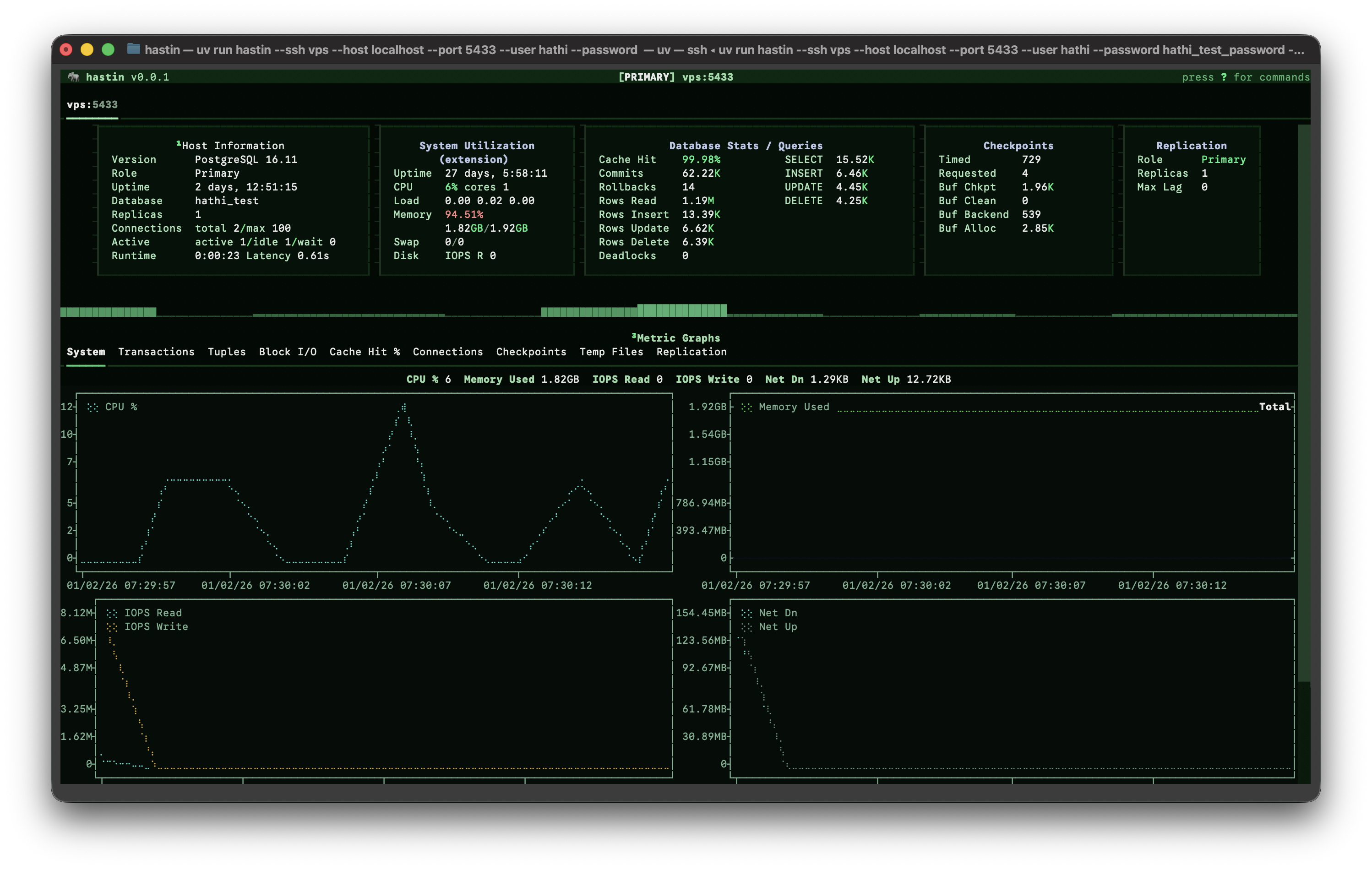
hastin is a fork of and would not be possible without Charles Thompson's dolphie, an excellent MySQL/MariaDB/ProxySQL tool built with Textual.
Features
- Real-time PostgreSQL monitoring with configurable refresh intervals
- Multi-tab support for monitoring multiple databases simultaneously
- PgBouncer monitoring (standalone and combined modes)
- SSH tunnel support for secure remote connections
- Record & replay functionality for incident analysis
- Daemon mode for continuous background monitoring
- 16+ cloud provider detection and support
- System metrics collection from multiple sources
Installation
Requires Python 3.11+
Using PyPI
pip install hastin
Using uv (recommended)
uv tool install hastin
From source
git clone https://github.com/euceph/hastin.git
cd hastin
uv sync
uv run hastin --help
Quick Start
# Connect with URI
hastin postgresql://user:password@localhost:5432/mydb

# Connect with options
hastin -h localhost -P 5432 -u postgres -p mypassword -d mydb

# Start with Tab Setup modal
hastin --tab-setup

# Monitor PgBouncer (standalone)
hastin pgbouncer://user:password@localhost:6432/pgbouncer

# Monitor PostgreSQL + PgBouncer (combined)
hastin -h localhost -P 5432 -u postgres -d mydb --pgbouncer-host localhost --pgbouncer-port 6432

# Connect via SSH tunnel
hastin -h dbserver -P 5432 -u postgres -d mydb --ssh jumpbox.example.com --ssh-user admin
Usage
positional arguments:
  uri                   URI string for connection - format: postgresql://user:password@host:port/database
                        or pgbouncer://user:password@host:port/pgbouncer

options:
  --help                Show this help message and exit
  -V, --version         Display version and exit
  --tab-setup           Start by showing the Tab Setup modal instead of auto-connecting

Connection options:
  -h, --host            Hostname/IP address
  -P, --port            Port [default: 5432]
  -u, --user            Username
  -p, --password        Password
  -d, --database        Database name
  --ssl-mode            SSL mode: disable/allow/prefer/require/verify-ca/verify-full [default: prefer]

PgBouncer options:
  --pgbouncer-host      PgBouncer hostname for combined mode
  --pgbouncer-port      PgBouncer port [default: 6432]
  --pgbouncer-user      PgBouncer username (defaults to main user)
  --pgbouncer-password  PgBouncer password (defaults to main password)

SSH tunnel options:
  --ssh                 SSH host for tunneling (can be alias from ~/.ssh/config)
  --ssh-port            SSH server port [default: 22]
  --ssh-user            SSH username
  --ssh-key             Path to SSH private key

Display options:
  -r, --refresh-interval  Refresh interval in seconds [default: 1]
  --panels              Panels to display on startup, comma-separated
                        Supports: dashboard,processlist,graphs,replication,locks,statements
  --graph-marker        Graph marker style [default: braille]

Recording options:
  -R, --record          Enable recording to replay file
  -D, --daemon          Run in daemon mode (background recording)
  --replay-file         Load and replay a recorded session
  --replay-dir          Directory for replay files
  --replay-retention-hours  Hours to retain replay data [default: 48]

Configuration:
  -C, --cred-profile    Credential profile name from config file
  -c, --config-file     Path to hastin config file
  --host-cache-file     IP to hostname mapping file
  --tab-setup-file      File containing hosts for Tab Setup modal

System metrics:
  --system-metrics      System metrics provider: auto/local/extension/none [default: auto]
Supported PostgreSQL Versions
- PostgreSQL 14, 15, 16, 17, 18
- Minimum supported version: PostgreSQL 14
Cloud Provider Support
hastin automatically detects and optimizes for supported cloud providers:
| Provider | Detection Method |
|---|---|
| AWS RDS | Hostname pattern |
| AWS Aurora | Hostname + cluster detection |
| Google Cloud SQL | Hostname pattern |
| Google AlloyDB | Extension detection |
| Azure Database for PostgreSQL | Hostname pattern |
| Azure Cosmos DB (Citus) | Hostname + extension |
| Supabase | Hostname or extension |
| Neon | Hostname pattern |
| Aiven | Hostname pattern |
| Crunchy Bridge | Hostname pattern |
| DigitalOcean | Hostname pattern |
| Heroku Postgres | Hostname pattern |
| Timescale Cloud | Hostname or extension |
| Railway | Hostname pattern |
| Render | Hostname pattern |
| Fly.io | Hostname pattern |
PgBouncer Support
hastin supports PgBouncer monitoring in two modes:
Standalone Mode - Monitor PgBouncer directly:
hastin pgbouncer://user:password@localhost:6432/pgbouncer
Combined Mode - Monitor PostgreSQL and PgBouncer together:
hastin postgresql://user:password@localhost:5432/mydb \
  --pgbouncer-host localhost --pgbouncer-port 6432
PgBouncer panels include:
- Connection pool statistics
- Client connections
- Server connections
- Pool configuration
PostgreSQL Grants Required
Minimum privileges
-- Basic monitoring (own sessions only)
GRANT CONNECT ON DATABASE mydb TO hastin_user;
GRANT SELECT ON pg_stat_activity TO hastin_user;
Recommended privileges
-- Full monitoring visibility
GRANT pg_read_all_stats TO hastin_user;

-- Query termination capability
GRANT pg_signal_backend TO hastin_user;

-- For pg_stat_statements panel
CREATE EXTENSION IF NOT EXISTS pg_stat_statements;
GRANT SELECT ON pg_stat_statements TO hastin_user;
Superuser alternative
For full functionality without individual grants:
ALTER USER hastin_user WITH SUPERUSER;
Note: Cloud providers like RDS use rds_superuser role which has limited superuser capabilities.
Keyboard Shortcuts
| Key | Action |
|---|---|
1-6 |
Switch between panels |
Tab |
Cycle through panels |
g |
Toggle graphs |
space |
Pause/resume refresh |
+/- |
Increase/decrease refresh interval |
k |
Kill selected query |
K |
Terminate selected backend |
t |
Create new tab |
w |
Close current tab |
[/] |
Switch tabs |
q |
Quit |
? |
Show help |
Record & Replay
Like dolphie, hastin can record monitoring sessions for later analysis:
# Record a session
hastin -h localhost -u postgres -d mydb --record --replay-dir ~/hastin-replays

# Replay a recorded session
hastin --replay-file ~/hastin-replays/20240115_143022.zst
Replay files are compressed with zstd for efficient storage. Use the controls to navigate through recorded data:
←/→- Step backward/forwardSpace- Play/pauseHome/End- Jump to start/end
Daemon Mode
Run hastin in the background for continuous recording:
hastin -h localhost -u postgres -d mydb --daemon --replay-dir /var/lib/hastin/replays
Daemon mode:
- Runs without the TUI interface
- Automatically enables recording
- Logs to console and optional log file
- Ideal for capturing incidents for later analysis
SSH Tunnel Support
Connect securely through a jump host:
# Basic SSH tunnel
hastin -h dbserver -P 5432 -u postgres -d mydb \
  --ssh jumpbox.example.com --ssh-user admin

# With custom SSH key
hastin -h dbserver -P 5432 -u postgres -d mydb \
  --ssh jumpbox.example.com --ssh-user admin --ssh-key ~/.ssh/id_rsa

# Tunnel for both PostgreSQL and PgBouncer
hastin -h dbserver -P 5432 -u postgres -d mydb \
  --pgbouncer-host dbserver --pgbouncer-port 6432 \
  --ssh jumpbox.example.com --ssh-user admin
System Metrics
The dashboard displays system metrics when available:
- CPU: Usage percentage, core count, load averages
- Memory: Used/total, swap usage
- Disk I/O: Read/write IOPS
- Network: Bytes sent/received
Metrics are collected from:
- Local: psutil (when running on the database server)
- Extension:
system_statsPostgreSQL extension - Cloud APIs: AWS CloudWatch, GCP Monitoring, Azure Monitor
Configuration File
Create ~/.hastin.conf or /etc/hastin/hastin.conf:
[hastin]
refresh_interval = 2
graph_marker = braille
startup_panels = dashboard,processlist,graphs

[credential_profile_prod]
host = prod-db.example.com
port = 5432
user = hastin
password = secret
ssl_mode = require

[credential_profile_dev]
host = localhost
port = 5432
user = postgres
Use credential profiles:
hastin -C prod
Environment Variables
export HASTIN_USER=postgres
export HASTIN_PASSWORD=secret
export HASTIN_HOST=localhost
export HASTIN_PORT=5432
export HASTIN_DATABASE=mydb
export HASTIN_SSL_MODE=prefer
Panels
| Panel | Description | Shortcut |
|---|---|---|
| Dashboard | Server info, connections, cache hit ratio, replication status | 1 |
| Processlist | Active queries from pg_stat_activity | 2 |
| Graphs | Real-time metric graphs (transactions, tuples, I/O, etc.) | 3 |
| Replication | Streaming and logical replication status | 4 |
| Locks | Blocked queries and lock information | 5 |
| Statements | Query statistics from pg_stat_statements | 6 |
| PgBouncer | PgBouncer activity and monitoring in combined mode | 7 |
Graph Metrics
| Graph | Metrics |
|---|---|
| Transactions | Commits, rollbacks per second |
| Tuples | Fetched, inserted, updated, deleted per second |
| Block I/O | Buffer hits vs disk reads |
| Cache Hit % | Buffer cache efficiency |
| Connections | Active, idle, idle in transaction |
| Checkpoints | Timed vs requested, buffers written |
| Temp Files | Temporary file count and size |
| Replication Lag | Lag in bytes (when replicas present) |
Credits
hastin, of course, would not be possible without the amazing work by Charles Thomspson, who created dolphie, an excellent MySQL/MariaDB monitoring tool. hastin adapts dolphie for PostgreSQL monitoring purposes while maintaining the same beautiful UI and replay functionalities.
License
GPLv3 - See LICENSE for details.
Feedback
Questions, bug reports, and feature requests are of course welcome. Please open an issue on GitHub.
Release history Release notifications | RSS feed

Download files
Download the file for your platform. If you're not sure which to choose, learn more about installing packages.
Source Distribution
Built Distribution
Filter files by name, interpreter, ABI, and platform.
If you're not sure about the file name format, learn more about wheel file names.
Copy a direct link to the current filters
File details
Details for the file hastin-0.0.1.tar.gz.
File metadata
- Download URL: hastin-0.0.1.tar.gz
- Upload date:
- Size: 1.8 MB
- Tags: Source
- Uploaded using Trusted Publishing? No
- Uploaded via: twine/6.2.0 CPython/3.12.9
File hashes
| Algorithm | Hash digest | |
|---|---|---|
| SHA256 |
0b9a72f637a38fcea58c2fcb736a8fcd73ebd15bbca25d24f9fd2585d2c5c289
|
|
| MD5 |
99d6d05386dfa36da94e95f36e11e5a7
|
|
| BLAKE2b-256 |
08761aef7dda524d61bf6be006d0e29475cf95e75bfb50bd7705e6b3f1d1f731
|
File details
Details for the file hastin-0.0.1-py3-none-any.whl.
File metadata
- Download URL: hastin-0.0.1-py3-none-any.whl
- Upload date:
- Size: 129.8 kB
- Tags: Python 3
- Uploaded using Trusted Publishing? No
- Uploaded via: twine/6.2.0 CPython/3.12.9
File hashes
| Algorithm | Hash digest | |
|---|---|---|
| SHA256 |
2363c616006b6115f94b5002b3a16231a2c879e8f87d804e4e95b59b7193717b
|
|
| MD5 |
21c14497e871ec0452b649902af64f97
|
|
| BLAKE2b-256 |
ca20a81774ebf76b9a3603a8792803149470cae94c12778a24489e9c36ca9d21
|






