
If an infostealer ran on your machine right now, what would it take?
Haul finds every API key, token, SSH key and password lying where stealer malware looks first,
scores how exposed each one is, and tells you exactly how to fix it.
It never reads a secret out. Read-only, offline, zero dependencies.







pip install haul-scanner
Why · Features · Screenshots · Quick start · Coverage · How it works · Safety · CI · FAQ
Defensive use only. Haul is a read-only self-audit tool. Run it on systems you own or are explicitly authorized to test. It scans the current user's own account, refuses other users' profiles and network paths, and makes zero network connections.
Why Haul
Infostealers don't need an exploit. They run once as you, then sweep everything you can already read:
- cloud and package-registry credentials:
~/.aws,gcloud,az,kubeconfig,.npmrc,.pypirc - SSH keys with no passphrase,
.envfiles in every project folder, shell and PowerShell history - and, increasingly, the chat history of AI coding tools, where keys get pasted and
.envfiles get echoed back
Most secret scanners look at repositories. Haul looks at your machine: the home folder, project folders, app-data stores and AI-tool transcripts that never reach a repo but sit on disk, readable by anything you run. It reports, ranks and explains. It never takes.
What you get
 Nine scanners, one pass
Cloud & package CLIs, SSH keys, .env files, shell & PowerShell history, environment variables, 12 AI coding tools, browsers, desktop apps and sensitive files.
|
 AI-history aware
Claude Code, Cursor, Copilot, Windsurf, Codex, Gemini CLI and more. Streams transcripts of any size and reads SQLite chat stores read-only. A key echoed 500× is one finding. |
 Git aware
Knows whether a .env is ignored, not ignored, or already committed, by reading .git directly. Git is never executed.
|
 Real risk, not noise
58 provider rules plus assignment, YAML, JSON and XML heuristics. Aggressive false-positive filtering, and a 0–100 exposure score for every finding. |
 Never discloses a value
Secrets are sealed in memory the moment they are found. Reports carry only a non-reversible fingerprint, and an output firewall double-checks every byte. |
 Zero network, zero dependencies
An irreversible audit hook blocks sockets, DNS and subprocesses for the whole run. Pure standard library, so there is no supply chain to attack. |
 Reports people actually read
A worst-first terminal view with clickable paths, a self-contained HTML report, plus JSON, CSV and SARIF 2.1.0. |
 Built for CI
Exit codes by severity, --fail-on, baselines that survive edits, and SARIF that maps straight onto your repository's files.
|
See it in action
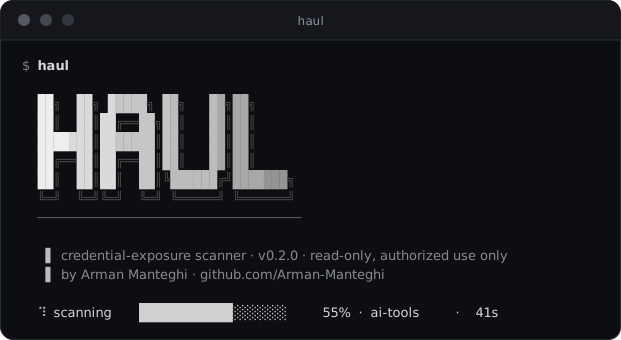
Run haul and it walks your machine once. The live progress bar keeps moving even through hundreds of
megabytes of AI transcripts.
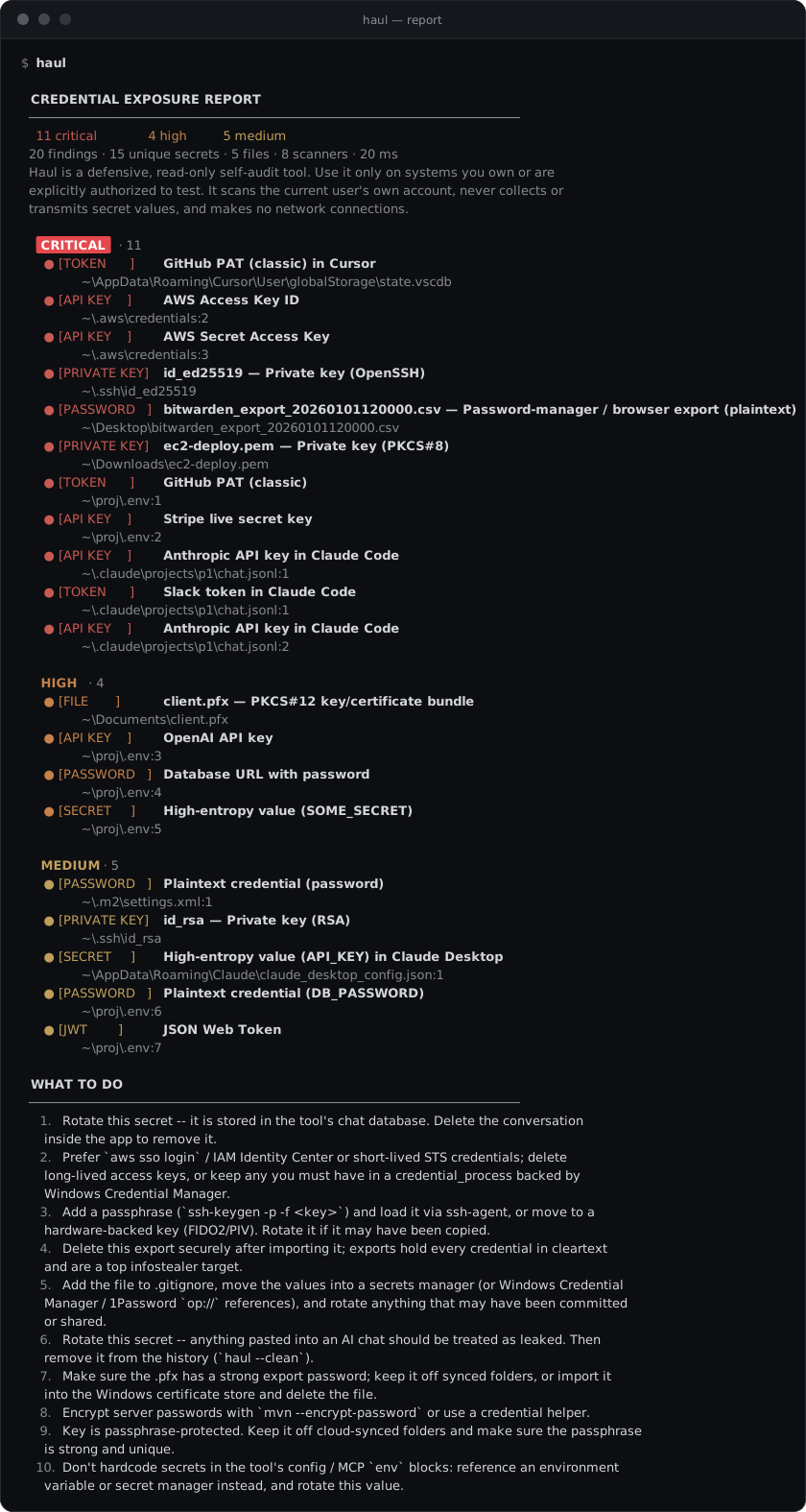
The report is worst first. Every finding names its kind (API KEY, TOKEN, PRIVATE KEY,
PASSWORD…), what it is and where it lives. Paths are clickable in modern terminals, and each fix
appears once, numbered, under What to do.
Need to hand it to someone? haul -f html -o report.html writes one self-contained file with live
search, severity filters and the same fixes. It needs no internet and loads nothing external.
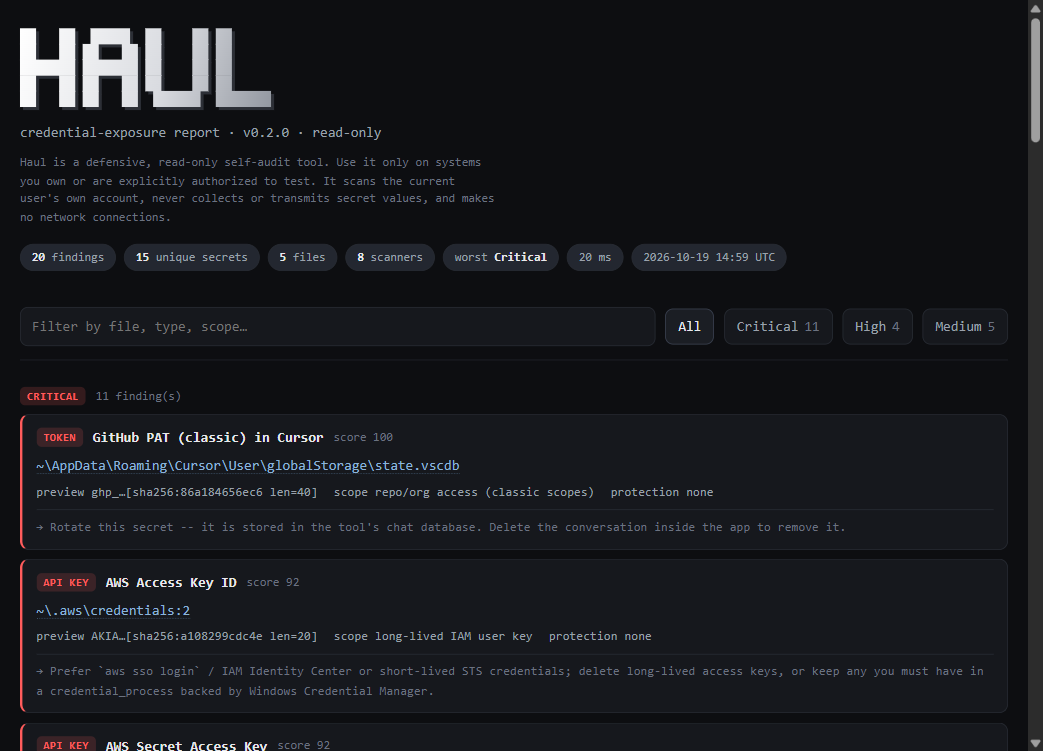
The HTML report filtered to one severity
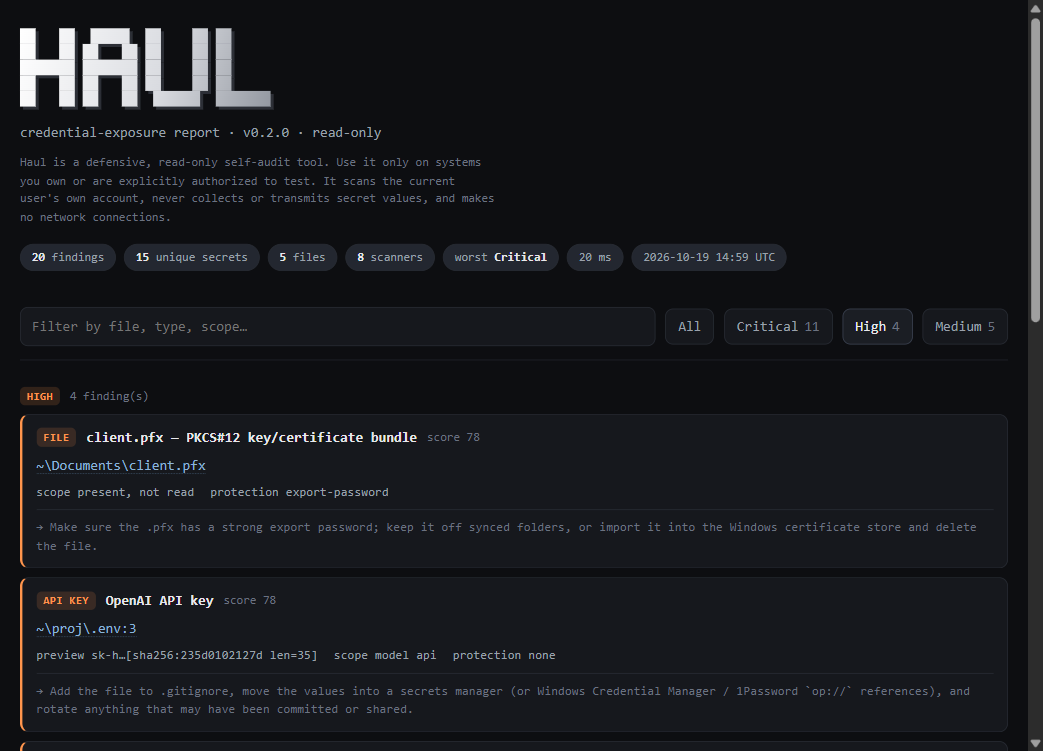
Every screenshot is real Haul output, captured on a demo profile seeded with fabricated secrets.
Quick start
Install it once, then run it as any normal user. Haul needs Python 3.11+ and nothing else.
pip install haul-scanner
Prefer an isolated install? Use pipx or uv.
pipx install haul-scanner
uv tool install haul-scanner
| Run this | To get |
|---|---|
haul |
The full scan: terminal report, worst first |
haul --min-severity high |
Only what matters most |
haul -f html -o haul-report.html |
A readable, shareable HTML report |
haul --only ai-tools |
Just your AI coding tools' history and configs |
haul --clean |
A dry run of redacting secrets from AI-chat history |
haul --list-scanners |
Every scanner and what it covers |
What it scans
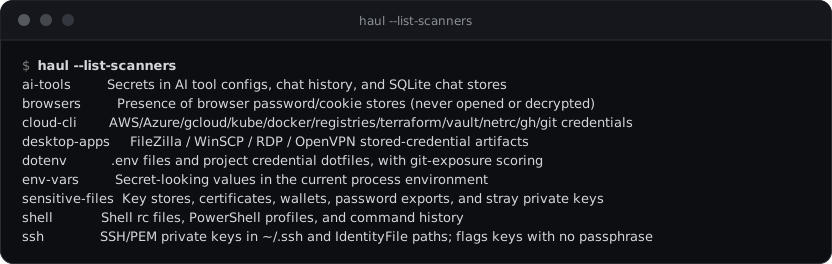
| Scanner | What it covers |
|---|---|
cloud-cli |
AWS (static keys, SSO and CLI caches), Azure, gcloud, kubeconfig, Docker, npm, Yarn, PyPI, Cargo, RubyGems, Composer, NuGet, Maven, Terraform Cloud, Vault, .netrc / _netrc, GitHub CLI and .git-credentials, resolved per OS. |
ssh |
~/.ssh plus every IdentityFile in ~/.ssh/config. OpenSSH, PEM, PKCS#8 and PuTTY .ppk, flagging keys with no passphrase. Reads only the header; key material is never decoded. |
dotenv |
.env, .env.*, .npmrc, .yarnrc.yml and .pypirc across your project folders. Templates such as .env.example are skipped. Scored higher when not git-ignored, much higher when committed. |
shell |
bash, zsh and fish rc files, PowerShell profiles, and PSReadLine, bash, zsh and REPL histories, using a stricter detection profile built for history. |
env-vars |
Secret-looking variables in the environment Haul inherited. The report names the variable, never its value. |
ai-tools |
Claude Code, Claude Desktop, Cursor, VS Code (Copilot chat), Windsurf, Cline, Roo Code, Codex, Gemini CLI, Continue, Zed and Aider: transcripts, configs, MCP env blocks, the tools' own login files and SQLite chat stores. |
browsers |
Presence only: Chrome, Edge, Brave, Chromium, Vivaldi, Opera and Firefox password and cookie stores, plus how this OS protects them. Never opened. |
desktop-apps |
FileZilla (plaintext vs. master password), portable WinSCP, saved RDP passwords, OpenVPN profiles with inline keys. Presence and protection only. |
sensitive-files |
Key stores (.pfx, .p12, .jks, .kdbx), crypto wallets, password-manager and browser exports, and stray private keys like an EC2 .pem in Downloads. |
Haul walks your working folders once into a shared inventory. It skips node_modules and build output,
never follows symlinks or junctions, never touches network drives, and skips cloud-only OneDrive files, so
a scan can never trigger a download.
How it works
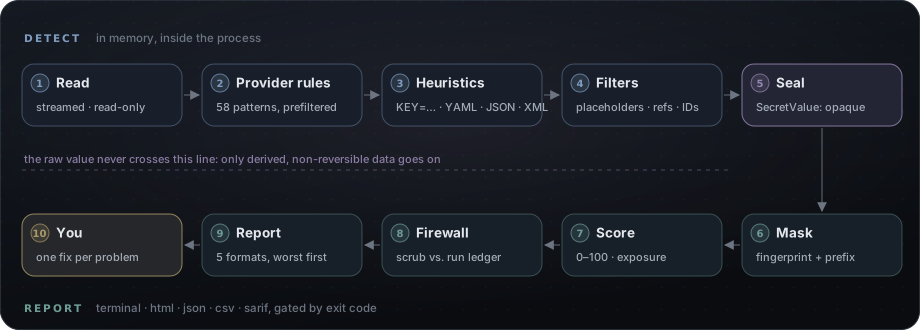
- Specific beats generic. Provider rules run first and claim their match, so an Anthropic key is reported once as Anthropic, never again as "OpenAI-shaped". Literal prefilters skip rules that can't match a line, which keeps multi-hundred-megabyte transcripts fast.
- Two detection profiles. Config files also report plaintext passwords under strong keys
(
DB_PASSWORD=…). History (transcripts, shell history, logs) reports only tokens and high-entropy values, because prose and code samples are full ofpassword: …. - Noise is filtered out. Haul drops placeholders (
your-token-here), references (${DB_PASSWORD},op://…), UUIDs, paths, URLs and token counters (max_tokens). - Nothing is skipped. AI tools often write a whole conversation on one JSON line. Haul scans long lines in overlapping 64 KB windows and streams large files, so memory stays flat.
- Optional offline validation.
--verify-formatchecks structure (JWT expiry, key shapes, GitHub token checksums) to cut false positives further, entirely in memory.
Severity and scoring
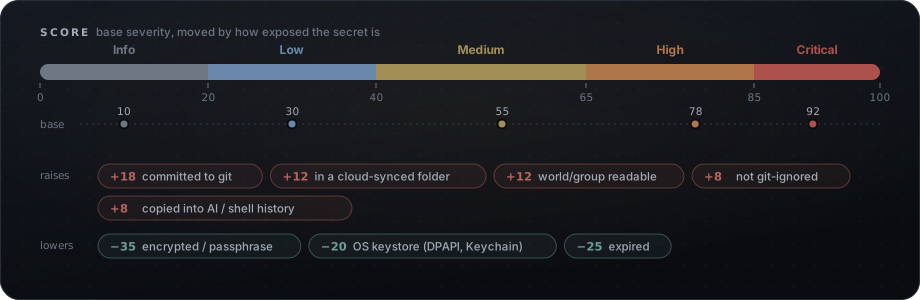
Every finding gets a 0–100 score: a base severity, moved by how exposed the secret really is. The bands are ≥ 85 Critical, ≥ 65 High, ≥ 40 Medium and ≥ 20 Low; anything lower is Info. The worst severity becomes the exit code.
A finding tells you everything except the secret:
- its type, file, line, and how many times it occurs
- a non-reversible preview: a domain-separated SHA-256 fingerprint, plus the first 4 characters
only for long random tokens, where they merely name the provider (
ghp_,AKIA). Passwords never show a single character. - its protection (passphrase, DPAPI, master password, none), inferred scope (a long-lived
AKIAkey vs. a temporaryASIAone), and a concrete fix
| Exit code | Meaning |
|---|---|
0 |
Nothing at or above --fail-on (default low) |
1 · 2 · 3 · 4 |
Worst finding is Low · Medium · High · Critical |
64 |
Usage error: a bad flag, an unknown scanner name, a refused path |
70 · 74 |
Internal error · I/O error |
130 |
Interrupted (Ctrl+C) |
Reports
| Format | Best for |
|---|---|
terminal (default) |
Reading at a glance. Colors and clickable paths when interactive, plain text when piped. |
html |
Handing to a person. One standalone file with search, filters and cards. |
json |
Automation. Schema 2 with summary, findings and errors. |
csv |
Spreadsheets. Hardened against formula injection. |
sarif |
Code scanning. SARIF 2.1.0 with paths relative to SRCROOT and stable fingerprints. |
Write several at once into a folder:
haul -f terminal -f html -f json -f csv -f sarif -o ./reports
What the JSON looks like
{
  "tool": "haul",
  "version": "0.2.0",
  "schema": 2,
  "summary": {
    "total": 20, "unique_secrets": 15, "files_scanned": 5,
    "by_severity": { "Critical": 11, "High": 4, "Medium": 5, "Low": 0, "Info": 0 },
    "highest_severity": "Critical", "exit_code": 4, "elapsed_seconds": 0.02
  },
  "findings": [
    {
      "secret_type": "AWS Access Key ID",
      "severity": "Critical", "score": 92,
      "file": "C:\\Users\\dev\\.aws\\credentials", "line": 2, "occurrences": 1,
      "preview": "AKIA…[sha256:a108299cdc4e len=20]",
      "fingerprint": "a108299cdc4e",
      "protection": "none", "scope": "long-lived IAM user key",
      "remediation": "Prefer `aws sso login` / IAM Identity Center or short-lived STS credentials; …",
      "baseline_key": "cloud-cli|AWS Access Key ID|C:\\Users\\dev\\.aws\\credentials|a108299cdc4e"
    }
  ],
  "errors": []
}
Command-line reference
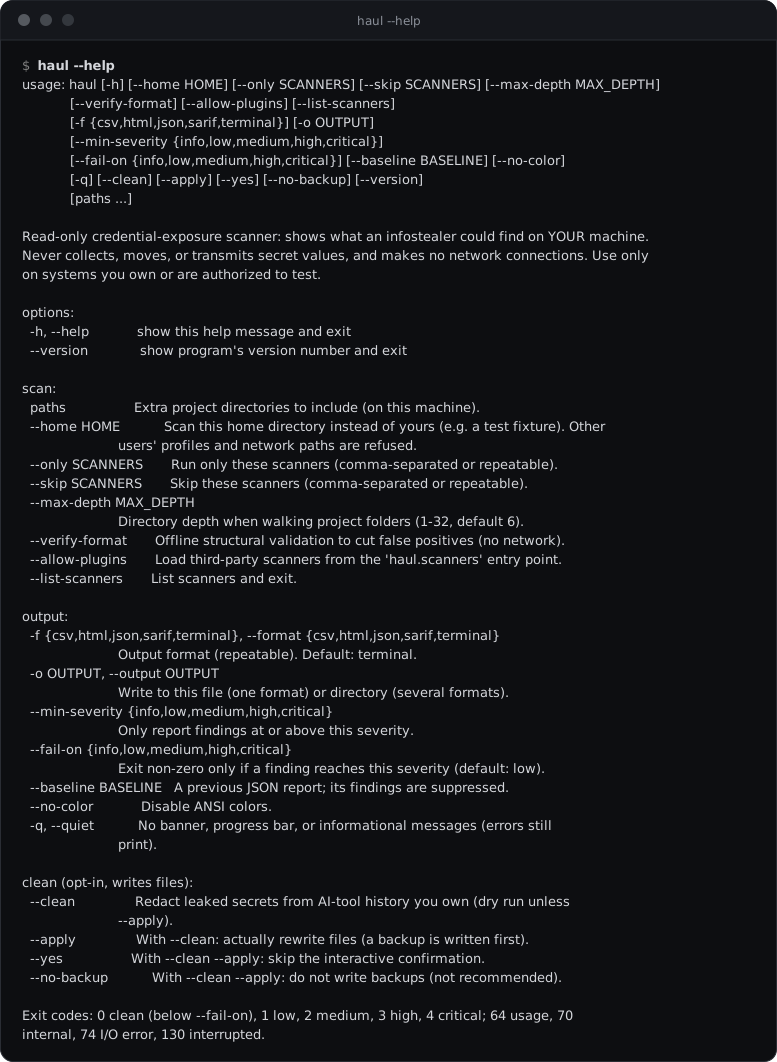
| Option | What it does |
|---|---|
paths… |
Extra project folders to include (on this machine) |
--home DIR |
Scan this home instead of yours. Other users' profiles and network paths are refused. |
--only · --skip SCANNERS |
Choose scanners (comma-separated or repeated). Unknown names are an error, never ignored. |
--max-depth N |
How deep to walk project folders (1–32, default 6) |
--verify-format |
Offline structural validation to cut false positives |
--allow-plugins |
Load third-party scanners from the haul.scanners entry point |
-f, --format |
terminal, html, json, csv, sarif (repeatable) |
-o, --output |
A file for one format, or a folder for several |
--min-severity |
Only report findings at or above this severity |
--fail-on |
Exit non-zero only when a finding reaches this severity |
--baseline FILE |
Hide the findings recorded in a previous JSON report |
--no-color · -q, --quiet |
No colors · no banner, progress or notices |
--clean [--apply] [--yes] [--no-backup] |
Redact secrets from AI-tool history (details) |
--list-scanners · --version |
List the scanners · print the version |
The full haul --help
Use it in CI
Haul makes a good gate. Fail on High or worse, and send SARIF to GitHub code scanning. Paths are relative to the folder Haul runs in, so findings land on the right files.
name: secrets
on: [push, pull_request]
permissions:
  contents: read
  security-events: write
jobs:
  haul:
    runs-on: ubuntu-latest
    steps:
      - uses: actions/checkout@v4
      - uses: actions/setup-python@v5
        with: { python-version: "3.12" }
      - run: pip install haul-scanner
      - name: Scan the repository
        run: haul --only dotenv,sensitive-files -f sarif -o haul.sarif --fail-on high -q "$GITHUB_WORKSPACE"
      - if: always()
        uses: github/codeql-action/upload-sarif@v3
        with: { sarif_file: haul.sarif }
Baselines accept known findings and fail only on new ones. They ignore line numbers, so editing a file doesn't bring an accepted finding back:
haul -f json -o baseline.json        # record today's state once
haul --baseline baseline.json        # from now on, only new findings
Cleaning AI-chat history
A key pasted into an AI chat stays in its transcript for good. --clean removes it. This is the only
mode that writes to disk, and it is deliberately careful:
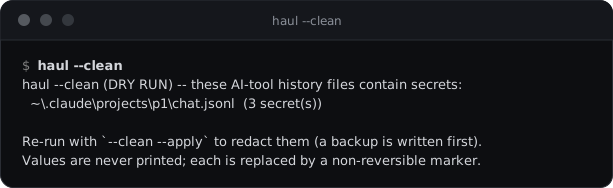
- A dry run by default. It lists what would change. Rewriting needs
--apply, then typingredact(or--yes). - History only. It never touches configs, a tool's own login file (that would log you out) or SQLite stores, and only works on regular files you own inside your home.
- Byte-exact. It works on raw bytes, so line endings and encodings survive unchanged. Whole private-key blocks are redacted, not just their first line.
- Backup first. It writes a backup with the same permissions, never overwrites an earlier one, replaces the file atomically, and backs off if the file changes mid-way.
- Never discloses. Each secret becomes a non-reversible marker:
«haul-redacted:sha256:…».
Rotate first. The
*.haul-bak-*backups still contain the original secrets. Rotate the exposed credentials, then delete the backups. Redaction is cleanup, not remediation.
Safety model
A tool that knows where every secret lives must be impossible to turn into a stealer. Haul enforces that in layers, each of which would stop a leak on its own:
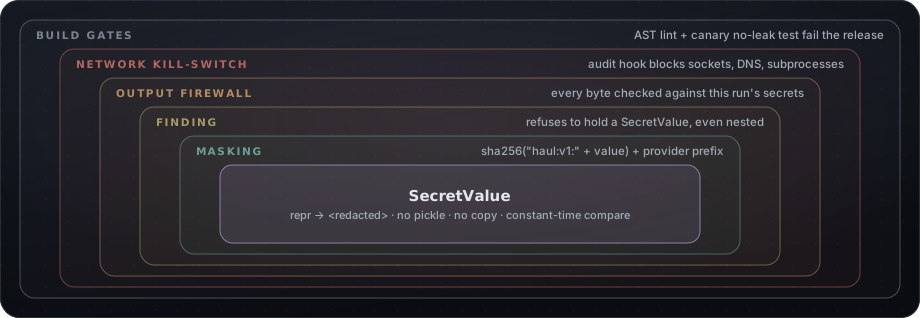
| Layer | Guarantee |
|---|---|
| SecretValue | Raw values are sealed the moment they're found. repr, str and format give <redacted>; pickle and copy refuse; comparison is constant-time. |
| Masking | Previews are a domain-separated SHA-256 fingerprint, plus a provider prefix for long tokens only. Just five internal modules may unseal a value, and the release build fails if any other code tries. |
| Finding | A finding validates itself and refuses to hold a sealed value anywhere, even nested. The only secret-derived field is the masked preview. |
| Output firewall | Every rendered report is checked against the secrets seen in this run before a single byte is written. |
| Network kill-switch | An irreversible audit hook blocks sockets, connects, DNS, subprocess, exec, os.startfile and loading network libraries. Network paths are refused before they are touched. |
| Build gates | Fabricated secrets are planted in every supported location, and the release fails if any of them shows up in any output format. |
The full threat model, and its honest limits, is in SECURITY.md.
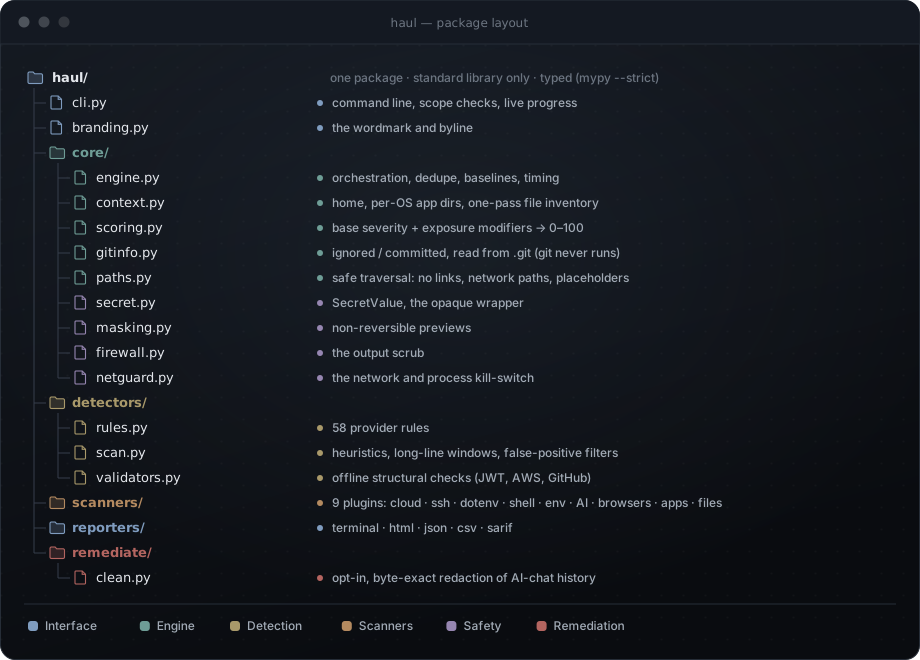
Inside the package
One focused package, written against the standard library only and fully typed. Each layer has a single job:
Plugins
Third-party scanners plug in through an entry point and load only with --allow-plugins. They inherit
every safety layer above, including the network kill-switch.
from collections.abc import Iterator

from haul.core.context import ScanContext
from haul.core.models import Finding, ScanCategory
from haul.core.registry import register
from haul.scanners.base import Scanner


@register
class MyToolScanner(Scanner):
    name = "my-tool"
    category = ScanCategory.CLOUD_CLI
    description = "Credentials written by my-tool"

    def scan(self, ctx: ScanContext) -> Iterator[Finding]:
        path = ctx.home_path(".mytool", "config")
        if path.is_file():
            yield from self.scan_file(ctx, path, remediation="Run `mytool login --keychain`.")
[project.entry-points."haul.scanners"]
my-tool = "my_package.haul_plugin"
Performance
1 walkYour folders are read once into a shared inventory, not once per scanner. |
~15 MB/sper core on AI transcripts, thanks to literal prefilters and keyword-driven parsing. |
~100 sfor a full scan of a laptop holding 1.2 GB of AI transcripts. |
Flat memoryLarge files are streamed and long lines windowed. Nothing is loaded whole. |
FAQ
Does Haul upload or send anything?
No. It makes zero network connections, and an audit hook enforces that at runtime: sockets, DNS,
subprocesses and network libraries are blocked for the whole process. Reports are written only where you
point -o, or to your terminal.
Does it read my browser passwords?
No. Browser stores are reported by presence only, together with the protection that guards them on your OS. Haul never opens, decrypts, parses or counts their contents.
Why do some previews show 4 characters and others none?
For long random tokens the first 4 characters only name the provider (ghp_, AKIA, sk_l) and reveal
nothing useful. For passwords, the first characters are part of the secret, so Haul shows none.
It found a key in an AI chat I deleted long ago. Is that real?
Almost certainly. Many AI tools keep transcripts and SQLite chat stores long after a conversation disappears
from the UI. Rotate the key, then run haul --clean to remove it from the history files.
Does it scan git history?
It reads .git to tell you a file is committed (and scores it higher), but it doesn't walk old commits.
Rotate anything that was ever committed, and use a history scanner for the rest.
Why is the package called haul-scanner?
The name haul was already taken on PyPI. The command you run is still simply haul.
Is Haul open source?
No. Haul is free to use, for personal and commercial work, but it is not open source. It is distributed through PyPI under its own license; see License.
Does it run on macOS?
Haul knows the macOS locations of every supported tool, but macOS is not yet a verified platform. Windows (the primary target) and Linux are.
Limitations
- Heuristic by nature. Expect occasional false positives and misses.
--verify-formatand baselines help. - The working tree only. Git history beyond the index is out of scope.
- Presence-only stores (browsers, gcloud and Azure caches, key stores) are reported, never inspected.
- No Windows Registry reads. WinSCP sessions stored in the registry, for example, are not covered.
- Defense in depth, not a sandbox. The kill-switch binds everything that goes through Python's audit layer; native extension code could bypass it, which is why plugins are opt-in.
Security
Found a way to make Haul emit, copy or transmit a secret, reach the network, or write outside --clean's
scope? Please report it privately through
a security advisory, not a public issue.
Reports are sensitive too. They contain no secret values, but they are a precise map of where secrets live on a machine. Store and share them like any sensitive document.
License
Free to use, all rights reserved. Haul is proprietary freeware © 2026 Arman Manteghi.
| You may | You may not |
|---|---|
| Install and run Haul for free, personally or commercially | Modify it, or redistribute, resell or sublicense it |
| Use it on systems you own or are authorized to assess | Remove its copyright or license notices |
| Keep the unmodified package in an internal mirror | Use it against systems you aren't authorized to assess |
The binding text is in LICENSE.
Built by Arman Manteghi
Read-only · zero network · zero dependencies · no secret ever leaves the process
1 maintainer

Metadata
1 maintainer
Release files for haul-scanner 0.2.0
For a detailed explanation of source distributions (sdists) and built distributions (wheels), please see the package formats documentation.
Built distribution (wheel)
| File | Interpreter | ABI | Platform | Reset |
|---|---|---|---|---|
| haul_scanner-0.2.0-py3-none-any.whl | Python 3 | none | any | Details |
Release files / haul_scanner-0.2.0-py3-none-any.whl
| Download URL | haul_scanner-0.2.0-py3-none-any.whl |
|---|---|
| Size | 105.8 kB |
| Tags | Python 3 |
|
SHA-256 checksum How to use checksums |
9f737f4c51f3a288469ea3f439a657206a93a3700c95154d1d74d0968a2765af
|
|
BLAKE2b-256 checksum How to use checksums |
3d98e0e8d9b5c8ae15e5600f4585152fa5c95e8b97f2086a8b55529b8c617a11
|
| Upload date | |
|
Uploaded using Trusted Publishing? What is trusted publishing? |
No |
| Uploaded via |
twine/7.0.0 CPython/3.11.4
|













