

HawkOpsec
One-tap Linux OPSEC hardening & anonymity toolkit




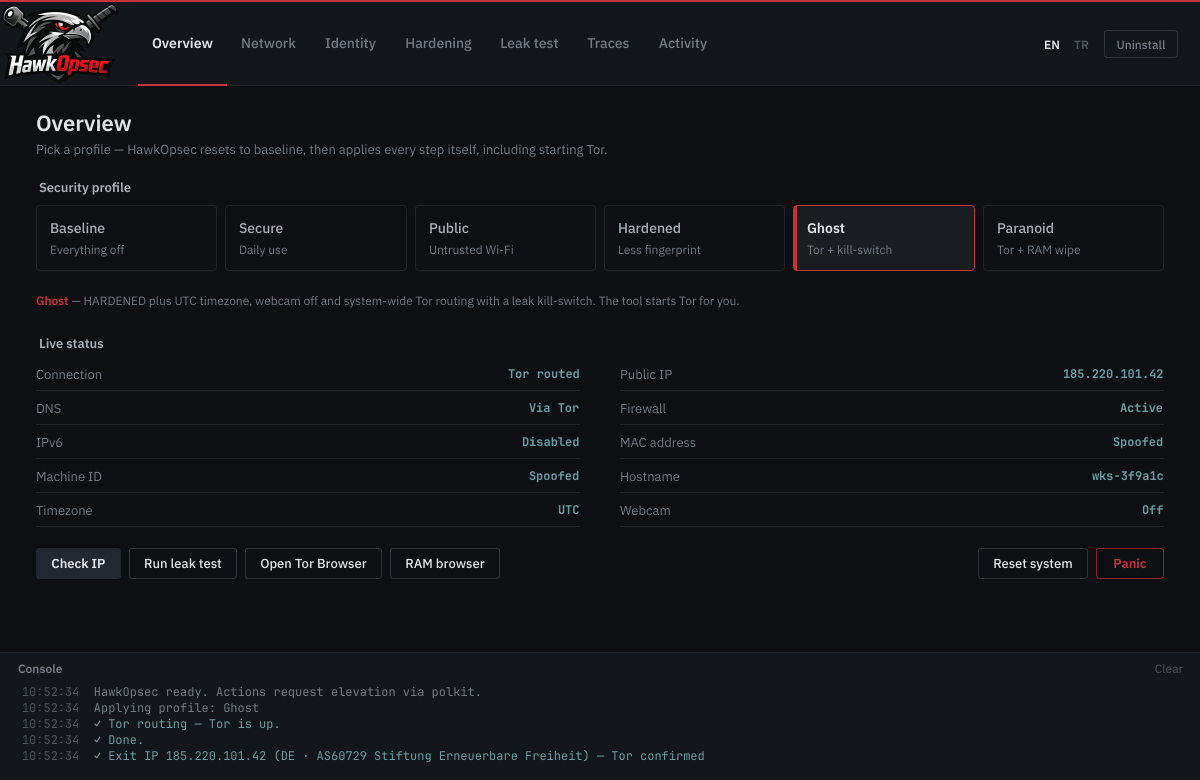
HawkOpsec turns a pile of manual privacy commands into security profiles you apply with one tap. Pick a profile — the tool starts Tor, configures DNS, randomizes your identity and hardens the kernel for you. Reset system rolls every change back from snapshots to your original state.
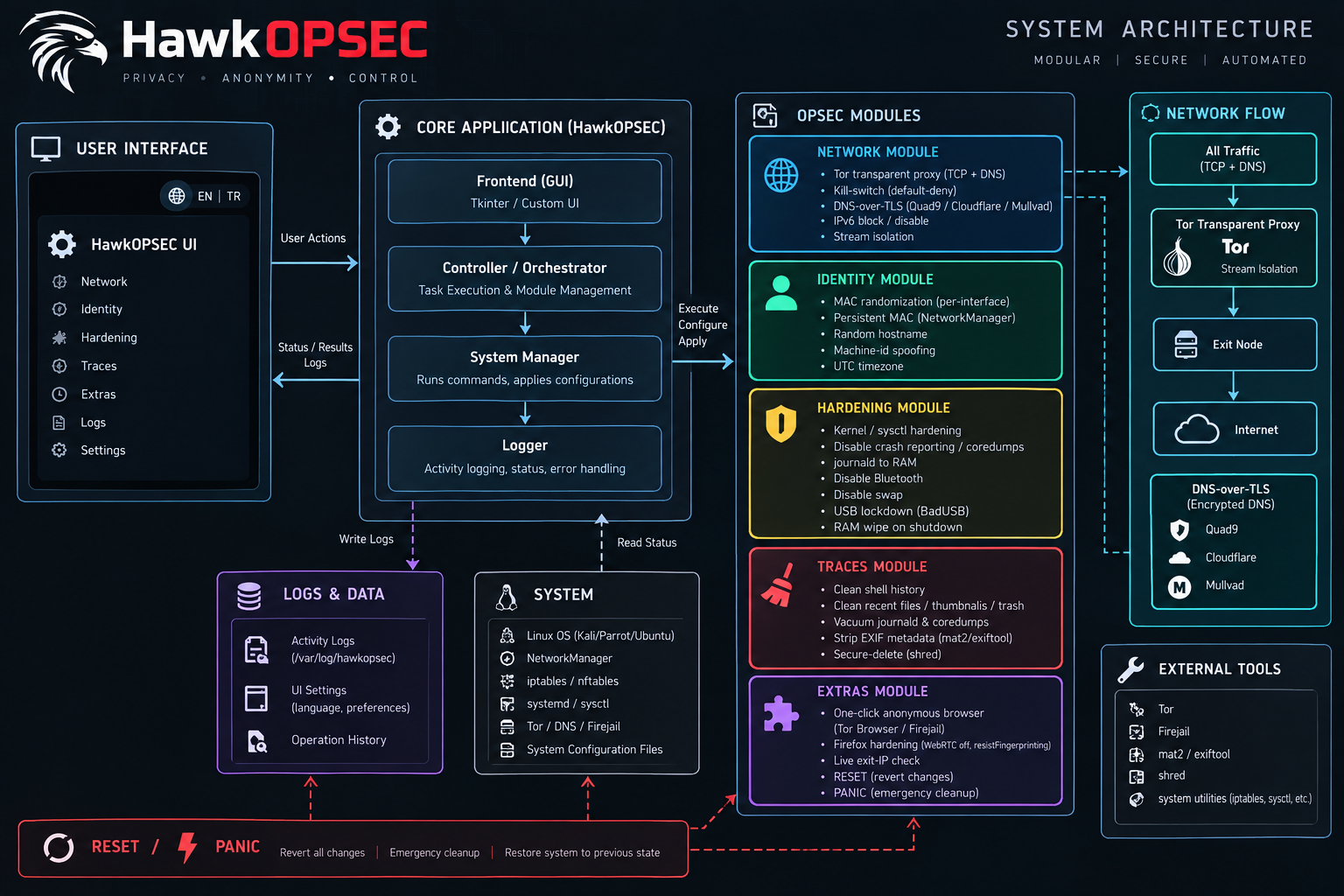
The GUI never runs as root; privileged actions go through a small helper via polkit/pkexec.
Architecture
Install
1. System dependencies
# Arch
sudo pacman -S --needed tor nftables polkit iproute2 rfkill systemd-resolvconf
# Debian / Ubuntu / Kali / Mint
sudo apt install -y tor nftables policykit-1 iproute2 rfkill systemd-resolved
# optional: torbrowser-launcher firefox mat2 xsel (or wl-clipboard) firejail
2. HawkOpsec from PyPI
pipx install hawkopsec          # recommended (isolated)
# or: pip install --user hawkopsec
sudo "$(command -v hawkopsec-setup)"   # one-time: root helper, polkit policy, menu entry
hawkopsec
If you skip hawkopsec-setup, the app offers to run it on first start (it asks for
your password once). The root helper is copied to /usr/local/lib/hawkopsec/ and owned by root —
HawkOpsec never runs a user-writable file as root.
From source (unchanged): python3 run.py, or sudo ./packaging/install.sh.
Uninstall
sudo "$(command -v hawkopsec-setup)" --remove   # reverts every change + removes system files
pipx uninstall hawkopsec                        # or: pip uninstall hawkopsec
The Uninstall button in the app does the same system cleanup.
What's new in 2.0
Fixes
- IP check — the console swallowed the real error (
<urlopen error …>was parsed as HTML), so failures showed onlyURLError:. Errors are now escaped and explained. The check waits for the network after a profile switch, retries, falls back across four endpoints and verifies Tor via the official exit list whencheck.torproject.orgis unreachable. - Baseline no longer restarts NetworkManager unless MAC/NetworkManager settings were changed — this was dropping the link right before the IP check.
- Tor DNS — queries to
127.0.0.1:53skipped the redirect rule, so DNS died in Tor mode on systems without systemd-resolved. Fixed rule order. - Tor start waits for
Bootstrapped 100%, not just an open port. - Tor Browser uses the system Tor (SOCKS 9050) when Tor routing is on — no more Tor-over-Tor.
Leak test (new tab) — read-only, one click
- Exit IP (Tor confirmed / real IP visible), DNS leak (bash.ws, matched against your real ISP),
IPv6 leak, UDP kill-switch test,
.onionmapping, Tor service health. - Your real ISP is remembered in BASELINE as a name + salted hash — never the raw IP.
Dark-web pre-flight — Tor Browser installed + Security Level, WebRTC, Firefox wipe-on-close, browser history on disk, timezone, clock sync, hostname, MAC, firewall, open ports, identity-linked apps (Discord, Telegram, Dropbox …), webcam, disk encryption, swap, non-root session, VPN. Verdict: Ready / Risky / Not ready, with a Fix button where possible.
Leave no browser traces
- RAM-only browser — Firefox with a throw-away profile in
/dev/shm; history, cookies, cache and sessions never touch the disk, the profile is deleted on close. - Clean browser traces — history, cookies, cache, sessions, site storage and form data of Firefox and Chromium-family browsers; bookmarks and saved passwords are kept.
- Firefox: wipe on close — your normal Firefox clears everything on exit, no disk cache.
- Clear clipboard (also done by Panic), DNS cache flush in Clean system traces.
- Panic now also kills Tor Browser, LibreWolf, Brave and Vivaldi.
Hardening — Disable webcam (UVC driver unloaded and blocked); part of GHOST / PARANOID.
UI — IBM Plex Sans for text, JetBrains Mono only for machine data; sentence-case labels, profile cards, console with clear button, Turkish terminology throughout. Window fits 1000×700.
Packaging — published on PyPI (pip install hawkopsec); assets moved into the package
(hawkopsec/assets, hawkopsec/data); new hawkopsec-setup command; python -m hawkopsec works.
Publishing to PyPI (maintainers)
The package is defined in pyproject.toml (setuptools). The version comes from
hawkopsec/__init__.py.
python -m pip install --upgrade build twine
rm -rf dist && python -m build          # -> dist/hawkopsec-X.Y.Z.tar.gz + .whl
python -m twine check dist/*
python -m twine upload --repository testpypi dist/*   # optional dry run
python -m twine upload dist/*                          # needs a PyPI API token
One-time setup: create an account on pypi.org, enable 2FA, create an API token and put it in
~/.pypirc — or use Trusted Publishing: .github/workflows/pypi.yml publishes automatically on every v* tag once you add the GitHub publisher on pypi.org. For each release bump
__version__, tag vX.Y.Z and upload — PyPI never accepts the same version twice.
Security note
HawkOpsec hardens the network and system layers. It does not make a normal browser fingerprint-resistant — for real anonymous browsing use Tor Browser at the Safest level, never log into personal accounts while anonymous, and remember that behavioural patterns are out of scope for a system tool. You are hardening your own machine.
License
MIT — see LICENSE.
1 maintainer

Metadata
1 maintainer
Release files for hawkopsec 2.0.0
For a detailed explanation of source distributions (sdists) and built distributions (wheels), please see the package formats documentation.
Source distribution (sdist)
| File | Size | Uploaded | |
|---|---|---|---|
| hawkopsec-2.0.0.tar.gz | 3.4 MB | Details |
Built distribution (wheel)
| File | Interpreter | ABI | Platform | Reset |
|---|---|---|---|---|
| hawkopsec-2.0.0-py3-none-any.whl | Python 3 | none | any | Details |
Total release size: 6.9 MB
Release files / hawkopsec-2.0.0.tar.gz
| Download URL | hawkopsec-2.0.0.tar.gz |
|---|---|
| Size | 3.4 MB |
| Tags | Source |
|
SHA-256 checksum How to use checksums |
16c4833490e0eebe23dec10512aa9b4d1b6f515cb74dd87d167bb13bc1b66063
|
|
BLAKE2b-256 checksum How to use checksums |
558a420bfcae4b17a1bdbdb25a66fc61a241dde631b298ab4878dc032c3b7de6
|
| Upload date | |
|
Uploaded using Trusted Publishing? What is trusted publishing? |
No |
| Uploaded via |
twine/7.0.0 CPython/3.12.3
|
Release files / hawkopsec-2.0.0-py3-none-any.whl
| Download URL | hawkopsec-2.0.0-py3-none-any.whl |
|---|---|
| Size | 3.4 MB |
| Tags | Python 3 |
|
SHA-256 checksum How to use checksums |
051396ce8ef51d5f1727e02c6491b31825ca396f3f0797424a90dfb70aa17d61
|
|
BLAKE2b-256 checksum How to use checksums |
4e588f3e36484b08e04d2416dc6d350f80731a2f28bfcc241077fba5a01ab2eb
|
| Upload date | |
|
Uploaded using Trusted Publishing? What is trusted publishing? |
No |
| Uploaded via |
twine/7.0.0 CPython/3.12.3
|














