
Lemmatization
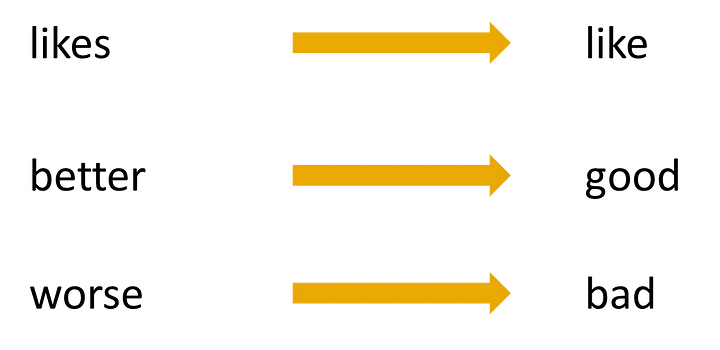
Lemmatization is a text pre-processing technique used in natural language processing (NLP) models to break a word down to its root meaning to identify similarities. For example, a lemmatization algorithm would reduce the word better to its root word, or lemme, good.
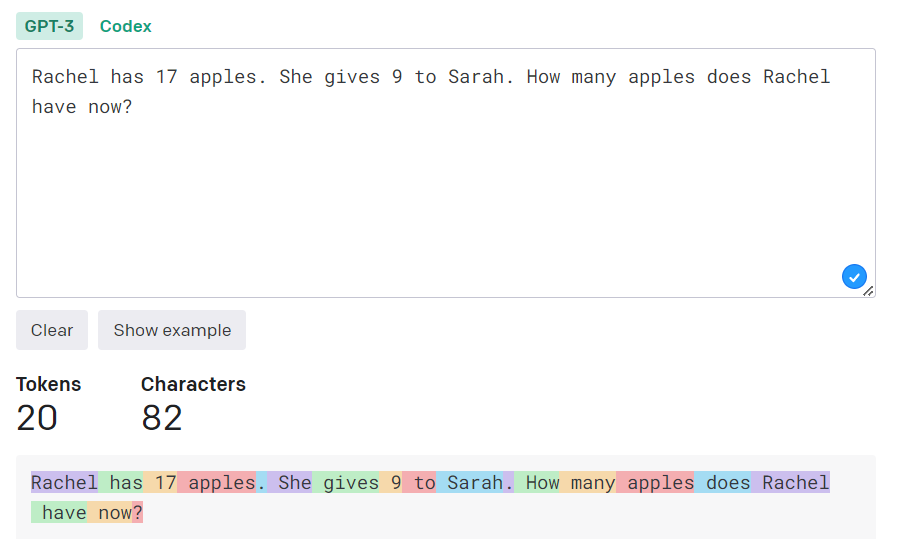
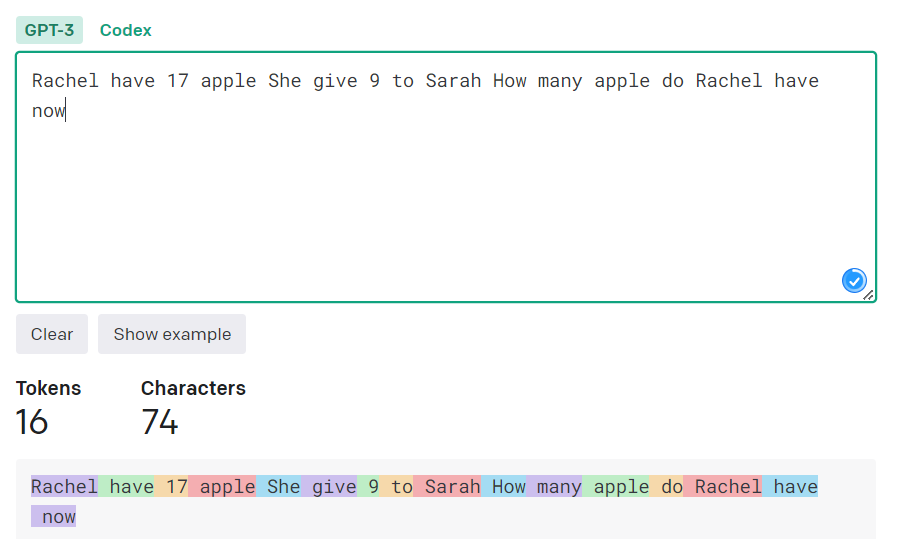
This node can be placed within a pipeline to lemmatize documents returned by a Retriever, prior to adding them as context to a prompt (for a PromptNode or similar). The process of lemmatizing the document content can potentially reduce the amount of tokens used by up to 30%, without drastically affecting the meaning of the document.
Before Lemmatization:
After Lemmatization:
Installation
Clone the repo to a directory, change to that directory, then perform a pip install '.'. This will install the package to your Python libraries.
Usage
Include it in your pipeline - example as follows:
import logging
import re

from datasets import load_dataset
from haystack.document_stores import InMemoryDocumentStore
from haystack.nodes import PromptNode, PromptTemplate, AnswerParser, BM25Retriever
from haystack.pipelines import Pipeline
from haystack_lemmatize_node import LemmatizeDocuments


logging.basicConfig(format="%(levelname)s - %(name)s -  %(message)s", level=logging.WARNING)
logging.getLogger("haystack").setLevel(logging.INFO)

document_store = InMemoryDocumentStore(use_bm25=True)

dataset = load_dataset("bilgeyucel/seven-wonders", split="train")
document_store.write_documents(dataset)

retriever = BM25Retriever(document_store=document_store, top_k=2)

lfqa_prompt = PromptTemplate(
    name="lfqa",
    prompt_text="Given the context please answer the question using your own words. Generate a comprehensive, summarized answer. If the information is not included in the provided context, reply with 'Provided documents didn't contain the necessary information to provide the answer'\n\nContext: {documents}\n\nQuestion: {query} \n\nAnswer:",
    output_parser=AnswerParser(),
)

prompt_node = PromptNode(
    model_name_or_path="text-davinci-003",
    default_prompt_template=lfqa_prompt,
    max_length=500,
    api_key="sk-OPENAIKEY",
)

lemmatize = LemmatizeDocuments() # you can pass the `base_lang=XX` argument here too, where XX is a language as listed here: https://pypi.org/project/simplemma/

pipe = Pipeline()
pipe.add_node(component=retriever, name="Retriever", inputs=["Query"])
pipe.add_node(component=lemmatize, name="Lemmatize", inputs=["Retriever"])
pipe.add_node(component=prompt_node, name="prompt_node", inputs=["Lemmatize"])

query = "What does the Rhodes Statue look like?"

output = pipe.run(query)

print(output['answers'][0].answer)
Caveats
Sometimes lemmatization can be slow for large document content, but in the world of AI where we can potentially wait 30+ seconds for an LLM to respond (hello GPT-4), what's a couple more seconds?
1 maintainer

Release files for haystack-lemmatize-node 0.0.2
For a detailed explanation of source distributions (sdists) and built distributions (wheels), please see the package formats documentation.
Source distribution (sdist)
| File | Size | Uploaded | |
|---|---|---|---|
| haystack_lemmatize_node-0.0.2.tar.gz | 3.3 kB | Details |
Built distribution (wheel)
| File | Interpreter | ABI | Platform | Reset |
|---|---|---|---|---|
| haystack_lemmatize_node-0.0.2-py3-none-any.whl | Python 3 | none | any | Details |
Total release size: 7.3 kB
Release files / haystack_lemmatize_node-0.0.2.tar.gz
| Download URL | haystack_lemmatize_node-0.0.2.tar.gz |
|---|---|
| Size | 3.3 kB |
| Tags | Source |
|
SHA-256 checksum How to use checksums |
6c043f49df2e605f0892ed9461c6b437ed1a323a8edd96f58ba86177486dca57
|
|
BLAKE2b-256 checksum How to use checksums |
bb804341bdf5e95ce4977df600cca1f0f9597dc0dd75935ec47fc8a60b633aed
|
| Upload date | |
|
Uploaded using Trusted Publishing? What is trusted publishing? |
No |
| Uploaded via |
twine/4.0.2 CPython/3.10.6
|
Release files / haystack_lemmatize_node-0.0.2-py3-none-any.whl
| Download URL | haystack_lemmatize_node-0.0.2-py3-none-any.whl |
|---|---|
| Size | 4.1 kB |
| Tags | Python 3 |
|
SHA-256 checksum How to use checksums |
efe1784454e80cb64ff9c8cad28a8085133c0acf33b9ebe9477ed706b64c6b0c
|
|
BLAKE2b-256 checksum How to use checksums |
c5e29325adb62e500f3b4de1198bdab25e602fb54650cc692cd729fcd778fbcd
|
| Upload date | |
|
Uploaded using Trusted Publishing? What is trusted publishing? |
No |
| Uploaded via |
twine/4.0.2 CPython/3.10.6
|













